FREE shipping to
More Buying Options
About This Item
- Key Specs
- Remote Control Type: Programmable
- Number Of Devices Controlled: 1
- General
- Brand: Wacom
- Model Number: ACK411050
- Product Name: ExpressKey Remote
- Color: Black, Grey
- Features
- Remote Control Type: Programmable
- Number of Buttons: 17
- Connectivity
- Number Of Devices Controlled: 1
- Wireless: true
- Compatibility
- Brand Compatibility: Wacom
- Model Compatibility: Wacom Cintiq DTK2700, DTH2700, DTK2200, DTH2200, DTH1620, DTH1320, DTH1300, DTHA1300, DTHW1310; Cintiq Pro DTH1320, DTH1620; MobileStudio Pro DTHW1320, DTHW1620; Intuos Pro PTH660, PTH860, PTH451, PTH651, PTH851
- Power
- Rechargeable: true
- Battery Chemistry: Lithium-ion
- Dimensions
- Product Weight: 0.6 ounces (The out of box weight of the item.)
- Warranty
- Warranty - Parts: 1 year
- Warranty - Labor: 1 year
- Other
- UPC: 753218989765
Access different pen display functions quickly with this Wacom ExpressKey remote. Its 17 customizable buttons let you assign multiple shortcuts for your most-used modes, settings, clicks, keystrokes and creative software application tools. Use this versatile Wacom ExpressKey remote with a compatible Cintiq Pro, MobileStudio Pro or Intuos Pro pen display.
- Compatible with select Wacom pen devices: Including Wacom Cintiq Pro or Cintiq pen displays, Wacom Mobile Studio Pro or Cintiq Companion Pen computers, and Wacom Intuos Pro pen tablets.
- 17 customizable buttons: Along with a touch ring, allow instant one-touch access to time-saving shortcuts in all your favorite creative applications.
- Optimize your workflow: Connect up to five remotes at a time - one for each of your creative software applications.
- Wireless connectivity: Place remote anywhere it's convenient while drawing - on screen, in your hand or beside your keyboard.
Whats Included
- Wacom ExpressKey Remote
- Micro-USB cable
- Wireless receiver
- Owner's manual
Product Manuals
Q: What type of battery does the remote use?
A: This remote uses a Lithium-ion battery.
Q: Is the battery in the Wacom ExpressKey Remote rechargeable?
A: Yes, the Lithium-ion battery in this remote is rechargeable.
Q: Is the Wacom ExpressKey Remote wireless?
A: Yes, it connects wirelessly, so you can place it wherever is most convenient.
Q: How many buttons does the Wacom ExpressKey Remote have?
A: This remote has 17 customizable buttons and a touch ring.
Q: What devices are compatible with this remote?
A: This remote is compatible with select Wacom pen devices, including Cintiq Pro or Cintiq pen displays, Mobile Studio Pro or Cintiq Companion Pen computers, and Intuos Pro pen tablets.
A: Yes, it will work nicely with the Wacom One.
Q: Will this combine use for a Sony smart tv and dvd player
A: undefined
Reviews
Customer Images
The vast majority of our reviews come from verified purchases. Reviews from customers may include My Best Buy members, employees, and Tech Insider Network members (as tagged). Select reviewers may receive discounted products, promotional considerations or entries into drawings for honest, helpful reviews.
Compare similar products
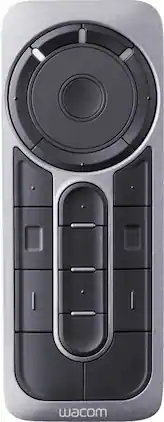
Access different pen display functions quickly with this Wacom ExpressKey remote. Its 17 customizable buttons let you assign multiple shortcuts for your most-used modes, settings, clicks, keystrokes and creative software application tools. Use this versatile Wacom ExpressKey remote with a compatible Cintiq Pro, MobileStudio Pro or Intuos Pro pen display.

Get creative with this Wacom Pen 4K stylus. It's highly pressure-sensitive for accurate drawing on a compatible Intuos pen tablet, and it has a programmable side switch for quick access to your favorite functions. This Wacom Pen 4K stylus is wireless and battery-free, so you can use it for hours without recharging.

Apple Pencil Pro adds even more magical capabilities to help bring your ideas to life. New advanced features make marking up, taking notes, and creating a masterpiece more intuitive than ever. Squeeze. Apple Pencil Pro can sense when you squeeze it and brings up a new palette so you can quickly switch tools, line weights, and colors, thanks to a new sensor. Barrel roll. A new gyroscope allows you to rotate the Apple Pencil Pro for precise control of shaped pen and brush tools. Haptic feedback. A custom haptic engine provides feedback that you can feel. When you squeeze or double-tap, a light pulse confirms the action. Apple Pencil hover. Preview exactly where your Apple Pencil will touch down on your display. So you can write, sketch, and illustrate with even greater precision. Double-tap.

The new Apple Pencil makes note-taking, writing, and drawing better than ever. It magnetically attaches to iPad Pro, charges wirelessly, and lets you change tools with a simple double tap. Apple Pencil (2nd generation) works with iPad Pro 12.9-inch (3rd, 4th, 5th, and 6th generation); iPad Pro 11-inch (1st, 2nd, 3rd, and 4th generation); iPad Air (4th and 5th generation); and iPad mini (6th generation).
| Pros for Wacom - ExpressKey Remote - Black, Grey | |||
|---|---|---|---|
| There were no pros for this product— | There were no pros for this product— | Overall Performance, Ease of use, Battery Life, Charging, Connectivity | Ease of use, Overall Performance, Charging, Battery Life, Compatibility |
| Cons for Wacom - ExpressKey Remote - Black, Grey | |||
| There were no cons for this product— | There were no cons for this product— | Price, Lag, Compatibility, Weight, Grip | Price, Lag, Tip, Connection, Size |