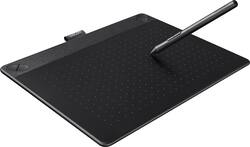
Wacom - Intuos 3D with Intuos Pen - Black
- Key Specs
- Screen Size: 10 inches (Size of the screen, measured diagonally from corner to corner.)
- Active Area: 8.5 x 5.3 in (The size of the screen area that a user interacts with, either by stylus and/or touch (if supported).)
- Total Storage Capacity: 256 gigabytes
- General
- Product Name: Intuos 3D with Intuos Pen
- Brand: Wacom
- Model Number: CTH690TK
- Year of Release: 2016
- Display
- Screen Size: 10 inches (Size of the screen, measured diagonally from corner to corner.)
- Active Area: 8.5 x 5.3 in (The size of the screen area that a user interacts with, either by stylus and/or touch (if supported).)
- Storage
- Total Storage Capacity: 256 gigabytes
- Compatibility
- System Requirements: USB port, internet connection, CD/DVD-ROM drive Windows® 7, 8 or 10, MacOS 10.8.5 or later, ZBrushCore – 64bit system required for Windows® (The software that a product must have for it to be able to integrate with another product.)
- Power
- Charging Interface(s): Wireless (The connection for transmitting power to charge the device.)
- Included
- Stylus Included: true
- Other
- UPC: 753218989246
Watch your imagination come to life with this Wacom Intuos 3D tablet. The pen and touch tech pairs with creative 3D software, letting you design and sculpt characters from every angle for 3D printing. Use the included software and tutorials to learn how to create with this Wacom Intuos 3D tablet.
- Take your work to the next level: Sketch, paint, design and edit with a pressure-sensitive pen on a digital canvas. Create with a natural line in paint, pastels, ink, charcoal and more.
- Create stunning digital artwork: Multi-touch tablet offers gesture support, so you can zoom, scroll and navigate your work.
- Electromagnetic resonance method technology: Provides battery-free, pressure-sensitive pen construction and helps you draw thick and thin lines depending on how hard you push on the pen.
- Assign important functions for fast access: Four ExpressKeys allow easy customization, so you can quickly change tips or tools.
- 3D-Sculpting/Digital-Clay software pack: With online tutorials, ready-made basic shapes and templates for your own digital sketch (download and registration requared).
- Sleek and chic: Compact, portable and perfect for limited desktop space.
- Wired connection is quick and easy: Simply plug into one of your computer's USB ports. Supports wireless connectivity with optional accessory kit (not included).
- Compatible with PC and Mac computers: For wide-ranging use.
Whats Included
- Wacom Intuos 3D with Intuos Pen
- USB cable
- Replacement pen nibs
- Software download instructions and code
- Quick start guide
Q: does the computer have to have 3D graphics card to work on it?
A: All computers have graphics cards, either integrated or dedicated. First, you need to confirm whether there are drivers for this tablet that support your operating system. You can find all supported drivers at Wacom's website. Second, since this tablet is bundled with Zbrush Core, you need to confirm whether your computer meets the minimum and/or recommended specifications of this software. You can find these specifications at Pixologic's website. I hope this helps. If you have any more questions, feel free to ask.
Q: Do you need a computer to use this
A: Hello Antboi Thank you for your question. You sure do, the Intuos 3D tablet needs a computer running a non-discontinued version of Windows or Mac in order to operate. For a better idea, you may explore the getting started page to see the involved > http://www.wacom.com/en/getting-started/intuos For any other technical questions, you may contact customer support from here http://www.wacom.com/en-us/support Regards Wacom
A: The pad measures 8.5 x 10.8 x 0.42 inches.
Q: Does this tablet create normal/non 3d drawing?
A: Thank you for asking. The Intuos family has very little variations when it comes to Hardware, you can find Small and Medium size in different colors and one of the models the Draw comes without the touch option. When it comes to software, depending on the model you choose you will find a bundled software that serves your needs better but regardless of this you can use any software you wish to use and create in both 2d and 3D. If you are looking for a medium size and not interested in the 3D software bundle that comes with the 3D model you can opt for the Intuos Art medium as well. Hope that helps. Regards












