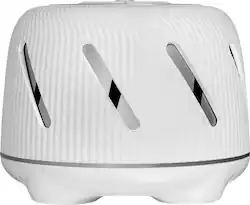
Yogasleep - Dohm Connect Sleep Sound Machine - White
- General
- Product Name: Dohm Connect Sleep Sound Machine
- Brand: Yogasleep
- Recommended Minimum Age: 0 years
- Model Number: 4000900
- Color: White
- Features
- Sound Type: Relaxing
- Adjustable Volume Control: true
- Adjustable Timer: true
- Night Light: false
- Power
- On/Off Switch: true
- Power Source: Plug-in
- Material
- Material: Plastic
- Dimensions
- Product Height: 4.8 inches (The out of box height of the item. Height is measured as the vertical distance from the bottom of the item to the top as it would be primarily used or placed.)
- Product Width: 7.9 inches (The out of box width of the item. Width is measured as the horizontal distance from one side of the item to the other as it would be primarily used or placed.)
- Product Length: 6.7 inches (The out of box length of the item. Length is measured as the longest dimension of the item.)
- Product Weight: 2.3 pounds (The out of box weight of the item.)
- Other
- UPC: 036005409012
Drift off to sleep with this Yogasleep Dohm Connect white noise machine. The fan-based sound helps mask audio distractions so you can relax for a more restful night. This Marpac Dohm Connect white noise machine includes a convenient app that lets you adjust volume and set sleep schedules using your smartphone.
- Fan-based white noise: Soothing sound for your sleep.
- Background noise masking: Offers a better night's sleep.
- Adjustable tone and volume: Enjoy the perfect sound environment.
- Marpac app enabled: Control the sleep sound machine, change the volume, and set your sleep schedule from your mobile devices.
- Two speed options: Provide more control for your comfort.
Whats Included
- Owner's manual
- Yogasleep Dohm Connect Sleep Sound Machine
Q: is this just white noise or are there other selections like rain, ocean etc?
A: The Dohm Connect offers a fan based white noise. If you are looking for a machine that offers a variety of soundtracks, we recommend the Whish (link below) It offers 16 different sounds to choose from. It will not have the app feature like the Dohm Connect. Sara - Yogasleep Customer Experience www.yogasleep.com [email protected] https://www.bestbuy.com/site/yogasleep-whish-sleep-sound-machine-white/6193100.p?skuId=6193100&ref=212&loc=1&ref=212&loc=BM01&gclid=Cj0KCQjwpfHzBRCiARIsAHHzyZqoiBO_rA_EA6XN_VIdyei_70LoqY-3VCX5ieASNUrsdFNpKPgWZxMaAnxbEALw_wcB&gclsrc=aw.ds
Q: Can one phone control 2 separate machines in 2 different rooms?
A: Hello, As a Customer Experience Specialist for Yogasleep, there is nothing more important to me than ensuring our customers have the very best experience any company can offer. We take this goal very seriously throughout Yogasleep. I am more than happy to answer your questions! Here’s how you can add two units to your Marpac app: 1. Unplug the unit that is connected to your app. This will disconnect the unit from your app. 2. Turn your Bluetooth setting on your phone off and on 3. Go through the setup process on the app to connect your second unit 4. Once this is complete you should be able to plug in the first unit you connected. When you open the app, you should be able to see the two separate machines. Our priority is your happiness, so please let me know what else Yogasleep can do to help. We are here for you!












