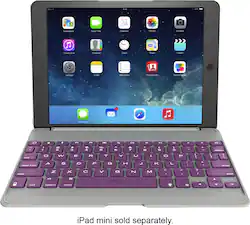
ZAGG - ZAGGfolio Keyboard Case for Apple® iPad® Air - Orchid
- Key Specs
- Model Compatibility: Apple iPad Air (1st Generation)
- General
- Product Name: ZAGGfolio Keyboard Case for Apple® iPad® Air
- Brand: ZAGG
- Model Number: ID5ZFN-PUB
- Color: Orchid
- Compatibility
- Brand Compatibility: Apple
- Model Compatibility: Apple iPad Air (1st Generation)
- Design
- Case Style: Case
- Design: Solid
- Warranty
- Manufacturer's Warranty - Parts: 1 year
- Manufacturer's Warranty - Labor: 1 year limited
- Other
- UPC: 848467019599
This ZAGG ZAGGfolio ID5ZFN-PUB case for your Apple iPad Air features a built-in keyboard with Bluetooth technology for easy wireless connection to your device. The hinge rotates up to 135° to help you find an optimal view.
- Compatible with Apple iPad Air: For a precise fit.
- Leather-textured cover: Provides stylish protection against bumps and scratches.
- Built-in Bluetooth keyboard: Features island-style keys for easy typing.
- Hinged design: Provides 135° of viewing angles.
- 950 mAh lithium-ion battery: Allows you to use the keyboard for up to 3 months between charges.
Whats Included
- ZAGG ZAGGfolio Keyboard Case
- Charging cable
- Owner's manual
Q: How do you get the keyboard, to work
A: I believe the little instruction "booklet" that came with the keyboard explains what to do quite well. But in simple terms, you charge the keyboard, then turn it on, pair it via the Connect button on the iPad and in your iPad Bluetooth settings (go to the Settings App and to Bluetooth and make sure the ZAGG keyboard is listed, and then tap on the ZAGG Folio Keyboard where you see it listed in Settings). If it doesn't connect at first, try turning the keyboard off and then back on. If all else fails, find someone else to help you who has done it with any keyboard or any other device. The process is always pretty much the same and straightforward. Good luck!
A: Not backlit
Q: null
A: undefined
Q: Does this keyboard fir he new ipad?
A: Yes it does.
Q: Does this case work with the new IPad 5?
A: Fits perfectly EXCEPT it covers the up volume but doesn't bother me.
Q: What type of ports are in the keyboard
A: mini usb to charge the keyboard is all