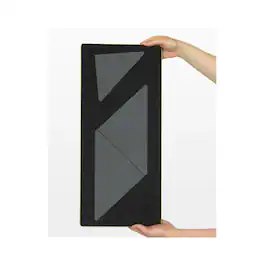
AccuQuilt - GO! Setting Triangles-8" Finished Die - Multicolor
Reviews coming soon
Related Item

About This Item
- General
- Brand: AccuQuilt
- Model Number: 55551
- Product Name: GO! Setting Triangles-8" Finished Die
- Color: Multicolor
- Features
- Product Type: Cutting material
- Material: Fabric
- Dimensions
- Product Height: 0.3 inches (The out of box height of the item. Height is measured as the vertical distance from the bottom of the item to the top as it would be primarily used or placed.)
- Product Length: 6.1 inches (The out of box length of the item. Length is measured as the longest dimension of the item.)
- Product Weight: 0.31 pounds (The out of box weight of the item.)
- Product Width: 5.9 ounces (The out of box width of the item. Width is measured as the horizontal distance from one side of the item to the other as it would be primarily used or placed.)
- Warranty
- Warranty - Parts: 1 Year Warranty, We may deny warranty coverage if the product is damaged from using an unauthorized part.
- Other
- UPC: 699195555510
Creating quilts with blocks set on point has never been so simple. AccuQuilt has taken math out of the equation for you. Both corner and side setting triangles are on one die board to coordinate with all your 8” finished blocks. Just add your creativity •AQ Cutting Mat Required: GO! Cutting Mat, 10 in. x 24 in. (25.4 cm x 61 cm) How to Die Cut 8" Finished Setting Triangles: For best cutting results, position fabric on the lengthwise grain (straight of grain) as it goes under the roller. Side Triangles: Cut 7" x length of fabric (LOF) strip along the selvage edge. Layer up to 6 layers of fabric. Use the Cut & Shift™ method. Start at one end of fabric by placing fabric right side up over the side triangle shapes. Place die through the cutter. Continue to cut and shift the fabric strip to align the cut angle of fabric with the angle of blades to cut the next triangle across the LOF. Continue to cut each triangle by shifting the fabric. Cut 4 side triangles across the width of 40" of fabric. One yard of 40" wide fabric-cuts 20 side triangles. Corner Triangles: Cut a 6-3/4" strip across the width of fabric. Fanfold into 6-3/4" widths. Place on selected blade and cut. Cut 5 corner triangles across the width of fabric. One yard of 40" wide fabric-cuts 25 corner triangles. Why Quilters Love the GO! 8" Finished Setting Triangles Die: Expand your quilt design options and make on-point quilts with ease! The GO! Setting Triangles-8" Finished die includes the corner and side setting triangles for creating 8" finished on-point quilts. No math required! GO! Setting Triangles dies include the corner and side setting triangles that are difficult to cut by hand. No need to buy two dies! Both corner and side setting triangles included on one die. GO! Setting Triangles-8" Finished includes ¼" seam allowances and dog-eared corners for easy alignment and piecing.
- Cut 25 triangles per yard: Corner Triangles: Cut a 6-3/4" strip across the width of fabric. Fanfold into 6-3/4" widths. Place on selected blade and cut. Cut 5 corner triangles across the width of fabric. One yard of 40" wide fabric-cuts 25 corner triangles.
- Cut 25 triangles per yard: Corner Triangles: Cut a 6-3/4" strip across the width of fabric. Fanfold into 6-3/4" widths. Place on selected blade and cut. Cut 5 corner triangles across the width of fabric. One yard of 40" wide fabric-cuts 25 corner triangles.
Reviews
This product doesn't have any reviews yet.
Compare similar products
Creating quilts with blocks set on point has never been so simple. AccuQuilt has taken math out of the equation for you. Both corner and side setting triangles are on one die board to coordinate with all your 8” finished blocks. Just add your creativity •AQ Cutting Mat Required: GO! Cutting Mat, 10 in. x 24 in. (25.4 cm x 61 cm) How to Die Cut 8" Finished Setting Triangles: For best cutting results, position fabric on the lengthwise grain (straight of grain) as it goes under the roller. Side Triangles: Cut 7" x length of fabric (LOF) strip along the selvage edge. Layer up to 6 layers of fabric. Use the Cut & Shift™ method. Start at one end of fabric by placing fabric right side up over the side triangle shapes. Place die through the cutter. Continue to cut and shift the fabric strip to align the cut angle of fabric with the angle of blades to cut the next triangle across the LOF. Continue to cut each triangle by shifting the fabric. Cut 4 side triangles across the width of 40" of fabric. One yard of 40" wide fabric-cuts 20 side triangles. Corner Triangles: Cut a 6-3/4" strip across the width of fabric. Fanfold into 6-3/4" widths. Place on selected blade and cut. Cut 5 corner triangles across the width of fabric. One yard of 40" wide fabric-cuts 25 corner triangles. Why Quilters Love the GO! 8" Finished Setting Triangles Die: Expand your quilt design options and make on-point quilts with ease! The GO! Setting Triangles-8" Finished die includes the corner and side setting triangles for creating 8" finished on-point quilts. No math required! GO! Setting Triangles dies include the corner and side setting triangles that are difficult to cut by hand. No need to buy two dies! Both corner and side setting triangles included on one die. GO! Setting Triangles-8" Finished includes ¼" seam allowances and dog-eared corners for easy alignment and piecing.

Craft in style with our Basic Tool Set in fresh, complementary hues. This 5-piece set gets you started with the basic tools you need for a Cricut crafting session. You'll be equipped to precisely and expertly handle most DIY projects, from vinyl for decals to iron-on decor projects, to cardstock masterpieces – and that's just the beginning. It's an essential companion for all Cricut cutting machines.
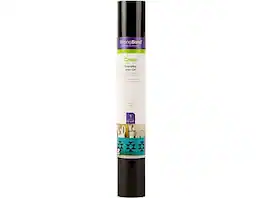
Outlasts more than 50 washes. Cricut Everyday Iron-On with StrongBond guarantee works fabulously with a wide variety of base materials, including wood. Intricate designs are simple to cut with your Cricut machine, and you'll weed with ease to prep for flawless application. Make a T-shirt with an inspirational quote, design heartwarming home decor, embellish accessories with one-of-a-kind designs, and create handmade gifts that will leave a lasting impression. Use one color or layer up to three for standout patterns and projects. For use with all Cricut cutting machines. For a flawless iron-on application, use Cricut EasyPress. Or apply with household iron.
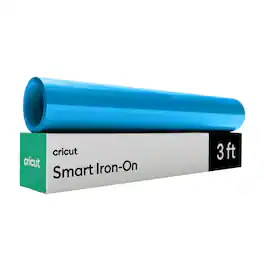
Just add heat! With Cricut Smart Iron-On Matless Heat Transfer Vinyl, you can personalize T-shirts, jackets, backpacks, and so much more. Plus, this material requires no machine mat, saving you time and simplifying your making experience. It's the same Smart Iron-On you love in bulk size and with simplified packaging, so we can pass the savings on to you. All Cricut materials are optimized for Cricut cutting machines with automatic cut settings in Design Space to ensure you have the best cutting experience. One roll Cricut Smart Value Iron-on - 13 in x 3 ft.