Adesso - TruForm Ergonomic Desktop Keyboard - Cable Connectivity - Full-size - USB Interface - 104 Key(s) - Home, Back - Black
Reviews coming soon
About this product
Adesso TruForm Ergonomic Desktop Keyboard - Cable Connectivity - Full-size - USB Interface - 104 Key(s) - Home, Back, Forward, Search, Email, Sleep, Wake-up, Power, Media Player, Calculator, Play/Pause, ... Hot Key(s) - Rugged - English (US) - Scroll Wheel - Windows - Membrane Keyswitch - Black
Split Ergonomic Design
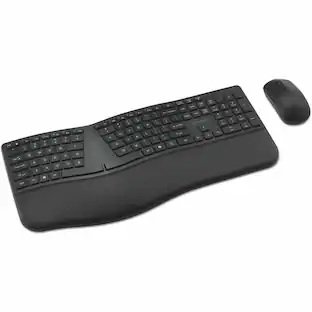
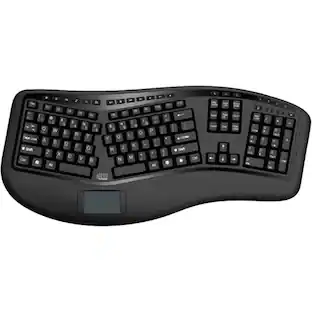
The design of this keyboard with split key zones and gently sloped shape encourages natural position of hands, wrists, and forearm in maximum comfort for long use.
One Touch Media Hotkeys
Instantly open your favorite Windows applications, such as My Computer, Calculator, Mail, or Search without having to navigate with your mouse.
Low-profile Chiclet Keycaps
The low-profile Chiclet Keys Provide a Quiet, Comfortable Typing Experience with its Sleek and Sturdy Design and a 5 million keystroke life.
Chiclet Keycap
Unlike traditional keycaps that are more elevated from the keyboard, Chiclet keycaps have a low profile, sleek, and sturdy design. Their surfaces are also larger than traditional slanted-edged keys' surfaces, making them easier to type on.
Integrated Palm Rest
Designed to keep your hands in a natural resting position, this not only relieves joint pain and improves posture, but has also been shown to relieve back pain and spinal discomfort.
- Form FactorFull-sizeConnection TypeWired
Reviews
This product doesn't have any reviews yet.
Compare similar products

Adesso TruForm Ergonomic Desktop Keyboard - Cable Connectivity - Full-size - USB Interface - 104 Key(s) - Home, Back, Forward, Search, Email, Sleep, Wake-up, Power, Media Player, Calculator, Play/Pause, ... Hot Key(s) - Rugged - English (US) - Scroll Wheel - Windows - Membrane Keyswitch - Black

Adesso Desktop Ergonomic Keyboard - Cable Connectivity - Full-size - USB Interface - 105 Key(s) - 13 Hot Key(s) - Multimedia, Internet, Volume Down, Volume Up, Mute, Play/Pause, Previous Track, Next Track, Media Player, Home Hot Key(s) - English (US) - PC - Membrane Keyswitch

Increase your typing efficiency with this Adesso Tru-Form keyboard. Its ergonomic shape and split-key design encourage natural hand and wrist positions, and its integrated palm rest reduces wrist strain. This Adesso Tru-Form keyboard has a touch pad that replaces a traditional mouse and employs GlidePoint technology for precise cursor control.

The K75400US with its split and sloped keyboard with adjustable reverse tilt, and a built-in cushioned wrist rest, the ergonomist-approved Pro Fit Ergo Wired Keyboard positions your hands for improved comfort.
Specs
Be the first to ask a question.
We’ll try to get your question answered within 24 hours by a Best Buy customer or brand representative.
Customers often buy these together

Logitech - MK270 Full-size Wireless Membrane Keyboard and Mouse Bundle for PC - Black
$26.99The price was $29.99





![Sure, here is the corrected and grouped text from the image:
**Top Row:**
- ESC
- F1
- F2
- F3
- F4
- F5
- F6
- F7
- F8
- F9
- F10
- F11
- F12
- PRTSC
- DEL
**Number Row:**
- 1
- 2
- 3
- 4
- 5
- 6
- 7
- 8
- 9
- 0
- -
- =
- \
**Letter Row:**
- TAB
- Q
- W
- E
- R
- T
- Y
- U
- I
- O
- P
- [
- ]
- \
**Letter Row:**
- CAPS
- A
- S
- D
- F
- G
- H
- J
- K
- L
- ;
- '
**Letter Row:**
- SHIFT
- Z
- X
- C
- V
- B
- N
- M
- ,
- .
- /
**Function Row:**
-](https://pisces.bbystatic.com/image2/BestBuy_US/images/products/9be10b95-8e90-4a5d-b85f-cbc6a7d8e8df.png;maxHeight=232;maxWidth=233?format=webp)


![esc ~ ! 1 tab caps lock shift ctrl F2 Fl # 2 3 Q W A S Z start opt L F3 $ 4 E D X alt cmd3 ) FS F4 A % 5 6 R T F G V C logi 44 HI & F9 FID FB F7 F6 * ) - - & 0 8 9 7 O P U I Y K L H J > < N M 1 B PM + = { [ : I ; ? I alt cmd D 2 4 300 3 1 F12 . * page I insert home up clear backspace 8 9 + 7 page A pg up end down home } I delete ] / 6 4 5 4 enter 2 3 enter 1 dn Pg end shift = 0 del ins etrl fn opt](https://pisces.bbystatic.com/image2/BestBuy_US/images/products/6539/6539505_sd.jpg;maxHeight=232;maxWidth=233?format=webp)
![Sure, here is the corrected and grouped text:
```
ESC F1 F2 F3 F4 F5 F6 F7 F8 F9 F10 F11 F12 1 2 3 logitech - - 1 2 # $ 4 % 5 6 & 7 8 9 0 - - back insert home page up num lock clear / . tab Q W E R T Y U I O P { [ } ] / delete end page down 7 home 8 A 9 P9 up + caps lock A S D F G H J K L : ; a enter 4 5 6 shift Z X C V B N M < > ? shift 1 end 2 3 pg dn enter ctrl fn start alt opt alt crnd x alt cmd x fn ctrl alt opt 0 ins del 1 logitech
```](https://pisces.bbystatic.com/image2/BestBuy_US/images/products/5761/5761911_sd.jpg;maxHeight=232;maxWidth=233?format=webp)

![Esc F1 F2 F3 F4 F5 F6 F7 F8 F9 F10 F11 F12 Print Screen Scroll Lock Pause Break 1 2 3 4 5 6 7 8 9 0 - + = Backspace Insert Home H Page Up A Num Look 1 I Tab Q W E R T Y U I o P { [ } ] I I Delete End IN Page Down 7 Home 8 9 Pg Up Caps A Lock A S D F G H J K L ; : DE g Enter 4 5 6 Shift Z X C V N M < > ? I Shift 1 End 2 3 Pp Dn Enter Ctrl Alt Alt Ctrl 0 Ins Del](https://pisces.bbystatic.com/image2/BestBuy_US/images/products/a588d446-5678-40ae-86b8-1f15e0026e66.jpg;maxHeight=232;maxWidth=233?format=webp)


Customers ultimately bought
Explore tech essentials Sponsored
 $159.99The price was $219.99



Keep exploring
 $91.49The price was $107.49
 $247.64The price was $283.49