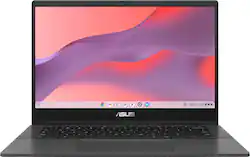
ASUS - Chromebook CM1402 14" FHD Laptop - MediaTek Kompanio 520 - 4GB Memory - 64GB eMMC - Gravity Gray
- Key Specs
- Screen Size: 14 inches (Size of the screen, measured diagonally from corner to corner.)
- Screen Resolution: 1920 x 1080 (Full HD) (Screens come in a range of resolutions (measured in pixels, horizontal x vertical). The higher the resolution, the greater the picture quality.)
- Touch Screen: false (Touch-screen devices make navigating more intuitive. Using a touch-screen display, you can do things such as tap to select, hold and drag to move items, swipe to scroll, and pinch to zoom.)
- Refresh Rate: 60Mhz (The number of frames per second the device can produce natively without enhancement. Higher rates help produce smooth, seamless pictures.)
- Brightness: 250 nits (A measure of the total light output.)
- Processor Model: MediaTek Kompanio 500 Series (Your computer's processor is like its brain. Working in combination with system memory, the power of the processor determines the complexity of software you can run, how many programs you can have open at the same time, and how fast those programs will run. Most computers feature an AMD, Intel or Snapdragon processor.)
- CPU Base Clock Frequency: 2 gigahertz (Actual central processing unit (CPU) speed may vary by device configuration and design. The average rate at which the processor is able to execute tasks under normal operating conditions as asserted by the manufacturer.)
- Storage Type: eMMC
- Total Storage Capacity: 64 gigabytes
- System Memory (RAM): 4 gigabytes (Random-access memory (RAM) is a computing device's short-term data storage, which allows active information to be accessed quickly. The size and type of RAM determines how efficiently the device can handle large amounts of information at one time. For example, gaming or video editing requires more RAM for optimal performance.)
- Graphics: MediaTek Integrated Graphics (Often referred to as a "graphics processing unit" (GPU), this device is responsible for displaying image content and decoding/encoding video content in programs and games.)
- Display Connector(s): 2 x Thunderbolt 4 (The number and type of connectors used to connect to an external display.)
- Battery Life (up to): 15 hours (Battery life will vary depending on the product configuration, product model, applications loaded on the product, power management setting of the product and the product features used by the customer. As with all batteries, the maximum capacity of this battery will decrease with time and usage.)
- Battery Chemistry: Lithium-ion
- 2-in-1 Design: false (A laptop and a tablet combined in one lightweight, portable device. Sometimes referred to as "convertible" or "hybrid" laptops, these devices deliver the processing power and keyboard of a laptop. When you're ready to play, either detach the screen or fold your 2-in-1 into tablet mode to comfortably watch movies, play games, read an e-book and more.)
- Backlit Keyboard: false (Integrated lights allow for visibility of the keys in low-light conditions.)
- General
- Brand: ASUS
- Model Number: CM1402CM2A-M8186
- Product Name: Chromebook CM1402 14" FHD Laptop - MediaTek Kompanio 520 - 4GB Memory - 64GB eMMC
- Color: Gravity Gray
- Year of Release: 2024
- Display
- Display Type: LED
- Screen Size: 14 inches (Size of the screen, measured diagonally from corner to corner.)
- Screen Resolution: 1920 x 1080 (Full HD) (Screens come in a range of resolutions (measured in pixels, horizontal x vertical). The higher the resolution, the greater the picture quality.)
- Touch Screen: false (Touch-screen devices make navigating more intuitive. Using a touch-screen display, you can do things such as tap to select, hold and drag to move items, swipe to scroll, and pinch to zoom.)
- Refresh Rate: 60Mhz (The number of frames per second the device can produce natively without enhancement. Higher rates help produce smooth, seamless pictures.)
- Brightness: 250 nits (A measure of the total light output.)
- Color Gamut (NTSC): 45 percent
- Processor
- Processor Brand: MediaTek
- Processor Model: MediaTek Kompanio 500 Series (Your computer's processor is like its brain. Working in combination with system memory, the power of the processor determines the complexity of software you can run, how many programs you can have open at the same time, and how fast those programs will run. Most computers feature an AMD, Intel or Snapdragon processor.)
- Processor Model Number: K520
- CPU Base Clock Frequency: 2 gigahertz (Actual central processing unit (CPU) speed may vary by device configuration and design. The average rate at which the processor is able to execute tasks under normal operating conditions as asserted by the manufacturer.)
- CPU Boost Clock Frequency: 2.05 gigahertz (Actual central processing unit (CPU) speed may vary by device configuration and design. The maximum rate at which the processor is able to execute tasks, typically only used for a short period of time as needed. This rate may temporarily boost the processor's performance, but may result in overheating, shutdown, or damage to equipment if sustained.)
- Number of CPU Cores: 8-core (A core, or "brain" of a CPU, allows it to receive and execute instructions. Each core can work independently or together to perform parallel operations.)
- Storage
- Storage Type: eMMC
- Total Storage Capacity: 64 gigabytes
- eMMC Capacity: 64 gigabytes (The amount of data that can be stored on the device's embedded Multimedia Card (eMMC). eMMC is a flash-based storage used in smartphones and personal computers; it typically has a smaller capacity than HDD or SSD storage.)
- Memory
- System Memory (RAM): 4 gigabytes (Random-access memory (RAM) is a computing device's short-term data storage, which allows active information to be accessed quickly. The size and type of RAM determines how efficiently the device can handle large amounts of information at one time. For example, gaming or video editing requires more RAM for optimal performance.)
- Type of Memory (RAM): LPDDR4X (Each type of RAM delivers a different level of speed, bandwidth, energy efficiency and performance.)
- System Memory RAM Speed: 3600 megahertz (How fast the information-storing hardware operates. The faster the RAM, the faster memory can be transferred to other system components. Ultimately, faster RAM improves operational efficiency.)
- Number Of Memory Slots: 0
- Number of Memory Sticks Included: 0
- Graphics
- Graphics Type: Integrated (Dedicated graphics uses a separate graphics card for processing video images. Because it does not use memory from the system's RAM, there is no extra burden on the CPU and graphics are processed more efficiently. Integrated graphics shares system RAM to process video images.)
- GPU Brand: MediaTek
- Graphics: MediaTek Integrated Graphics (Often referred to as a "graphics processing unit" (GPU), this device is responsible for displaying image content and decoding/encoding video content in programs and games.)
- Compatibility
- Operating System: Chrome OS (The operating system manages all software and hardware, including files, memory and connected devices. Most importantly, it lets you interact with your device and your programs in a visual way; otherwise, you'd be typing computer code to get anything done.)
- Voice Assistant Built-in: Google Assistant (A digital assistant built into the device that uses voice commands to answer questions and control smart devices.)
- Connectivity
- Display Connector(s): 2 x Thunderbolt 4 (The number and type of connectors used to connect to an external display.)
- Number of HDMI Outputs (Total): 0
- Number of DisplayPort Outputs (Total): 0
- Number of Thunderbolt Ports (Total): 2
- Number of VGA Ports: 0 (VGA (Video Graphics Adapter or Video Graphics Array) is a display standard that transmits via analog signals. This type of interface is typically used to connect a computer to a display device such as a monitor, projector, or TV.)
- USB Ports: 1 x USB-A 3.2, 2 x USB-C 3.2 (The number and type of USB ports the product has.)
- Number of USB Ports (Total): 3
- Headphone Jack: true (The device features an interface that allows for the connection of headphones.)
- Microphone Input: true (The device features an input for connecting an external microphone.)
- Wireless Connectivity: Bluetooth, Wi-Fi (The manner in which a device sends data to another device over a short distance without the use of wires or cables.)
- Wireless Standard: AX (The wireless networking protocol used by the device. Each iteration of the protocol is based on the 802.11 standard developed by the Institute of Electrical and Electronics Engineers (IEEE) Standards Association. Denoted by letters following 802.11 (802.11a, 802.11ac, etc.), each version, published in alphabetical order, encompasses all previous versions.)
- Wireless Networking Standard: Wi-Fi 6 (The wireless networking standard used by the device. Each iteration of the standard developed by the Wi-Fi Alliance corresponds to an existing IEEE 802.11 protocol; for example, standard 802.11ac (or AC) is termed Wi-Fi 5. Refers specifically to the standard the device is designed to use, but ultimately determines product interoperability and backward compatibility including previous versions.)
- Network Connectivity: None (The manner in which a device sends data to another device over a long distance using a cellular network.)
- Cooling
- CPU Cooling System: Air
- Power
- Power Supply Input: USB-C
- Power Supply Maximum Wattage: 45 watts
- Battery Life (up to): 15 hours (Battery life will vary depending on the product configuration, product model, applications loaded on the product, power management setting of the product and the product features used by the customer. As with all batteries, the maximum capacity of this battery will decrease with time and usage.)
- Battery Cells: 3-cell
- Battery Chemistry: Lithium-ion
- Camera
- Front-Facing Camera: true
- Front Facing Camera Video Resolution: 720p (Refers to the number of pixels, both horizontally and vertically, used by the camera facing the user to capture video. The higher the resolution the finer the video detail that can be seen.)
- Built-In Microphone: true
- Features
- 2-in-1 Design: false (A laptop and a tablet combined in one lightweight, portable device. Sometimes referred to as "convertible" or "hybrid" laptops, these devices deliver the processing power and keyboard of a laptop. When you're ready to play, either detach the screen or fold your 2-in-1 into tablet mode to comfortably watch movies, play games, read an e-book and more.)
- Backlit Keyboard: false (Integrated lights allow for visibility of the keys in low-light conditions.)
- Customizable Keyboard Lighting: No
- Foldable Screen: false
- GPS Enabled: false
- Media Card Reader: true (A hardware device that allows for access to data on a memory card and enables the transfer of its files to a computer. These devices may have one or multiple slots for various types of memory cards, and may be integrated into the computer or available as an external device.)
- Media Card Slot: microSD
- Customizable Case Lighting: false
- Chrome Features: Google Assistant, Android apps
- Stylus Dock: None
- Dimensions
- Product Height: 0.72 inches (The out of box height of the item. Height is measured as the vertical distance from the bottom of the item to the top as it would be primarily used or placed.)
- Product Width: 12.8 inches (The out of box width of the item. Width is measured as the horizontal distance from one side of the item to the other as it would be primarily used or placed.)
- Product Depth: 8.9 inches (The out of box depth of the item. Depth is measured as the distance from the front of the item to the back as it would be primarily used or placed.)
- Product Weight: 3.2 pounds (The out of box weight of the item.)
- Certifications Listings & Approvals
- ENERGY STAR Certified: true (Devices carrying the ENERGY STAR service mark, such as computer products and peripherals, kitchen appliances, and other products, generally use 20% to 30% less energy than required by federal standards.)
- EPEAT Qualified: true (The Electronic Product Environmental Assessment Tool (EPEAT) was designed to provide an environmental assessment tool for purchasers. In order to qualify for EPEAT, a product must meet all 23 required criteria.)
- EPEAT Level: Gold (The Electronic Product Environmental Assessment Tool (EPEAT) was designed to provide an environmental assessment tool for purchasers. In order to qualify for EPEAT, a product must meet all 23 required criteria. Products are rated Bronze, Silver or Gold based on how many of 28 optional criteria they meet (below 50%, 50%, 75%).)
- Included
- Numeric Keypad: false
- Stylus Included: false
- Warranty
- Warranty - Parts: 1 year
- Warranty - Labor: 1 year
- Other
- UPC: 197105425781
ASUS Chromebook CM14 is made for boosting productivity and having more fun — all day, every day. An efficient MediaTek Kompanio 520 processor and up to 15-hour battery life* gives you the freedom to stay productive throughout the day.
- Runs ChromeOS: The fast and secure operating system built by Google. From easy setup with Gmail, to built-in Google apps a tap away, plus supercharged search, everything is designed to be easier.
- 14" FHD display: The 1920 x 1080 resolution boasts impressive color and clarity.
- Processor: MediaTek Kompanio 520 offers smooth operation and high-speed multitasking for learn or play.
- 64GB eMMC: This ultracompact system is ideal for mobile devices and applications, providing enhanced storage capabilities, streamlined data management, quick boot-up times and support for high-definition video playback.
- Built-in cloud support: Easily save your files to your Google Drive account for secure access wherever you go. You can also sync with your other devices running Chrome and even work offline when needed. Fees may apply.
- Weighs 3.2 lbs. and measures 0.72" thin: Ultrathin and ultralight for maximum portability, featuring a 14" screen size. Lithium-polymer battery.
- Built-in media reader for simple photo transfer: MicroSD card slot supports SD, SDHC and SDXC memory card formats.
- Wireless/Wired connectivity (Wi-Fi 6 - 802.11ax): Connect to a Wireless-AX router for nearly 3x the speed, more capacity and wider coverage than Wireless-N. Backward-compatible with all other Wi-Fi networks and hotspots.
- Built-in HD webcam with microphone: Makes it easy to video chat with family and friends or teleconference with colleagues over Google Hangouts or other popular applications.
- Additional port: Headphone/microphone combo jack.
- Never had a virus - no need to worry*: How good is Chromebook security? Try never-had-a-virus good.* Layers of built-in protection help keep viruses out and prevent little issues from becoming big headaches.
- Minecraft now available on Chromebook: Join millions of players to mine, craft, explore and survive in a vast open world, with seamless cross-play with friends.
- Runs ChromeOS: The fast and secure operating system built by Google. From easy setup with Gmail, to built-in Google apps a tap away, plus supercharged search, everything is designed to be easier.
- 14" FHD display: The 1920 x 1080 resolution boasts impressive color and clarity.
- Processor: MediaTek Kompanio 520 offers smooth operation and high-speed multitasking for learn or play.
- 64GB eMMC: This ultracompact system is ideal for mobile devices and applications, providing enhanced storage capabilities, streamlined data management, quick boot-up times and support for high-definition video playback.
- Built-in cloud support: Easily save your files to your Google Drive account for secure access wherever you go. You can also sync with your other devices running Chrome and even work offline when needed. Fees may apply.
- Weighs 3.2 lbs. and measures 0.72" thin: Ultrathin and ultralight for maximum portability, featuring a 14" screen size. Lithium-polymer battery.
- Built-in media reader for simple photo transfer: MicroSD card slot supports SD, SDHC and SDXC memory card formats.
- Wireless/Wired connectivity (Wi-Fi 6 - 802.11ax): Connect to a Wireless-AX router for nearly 3x the speed, more capacity and wider coverage than Wireless-N. Backward-compatible with all other Wi-Fi networks and hotspots.
- Built-in HD webcam with microphone: Makes it easy to video chat with family and friends or teleconference with colleagues over Google Hangouts or other popular applications.
- Additional port: Headphone/microphone combo jack.
- Never had a virus - no need to worry*: How good is Chromebook security? Try never-had-a-virus good.* Layers of built-in protection help keep viruses out and prevent little issues from becoming big headaches.
- Minecraft now available on Chromebook: Join millions of players to mine, craft, explore and survive in a vast open world, with seamless cross-play with friends.
Whats Included
- Chromebook CM1402 14" FHD Laptop - MediaTek Kompanio 520 - 4GB Memory - 64GB eMMC
- Chromebook CM1402 14" FHD Laptop - MediaTek Kompanio 520 - 4GB Memory - 64GB eMMC
Disclaimers
- *Battery life may vary based on device and upon usage and other conditions.
- *Battery life may vary based on device and upon usage and other conditions.
Q: What is the screen resolution of this Chromebook?
A: The ASUS Chromebook CM14 has a 1920 x 1080 resolution display.
Q: Does this Chromebook have a built-in webcam?
A: Yes, this Chromebook has a built-in HD webcam with a microphone.
Q: What is the weight and thickness of this Chromebook?
A: This Chromebook weighs 3.2 lbs and is 0.72 inches thin.
Q: What is the maximum battery life of this Chromebook?
A: This Chromebook boasts a battery life of up to 15 hours.
Q: What type of processor does this Chromebook have?
A: This Chromebook is equipped with a MediaTek Kompanio 520 processor.
Q: What kind of wireless connectivity does this Chromebook support?
A: This Chromebook supports Wi-Fi 6 (802.11ax) for fast and efficient wireless connectivity.
Q: How much storage space does the ASUS Chromebook CM14 have?
A: The ASUS Chromebook CM14 has 64GB of eMMC storage.
Q: I'm not computer savvy. What doesn't it have that mote expensive lab tops have?
A: This is a Chromebook, it comes with a Chrome OS, not a Windows OS. Chrome OS is a web or cloud-based OS that is fast, secured and easy to use and is becoming a popular choice because of these features. Internet security or antivirus software is integrated, no need to purchase the software or application separately. Besides, it is low-cost and lightweight, and supports thousands of popular computing applications, both in Chrome and Android, and Linux applications as well. Since it is a web base OS it does require a Google or Gmail account and an internet connection in order to use or operate it properly. If this is your first experience with a Chromebook, I recommend using the HELP file incorporated within the OS. To access HELP, please click your profile picture on the Notification Bar, located on the lower right-hand corner of the Home screen then click the question mark icon or widget.