Deals for every list.It’s officially saving season.Shop now

Skip to contentGo to Product Search
Main Content

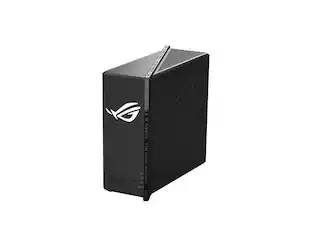
ASUS - ROG Strix GS-BE7200X Dual-Band Wi-Fi 7 Gaming Router - Black

Model: GS-BE7200X
SKU: 13220220
Sold & shipped by

About this product

ROG Strix GS-BE7200X Dual-Band Wi-Fi 7 (802.11be) Gaming Router, Supports 4096-QAM, Gaming Port, Enhanced 5GHz Long-Range Antennas, Smart Home Master, and Commercial-Grade AiProtection.

Highlights

Features

  • Next-Gen Wi-Fi 7 Performance

    Dual-band Wi-Fi 7 throughput of up to 7200Mbps with MLO and 4K-QAM

  • Multi-Gig Wired Performance

    16.5G wired capacity with a 10G WAN port, one 2.5G LAN port, and four 1G LAN ports

  • Prioritized Gaming Performance

    ROG-exclusive Gaming Network streamlines Game Acceleration, plus dual dedicated gaming ports

  • Intelligent Network Management

    Easy IoT device and VPN subnetwork setup, parental controls, and instant connections with Smart Home Master

  • Advanced Network Protection

    Advanced triple-level network security with AiProtection and pre-installed VPN support

  • Seamless AiMesh Expansion

    Wi-Fi 7-enhanced AiMesh enables a secure and extendable network for compatible ASUS routers

Specifications

  • Wi-Fi Mesh System
    No
    Number Of LAN Ports
    5
    Wi-Fi Speed
    5.8 gigabits per second
    Works With
    Amazon Alexa
Sponsored

Reviews

Rating 4.9 out of 5 stars with 23 reviews

5 star rating. 20 reviews4 star rating. 3 reviews
100% would recommend to a friend

Customer Images

The vast majority of our reviews come from verified purchases. Reviews from customers may include My Best Buy members, employees, and Tech Insider Network members (as tagged). Select reviewers may receive discounted products, promotional considerations or entries into drawings for honest, helpful reviews.


  • Rated 5 out of 5 stars

    Impressive performance; up & running in < 10 mins

    [ Summary and Verdict] The ASUS ROG Strix GS-BE7200X runs ASUS's familiar ASUSWRT firmware, with a refreshed ROG-themed interface, and like other ASUS routers, setup is straightforward and beginner-friendly. The firmware offers a comprehensive set of features, many of which advanced users may appreciate and casual users may never need. During testing, both the firmware and user interface proved stable, and Wi-Fi 7 and Wi-Fi 6 performance were equally reliable. For gamers, the most valuable feature might be Game Acceleration. It can identify gaming traffic and give it priority over less time-sensitive network activity. The result is lower and more consistent latency (which improves real-time, interactive applications where timing and responsiveness matter), particularly when other devices on the network are streaming, web-conferencing, downloading, or otherwise consuming bandwidth. The router feels somewhat plasticky and is light, but its performance has been excellent. In my 2,400 sq. ft. single-story home, the centrally located unit provides full-house wireless coverage. Its compact footprint is another advantage, allowing it to fit nicely in a cable cabinet. After setup, I fine-tuned the wireless settings by setting the 2.4 GHz band to a 40 MHz channel width instead of the default 20/40 MHz setting. This allows significantly higher throughput, with potential speeds exceeding 500 Mbps versus roughly 160 Mbps on a 20 MHz connection. Signal coverage extends throughout my home, though connectivity in the lanai is minimal because our hurricane-resistant triple-pane windows and sliding doors greatly reduce Wi-Fi signal penetration, even the 2.4 GHz band. The router does not include a 6 GHz band, which would provide 320 MHz channels (twice as wide as Wi-Fi 6's 160 MHz) for higher peak throughput and multi-gigabit speeds. However, 5 GHz is the most common general use frequency band today for consumer products, and provides a good compromise of performance and range. Verdict: 5 out of 5 stars. I would recommend this router to friends and family looking for an affordable entry into Wi-Fi 7. While it lacks support for the 6 GHz band, it delivers strong overall performance, modern features, and excellent value for the price. [ Steps prior to setting up your router ] Before using a wireless router, verify that your current internet service supports the use of third-party networking equipment. For example, I use Quantum Fiber, whose modem can be configured to work with a personal wireless router instead of the provider's router. To my knowledge, Xfinity also allows customers to use their own routers. Owning your own wireless router offers several advantages, such as flexibility if you decide to change internet service providers. In many cases, you only need to replace the modem while keeping your existing router and network configuration. As a result, all of your connected devices (including your smart and home automation devices) can continue using the same Wi-Fi network without requiring reconfiguration, making the transition to a new provider much simpler. After you have connected the router's WAN port to the cable modem, connect your laptop or desktop to one of the router's LAN ports. [ Set Up | Up and running in less than 10 minutes ] You can complete the basic setup in less than 10 minutes, which includes the installation of the latest firmware. All you need to do is load asusrouter.com, use suggested default settings, and select: (1) Create A New Network (2) Define a user name and password for protecting your ASUS router (3) Define your Network Name (SSID) and Network Password; there is an option to separate the 2.4 GHz and the faster 5 GHz bands, which I would not recommend checking; modern devices, such as smartphones, can change bands as needed automatically as you walk through your house (4) Select to upgrade your firmware (takes about 3 minutes) (5) Reboot, followed by logging in and fine-tuning the router where needed. [ Some cool router features that deserve mentioning ] Workload management: I have a mix of 40 devices, connected wirelessly or via Ethernet switches to the router, gaming consoles, smart TVs, streaming boxes for audio and video, several laptops, and many home automation devices (including all my home appliances) and I can confirm the router handles heavy traffic loads, simultaneous gaming sessions, and VPN server with absolute ease. USB3 Port for DLNA Media Server, Samba file sharing, and 4G/5G Internet tethering (as a backup when you connect a supported phone or USB modem to the router). AIProtection (free service, no subscription!) to instantly block access to known malware-infected websites adding a layer of protection for every device on your network. Various Networks in addition to your main homme network, such as: (1) Guest Network (to provide scheduled or one-time access network) (2) Gaming Network (to provide an exclusive network for gaming devices with game profile presets) (3) Kid's Network (to ensure Internet access safety for kids) (4) IoT Network (to easily separate a network for IoT devices, such as smart devices, home automation, etc.) (5) VPN Network (to establish a secure Internet connection), Multi-Link Operation (MLO) (to boost data rates, reduce latency, and improve reliability).

    This review is from ASUS - ROG Strix GS-BE7200X Dual-Band Wi-Fi 7 Gaming Router - Black

    Posted by UweZ

  • Rated 5 out of 5 stars

    Great speed and set of features

    I've used a handful of different routers and brands over the years and always find myself going back to ASUS after a while. This is another great offering from them and a nice step up from a lot of their cheaper offerings. Setup was pretty simple. I was upgrading from an older/cheaper ASUS model so I made a backup of my configuration so I could restore it when I had the new router hooked up. It was mostly as simple as swapping them out. Just remember to reboot all of your devices afterwards. I was scratching my head for a little bit until I started rebooting things (even my unmanaged switch seemed to benefit from a quick reboot). Once I was back up and running, it was familiar ground and I just had some exploring to do of all the new features. This is a ROG router so it's geared towards "gamers" and with that comes the "gamer" theme in the router software. I actually like it. It's meaningless and all, but it's a nice change from the mostly plain looking ASUS router firmware. There are a bunch of new features on the home dashboard that I didn't have on my cheaper model. A network traffic monitor and graph is front and center. A constant ping test is being sent and graphed so you can see what your ping looks like and how much it's been deviating from that over time. And what gaming centered device would be complete without RGB? Customize the lighting on the logo with a handful of options and any color you like. There's also a nightmode in case you're sleeping next to the router. If speed is what you're really interested in, this one has you covered. It's got 4 1Gbps ports but also has a 2.5Gbps port and single 10Gbps port. I really wish the 1Gbps ports were all 2.5Gbps but I have plenty of 1Gbps devices that wouldn't benefit from more so it's not the end of the world. The 2.5 port is definitely going into an upgraded switch when I get one. Wifi 7 works great. I saw speeds around 1.6Gbps on my 2.5Gbps internet connection. Wired connections also had no problems saturating their expected bandwidth. If you're familiar with the ASUS firmware, you'll be right at home. But if you're coming from a cheaper model like I was, you'll be pleasantly surprised at all of the extra goodies you see on the side bar. AiProtection modes are routed through TrendMicro so you need to accept their terms to use those things but they do open up some extra tools like two way IPS, infected device blocking, malicious site blocking. Traffic monitoring and analysis is available and updated once an hour on both a device and app level. There's also 4 different VPN servers you can use for whatever your needs are for connecting to your home network from away. Bottom line here, this is a great router. If you like ASUS routers and are looking for an upgrade, give this one a look. It offers a lot of speed and extra analysis features that might be useful to you or might just be neat. Fast wifi and the ability to connect to an internet connection as fast as 10Gbps is fantastic. The only real downside I could find was last of more 2.5Gbps ports in lieu of the 1Gbps ports. If it's in your budget, put it on your list.

    This review is from ASUS - ROG Strix GS-BE7200X Dual-Band Wi-Fi 7 Gaming Router - Black

    Posted by swemoney

  • Rated 5 out of 5 stars

    Gaming Router for All

    I was super excited to test Asus’s new Wi-Fi 7 router, the GS-BE7200X. I currently own the Asus RT-BE88U which is also a WIFI 7 router, but it has caused me headaches since I purchased it back in 2024. I would get random disconnects on certain devices with no explanation as to why. I have a mixture of 50 wired and wireless devices, so I needed a router that is reliable and able to handle multiple devices without having random disconnects. Another major issue I was experiencing when connecting the router to my Fiber service, was that my router would not obtain an IP address from my ISP. This is the reason I wanted to try the new GS-BE7200X from Asus. I’m happy to report that this router is rock solid. I haven’t experienced any random disconnects, and the router was able to obtain an IP address from my ISP at the initial setup with no issues. Setting things up Since I have another Asus router on hand, I wanted to test the functionality of the GS-BE7200X. I backed up the settings from my existing Asus router to see if the new router would allow me to import my settings. Sad to report that this did not work. I needed to manually set up the GS-BE7200X as a new router. This was a pain, but I was able to get everything set up properly after some tinkering to mirror my previous network settings. One cool aspect of adding the GS-BE7200X as my main router, it allowed me to setup a mesh network by using Asus’s AiMesh. This was a much-needed addition as my home is 3,000 square feet, and the GS-BE7200X is rated for 2,750 square feet of coverage. AiMesh works like a charm. I was able to setup the GS-BE7200X as my main router on the second floor and have my other Asus router setup downstairs. I love the fact that I’m able to bind certain clients to a specific router to ensure I receive the proper wireless coverage at all times. Tech Specs The Asus router is more of a mid-range router since it only has one 10g WAN port, and one 2.5g LAN port with four additional 1G LAN ports. I really wish this one came with more 2.5g LAN ports, but this is nothing a dedicated switch can’t fix. I like the fact that this router has provided consistent upload and download speeds as well. I have a 2 Gig download and upload fiber plan, and this router handles that with ease. If I ever decided to upgrade my internet plan, I would have to switch out the GS-BE7200X since this router is only capable of 2.5g speeds due to the limitations of its ports. Having a dedicated gaming port, VPN Fusion, AiProtection and vast parental controls make these Asus routers stand out. Having the ability to create an Asus account and bind the router to my online account was an added benefit. I also have the ability to adjust the router settings within the Asus router app. Thoughts overall This new router has been everything I’ve wanted in a router and more with its consistency and stability in comparison to my other Asus router. I was on the verge of testing other brands due to the wireless disconnects I was experiencing until using the GS-BE7200X. This is the perfect mid-range gaming router for any setup. You won't be disappointed with its price to performance.

    This review is from ASUS - ROG Strix GS-BE7200X Dual-Band Wi-Fi 7 Gaming Router - Black

    Posted by kriserikka

  • Rated 5 out of 5 stars

    Compact, sleek, good coverage

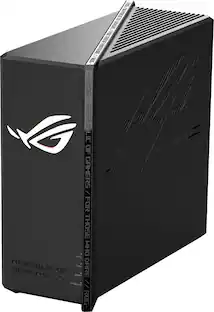
    I was hit with a problem on two ends. My Internet WiFi router started to fail and when it did work, it had connectivity issues routinely dropping connections with many devices and flat out not connecting with some at all. A replacement unit still had the same issues and a simple online search let me know I wasn't alone. I was limping along with a very old Netgear wifi router that just wasn't as compatible with newer devices and protocols as I would like so I was on the hunt for a newer router and decided to give the "Asus Rog Strix GS-BE7200X" (Just rolls off the tongue eh?). We'll call it the BE7200X from now on. I have owned and continue to own several Asus products including two laptops, three motherboards, a few keyboards, a mouse and I'm sure a few more items so the fact their router showed up in pure Asus ROG fashion in the classic colors and their ROG logo massively displayed on the front of the router was no shock or surprise. Unlike many of their other Strix products, there was zero swag inside the box. You basically get the router and a power adapter along with some basic "getting started" literature. Aesthetically and build wise, I picked this unit specifically because it is centrally placed in my living room hardwired via ethernet to my internet router in the other room. I prefer a unit that is square, compact and doesn't have antenna sticking out everywhere and the BE7200X fits my aesthetic and size requirements perfectly. Upon startup, you're met with a BLAZINGLY BRIGHT Asus logo that can and will light up the room. I like it, so I left it on. There is an app for setup, but it just kept looping and searching after finding the initial Asus internal network for setup. I tried several times, but it would get stuck at the same point every time. Find network, connect to network (successful), spinning logo. At this point, I just used my laptop to connect manually and setup was quick and easy. In the end, I ended up deleting the Asus app from my phone as I found it really not needed for my use case. I'll notch this up to an early release bug and I'm sure Asus will sort it out. After setup, I connected it to my actual network and it was picked up instantly and really that was it. My connection speeds are fantastic maxing out my ~600mbps internet connection and matching my ethernet speeds. More importantly, all my devices from tablets to home security to laptops and more have been rock solid. Something I haven't experienced in quite some time. I also like that the BE7200X visually looks good and fits right into my living room setup and its compact nature lets me place it on top of a small bookcase shelf I have behind my TV. Coverage is excellent and since it is centrally placed it reaches every corner of my house and even extends outside my front door all the way into my front street. In the end, I have a very competent router, with a smooth web based setup interface that is compact, visually pleasing that is getting the job done and then some.

    This review is from ASUS - ROG Strix GS-BE7200X Dual-Band Wi-Fi 7 Gaming Router - Black

    Posted by Electrosoft

  • Rated 5 out of 5 stars

    Stellar upgrade in perfornance

    I tend to be more involved in my networking build than most tech enthusiasts. I built my home network from the ground up and wanted ethernet ports all over the house. I looked at what was available at the time and it was not as easy to piece together devices based on performance or network needs. It is nice that ASUS focuses many of its features on gaming and optimal performance. On top of that, they make it really easy to setup and manage your whole network from a app or webpage. Who doesn't want a fast and reliable network that you can simply set it and forget it or be more involved with monitoring? WiFi 7, with speeds of up to 7.2 Gbps. With 16.5 dedicated wired Ethernet port speeds (10g WAN, 2.5 LAN, and 4x 1g LAN). I could stop here and say I would be impressed with these features for gaming but ASUS steps it up. Here is where I think this gaming router shines. -Dedicated gaming ports that prioritize gaming traffic -4g/5g mobile tethering that is useful in the event of a internet outage or when traveling -Smart Home Master - Assists with network setups for IOT devices, gaming devices, kid's devices, and even a MLO network setup -ASUS ROG Aura RGB lighting is configurable. Game on in style where you would actually want to showcase this router on your desk proudly Get this if you are looking for prime gaming performance and overall high network bandwidth. This is for the gamer and/or work from home parent with many devices on the same network where you can prioritize your devices.

    This review is from ASUS - ROG Strix GS-BE7200X Dual-Band Wi-Fi 7 Gaming Router - Black

    Posted by HoMi3

Compare similar products

ASUS - ROG Strix GS-BE7200X Dual-Band Wi-Fi 7 Gaming Router - Black
4.9(23)

ROG Strix GS-BE7200X Dual-Band Wi-Fi 7 (802.11be) Gaming Router, Supports 4096-QAM, Gaming Port, Enhanced 5GHz Long-Range Antennas, Smart Home Master, and Commercial-Grade AiProtection.

ASUS - ROG Strix GS-BE18000 Tri-Band Wi-Fi 7 Gaming Router - Black

Slash through the game with blazing-fast tri-band speeds up to 18 Gbps, featuring AFC System, 320 MHz bandwidth, Multi-Link Operation, and one-tap gaming acceleration.

ASUS - ROG Rapture GT-BE98 Pro BE30000 Quad-Band Wi-Fi 7 Gaming Router - 20th Edition
5.0(5)

ROG celebrates its 20th anniversary with the ROG Rapture GT-BE98 PRO Edition 20 wireless router. Featuring a premium gold-on-black aesthetic, embodying the spirit of ROG's 20th anniversary and an exclusive Signature Edition 20 Interface, a specially crafted Edition 20 interface with an iconic ROG inspired theme. This limited-edition wireless router represents two decades of ROG innovation.

TP-Link - Archer AXE7800 Tri-Band Wi-Fi 6E Router - Black

Embrace lightning-fast 7.8 Gbps speeds and experience 6GHz band with Archer AXE7800 Tri-Band WiFi 6E router. With eight WiFi streams combined with three separate bands, the Archer AXE95 achieves unbeatable performance to boost capacity and reduces congestion for smoother 8K streaming and AR/VR intensive gaming. Premium 2.5 Gbps and 1 Gbps WAN/LAN ports support flexibility for the peak performance, transmitting maximum fiber internet speeds to fill every corner of your house. Protect your IoT devices with TP-Link HomeShield.

Pros for ASUS - ROG Strix GS-BE7200X Dual-Band Wi-Fi 7 Gaming Router - Black
There were no pros for this product—Overall Performance, Speed, Range, Connectivity, DesignOverall PerformanceSpeed, Range, Performance, Ease of use, Setup
Cons for ASUS - ROG Strix GS-BE7200X Dual-Band Wi-Fi 7 Gaming Router - Black
There were no cons for this product—Setup ProcessThere were no cons for this product—Wi-Fi 6E, Lag, Size, Parental Control

Specs

Be the first to ask a question.

We’ll try to get your question answered within 24 hours by a Best Buy customer or brand representative.

No content

Customers often buy these together

Sponsored