Techtober SaleEnds Sunday. Limited quantities. No rainchecks.Shop now

Skip to contentGo to Product Search
Main Content

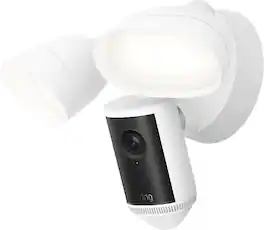
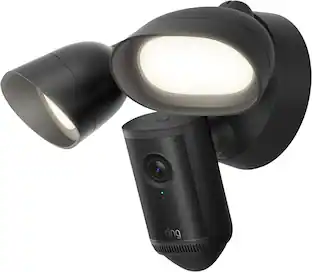
Ring - Floodlight Cam 4K Pro, Retinal 4K video, up to 10x Zoom, ultra-bright motion-activated floodlights - White

Model: B0F67KWWQH
SKU: 6643832
Sold byBest Buy

Customers are saying

Customers are satisfied with the exceptional video clarity and the impressive brightness provided by this device, which effectively illuminates outdoor spaces after dark. Users also frequently praise the reliable motion detection and the straightforward installation process. Furthermore, the product is noted for its smooth Wi-Fi connectivity and a wide field of view that enhances overall performance.

Generated by AI based on customer reviews.

Highlights

Features

  • Capture it all with Retinal 4K video

    See your home or business in the ultimate clarity with Retinal 4K.

  • Zoom in up to 10x

    Catch details at a distance and inspect faces or license plates with up to 10x Enhanced Zoom.

  • Live View & Two-Way Talk with Audio+

    See, hear, and speak to who’s there in real time with enhanced sound quality.

  • 3D Motion Detection

    Receive more precise alerts with radar-powered motion detection.

  • Night Vision

    Stay in color longer with Night Vision - even when your floodlights are off - and automatically switch to crisp black and white in total darkness.

  • Light Up Large Areas

    Give unwanted visitors nowhere to hide with 2000 lumen floodlights.

  • Remote Activated Siren

    Sound off in the Ring app to send unwanted visitors running.

  • See More. Know More. Protect More.

    Scroll back in time to rewatch what you missed, get intelligent alerts that tell you what’s happening, and so much more, with a compatible Ring Protect subscription (sold separately).

  • Link with other Ring devices

    Link with select Ring devices, allowing them to activate when Spotlight Cam Plus detects movement for additional security, recording angles, and more. Subscription required, sold separately.

Specifications

  • Video Camera Resolution
    4K (2160p)
    Field Of View
    158 degrees
    Night Vision
    Yes
    Number Of Cameras Included
    1
    Camera Power Source
    Hard wired
Sponsored

Reviews

Customers are sayingCustomers are satisfied with the exceptional video clarity and the impressive brightness provided by this device, which effectively illuminates outdoor spaces after dark. Users also frequently praise the reliable motion detection and the straightforward installation process. Furthermore, the product is noted for its smooth Wi-Fi connectivity and a wide field of view that enhances overall performance.
This summary was generated by AI based on customer reviews.
  • Video Quality (64)
  • Brightness (29)
  • Motion Detection (22)
  • Overall Performance (14)
  • Installation Ease (8)

Customer Images

The vast majority of our reviews come from verified purchases. Reviews from customers may include My Best Buy members, employees, and Tech Insider Network members (as tagged). Select reviewers may receive discounted products, promotional considerations or entries into drawings for honest, helpful reviews.

  • Rated 4 out of 5 stars

    Hated the Price but Like the product

    I dreaded the price but I am very satisfied with the product. The light has a yellowish hue I actually liked my older spot light which was white hue. This is definitely an upgrade and gives a excellent picture day or night which you can view in my attached photos taken at night.

    Posted by Never4Get

  • Rated 5 out of 5 stars

    Lights, Camera, and Action is caught on record

    For the longest time, I have had a very simple motion activated floodlight setup for our patio in the backyard. I’ve often thought about wanting to keep tabs on our dogs, watch for any other wildlife, or keep us more secure while lighting up that area. Well, enter Ring’s latest version of the Floodlight Cam Pro. This newest iteration captures video in 4K as opposed to 2K on the older model. It also adds what is dubbed as Low-Light Sight to the continued Color Night Vision. This model also has the ability to work with WiFi 6 whereas the last model worked with WiFi 4. You get all of that along with those two super bright 2000 Lumen floodlights. The installation process was pretty straightforward. Having that existing area and connection helped out a great deal there, but I think the average person with some electrical knowledge could install this easily. I am certainly not an electrician, and I got it working just fine. Once installed, it was turning back on the power and then establishing the connection. As it has been with the other Ring products I own, that process went without hiccups as well. Once it was installed and set up, it was time to let it do its job. Since we have two dogs, this area is constantly heaving with activity. They are always running to the back of the yard to chase squirrels or from one side to the other to bark at people as they pass by the front of the house. The Ring Floodlight Cam Pro was probably 80/20 in catching them in the act. This seems to be the norm because I get similar results with the doorbell. I will continue to tinker with the settings to see if I can improve that though. When it did capture the movement, the video was crisp and clean during the day. Panning and zooming worked really well too. When it comes to the nighttime action, I found the night vision to be pretty incredible. We picked up some coyote action when they entered the yard, and that’s one of the reasons why I wanted this coverage. We want to make sure we can keep our family, kids and dogs, safe at all times. I’ve also tried things at different light levels. I am very happy to have that option with how much light these things can provide. I’m also impressed with that light schedule in the app as well. While I take issue with some settings within the Ring app, I think that light schedule is very nice. The last thing we need is those to turn on all day long. All in all, I am a big fan of this addition to our Ring household. If you are already using their products, I don’t think you can go wrong for your home security and lighting needs in an area that you want to monitor. Just remember to take the time to tinker with the settings in the app. The recording time, brightness of the lights, your zones to monitor, and alerts are the main ones that I think you definitely need to check and fine tune.

    Posted by Evolved1

  • Rated 5 out of 5 stars

    Great quality photo and easy upgrade

    Great camera to protect my house and Amazon packages

    This review is from Ring - Floodlight Cam 4K Pro, Retinal 4K video, up to 10x Zoom, ultra-bright motion-activated floodlights - Black

    Posted by Webjibaro

  • Rated 5 out of 5 stars

    Clear 4K video with good detail

    The Ring Floodlight Pro has been an excellent added security measure for our home. I installed ours over the garage door, where it captures the entire front of our home. The camera has solid motion detection that alerts us and starts recording if triggered. If it is triggered during night hours or in dim light, the floodlights also illuminate. The floodlight camera ships with the light, camera mount and mounting hardware. A small screwdriver is included and is the only tool required. No printed instructions were included, however a scannable QR code link to download the Ring app is provided. Installation and setup are then completed in the Ring app. The app-driven installation is simple for anyone who has ever installed a light fixture. First time device setup in the app is also simple and straightforward. I already had an HD Ring floodlight camera installed, so I removed it and installed the new camera in its place. A handy anchor cable is built into the camera that hooks to the mount to keep the camera securely in place while performing the wiring. I started to re-use the previous camera's mounting base but changed my mind since this camera is white and the previous camera was black. The camera holes that slide over the base screws can be a little tricky to slide through fully, but that’s the only step that caused any issues. Once the floodlight was installed, I added it to my existing Ring app, and the app applied a firmware update. I’m usually disappointed by the vast majority of device apps because many are poorly developed. However, the Ring app is one of the best out there. It is stable and always alerts me reliably, when something is detected. It is also full of useful features beyond Ring devices. One example, Neighbors is a community within Ring where Ring subscribers in the immediate vicinity share safety tips, warnings, alerts, or even weather information. It’s like having our own crowdsourced neighborhood watch. The only thing I’m not wild about are the loud wind chime–sounding alerts, but at least the alert tone is jarringly loud enough to wake me from a deep sleep if I set the phone volume to max and someone starts poking around our driveway in the middle of the night. Video quality can be subjective, but I like it. I was admittedly a little disappointed initially because the video from my previous HD camera seemed superior to this new 4K “retina” Pro camera. The older camera footage seemed sharper, cleaner, and had much better contrast. The new camera looked washed out and overexposed by comparison. Ironically, I opted for the HD camera over the Gen 1 Pro last year after reading numerous user reviews saying they preferred the HD video quality over the Pro. I will agree, at first glance the HD camera video looks more natural and outright better. However, things get interesting when I begin to zoom in. That’s where smaller, more granular details are more clearly visible on the newer camera, especially in dim light footage. Zooming is where the higher resolution is most useful, not necessarily viewing the entire frame. I’d much rather have a washed-out looking video where I can clearly read the plate numbers of a vehicle on the street than a prettier video at first glance that muddies up smaller details as I zoom in tighter. Night vision on these cameras is phenomenal. The IR illumination works really well, and I can see footage quite clearly in IR lighting when the floodlights are off. When the floodlights are on, I get sharp full-color video. The adjustable motion detection is also nice. I can set detection zones and omit areas I don’t want triggered by motion. I can adjust motion sensitivity or completely disable it. I can also live view and/or manually record at will. When the camera senses motion, it begins recording and saves a snapshot in the history. The Ring app is an excellent tool for monitoring and securing our residence. It monitors all our Ring cameras. The user interface is nicely done, being both easy and intuitive to navigate. When the floodlight camera, or any of our other Ring cameras, senses motion, they send an alert to the app. I am notified through an audible chime or vibration (if the device is on silent), which I receive on both my smartphone and smartwatch. When I open the Ring dashboard in the app, I instantly see a snapshot from every camera at that specific moment. I can then choose to view live or go through the history of recordings, and I can filter by any camera. I can download and save video at will. Some features, like Bird’s Eye View, feel more gimmicky than useful, but are still nice to have. The app can also host Ring alarm systems and other Ring devices. My Ring cameras have withstood all the seasons like a champ. In my region, we can go as low as zero or below in the winter to highs of 100 or more in the summer. I’ve never had any of my Ring devices stop working due to excessive cold or heat. And the floodlight camera is in direct sunlight for the better part of the day. They’re durable devices.

    Posted by JMan

  • Rated 5 out of 5 stars

    Happy With This Floodlight Cam

    The Ring Floodlight Cam Pro V2 is my first floodlight install and my first camera device from Ring. What drew me to the Ring camera is its 4K sensor and ability to record 24/7, two main capabilities that I’m very much used to with another brand of camera system. It was welcoming to hear that this is an option now and it made my decision to try Ring much easier. The Floodlight Cam Pro V2 sports a 4K sensor with a 140 degree horizontal wide field of view (85 degree vertical) and allows for clarity at up to 10X zoom. The floodlights themselves produce up to 2000 lumens at a warm 3000K. The camera offers two way talk and active noise cancelling. I opted to install my floodlight on the side of my house, an area that I actually don’t have covered by any type of camera system. It’s a case of “it was meant to be” seeing that I wanted a full-time wired camera and all that was on that side of a house was an outdoor wall light. Since the floodlight is a wired install, it was a perfect choice. Installation was fairly simple with the only concern being the hardware supplied. Ring is very generous about providing a variety of screws of different lengths to mount the main bracket to your current junction box. Unfortunately, none of them worked on my ancient junction box, but I was able to reuse the screws from the older wall lamp bracket. So make sure to hold onto your older stuff during the install…just in case. If you’re a seasoned light fixture installer or are very handy, the installation is self explanatory when you look at the 3 main parts. But for the rest of us, the Ring App will guide you through the installation process, including to make sure you have shut off power to the circuit you intend to install the floodlight on. Once the hardware installation is complete, the app will begin its onboarding process of the floodlight into your account. This included me being near the floodlight for the app to recognize it, choosing a wifi to connect to, and a 10-15 minute software update. In about 30 minutes, I was up and running in the Ring App and able to see my view of the side yard. From here, this is where the real fun begins. Ring does include a 30-day trial of its Ring Home Premium plan, its top tier plan that includes AI video analysis and 24/7 video recording, so I’ll continue to talk about this review with the Premium plan in mind and what you’ll need at a minimum moving forward. Out of the chute, the Floodlight Cam Pro V2 was recording my movements as I worked to adjust the camera point and lights to better fit my side yard. Seeing that I do have a clear view of my neighbors yard as well, I was able to go into the app settings and set detection zones so that I don’t trigger any unneeded notifications. I was also able to adjust the floodlight brightness settings that I felt worked perfectly for the space. There are some things you’ll probably have to do once you have yours installed. Viewing the camera can be done in three ways. You can live stream your camera by simply tapping on the thumbnail of your view. This will immediately bring up the Live View where you can turn the lights on or off, activate the siren, and even send precanned replies. This is probably the preferred way to view your camera live. Then there’s something called Timeline. It’s not an option readily available from your app dashboard view and can only be by tapping “End Live” when you’re in Live View. When in timeline view, you can scrub through the events back and forth by simply swiping your finger left and right on the timeline bar. Finally, there is a dedicated button for “History” from the dashboard where you can replay specific events that happened, up to 180 days in history. Now what I found is that 24/7 is not on by default and is something you have to turn on in the app. I’m a big proponent of 24/7 recording as it picks up even the tiniest of movements that sometimes the software doesn’t see as a detection. With 24/7 recording on, Timeline view becomes invaluable to a user as they can scrub through the recordings to notice things that weren’t automatically detected. That being said, 24/7 view is a luxury and only comes with the Ring Home Premium at a premium monthly cost. Also, it does tax the amount of upload bandwidth you have, especially this being a 4K camera. It’s obviously nice, but not a requirement to have to use this floodlight camera. The other thing I found that needed to be turned on is AI alerts, which analyze your events and provide a summary for you to read alongside the recording itself. I obviously turned it on for the sake of science (and unfortunately, it is also only offered as part of the Ring Home Premium plan), and it was like having ChatGPT on speed dial. It was pretty good about describing specific people and things. For example, I was given a “A person is opening the door and walking on the paved area” and even a “A person is opening the brown gate” on two different event occasions. My brown gate is the entrance to my side yard from the front of the house, so if I read this, I would immediately know that someone is accessing my side yard. Again, a very nice thing to have, but not a requirement to use this floodlight camera. But man, it is nice. From a quality and detection standpoint, the Ring Floodlight Cam V2 showed no problems with detection and what it was detecting. In my case… a skunk. Never in a million years would I have guessed that a skunk would use my yard as a routine path to wherever it needs to go at night. And get this….the AI alert told me it was a skunk! I was able to replay back the recording, and even zoom in to see the skunk’s features. It’s pretty darn good. The floodlights are very bright and I had to dim them a bit so I don't blind my neighbors. The floodlights do come on about a second late when it detects the initial motion, and that may be fine for most things like detecting a human being, but that skunk was moving pretty quick. And for something that small and quick, I give many kudos to the Ring team for their detection algorithm. Again, AI detection and 24/7 recording do come at a cost. Overall, I’m very happy with the Floodlight Cam V2 and its features. Now that it’s up and running, it’s a “set it and forget it” type of device that will do its job notifying me when things are happening. And depending on your situation, you can opt in or out of the 24/7 + AI features that the premium plan offers. I’d say I’d go for it if your camera faces a busy area, and not so much if the camera is pointed to an area that’s essentially boring.

    Posted by softwareEngineer

Compare similar products

Ring - Floodlight Cam 4K Pro, Retinal 4K video, up to 10x Zoom, ultra-bright motion-activated floodlights - White

Our most powerful floodlight camera shows you critical details - even at a distance - thanks to Retinal 4K. 1 Radar-powered 3D Motion Detection lets you fine-tune your motion zones to your property for more precise alerts. Two super-bright floodlights light up wide areas to deter anything unwanted before it gets close.

Ring - Spotlight Cam Pro (2nd Gen), Plug In, Retinal 4K for ultra-clear video, 10x Enhanced Zoom, 2 LED Spotlights - Black
4.6(44)

Spotlight Cam Pro eliminates dark spots and helps protect key outdoor areas with targeted, motion-activated lights. See critical details — even at a distance — with Retinal 4K video. 1 Radar-powered 3D Motion Detection lets you fine-tune your motion zones to your property for more precise alerts.

Google - Nest Cam with Floodlight - Outdoor or Wired - Smart Security Camera - Snow

Nest Cam with floodlight has built-in intelligence that can tell the difference between a person, a vehicle, and an animal. It alerts you when there’s important activity,* and lights up automatically so you can see what’s happening. With 24/7 live view and free event video history, you never miss a thing, day or night. Swap out your existing basic floodlight and use the same wires for power. Nest Cam with floodlight requires the Google Home app and a Google Account – it’s not compatible with the Nest app or the home.nest.com site.

Ring - Outdoor Cam Pro, Retinal 4K for the ultimate wide-angle video, 10x Zoom, Low-Light Sight full-color in near dark - White

Supercharge your security with Outdoor Cam Pro. See it all with Retinal 4K, featuring wide-angle video that captures detail in any light — even at a distance. Protect what’s yours with the power and precision of Ring’s most advanced anywhere-ready outdoor camera.

Pros for Ring - Floodlight Cam 4K Pro, Retinal 4K video, up to 10x Zoom, ultra-bright motion-activated floodlights - White
Video Quality, Brightness, Motion Detection, Overall Performance, Installation EaseVideo Quality, Brightness, Motion Detection, Spotlight Performance, Setup EaseOverall Performance, Camera Quality, Light Brightness, Ease of use, InstallationVideo Quality, Overall Performance, Motion Detection, Ease of Use, Field of View
Cons for Ring - Floodlight Cam 4K Pro, Retinal 4K video, up to 10x Zoom, ultra-bright motion-activated floodlights - White
There were no cons for this product—There were no cons for this product—App Compatibility, Battery Life, Price, Connectivity, CompatibilityPower Supply

Specs

Questions & Answers

  • This would be mounted where it gets direct afternoon sunlight in the SoCal desert area to replace an older Ring Flood Camera that no longer operates correctly. When the temperature exceeds 120 degrees, will it damage the camera?

    Hi DesertDweller. Thank you for taking the time to ask this question. The Ring Floodlight Cam Pro (2nd Gen) is rated for an operating temperature range of -4°F to 122°F (-20.5°C to 48.5°C). Extreme temperatures and other conditions can cause your Ring video doorbell or security camera to overheat. Some devices will enter Device Cooldown to help keep your device safe, which will limit features and temporarily reduce video quality. If the temperature continues to rise, your device will turn off automatically to prevent damage. We invite you to reach out to our community if any additional information is needed regarding your question. The Ring Community is our first peer-to-peer community forum, giving our customers the ability to help one another by sharing their feedback and experiences with each other. Thank you, Miyuki from Ring.

    Answered by Ring
    Ring response
  • Is it easy to install?

    Hi Abp5. Thank you for your question. The Ring Floodlight Cam 4K Pro is designed to replace an existing outdoor hardwired floodlight fixture, so if you already have one installed at your home, the process is straightforward. The device connects to your existing electrical junction box and wiring where your current floodlight is mounted. Before getting started, you will want to make sure you turn off the power at the circuit breaker to the light fixture you are replacing. The package includes a mounting bracket, all necessary hardware, and a step-by-step installation guide. Once the power is off, you will remove your existing floodlight fixture, connect the wiring to the Ring Floodlight Cam 4K Pro using the included wire nuts, secure the mounting bracket to the junction box, and attach the camera to the bracket. After the device is mounted, you can restore power at the breaker and complete the setup through the Ring app, which will walk you through connecting the device to your wifi network and customizing your settings. It is important to note that the Ring Floodlight Cam 4K Pro requires a hardwired connection and does not run on battery power. If you do not have an existing outdoor junction box or floodlight wiring in place, you may need an electrician to install one before mounting the device. We invite you to reach out to our community if any additional information is needed regarding the Ring Floodlight Cam 4K Pro. The Ring Community is our first peer-to-peer community forum, giving our customers the ability to help one another by sharing their feedback and experiences with each other. Thank you, Melissa from Ring.

    Answered by Ring
    Ring response
  • Is it possible to record videos with this camera?

    Yes, this camera has video recording capability.

    This question and answer was generated by AI based on customer and product data.
  • What is the maximum zoom this camera offers?

    This camera offers 10x enhanced zoom.

    This question and answer was generated by AI based on customer and product data.
  • Does this floodlight camera work with Alexa?

    Yes, this floodlight camera works with Amazon Alexa.

    This question and answer was generated by AI based on customer and product data.
Ask a question
No content

Customers often buy these together

Sponsored