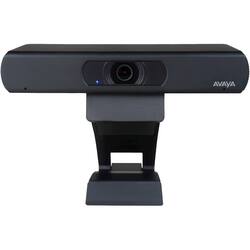
Avaya - Huddle IX 2160 (4K) Webcam
- Key Specs
- Video Resolution: 2160 (4K) (Refers to the number of pixels, both horizontally and vertically, used to capture the video. The higher the resolution the finer the video detail that can be seen.)
- General
- Brand: Avaya
- Model Number: 700514534
- Product Name: Huddle IX 2160 (4K) Webcam
- Camera
- Video Resolution: 2160 (4K) (Refers to the number of pixels, both horizontally and vertically, used to capture the video. The higher the resolution the finer the video detail that can be seen.)
- Maximum Video Frame Rate: Up to 60 fps (The maximum frequency at which consecutive images can be captured by a video recording device.)
- Megapixels: 8.5 megapixels (Measures the amount of graphic resolution that the product can capture.)
- Image Resolution (Display): 3840 x 2160 (Refers to the number of pixels, both horizontally and vertically, used to either capture an image or display it. The higher the resolution the finer the image details.)
- Autofocus: true (Allows the camera to automatically focus through the lens, rather than by adjusting the lens manually.)
- Features
- Integrated Microphone: true
- Plug And Play Operation: true (The product can work when first used or connected, without reconfiguration or adjustment by the user.)
- 360 Degrees Rotation: false (The product is capable of turning freely about an axis, incorporating horizontal points of view covering 360 degrees.)
- Connectivity
- System Requirements: Mac or Windows PC (The software that a product must have for it to be able to integrate with another product.)
- Dimensions
- Product Height: 1.34 inches (The out of box height of the item. Height is measured as the vertical distance from the bottom of the item to the top as it would be primarily used or placed.)
- Product Width: 7.64 inches (The out of box width of the item. Width is measured as the horizontal distance from one side of the item to the other as it would be primarily used or placed.)
- Product Depth: 1.65 inches (The out of box depth of the item. Depth is measured as the distance from the front of the item to the back as it would be primarily used or placed.)
- Product Weight: 0.63 pounds (The out of box weight of the item.)
- Other
- UPC: 715663086376
Transmit crisp footage during video conferences with this Avaya IX Huddle HD USB fixed camera. The Ultra HD 4K sensor supports 1080p resolution and offers pan, tilt and zoom functions for increased visibility. This Avaya IX Huddle HD USB fixed camera lets you send superior signal for a clear picture.
- High quality video: Full high definition video quality means rich, optimal interactions and experiences for those in the room or participating remotely.
- UltraHD 4K sensor: Record vibrant, true-to-life 1080p60 or 2160p30 video that captures the exciting details.
- Windows and Mac compatible: For multifunctional use.
- Built-in microphone: Ensures clear, audible communication.
- Affordable: Enjoy enterprise quality and capability at a lower cost. Great for businesses of any size.
- Intuitive: Like all Avaya products, it's designed for ease of use so you can spend less time fiddling and more time collaborating.
- Easy to deploy: Plug and play deployment means you can get up and running quickly - so you can get right down to business.
- USB port: Let you send compressed (H.264) on USB signal for a clear picture.
- Pan tilt and 8x digital zoom: Allow you to position the camera where you need it.
- Tripod/camera mount screw hole: Provides versatile mounting options.
- 123° horizontal field of view: More than one person can join the conversation.
- High quality video: Full high definition video quality means rich, optimal interactions and experiences for those in the room or participating remotely.
- UltraHD 4K sensor: Record vibrant, true-to-life 1080p60 or 2160p30 video that captures the exciting details.
- Windows and Mac compatible: For multifunctional use.
- Built-in microphone: Ensures clear, audible communication.
- Affordable: Enjoy enterprise quality and capability at a lower cost. Great for businesses of any size.
- Intuitive: Like all Avaya products, it's designed for ease of use so you can spend less time fiddling and more time collaborating.
- Easy to deploy: Plug and play deployment means you can get up and running quickly - so you can get right down to business.
- USB port: Let you send compressed (H.264) on USB signal for a clear picture.
- Pan tilt and 8x digital zoom: Allow you to position the camera where you need it.
- Tripod/camera mount screw hole: Provides versatile mounting options.
- 123° horizontal field of view: More than one person can join the conversation.
- High quality video: Full high definition video quality means rich, optimal interactions and experiences for those in the room or participating remotely.
- UltraHD 4K sensor: Record vibrant, true-to-life 1080p60 or 2160p30 video that captures the exciting details.
- Windows and Mac compatible: For multifunctional use.
- Built-in microphone: Ensures clear, audible communication.
- Affordable: Enjoy enterprise quality and capability at a lower cost. Great for businesses of any size.
- Intuitive: Like all Avaya products, it's designed for ease of use so you can spend less time fiddling and more time collaborating.
- Easy to deploy: Plug and play deployment means you can get up and running quickly - so you can get right down to business.
- USB port: Let you send compressed (H.264) on USB signal for a clear picture.
- Pan tilt and 8x digital zoom: Allow you to position the camera where you need it.
- Tripod/camera mount screw hole: Provides versatile mounting options.
- 123° horizontal field of view: More than one person can join the conversation.
Whats Included
- Avaya IX Huddle Webcam
- 4ft USB A/B cable
- Remote control
- 2xAAA batteries (for remote)
- Owner's manual
- Avaya IX Huddle Webcam
- 4ft USB A/B cable
- Remote control
- 2xAAA batteries (for remote)
- Owner's manual
- Avaya IX Huddle Webcam
- 4ft USB A/B cable
- Remote control
- 2xAAA batteries (for remote)
- Owner's manual
A: Avaya Huddle cameras HC020 / HC050 / Collaboration Unit CU360 / B109 for Consumer Channel: Do I need a Sold To / Functional Location Number? https://support.avaya.com/ext/index?page=content&id=FAQ117158 Avaya IX HC020 / HC050 Huddle Cameras: How to setup with PC / Mac Software Clients https://support.avaya.com/ext/index?page=content&id=FAQ116095 AVAYA IX HC020 camera setup on PC or a laptop with a 3rd party software client application https://support.avaya.com/ext/index?page=content&id=FAQ117115 Avaya HC020 / HC050 Huddle Cameras: Can I connect the camera wirelessly? https://support.avaya.com/ext/index?page=content&id=FAQ117156 Avaya IX HC020 / HC050 Huddle Cameras: How to use the Remote Control and configure their settings? https://support.avaya.com/ext/index?page=content&id=FAQ117106 Avaya IX Huddle Camera HC050 Remote Control Guide https://support.avaya.com/ext/index?page=content&id=FAQ117111 Avaya IX Huddle Camera HC020 Remote Control Guide https://support.avaya.com/ext/index?page=content&id=FAQ117108 Avaya Huddle cameras HC020 / HC050: Why Camera and Microphone are not detected https://support.avaya.com/ext/index?page=content&id=FAQ117112 Avaya Huddle cameras HC020 / HC050: Why does the camera menu appear mirror? https://support.avaya.com/ext/index?page=content&id=FAQ117159 Avaya Huddle Camera HC020: Why Pan and Tilt do not work ? https://support.avaya.com/ext/index?page=content&id=FAQ117082 Avaya Huddle cameras HC020 / HC050: How to download a firmware upgrade file? https://support.avaya.com/ext/index?page=content&id=FAQ117157 Avaya IX HC020 / HC050 Huddle Cameras: How to upgrade using a Windows PC https://support.avaya.com/ext/index?page=content&id=FAQ117091 Avaya IX Camera HC020 : How to upgrade the firmware using Mac https://support.avaya.com/ext/index?page=content&id=FAQ117113
Q: Why does it need an ethernet connection? Does it connect to the computer directly?
A: It doesn't need to use it. That's there if you are connecting this to an Avaya networked setup. The camera will work ok as standalone otherwise.
Q: Is this a suitable web camera for personal web camera use?
A: Yes, it is -- the installing a bit tricky, at least for when I did it on Windows 10 via USB 3.0. I wrote a review that breaks down the steps on getting it to work better.
Q: Can the HDMI be used to connect to a smart tv?
A: I am not sure of the answer, but it doesn't come with an HDMI cable. it has an USB A (enhanced - larger than normal USB-A). I use it into the USB port on my computer (I have a PC and a Mac) and then run an HDMI cable from my computer to a tv and it works great. I have never had a reason to run the camera directly to a tv but you would need a special cable to do so, if it would work.
A: I am not sure what you mean by rotate. It does not go back and forth (like Pan/Tilt). The camera doesn't physically move, but the remote control allows you to move the cameral right or left as well as zoom. And there are pre-sets so you can zoom to different parts of the room with 1 click. It took me a bit to figure that out. documentation not great, but works great.
Q: Will this mount on a standard tripod?
A: Yes; it has a 1/4-20 standard thread for mounting to a camera tripod.
Q: When will this webcam be available for purchasing?
A: undefined