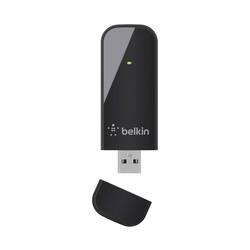
Belkin - Dual-Band Wireless-N USB Network Adapter - Black
- Key Specs
- Adapter Type: Wireless
- General
- Brand: Belkin
- Model Number: F9L1101
- Product Name: Dual-Band Wireless-N USB Network Adapter
- Color: Black
- Security
- Data Encryption: true
- Network
- Compatible Wireless Standard(s): Wireless-N (The wireless networking standard(s) the device is backwards compatible with. This includes networking protocols based on the IEEE 802.11 standard (alphabetically ascending) and the Wi-Fi Alliance standard (numerically ascending), both of which provide high-throughput wireless local area networks (WLANs). Devices designed to work with specific standard(s) will be backwards compatible with previous versions but may not run at optimal performance when using earlier iterations.)
- Compatibility
- System Requirements: Microsoft Windows XP, Microsoft Windows 7, Microsoft Windows Vista (The software that a product must have for it to be able to integrate with another product.)
- Dimensions
- Product Height: 2.75 inches (The out of box height of the item. Height is measured as the vertical distance from the bottom of the item to the top as it would be primarily used or placed.)
- Product Length: 1.2 inches (The out of box length of the item. Length is measured as the longest dimension of the item.)
- Product Width: 0.3 inches (The out of box width of the item. Width is measured as the horizontal distance from one side of the item to the other as it would be primarily used or placed.)
- Product Weight: 0.18125 pounds (The out of box weight of the item.)
- Warranty
- Warranty - Parts: 2 years
- Warranty - Labor: 2 years
- Other
- UPC: 722868818930
Connect wired computers to a wireless network with this Belkin dual-band USB adapter. This small dongle plugs into the computer's USB port and connects the device to the internet via a router's wireless access point. This Belkin dual-band USB adapter lets you choose the quietest channel for your wireless network.
- Wireless-N technology: Delivers up to 300 Mbps data transfer rates for high-speed wireless access.
- Compatible with draft 802.11n: Backward compatible with 802.11b/a/g networks for versatile use.
- External network adapter for wireless devices: So you can connect an additional device.
- WPA and WPA2 data encryption: For high-level wireless security.
- PC system requirements: Microsoft Windows XP, Microsoft Windows 7 and Microsoft Windows Vista.
Whats Included
- Belkin Dual-Band Wireless-N USB Network Adapter
A: No, N-600 means it's dual-band - it can operate on the 5 Ghz and 2.4 Ghz frequencies. It used to be that wireless networks all operated on 2.4 Ghz, but because alot of other electronics (ie home phones) can also operate on this frequency, you could get alot of interference, so some manufacturers switched to using 2.4 or 5 Ghz. Realististically, 5 Ghz actually has a shorter range due to the higher frequency (shorter wavelength = less distance when the router uses the same amount of power to broadcast) though there's less interference. You'd probably be better with the N300 over longer distances. Ie, my dual band router upstairs puts out 2.4 Ghz and 5 Ghz networks, but I only recieve the 2.4 Ghz upstairs and downstairs, though 5 Ghz works great upstairs.
A: This will work fine. My son plays online gaming to China and has no issues with his internet connection or speed in-house.
A: The browser thing is totally weird. Normally the browser will open and if there is an issue it will forward you to an error page. This device should help you become wireless on your desktop, HP's are just a different name with relatively the same hardware as the others. Just pop the Belkin N600 into a usb port, insert the install disk, walk through the install wizard after clicking setup.exe. After the install, you will be prompted to reboot. Once the machine reboots, you need to go into network connectionn and sharing screen and manually connect to your existing wifi signal (the name you gave your wireless network is called the SSID) coming off the Motorola Router. Make sure you setup a password for your network on your router's admin page, and use that pwd to connect from all devices and computers. We did this same thing with a different brand on an old PC from the Nineties in 2003, so you should be fine. Also the browser thing may be related to something else - run a virus scan and pc cleanup utility to do some maintenance, to see if you have a virus or you are maxed out on disk space - Virus Utiliyt I use is Kaspersky, and Maintenance tool I use is Wise Care 365 free version it has a cleanup feature you can schedule every day, and it also has a memory optimizer for when things get slow.
Q: will this work on a Blue Ray?
A: yes, you should be able to plug this into the blue ray player and use it to set up the wireless network to connect to it so that you don't have to plug it in
Q: Compatible with All Routers?
A: The Belkin N600 USB adapter is designed to work with any Wireless B, G or N device as well as with dual band capable routers. Regards, Belkin Support
Q: New to this
A: You could try a Bluetooth USB adapter for your computer and use your phones minutes.
Q: will this adapter work to connect my tv to the internet
A: Probably not a way to get internet connected to a SmartTV. It might require a driver. Best bet is to hard wire your SmartTV using an ethernet cable.
Q: does it work with Windows XP?
A: Yes, it does. It is compatible with Windows XP (SP2 or higher).
People also viewed
 $12.99The price was $14.99
Today's top picks
 $449.99The price was $829.99
 $2,449.99The price was $3,199.99
 $999.98The price was $1,639.98
 $199.99The price was $249.99
 $1,099.99The price was $1,499.99