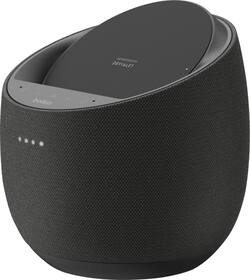
Belkin - SoundForm Elite Hi-Fi Smart Speaker + Wireless Charger - Black
- Key Specs
- Built-In Speakers: true
- General
- Brand: Belkin
- Model Number: G1S0001TT-BLK
- Product Name: SoundForm Elite Hi-Fi Smart Speaker + Wireless Charger
- Color: Black
- Audio
- Built-In Speakers: true
- Voice
- Voice Assistant Built-in: Google Assistant (A digital assistant built into the device that uses voice commands to answer questions and control smart devices.)
- Connectivity
- Connectivity Technology: Bluetooth (The manner in which a device sends data to another device over a short distance.)
- Works With: Google Home (Compatible with or able to be connected to other smart devices or applications.)
- Wireless Connectivity: Wi-Fi (The manner in which a device sends data to another device over a short distance without the use of wires or cables.)
- Operating System Compatibility: Android, Apple iOS
- Power
- Power Source: Plug-in
- Display
- Display Screen: false
- Dimensions
- Product Height: 6.63 inches (The out of box height of the item. Height is measured as the vertical distance from the bottom of the item to the top as it would be primarily used or placed.)
- Product Width: 6.4 inches (The out of box width of the item. Width is measured as the horizontal distance from one side of the item to the other as it would be primarily used or placed.)
- Product Depth: 6.4 inches (The out of box depth of the item. Depth is measured as the distance from the front of the item to the back as it would be primarily used or placed.)
- Product Weight: 2.8 pounds (The out of box weight of the item.)
- Warranty
- Warranty - Parts: 2 years
- Warranty - Labor: 2 years
- Other
- UPC: 745883783922
Improve your listening experience with this Belkin SoundForm Elite Hi-Fi smart speaker. The Push-Push dual woofer design delivers deep, distortion-free bass, and the Speaker Active Matching technology helps maximize sound quality. Google Assistant integration lets you control this Belkin SoundForm Elite Hi-Fi smart speaker and play songs from your library using voice commands.
- High-fidelity smart speaker: Patented technologies from audio pioneers Devialet provide incredible sound quality from a compact device.
- Speaker Active Matching technology: Ensures absolute fidelity and exceptional performance.
- Use your voice to play music: Pair with other Google Assistant enabled smart speakers in your home so you can enjoy the songs you love no matter what room you are in.
- Wireless charging design: Eliminates tangled wires for easy use.
- Delivers up to 10W of power: Integrated fast wireless charging up to 10-watts. Compatible with all Qi-enabled devices from Apple, Samsung, Google, and more.
Whats Included
- Belkin SoundForm Elite Hi-Fi Smart Speaker + Wireless Charger
- Owner's manual
- Power adapter
A: Hi, willm2work. The Belkin G1S0001 comes with a built-in Google Assistant, where you can play music, find answers, manage everyday tasks, and control other smart devices around your home through your voice. While the Belkin G1S0002 comes with a built-in Amazon Alexa feature, you can play music, find answers, manage everyday tasks, and control other smart devices around your home with your voice. In addition with the Belkin G1S0002, by using AirPlay 2, you can easily stream audio to your speaker directly from your iOS or macOS device.
Q: I own this speaker, and it dings every night at midnight. How can I get it to stop?
A: I’m not sure, but mine does the same thing at 12:05
Q: It doesn’t charge my phone. The light comes on when I put it on the speaker, but it doesn’t charge.
A: Hi, only certain phones are compatible. It has to have something called Qi technology.
A: Hello, Ben. No. You will have to manually connect your phone via Bluetooth.
A: undefined
Q: Does the Pixel 6 sit flush on the charger or is it incompatible with the camera bump?
A: Hi, Brian2342. The Belkin Soundform Elite Hi-Fi Smart Speaker + Wireless Charger has not been tested to work with your mentioned device.
Q: Can i purchase two additional speakers and pair them?
A: Yes, I myself have 3 Belkin Speaker. You only have to set up "Home-Group" on Google Home.
A: Hi! Please contact our phone support for better assistance. You can use refer to this link: https://www.belkin.com/us/support-article?articleNum=55022
People also viewed



Today's top picks
 $199.99The price was $249.99
 $479.99The price was $729.99
 $789.99The price was $1,049.99
 $799.99The price was $1,199.99