Rating 4.5 out of 5 stars with 33 reviews
4.5- Camera Quality (21)
- Solar Panel (12)
- Battery Life (9)
- Setup (8)
- App (6)
- Nectar Level (4)
Customer Images
The vast majority of our reviews come from verified purchases. Reviews from customers may include My Best Buy members, employees, and Tech Insider Network members (as tagged). Select reviewers may receive discounted products, promotional considerations or entries into drawings for honest, helpful reviews.
- Rated 4 out of 5 stars
Get the solar!
Berd Nerds! Endorsed by the Audubon Society- camera is great. Their species recognition isn’t the best. You can watch birds from all over the world. Very fun! I have the solar setup and I haven’t had to charge the camera at all. It’s a bit expensive and the app needs work. Naming your bird feature also needs work. Best app out there ATM.
Posted by Sarah
- Rated 4 out of 5 stars
Expensive but cool
Great concept, amazing photos and videos. But the fill reservoir is hard to clean as it doesn't pop apart. And I'm so far disappointed with the solar charger- still have to charge the battery every few weeks. Expensive for what it does, but I don't regret buying it on sale.
Posted by MikeM
- Rated 5 out of 5 stars
A Fun Way to Feed Your Fast Feathered Friends
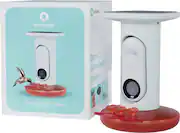
Bird feeders are a great way to attract your feathered friends to your home. Smart bird feeders like this one will also photograph and identify each visiting bird which makes it just that much more fun. This Smart Hummingbird feeder takes everything that is great about their original smart bird feeder and customizes it for nectar-eating hummingbirds. Highlights: * Easy to set up * Easy to fill with nectar without removing from mount * Solar roof maintains charge well * App is fun and easy to use * Battery lasts a long time even with overcast skies Room for Improvement: * Not easy to tell when nectar is low * Cannot tell in the app if the battery is charging from the solar roof * Details of the connected feeder(s) would be nice on the home screen of the app * Regular bird feeder housing is not available for purchase (yet?) Setup: Setup couldn’t be easier! The solar roof is pre-installed so essentially there are just 3 parts to assemble: the smart camera module which is the “brains” of the kit, the base that holds the nectar (food) and the main housing. As with most devices that have a battery, the first thing to do is plug the camera module in to give it a full charge before setting it up. Once things are all set up, you can let the solar roof maintain that charge, but for now, it’s easiest to do a full charge via the supplied cable and your own USB-C power adapter. Remove the pre-installed rubber port cover on the top of the camera module and plug it in to charge. Save that port cover just in case you ever want to swap this camera module into a different housing that doesn’t have a solar roof. Several spares come in the box but it’s always good to have more than one just in case. Once charged, download and install the free app on your phone. Follow the easy steps to create your new account, pair your camera module to the app, configure it to work on your home’s WiFi, and install any available updates. This whole process took me about 30 minutes to get it set up, online and ready to go. Now it’s time to insert the camera module in the main housing. There’s a short USB-C plug that comes from the top of the housing inside the recess where the camera fits. Plug in the cable from the solar roof and fully slide the camera into that recess. It will be magnetically held in there. Since this feeder has the solar roof, you shouldn’t need to remove the camera from the housing again. It’s waterproof enough to last through some serious weather but anything more serious (like a hurricane) might warrant just bringing the whole bird feeder inside until the weather subsides. Next is adding the hummingbird food (aka nectar) to the reservoir. When removed from the housing, the filler opening is large and easy to pour the food into. I made my own nectar by following the basic recipe listed in the manual (1.5 cups of tap water and 6 tablespoons of unprocessed sugar). Once filled, just align that opening with the base of the housing and give it a slight twist to lock in place. Just be careful to not spill anything when moving your feeder around. There are three (3) feeding spots on the base. Each spot can either have a “flower” with a hole for the birds to eat from, or a “plug” to cover that hole up. A few plugs come in box so you can swap out feeding spots as you like. It is recommended to leave the center one open and plug the outer two so that birds (at least initially) feed from the center of the perch for better camera framing. The last step of setup is to mount the feeder outside so that you can metaphorically hang the “Open” sign and welcome birds to your new Smart Feeder. I bought a shepherds hook from my local hardware store and set up things in my front garden. It’s recommend that you aim the camera at something picturesque so the background of your photos is attractive. It is also recommended to not aim the camera at things that you don’t want in your photos, like a neighbor’s yard, your bedroom window, etc…. You never know when the camera will take a picture of a visiting Hummingbird and the background of that photo should be something you like as well. Another thing to keep in mind when placing your feeder is to ensure that it gets enough sun exposure to keep the solar panel charging. You can always check the app to ensure the camera has enough charge, but just be sure to not mount the feeder under a bushy tree or a roof overhang that will shade the solar panel. Usage: While there’s a lot you can do in the app, this smart Hummingbird feeder will basically run on its own; taking photos of your winged visitors and charging from the sun. All you have to do is keep the food reservoir full and clean. There is an optional subscription available, but there’s a lot the app can offer even without paying for a subscription. When you first set up the feeder with a new account, you might be offered a discount on an annual premium subscription as I was. Without the subscription, your feeder still identifies birds automatically, takes photos and videos when a visitor stops by, and more. As of the time of this review, the premium subscription also allows for higher-resolution photos and videos, the ability to view remote feeders from around the world, unlimited cloud storage, and more. If you opted for the premium subscription, you can browse other smart feeders from around the world that have been made available for sharing while you’re waiting for some birds to come for a treat. I found some feeders in Norway and Slovenia that I can follow in addition to my own. You can view photo “postcards” or video clips from your’s or other feeders and see birds from around the world. In the app, you can check the battery level and wifi status of your feeder, but only deep in the settings menu. It would be nice to show both on the “Live” view as well as on the “Home” screen. What the app doesn’t show is whether the feeder’s battery is being charged by the solar panel. After setup, you can verify if the solar panel is working properly by checking the battery level in the morning and again in the evening to see how the charge level is doing. If your evening charge level is still good, then your feeder probably got some solar charge during the day. The one thing you do need to check periodically is the food level. The app doesn’t have a way to check the nectar level, so the only way to know if the nectar is low is to go out to the feeder and check visually. With their original smart bird feeder, you can see the seed level from a distance pretty clearly. With this Hummingbird feeder, the liquid nectar is in the base which is translucent red. You might be able to see the nectar level through the base if you’re up close, but otherwise you’ll have to unlock the base from the housing, remove it and just check the level inside. You can set up the app to share a push notification when a bird is detected by the camera. You can also just browse the app to see all photos and videos taken. Some of the interesting optional features that the premium subscription offers are the ability to have the camera identify and notify when a “pest” like a cat bothers your feeder so you can perhaps consider moving it. It also has the option to give a particular bird a name and then notify you when that same bird comes back. As with all new bird feeders, it can take days or weeks for birds to find and become comfortable visiting your newly installed feeder. In the few days since I’ve set up mine, I have yet to see a hummingbird stop by, but I’m sure it’ll happen soon. In the meantime, I can still check out a few feeders from around the world (with my paid subscription) and marvel at the birds that visit those shared feeders. Bird Buddy currently offers three styles of Smart Bird feeder; this one that is designed specifically for Hummingbirds, one that is more of a smart birdbath, and their original model that is designed for most other birds. The smart camera module included with each full kit is universal and can be swapped into the housing of any other their other models to save on the investment of buying multiple kits each with their own camera modules on the assumption that you don’t want multiple feeders operating at the same time. They offer the Hummingbird feeder without a camera, but as of the time of this review, they don’t yet offer the regular bird feeder or bird bath housings without a camera. If you’re sure you want to feed Hummingbirds, get this model. If you’re unsure, you can instead get the regular model and add the optional Hummingbird housing. Then just move the camera module to whichever feeder you want to use. Overall: If you’re curious about the winged friends near your home and are interested in adding a bird feeder to attract them, this Smart Hummingbird feeder is easy and fun to use. Set it up and then just keep the nectar full. Any visitors will be automatically recorded and you’ll be notified.
Posted by gadgeTT
- Rated 5 out of 5 stars
Skeptic at first. Now we are hooked.
I was skeptical at first with this bird feeder working. But....... I will get to that in a bit. Setup was super easy. I unpacked. Plugged in and let it charge up. Download the app. I downloaded from Play Store. Setup an account. Followed the step by step instructions including WiFi info and I was in. I picked a spot that was in the open and had good sunlight to keep the camera charged. I filled the reservoir sugar water and I waited. I waited.... And waited..... And waited...... I had to wait about 1 week and was getting impatient thus my skepticism. Then I got a notification that I had a bird visit... Holy cow. The app named the species. My entire family was all excited and so was it. The app notified me of the arrival and took a quick video and photo. I opted for not signing up for the membership yet because once again I was skeptical. Now that I capture a bird. I might actually sign up for a yearly membership. We will see. I was able to share both videos and snapshots through the app. I was also able to download to my phone. I can also share access up to 10 per the app. It also would have helped if I completely read the instructions where it said it might take about a week for birds to trust your feeder. So after getting out first hummingbird bird visit the family is hooked on this device. I would definitely recommend this for the intended purpose.
Posted by PhillipB
- Rated 4 out of 5 stars
Amazing wildlife insights on your phone / tablet
Depending on where you live, you might be lucky enough to get a regular hummingbird visitor or maybe quite a few (we live in Southern California, so most seasons we have visitors year round). They're pretty shy birds, so getting up close and personal with them is tricky and normally involves sticking some nectar feeders to the windows and doors of your house and hoping you get lucky. Well, things just got a whole lot easier! The Bird Buddy Hummingbird feeder comes in 3 main sections - the nectar reservoir , the camera module and the main body (incl. a solar power roof) As with most feeders , you just unscrew the bottom section and fill it with the nectar substitute of your choice and once you hang it somewhere accessible, it's feeding time for the birds. But the camera module is where things get smart. The camera module itself is a motion based module, that captures and records all your hummingbird visitors to the feeder, and uploads a photo and a short video clip to the cloud. To setup the camera module initially , and also to view the images / videos you need to install the Bird Buddy app from the appropriate Appstore. Here's my one and only crtique of the setup - like most small IOT devices, pairing it and joining it to you home WiFi network can be a little tricky id you do things in the wrong order. First it pairs bluetooth to your phone and then joins the WiFi directly (same as most other devices), but if you turn the module too early in the process and pair before the app gets to the right step , you have to unwind a few steps (remove the device from the phone, factory reset the camera module etc) before you try again. It sounds simple, but in this case it's true - if you do EXACTLY what the manual and App says (do NOT turn on the module until prompted to do so) then things will be fine. I'm sure there's an easier way to do this, but for now, this part took my probably longer than anything else. Once the module is charged and paired to your network - insert it into the main body and connect the USB cable. This cable connects to the solar panel in the roof of the main body, so assuming you get at least 'some' sunlight in your location the batter should keep itself charged year around. If not, then just be prepared to unplug it from the unit every now and then and give it a full charge using any regular USB-C mains adapter (note: you can see the batter level in the app so you don't need to guess). Finally the BirdBuddy App is both amazing and a little confusing - first the confusing part. There seems to be a mix between your videos/photos and community provided content unless you are very specific about what you want to see. Also getting feedback / help identifying birds is not clear, and then if you are luck to get a lot of hummingbird visitors , you'll end up switching off your notifications - which of course means then you might miss out on things. It's a minor gripe, but some level of 'detail' for notifications would be nice just to help streamline the process. Then the amazing part - the videos and pictures are crystal clear, and when you find them , easily accessible and sharable through the app. I had the feeder up for maybe 4 hours, and I already had a couple of visitors that I had never seen up so close before. If you are willing to pay for the Bird Buddy Pro subscription (not mandatory) then you can also start to name the birds that are repeat visitors, and ultra high res 2k videos - but to be honest I haven't found the need to sign up for this yet, as the out-of-the-box experieince is so awesome. However, as I become more familiar with my hummingbird neighbors, it might be worth paying that little extra to know who is coming and going. Note: BirdBuddy also make a regular Bird Feeder with the same functionality - if you don't get hummingbirds where you are, their other products offer similar features and functions.
Posted by DickieUK