Rating 3.3 out of 5 stars with 32 reviews
3.3- Camera Quality (707)
- Ease of use (293)
- Size (112)
- Overall Performance (48)
- Screen (33)
- Price (7)
- Flash (6)
- Focus (6)
Customer Images
The vast majority of our reviews come from verified purchases. Reviews from customers may include My Best Buy members, employees, and Tech Insider Network members (as tagged). Select reviewers may receive discounted products, promotional considerations or entries into drawings for honest, helpful reviews.
- Rated 3 out of 5 stars
Needs work
The camera arrived fully charged and included a cable and a 20W charger. The included micro SD card is 16GB but that storage could go fast. Installation was difficult. You need to download the Canon Connect app and they give you a QR code to do so. I had to update the software as well. The Canon Connect app is very poor. You need to register the Pick to continue the process but the Pick isn’t in the device list. I tried several other models and still received the same error message, “Pairing is not supported.” I tried connecting via Bluetooth (recommended) or Wi-Fi. No luck. I uninstalled and reinstalled software – no luck. So I called Kevin at Canon support. BINGO – the QR code in my package had me download the wrong app. You need to download the Connect app for Mini PTZ. It immediately recognized my device but wouldn’t pair to my Google Pixel 6 phone. Kevin has the Google Pixel 5 so he uninstalled and went with the process with me. We both had trouble connecting. It was a lot of back and forth. Turning phone off/ on, removing Pick from Bluetooth and starting the pairing process again … and again … and again. It finally connected but just because I think I wore the device down and it gave up trying to keep me from connecting. My goal for the Pick was to have it take pictures and videos of my brother who has Alzheimer’s. I wanted natural shots and the pick is great for this. It even warns you of the lighting is too dark for optimal shots. BUT every time I opened the app and turned on the camera, I had to start the pairing process again. EVERY TIME. I also tried this with my husband’s Samsung phone and had the same issue. Then the lightbulb came on. I looked in the online manual and the transmission frequency is 2.4GHz. We have a 5GHz mesh system. While I can make it work, it does require 5-15 minutes every time I turn it on just to connect it. The camera does a nice job. Pictures are pretty clear close up and a little blurry at 15 feet. The battery has only been lasting about 2 ½ hours but some of that is used up because I have to keep reconnecting. The concept behind the Pick is good but they need more retooling. Even after updating the firmware, the Pick has issues. Make sure you save your box as you may need the SSID or PASS (on the inside flap) in the future.
Posted by 47states
- Rated 3 out of 5 stars
GREAT POTENTIAL!!!
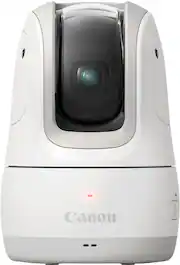
The Canon PowerShot Pick is a portable, battery powered camera that can take pictures of you and your loved ones all on its own. This tiny camera can pan, tilt, and zoom all on its own, has face tracking, takes photos and videos on voice command, and can also be used as a webcam and when you are all done, simply throw it in your pocket. This pocket-sized camera is an amazing idea with great potential, but it’s just not there, yet!!! I have had the opportunity to test out the Canon Powershot Pick camera in my home for about a week now and everything about this camera is great, but I ran into a few issues with the tracking and it constantly losing connection. The Powershot Pick is meant to follow the faces and take photos and record video and it seems to do its job about 90 percent of the time and the rest of it just stares at the wall in our family room. You can manually control the camera as well using the application so you can use the app to turn it back in the direction you want to but it defeats the purpose. The other issue that I came across was a connection issue. The Powershot had some issues staying connected to my phone. I am not sure what the issue is and did a perform factory reset on the camera but that did not seem to help, and I was using the Google Pixel 7 Pro. Aside from the connection and tracking issue, which I am sure can be easily fixed with an update, the camera actually does a pretty good job of taking pictures and takes some good quality photos. The pictures are crisp and clear and records videos in Full HD (1080p). I have registered my daughters in the application and have set them as a priority in the camera settings, so whenever the camera detects them smiling or looking at the camera it takes a picture. We have a few family gatherings coming up and I actually cant wait to try out this little pocket-sized photographer at those events and let this little camera do all the work. Overall, this is not a bad product at all and has some real potential and I am hoping that a future update may resolve the tracking and connection issues that I encountered.
This review is from Canon - PowerShot Pick Active Tracking PTZ 11.7MP Digital Camera - Black
Posted by Hmirza
- Rated 3 out of 5 stars
Cool Idea - Needs Some Work
The Canon PowerShot Pick PTZ camera is an interesting idea. The Pick offers the ability to photograph your gatherings/events/social interactions without breaking out your phone or camera. The idea is the Pick becomes your own personal photographer that can capture candid moments. Some basic specs on the Pick. It has an effective pixel count of 11.7MP, 2-5 hours of battery life depending on shooting frequency, 1080p 60fps recording, and 3X optical zoom. The PTZ aspect of the camera allows it to rotate ±170° horizontally, and -20 to +90° vertically. This gives the Pick plenty of flexibility to shoot all around the room from any given location. The Pick comes bundled with a USB C charge cable, an Anker PowerPort PD Nano charger, and a SanDisk Ultra 16GB UHS-1 microSD card. It also has a threaded mount hole to pair with a tripod. Setup of the Pick is pretty straightforward and follows a familiar routine of downloading the app (MiniPTZ) – I already had the Canon Camera Connect app, so I was sad it was going to be a separate utility. Once you power on the Pick you should be able to find it with the app – it uses a local Wi-Fi connection. From there you can setup camera shot frequency, auto tracking, photo/video mode, manual mode, etc. You can also configure it to use as a wireless webcam for your PC. I took the Pick around to try out in a couple of different settings – family game night, dinner party, the gym, and driving range. Family game night was in a well-lit room with 5 kids and 2 adults sitting around. Dinner Party was lower light with 5 couples at a friend’s house. Last was at the gym with bright overhead lights that I recorded some video at. For all events I set the camera to auto-track, and to shoot registered persons more. In messing around with it prior to the events I was able to get myself and my partner to be registered subjects. At family game night the Pick took a couple dozen shots of our group over 2 hours. The shots were pretty good and the images looked nice. Every shot was a candid shot, so it worked out great. I also did some manual shots and video. The video was pretty good and it was interesting to see it track different faces. At the dinner party things didn’t go as planned. After 45 minutes I think it had taken 1 picture of my partner and I, and that was it. I asked pick (via the voice command) to scan around for other subjects to shoot. It took pictures of the wall behind it – opposite from where we were all sitting. In 2 hours I got 3 pictures of people and 7 of the wall and other nearby objects that were not people. If not for the manual control being available, I wouldn’t have gotten hardly any pics. It made me wonder if Pick has a difficult time with lower light conditions and finding subjects to shoot. I tested this out in my living room at home (lower light conditions like the dinner party) with my partner while we watched a movie. It didn’t take any pictures of us (10 ft. away and near the light), but it did take pictures of objects near to Pick like a headset and a movie case over the course of 20 minutes. I figured I would give Pick another try at the gym, which is very well lit. I shot video and some images. While I did deadlifts I had a video record with tracking on. It worked great and followed me up and down through my reps. I stayed centered and it kept my whole body in frame. I switched it over to picture mode and it took 2 pics during the next 2 sets. When I switched to a circuit workout with a lot of movement I managed to get more engagement with Pick. I got a few more pictures out of it there, and it also snapped a pic of a random gym goer nearby (deleted it once I saw it). Video tracking was again great, and I had it in a side profile. The driving range was well lit (daytime), but some shadows were starting to creep. I setup Pick to use as sort of a swing monitor for footage I could review later. I turned off auto-tracking so the image frame wouldn’t move around. The movie footage looked great and was pretty clear. The 60FPS comes in handy when looking at a golf swing. I had Pick on the ground and on my little travel tripod – both worked for what I wanted to see. I didn’t have it take any pics in this setting since I was mostly focused on video performance. Image quality across all of these events varied. The well lit events look pretty good, but low light really turns the photos grainy. Across all images though I felt my phone camera (3.5 year old LG V40) produces as good, if not better images. This was somewhat disappointing as I figured the image processing would be a lot better coming from Canon even with the reduced pixel count. The images are still good though, and the optical zoom brings in another layer of usefulness. I do have some things that should be better. The registered subjects were very difficult to get setup. There is no rhyme or reason why a person gets registered. I wish there was a manual way to take a headshot for the person you want to register. The most frustrating thing about the Pick is the app connection. I honestly have never been so confused by a connection link before. Your phone connects to the Pick via a local wireless link. However, the link dies the moment your screen shuts off, or if you toggle to one of your other apps. It will then have to re-establish the connection. So if you want to use it in manual mode then you need to configure your phone screen to never turn off, and also not use any other apps. I can’t fathom why it doesn’t maintain a persistent connection other than preserving battery life. I would rather accidently drain the battery by not disconnecting than have to repeatedly reconnect. Also, the manual controls are both too sensitive and not sensitive enough. If you use the arrows to move around it takes forever to pan and the movement is choppy – bigger movements are easy but fine adjustments are an exercise in frustration. You can also drag around on the screen to move, but doing so sends the camera flying past whatever you were trying to frame in. The last thing I would like is for the voice commands to be simpler. The “Hello Pick, snap a picture” breaks the flow of things, and it would be great if a picture could be taken with a simpler phrase like “Cheese.” My thoughts on the Pick are still that I think it’s a really cool idea. The personal event photographer that you can just plop down in a corner or on a table is a great idea. However, it seems as though my expectations exceed its abilities as of right now. I thought Pick would be snapping pictures fairly often and constantly scanning the room to capture the event. It’s just not there yet unfortunately. I will say that it can likely be improved by firmware to an extent. I found that light conditions really affect how well Pick determines a subject is photo-worthy. Lower light conditions resulted in Pick just spinning around looking for a subject. The video mode is honestly pretty good and the auto-tracking is fun for keeping a subject in frame. For me I think its most useful for candid videography – the tracking is well done, and the video stream looks good.
Posted by DaveW
- Rated 5 out of 5 stars
Great versatile camera
In the past, I used to be an amateur photographer and devoted a lot of time to artistic, events, and personal photography. Knowledgeable with single-lens reflex (SLR) cameras, my favorite devices were Canon. They make high-quality devices that always give you the best images. After 15 years, those devices still work, and I can still use them to produce high-quality images. In any event, one drawback of being a photographer is that you are not fully involved in the event because your eyes are focused on the viewfinder or just looking to capture joyful moments. Now, this cute and robotic-like looking Canon PowerShot Pick does help anyone who likes to take pictures and at the same time be involved with what is happening. It is fully automated; it moves 360° from side to side and up/down to get different views and orientations. It has artificial intelligence (AI) to catch the incredible and lively moments happening. It does a great job looking at and detecting faces, movements, and actions, and it records various images to capture them. All of the features make this camera versatile. If you are going out with friends or family, you can set it in the center, like the coffee table, and it will do its own thing to capture joyful moments. If you are an online influencer (content creator), for videos and photos, the device tracks your facial reactions, follows your around, and is voice-activated. Set-up is quick and easy using the Canon MiniPTZ app. The device connects to a smartphone, tablet, or computer using BlueTooth or Wi-Fi. The app lets you live view, download images or video from the Pick to your mobile phone/table, move the camera around and adjust settings. The image and audio quality are good. There is no light or flash on the camera. It is battery-operated and portable but is not water-resistant. The base of the device has a tripod socket which allows it to mount on a tripod and top a DSLR camera shot shoe slot using a tripod screw to hot shoe adapter. It will also work with a point-and-shoot camera with a hot shoe slot. While photo-taking with your primary camera, the Pick will simultaneously give you images or videos of a different perspective of an event. This option is excellent for weddings, quinceaneras, or other important events. As a dedicated photographer, having this device on top of your primary camera will give your more options for your clients. It uses USB-C charging port, which is excellent for the environment and handles fast charging, which is a big time saver. It is like having your how little personal photographer. If you are always a photo taker, the best part of the PowerShot Pick is you can enjoy events and not be behind the camera. This device will capture a lot of the things that one might miss. Overall, this camera is excellent for photographers, content creators, or anyone who doesn’t like to miss lively moments.
This review is from Canon - PowerShot Pick Active Tracking PTZ 11.7MP Digital Camera - Black
Posted by SimpleLiving
- Rated 3 out of 5 stars
Nice photo quality, but the AI is lacking
I'm not a huge fan of this camera. I'll give Canon credit for making a cute, compact camera with excellent image quality. Unfortunately, the "A.I." functions are sorely lacking. The initial setup was grueling and arduous. I charged the camera overnight, downloaded the app, and I attempted to set the camera up the following evening. It took my phone 15 attempts to connect to this camera. I suspect that it may have been because my phone only had 24% charge when I went to set this up. On the 15th attempt (after having tried a variety of different things - i.e. plugging the camera in, connecting to the camera through settings instead of the app, . . . etc.), I plugged my phone in to recharge, and it finally connected when my phone's battery was up around 70%. Once connected, the app proved to be fairly intuitive. I was able to move the camera around, take photos, and record video very easily. Unfortunately, things went downhill when I attempted to let the camera take control. The camera did a great job of focusing on faces that were directly in front of it when it first booted up. It would swivel around and make slight adjustments to keep the person's face centered as they moved around while seated. Unfortunately, the camera completely fell apart the moment someone stood up or moved in a more dynamic fashion. Upon standing (at a completely normal rate - it's not like people were leaping from their seats), the camera would lose the person's face, get confused, and fixate on the nearest light-source instead. The camera would only sometimes find the person if they moved back into the frame and remained stationary. More often than not, the camera would just remain fixated on the light-source. I was looking forward to using this at Christmas to try and catch people's expressions as they open gifts. Unfortunately, this isn't going to work unless we're all sitting at a table, facing the camera, without moving more than a foot or two. I'm hoping that this is something that they can maybe fix with a software update the down the road. But as it stands right now, I can't recommend this camera.
This review is from Canon - PowerShot Pick Active Tracking PTZ 11.7MP Digital Camera - Black
Posted by TechEnthusiast