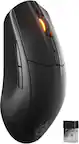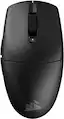
CORSAIR - M55 Wireless FPS Optical Gaming Ambidextrous Mouse with Slipstream Technology - Wireless - Black
CORSAIR - M55 Wireless FPS Optical Gaming Ambidextrous Mouse with Slipstream Technology - Wireless - Black
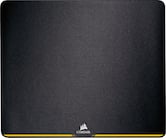
- CORSAIR - MM200 Gaming Mouse Pad - Medium - Black$16.99
More Buying Options
Related Item

Specifications
- Lighting TypeNoneMaximum Sensitivity24000 dots per inchNumber of Buttons (Total)6Connection TypeWireless
- Key Specs
- Lighting Type: None
- Maximum Sensitivity: 24000 dots per inch (Mouse sensitivity is measured in dots per inch (DPI). The higher the DPI, the more sensitive the mouse is and may be more useful for high-density pixel screens. Lower DPI typically means more precision and accuracy in mouse movement.)
- Number of Buttons (Total): 6
- Connection Type: Wireless
- General
- Brand: CORSAIR
- Model Number: CH-931F000-WW
- Product Name: M55 Wireless FPS Optical Gaming Ambidextrous Mouse with Slipstream Technology
- Color: Black
- Features
- Mouse Type: Gaming
- Lighting Type: None
- Maximum Number of Memory Profiles: 1
- Performance
- Mouse Operation: Scroll wheel, Button(s)
- Mouse Grip Style: Claw grip, Palm grip, Fingertip grip (In comparison to many palm and claw grips, ergonomic grip mice are designed for a specific handedness and put the hand and wrist in a position to promote comfort. Customizable grips feature buttons/keys that can be configured to perform specific actions and may also have customizable calibration and sensitivity settings.)
- Handedness: Ambidextrous
- Tracking Method: Optical (There are several types of computer mice, optical and laser being among the most common. Optical mice detect less detail and provide more precise and accurate movement. Laser mice detect more detail and can be used on a wider variety of surfaces, but are more sensitive to small movements.)
- Maximum Sensitivity: 24000 dots per inch (Mouse sensitivity is measured in dots per inch (DPI). The higher the DPI, the more sensitive the mouse is and may be more useful for high-density pixel screens. Lower DPI typically means more precision and accuracy in mouse movement.)
- Number of Buttons (Total): 6
- Number of Thumb Buttons: 2
- Number of Programmable Buttons: 6
- Designed for Game Genre: FPS, MOBA
- Adjustable Weight: false
- Connectivity
- Connection Type: Wireless
- Wireless Connectivity: Bluetooth, Radio Frequency (RF - 2.4 Ghz/Low Latency) (The manner in which a device sends data to another device over a short distance without the use of wires or cables.)
- Maximum Wireless Range: 33 feet
- Operating System Compatibility: Windows, Mac
- Plug and Play Operation: true
- Number of Devices Connectable Simultaneously: 1
- Power
- Mouse Power Source: Battery-powered
- On/Off Switch: true
- Rechargeable Battery (Mouse): false
- Battery Size: AA (The battery size required for operation.)
- Number of Batteries Required: 1
- Batteries Included: true (Indicates whether the product comes with the required batteries for its operation.)
- Included
- Mouse Pad Included: false
- Dimensions
- Product Height: 1.51 inches (The out of box height of the item. Height is measured as the vertical distance from the bottom of the item to the top as it would be primarily used or placed.)
- Product Length: 4.67 inches (The out of box length of the item. Length is measured as the longest dimension of the item.)
- Product Width: 2.45 inches (The out of box width of the item. Width is measured as the horizontal distance from one side of the item to the other as it would be primarily used or placed.)
- Product Weight: 84.82 grams (The out of box weight of the item.)
- Warranty
- Warranty - Parts: 2 years
- Warranty - Labor: 2 years
- Other
- UPC: 840440483113
Become a truly unstoppable force. The CORSAIR M55 WIRELESS gaming mouse has the compact symmetrical shape to fit your hand size and grip style. The sleek M55 WIRELESS dashes across your desktop with ease, and quick snaps and flicks are a cinch to control thanks to ergonomic textured side grips. Its wireless connection is just as fast, transmitting inputs with near-zero lag via SLIPSTREAM WIRELESS v1.5. The optical sensor supports up to 24,000 DPI to track every sweep and stop with pinpoint precision. With prime performance so close at hand, M55 WIRELESS puts you in position to make your best gaming moves.
- Compact Symmetrical Shape: The streamlined design fits a wide range of hand sizes and grip styles, making it easy to control even during fast-paced gameplay.
- Low-latency Wireless Connectivity: Low-latency 2.4GHz SLIPSTREAM WIRELESS v1.5 offers a reliable no-lag connection, or connect via versatile Bluetooth.
- Ultra-long-lasting Wireless Battery: Play with confidence knowing your mouse battery won’t quit, lasting up to 185 hours on a single AA battery.*
- Precise Optical Sensor up to 24,000 DPI: The optical sensor supports up to 24,000 DPI to accurately track every microscopic movement and aim, adjustable on-the-fly with a dedicated DPI button.
- Textured Side Grips: Textured tri-hex pattern side grips give you the added control you need to come through in the clutch.
- Durable Left- and Right-Click Switches: Ultra-quick mechanical switches are guaranteed for 60 million clicks.
- Six Programmable Buttons: Put your roster of moves and attacks right where you need them on six optimally placed programmable buttons.
- 100% PTFE Mouse Feet: Mouse feet built from 100% ultra-low-friction PTFE skates offer a smooth glide across any surface.
- Optimize Your Mouse in iCUE: Powerful CORSAIR iCUE software enables you to set DPI, program buttons, sniper mode, and more.
Whats Included
- M55 Wireless Gaming Mouse
- USB wireless transceiver
- CORSAIR Sticker
- Safety Leaflet
- Warranty Card
- AA Alkaline Battery
Disclaimers
- *including AA battery
Q: How many buttons does the mouse have?
A: This mouse has a total of six buttons.
Q: What is the maximum DPI of the optical sensor?
A: The maximum DPI of the optical sensor is 24,000.
Q: Can the mouse be used with multiple devices simultaneously?
A: This mouse can only connect to one device at a time.
Q: Is the mouse compatible with Windows operating systems?
A: This mouse is compatible with Windows operating systems.
Q: What type of battery does the mouse use?
A: This mouse uses one AA battery.
Compare similar products

Become a truly unstoppable force. The CORSAIR M55 WIRELESS gaming mouse has the compact symmetrical shape to fit your hand size and grip style. The sleek M55 WIRELESS dashes across your desktop with ease, and quick snaps and flicks are a cinch to control thanks to ergonomic textured side grips. Its wireless connection is just as fast, transmitting inputs with near-zero lag via SLIPSTREAM WIRELESS v1.5. The optical sensor supports up to 24,000 DPI to track every sweep and stop with pinpoint precision. With prime performance so close at hand, M55 WIRELESS puts you in position to make your best gaming moves.

Create, control, and champion your playstyle with the new Razer Basilisk V3—the quintessential ergonomic gaming mouse for customized performance. With 10+1 programmable buttons, a dual-mode tilt scroll wheel, and a heavy dose of Razer Chroma RGB, it's time to light up the competition your way.

Enjoy hyper-fast movement with this CORSAIR Harpoon RGB wireless gaming mouse. The contoured shape makes it easy to grip during gameplay, and it offers up to 60 hours of battery life to keep you slaying dragons and firing on the enemy longer. This CORSAIR Harpoon RGB wireless gaming mouse lets you easily customize sensitivity and DPI settings.

Defined in ambition. Built through rigor. M75 AIR was made for a single purpose – to help you win. The symmetrical mouse shape has been expertly crafted to let nothing come between you and top-tier play. The speed and control you gain from M75 AIR is simply unrivaled, and at just 60g, M75 AIR is unbelievably light, enabling you to make the most agile movements, sweeps, and recenters. The 26K DPI CORSAIR MARKSMAN optical sensor detects those moves with pro grade precision, and your shots register instantly on optical switches guaranteed for 100 million clicks. When you grasp M75 AIR, you’re holding a mouse that’s sculpted by victory.
| Pros for CORSAIR - M55 Wireless FPS Optical Gaming Ambidextrous Mouse with Slipstream Technology - Wireless - Black | |||
|---|---|---|---|
| Battery Life, Overall Performance, Weight, Portability, Connectivity | Overall Performance, Comfort, Weight, RGB Lighting, Scroll Wheel | Battery Life, Overall Performance, Wireless, Ease of use, RGB | Weight, Battery Life, Comfort, Build Quality, DPI |
| Cons for CORSAIR - M55 Wireless FPS Optical Gaming Ambidextrous Mouse with Slipstream Technology - Wireless - Black | |||
| Size, Button Quality | Software, Size, Connectivity, Sensitivity, DPI | Size, Software, Connection, Side Buttons, Scroll Wheel | Connectivity, Price |
Specs




Reviews
Customers are saying
Customers have good things to say about the M55 Wireless Optical Gaming Mouse, especially its portability, weight, and battery life. Users appreciate the reliable connectivity and sturdy build quality. The mouse's effortless glide and comfortable grip are also well-received, along with its precise tracking and responsive sensor. However, some customers feel the mouse is undersized.
Customer Images
The vast majority of our reviews come from verified purchases. Reviews from customers may include My Best Buy members, employees, and Tech Insider Network members (as tagged). Select reviewers may receive discounted products, promotional considerations or entries into drawings for honest, helpful reviews.
- Rated 4 out of 5 stars
Decent for the price
Not a terrible mouse if your just looking for something cheap
Lars Posted
- Rated 5 out of 5 stars
Egg shaped mouse from Corsair
Corsair seems to be releasing some very interesting new mice lately - This M55 Wireless is a budget offering but from my testing still does end up ticking a lot of boxes that you’d want in a proper good versatile mouse that doesn’t just have to be for gaming. Once you unbox it from its very compact box here is what it’s like… Design and weight: I would classify this mouse as a small/medium “egg” shape. I have medium sized hands and I found the M55 to be very comfortable in claw grip. Most mice like this tend to keep your grip and fingers “locked-in” and this definitely did that, but because of the flat sides I also had a lot of extra maneuverability whenever I had to make those small adjustments in-game. I have dry hands and the coating was good enough for me. There’s also this diamond pattern on the side that didn’t really do much for me, but I can’t complain that it's there. Now onto the weight… right out of the box with the included AA alkaline battery you’re looking at about 82g according to my scale which for a small mouse like this is a bit hefty. I was however able to get the weight down to 70g with a lithium AAA + adapter. I highly recommend doing this as it makes the mouse much more enjoyable and agile to use. Connectivity and performance: For gaming and intense purposes you’re going to want to use the 2.4GHz receiver - I found that in my usual FPS games the mouse performed as good as it gets; my only caveat being lift-off distance which is a bit high. The sensor can go all the way to 24K DPI (via software). It’s also nice to be able to switch to bluetooth if you want to save on battery. Buttons: M55 uses mechanical switches and they feel just ok. Unfortunately they just don’t feel like a high-quality implementation and both the main triggers rattle and feel a bit loose. At least I don’t feel it to be an issue in-game as everything still feels responsive. Rest of the buttons like the side buttons and scroll wheel all feel great! Only thing to note is the scroll wheel might be a bit too light for *some* though I’m personally not too picky when it comes to that aspect. Skates: The 100% PTFE skates are some of the best I’ve tried on any mouse! The glide is perfectly smooth on my usual controlled mouse pads and I actually wish they used these skates on the M75. Software: iCUE still isn’t my favorite but it seems to be at least more responsive nowadays. Everything is easy to use and set-up. Realistically once you’ve dialed in your settings you won’t need the software anymore unless you have other Corsair products you wish to control. Battery life: I can’t comment much on this aspect since naturally removable batteries like AA/AAA will take a lot longer to die - Corsair quotes 185 via 2.4GHz or 400 hours via Bluetooth + since the mouse can go into sleep mode by itself you should realistically be able to get a lot out of just one battery. Closing thoughts: As a huge mouse enthusiast I like the Corsair M55 Wireless. The combination of its size and really solid feature set make it a great option for both desktop and travel use. It really just seems that the build quality is the one aspect that Corsair needs to work on. Pros: - Shape - Performance / 2.4GHz + Bluetooth - Skates - Portability - Value Cons: - Main buttons / build quality
GANdeK Posted
- Rated 5 out of 5 stars
Great all around use mouse from Corsair
The M55 wireless by Corsair has been a daily driver for my office PC for about a week and I even tried it on my gaming rig to see if a "budget" type mouse can compete with the top dogs of the mice world. The results did NOT disappoint. It may look plain and ordinary but I enjoyed the comfort and feel of it and since I don't play hardcore FPS games, it performed well above my expectations. In the box is the mouse, USB dongle (Slipstream connector), AA battery preinstalled (remove the tab) and the standard literature about warranty info. The mouse is easily plug and play to get you started. Also there is a storage spot for the USB connecter under the mouse. For me, as you can see with my pics, I use a lot of Corsair products and I am used to iCue. Once I plugged in the USB Slipstream receiver it was immediately recognized and was up and running. The M55 can connect to the USB for more features or via Bluetooth if you want to save on battery life (basically everyday use and not gaming). The little button under the wheel controls the DPI presets and can do 6 stages, all being fully customizable all the way to I believe 24000 DPI via iCue. Even though the mouse can be used by either hand, I never found comfort to be an issue for the standard shape or it being lightweight. Even when used for hours long sessions of gaming. Clicks are responsive and have a nice clicky feel.
Woo151 Posted