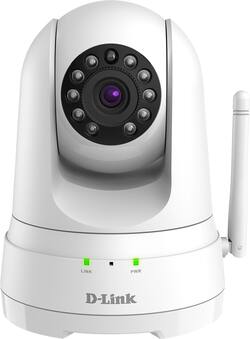
D-Link - Pan and Tilt Indoor 720p Wi-Fi Network Surveillance Camera - White
- Key Specs
- Video Camera Resolution: HD (720p) (Refers to the number of pixels, both horizontally and vertically, used to capture video/images. The higher the resolution the finer the detail that can be seen.)
- Field Of View: 110.4 degrees (The area of a target, measured as an angle from the location of viewing, that can be observed.)
- Night Vision: true
- Number Of Cameras Included: 1
- Camera Power Source: Cable with AC Adapter/Plug-in, Power over Ethernet (PoE)
- Wireless Connectivity: Wi-Fi (The manner in which a device sends data to another device over a short distance without the use of wires or cables.)
- Number Of Channels: 0
- Maximum Operating Temperature: 104 degrees fahrenheit (The highest recommended ambient (surrounding) temperature in which the product can ideally operate stated by the manufacturer. Generally long-term exposure of the product to temperatures more than the maximum can result in ineffective operation.)
- Storage Type: Memory card
- Indoor Or Outdoor Use: Indoor (Indicates the appropriate environment product was designed to be used in.)
- Minimum Operating Temperature: 32 degrees fahrenheit (The lowest recommended ambient (surrounding) temperature in which the product can ideally operate stated by the manufacturer. Generally long-term exposure of the product to temperatures less than the minimum can result in ineffective operation.)
- Audio Communication: 1-way (1-way communication devices allow a user to hear detected audio, while 2-way communication adds the ability for a user to talk back through the device.)
- General
- Brand: D-Link
- Model Number: DCS-5030L
- Product Name: Pan and Tilt Indoor 720p Wi-Fi Network Surveillance Camera
- Color: White
- Camera
- Video Camera Resolution: HD (720p) (Refers to the number of pixels, both horizontally and vertically, used to capture video/images. The higher the resolution the finer the detail that can be seen.)
- Camera Resolution: 1280 x 720, 640 x 480 (Refers to the number of pixels, both horizontally and vertically, used to capture video/images. The higher the resolution the finer the detail that can be seen.)
- Field Of View: 110.4 degrees (The area of a target, measured as an angle from the location of viewing, that can be observed.)
- Night Vision: true
- Night Vision Distance: 16.4 feet
- Number Of Cameras Included: 1
- Frame Rate: 30 frames per second (The frequency at which consecutive images can be captured. The higher the frame rate, the more detail that can be captured.)
- Day/Night Mode: true (Captures images/video with optimal clarity by automatically adjusting settings to various light levels.)
- IP Camera: true (An Internet Protocol (IP) camera is able to record and display image/video data via the internet, without need for a local recording device.)
- Minimum Required Illumination: 0 lux (Refers to the minimum amount of light needed to view objects. Generally, the lower the number, the better the camera can detect objects in little to no light.)
- Image Sensor Type: CMOS (CCD and CMOS are the two main technologies used in image sensors. CCD, the older of the two types, turns analog light signals into digital pixels. This conversion happens without distortion, resulting in high-quality images. Newer CMOS sensors use transistors at each pixel to move electrical charges. CMOS sensors are typically less expensive, but also require more light to create distortion-free images.)
- Infrared Cut Off Filter: true (Often referred to as an IR or heat-absorbing filter, this camera feature is designed to block infrared light during the day to produce optimally lit images, while still allowing for night vision capabilities in low light.)
- Power
- Camera Power Source: Cable with AC Adapter/Plug-in, Power over Ethernet (PoE)
- Voltage: 5 volts (Amount of power needed to support an electrical current.)
- Compatibility
- App Compatible: true (The product can be connected to a program or software application on a mobile device, which then receives collected data from the product.)
- Compatibility: Universal
- Operating System Compatibility: Android, Apple iOS, Mac, Windows, Windows Mobile
- Connectivity
- Camera Connectivity: Wireless (Security system cameras can be set up in several ways. Wired cameras require cables for power and footage transmission, while wire-free cameras don't need cables for either. Wireless cameras still require cables for receiving power but are able to transmit footage via a wireless network.)
- Wireless Connectivity: Wi-Fi (The manner in which a device sends data to another device over a short distance without the use of wires or cables.)
- Recording & Playback
- Records Audio: true
- Number Of Channels: 0
- Performance
- Maximum Operating Temperature: 104 degrees fahrenheit (The highest recommended ambient (surrounding) temperature in which the product can ideally operate stated by the manufacturer. Generally long-term exposure of the product to temperatures more than the maximum can result in ineffective operation.)
- Indoor Or Outdoor Use: Indoor (Indicates the appropriate environment product was designed to be used in.)
- Minimum Operating Temperature: 32 degrees fahrenheit (The lowest recommended ambient (surrounding) temperature in which the product can ideally operate stated by the manufacturer. Generally long-term exposure of the product to temperatures less than the minimum can result in ineffective operation.)
- Storage
- Storage Type: Memory card
- Memory Card Type: microSD, xD-Picture Card
- Features
- Audio Communication: 1-way (1-way communication devices allow a user to hear detected audio, while 2-way communication adds the ability for a user to talk back through the device.)
- 3-Axis Adjustable: true
- Auto-On Detection: Motion
- Dimensions
- Product Height: 5.3 inches (The out of box height of the item. Height is measured as the vertical distance from the bottom of the item to the top as it would be primarily used or placed.)
- Product Width: 4.3 inches (The out of box width of the item. Width is measured as the horizontal distance from one side of the item to the other as it would be primarily used or placed.)
- Product Depth: 4.6 inches (The out of box depth of the item. Depth is measured as the distance from the front of the item to the back as it would be primarily used or placed.)
- Product Weight: 0.6 pounds (The out of box weight of the item.)
- Sensor
- Sensors: Motion sensor, Sound sensor (Detects stimuli such as heat, light, sound, motion, or pressure and responds accordingly by operating a control or initiating a function of the device.)
- Motion Detection Range: 16.4 feet
- Display
- Color Display: true
- Warranty
- Warranty - Parts: 1 year
- Warranty - Labor: 1 year
- Other
- UPC: 790069415791
Monitor your home with your smartphone by using this D-Link Wi-Fi camera. Its sound and motion detection capabilities alert you with push notifications when movement and loud noises are sensed. This 720p D-Link Wi-Fi camera lets you see more clearly with its HD-quality 16-foot night vision and convenient pan-and-tilt control.
- Convenient Access Anytime, Anywhere with mydlink®: Access your camera through the free mydlink mobile app or website to view and manage your camera through your tablet, mobile phone, laptop or desktop, no matter where you are.
- Infrared night vision lets you see in the dark: Keep an eye on things up to 16' away when there's little to no light.
- 110.4° field of view: Captures a wide area of your property for high-level security at all times.
- Sound and motion detection alerts with e-mail/push: Place it anywhere and stay informed with automatic push alert notifications whenever sound or motion is detected.
- Local Recording: With the microSDXC card slot you can record video footage up to 128 GB directly from the camera so you never miss a moment.
- Connects to your Wi-Fi network: For convenient and simple setup.
- HD video and digital audio make you feel like you're there: See and hear everything clearly with a frame rate of up to 30 fps (frames per second) and a built-in microphone.
- Pan, tilt and zoom up to 4x magnification: Adjust the camera to focus on particular areas of the room that you want to see more clearly.
- CMOS image sensor: Captures high-resolution video footage up to 720p (1280 x 720).
Whats Included
- HD Pan & Tilt Wi-Fi Camera
- MicroUSB Power Adapter
- Mounting Screws
- Quick Install Guide
A: Super easy set up! It comes with one of those qr code things that you just focus your camera on (while in the app). It has step. T step instructions and only takes a couple of minutes. So easy a grandma could do it ha ha
Q: Can this unit connect to a Android smartphone or does it have to be an Apple phone?
A: We appreciate the interest in the product. The camera is compatible with both Android and Apple devices.
A: We appreciate the interest in the product. The DCS-5030L provides HD resolution and you will be able to zoom in. The picture should be clear enough for your satisfaction.
A: The camera comes with a wall mount but it does not operate on battery. It comes with an AC Adapter. It has a very sharp, high quality lens.
A: I too wanted to configure this camera via a web interface. I have not been successful. I am not a computer expert but have installed security cameras with web interfaces in the past. This camera appears to lack that ability. I could only install and use it via the smartphone app.
A: We thank you for the interest in the product. As long as you have stable internet connection in the area you will be fine. You can add up to 99 camera to your mydlink account.
A: I use D-Link DView Cam 5.2.0. It supports dozens upon dozens of D-Link cameras. Maybe over 100. It's just hard to find the software, but it will support at least 64 cameras on the screen. You can lay them all out however you want. No more viewing through a browser. That's terrible. Again, it's nearly impossible to find. I don't know if it's corporate/business software that I stumbled upon or what. You can see all cams at once, use PTZ, physically turn them, etc. Everything you could do in the browser and a lot more. You can record, set up motion and/or audio detection, select where you want the motion capture to pick up, select sensitivity, etc. You can see the calendar with recordings, pick a day, see the timeline of when they were recording with one color, see where motion was picked up with another color, etc. Then you can play it back, clip it, export it and put it on your PC or send it to your phone, e-mail, whatever.
A: undefined
People also viewed
 $29.99The price was $34.99
Today's top picks
 $499.99The price was $749.99
 $199.99The price was $249.99
 $789.99The price was $1,049.99