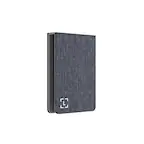
Dell - Pro Smart Dock SD25 Bundle with 6ft Type-C Cable, 6ft HDMI, Mouse Pad (Med Size)
Dell - Pro Smart Dock SD25 Bundle with 6ft Type-C Cable, 6ft HDMI, Mouse Pad (Med Size)
FREE shipping to
Related Item

About This Item
- Key Specs
- Maximum Number of Displays Supported: 4
- Number of DisplayPort Outputs (Total): 2
- General
- Brand: Dell
- Product Name: Pro Smart Dock SD25 Bundle with 6ft Type-C Cable, 6ft HDMI, Mouse Pad (Med Size)
- Display
- Maximum Number of Displays Supported: 4
- Ports
- Display Connector(s): 1 x HDMI 2.1, 2 x DisplayPort 1.4, Display connection via USB port (The number and type of connectors used to connect to an external display.)
- Number of DisplayPort Outputs (Total): 2
- Number of HDMI Ports (Total): 1
- Number of VGA Ports: 0 (VGA (Video Graphics Adapter or Video Graphics Array) is a display standard that transmits via analog signals. This type of interface is typically used to connect a computer to a display device such as a monitor, projector, or TV.)
- USB Ports: 4 x USB-A 3.2, 1 x USB-C 3.2 (The number and type of USB ports the product has.)
- Power
- Powered: true
- Compatibility
- Brand Compatibility: Panasonic, Dell, HP, Lenovo, Apple
- Model Compatibility: Panasonic Toughbook FZ-55 Notebook
- Dimensions
- Product Height: 8.07 inches (The out of box height of the item. Height is measured as the vertical distance from the bottom of the item to the top as it would be primarily used or placed.)
- Product Length: 1.39 inches (The out of box length of the item. Length is measured as the longest dimension of the item.)
- Product Width: 3.54 inches (The out of box width of the item. Width is measured as the horizontal distance from one side of the item to the other as it would be primarily used or placed.)
- Product Weight: 1.24 ounces (The out of box weight of the item.)
- Warranty
- Warranty - Parts: Full Manufacturers Warranty
- Other
- UPC: 196641192133
What's In The Box: Dell SD25 Pro Smart Dock|Power Adapter|Power Cord|Dell 3 Year Limited Warranty|Deco Gear Gaming Mouse Pad (Medium Sized)|Deco Essentials 6FT Braided Type-C Charge & Sync USB Cable|Deco Gear 6FT HDMI Cable --- Get the power and agility to work your way with the latest smart dock featuring up to 130W power delivery and remote management capabilities.
- A smarter workspace.: Gain the versatility to create your ideal workspace and boost your AI PC productivity with support for up to 4 displays, up to 130W power delivery, and multiple ports to connect all your peripherals.
Reviews
This product doesn't have any reviews yet.
Compare similar products
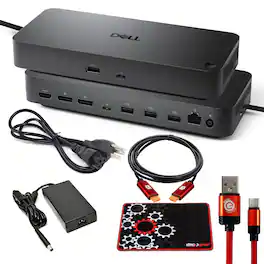
What's In The Box: Dell SD25 Pro Smart Dock|Power Adapter|Power Cord|Dell 3 Year Limited Warranty|Deco Gear Gaming Mouse Pad (Medium Sized)|Deco Essentials 6FT Braided Type-C Charge & Sync USB Cable|Deco Gear 6FT HDMI Cable --- Get the power and agility to work your way with the latest smart dock featuring up to 130W power delivery and remote management capabilities.
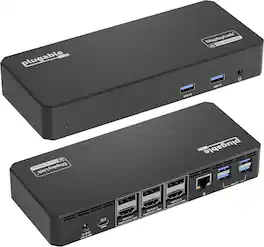
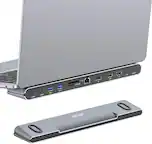
More than just screen count, it is about usability. This triple monitor docking station helps provide the space to get work done. Use the external displays for reference material, have multiple documents open side-by-side, or monitor your email while working on other tasks. Optimized for portable computers, this laptop docking stations uses a single connection to the computer for displays, USB devices, and powering the computer with a Thunderbolt dock. Enabled by the new USB Type-C port, this Thunderbolt 4 Dock replaces at least three connections to the host computer with a single cable, making it easy to start working in the morning, and take the computer with you in the evening. HDMI or DisplayPort, Both? Three HDMI monitors, three DisplayPort Monitors, or a combination of both. This three 4K HDMI Ports, and three 4K DisplayPort docking station enables you to mix and match up to three monitors — no adapters necessary. Of course, the UD-6950PDZ lets you connect more than screens. With an Ethernet port, an audio jack, and 6x USB-A ports, this USB-C Docking Station has room to pair all of your peripherals with a single connection back to your computer. Will it charge my laptop? This triple display docking station provides 100W charging to laptops that support power Delivery. You’ll want to take a look at your laptop’s specifications to determine if the USB-C port supports Power Delivery

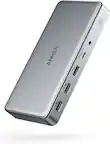
Connect to just about any device you have, wherever you are. Featuring a wide variety of ports available, the smallest and lightest 6-in-1 adapter offers video, network, data connectivity, and up to 90W power pass-through for your laptop.

The Thunderbolt Certified 16-in-1 Quad docking station from Plugable delivers peak performance. The innovation starts with our display connections. Connect your 4K screens through 2x HDMI ports and 2x DisplayPort ports — a rare level of display flexibility in a Thunderbolt dock. But the real expansion picks up at the ports. Offering sixteen total ports to park your peripherals, including 7x USB ports, SD and microSD card readers, Audio, and 2.5Gbps Ethernet. It even adapts to your desk with an included stand for vertical or horizontal orientation options. Quad Display: With this Thunderbolt 4 docking station Windows computers can use the 2x HDMI ports, and 2x DisplayPort ports to connect as many as 4x screens at up to 4K 60Hz. Can also be used a single, dual, or triple display docking station. On Mac (Intel, M1 / M2 / M3 Pro/Max, M4/ Pro/Max CPU), extend your desktop to 2x screens using any combination of HDMI and/or DisplayPort. Macs with an M1 / M2 / M3 CPU only support one external display. 100W Power Delivery: The laptop Thunderbolt docking station offers USB Power Delivery up to 100W (98W certified) — no more climbing under the desk to get plugged in. Not all laptop docking stations handle power the same. With the TBT4-UDZ, if your laptop needs less power, the docking station adjusts and only sends the optimal wattage. And with 6x available USB ports, and one USB-C port, your devices will always have a place to connect. Compatibility: The TBT4-UDZ is compatible with *Windows 10 and later and **macOS 11+. Actual number of screens that can be extended depends on capabilities of the host computer. Be sure to see the Display Compatibility Chart below. *On some Windows laptops, enabling four displays may require a Windows settings change to disable the internal screen. **On Macs, additional monitors beyond specs below may not function, and/or will “mirror” rather than extend.
| Pros for Dell - Pro Smart Dock SD25 Bundle with 6ft Type-C Cable, 6ft HDMI, Mouse Pad (Med Size) | |||
|---|---|---|---|
| There were no pros for this product— | There were no pros for this product— | Portability, Connectivity, Overall Performance, Size | There were no pros for this product— |
| Cons for Dell - Pro Smart Dock SD25 Bundle with 6ft Type-C Cable, 6ft HDMI, Mouse Pad (Med Size) | |||
| There were no cons for this product— | There were no cons for this product— | Cable Length | There were no cons for this product— |