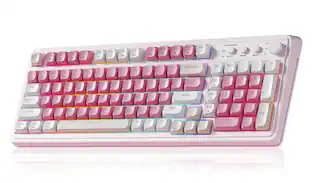
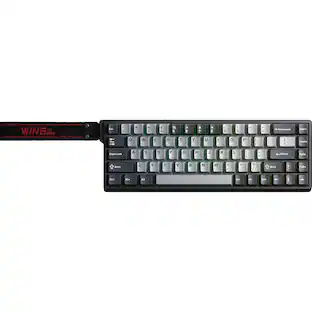
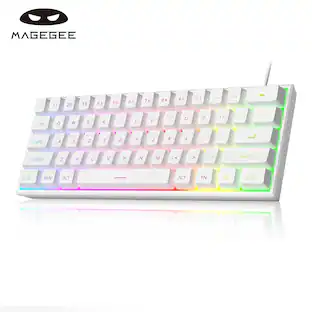
EPOMAKER - Galaxy100 QMK/VIA Wireless Aluminum Gaming Keyboard (Creamy White, Marble White Switch) - Gray
Reviews coming soon
About this product
1800 QMK Aluminum Keyboard with Enhanced Typing Sound: Drawing from the success of Galaxy80 and Galaxy70, the EPOMAKER Galaxy100 QMK keyboard joins the Galaxy Aluminum Keyboard series with new functionality and upgrades. Featuring a gasket-mounted structure, high-quality lubed linear switches, and 5 soft cushioning layers, the Galaxy100 keyboard provides a uniquely satisfying, creamy typing sound
Color
Gray1800 QMK Aluminum Keyboard with Enhanced Typing Sound
The Galaxy100 Lite hot-swappable keyboard comes with factory-lubed linear switches—thocky marble white and creamy wisteria linear V2—delivering a smooth, mellow sound akin to rolling marbles. Designed for keyboard enthusiasts, the Galaxy100 Lite also features a hot-swappable PCB and a 2-in-1 switch-and-keycap puller, allowing effortless, seamless testing of different switches.
QMK/VIA Keyboard with Multi-Device Compatibility
To elevate your typing experience, the Galaxy100 keyboard is upgraded with QMK/VIA support. The VIA Software offers endless possibilities in remapping keys, editing automating repetitive macros, and customizing layers, making Galaxy100 perfect for those seeking maximum control and personalization. Compatible with WIN, Mac, and Android systems, the Galaxy100 works across multiple devices with ease.
Long-Lasting Wireless Performance
Powered by the outstanding 8000mah battery, the Galaxy100 keyboard gives you convenience and productivity. Packed with three modes of connection, the Galaxy100 keyboard offers reliable 2.4Ghz wireless, low-latency cable mode, and versatile BT connectivity.
Pre-Lubed Hot-Swappable Linear Switches
Lubed in factory, the Galaxy100 keyboard houses linear marble switches that sounds as gentle and enjoyable as mellow marbles. With the cushioned Gasket-Structure, the typing sound is dampened to a soft thud perfect for various use scenarios. The Galaxy100 Keyboard also comes with hot-swappable PCB and a 2-in-1 switch puller, for keyboard enthusiasts to test out different switches seamlessly and effortlessly
Aluminum Gasket Keyboard
Enjoy the sleek, modern look of Galaxy100’s aluminum alloy shell, which brings the keyboards to the next level in more than appearance. Its satisfying and weighty feel aids in typing stability, while the thick aluminum case promises quality and durability. The Gasket-Mount design of Galaxy100 keyboard gives a perfect mix of rigidity and flexibility, helping achieve the soft but stable typing feel loved by many.
- Lighting TypeRGBForm FactorFull-sizeKeyboard TechnologyMechanicalKey Switch BehaviorLinearConnection TypeWireless, Wired
Reviews
This product doesn't have any reviews yet.

Compare similar products
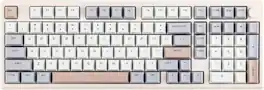
1800 QMK Aluminum Keyboard with Enhanced Typing Sound: Drawing from the success of Galaxy80 and Galaxy70, the EPOMAKER Galaxy100 QMK keyboard joins the Galaxy Aluminum Keyboard series with new functionality and upgrades. Featuring a gasket-mounted structure, high-quality lubed linear switches, and 5 soft cushioning layers, the Galaxy100 keyboard provides a uniquely satisfying, creamy typing sound
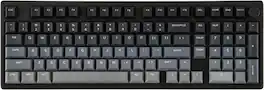
New Design, New Experience: Introducing the upgraded color schemes to the Galaxy100 aluminum keyboard, with all excellent features retained but in refreshing new styles. The white version features a milky white casing as the base, with yellow gradient keycaps as the highlight, transitioning from pure white to soft pale yellow.
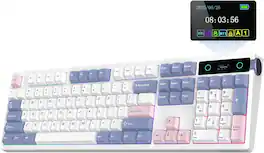
PRO with Screen, Upgrade on Display: Featuring a sophisticated smart screen, the TH108 PRO gaming keyboard puts vital information and personalised flair right at your fingertips. With this powerful display, instantly verify the time, monitor keyboard power, or toggle RGB backlight with the volume knob doubles as screen control (FN+Knob to switch), without losing focus.
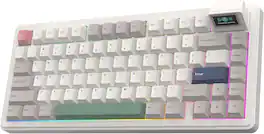
Detachable LCD Screen: Experience the revolutionary PC peripheral designed for modern users. The EPOMAKER RT82 mechanical keyboard features a magnetically detachable LCD screen that offers customization and utility. Stay productive without breaking your focus, as RT82 keeps essential information like the date, time, and keyboard battery right at your fingertips; tune-in with your writing, with type-writer mode where every letter input appears on keyboard’s screen in real-time
Specs
Be the first to ask a question.
We’ll try to get your question answered within 24 hours by a Best Buy customer or brand representative.
Customers often buy these together

Logitech - MK270 Full-size Wireless Membrane Keyboard and Mouse Bundle for PC - Black
$26.99The price was $29.99



![esc 1 ! 2 @ 3 # 4 $ 5 % 6 ^ 7 & 8 * 9 ( 0 ) - = | F1 F2 F3 F4 F5 F6 F7 F8 F9 F10 F11 F12 tab Q W E R T Y U I O P [ ] { } | caps A S D F G H J K L : : enter shift Z X C V B N M , < > ? shift ctrl alt fn ctrl](https://pisces.bbystatic.com/image2/BestBuy_US/images/products/bc5bce35-ca08-45da-bcc3-8d6fb215154b.jpg;maxHeight=232;maxWidth=233?format=webp)


![Sure, here is the corrected and grouped text from the image:
**Top Row:**
- ESC
- F1
- F2
- F3
- F4
- F5
- F6
- F7
- F8
- F9
- F10
- F11
- F12
- PRTSC
- DEL
**Number Row:**
- 1
- 2
- 3
- 4
- 5
- 6
- 7
- 8
- 9
- 0
- -
- =
- \
**Letter Row:**
- TAB
- Q
- W
- E
- R
- T
- Y
- U
- I
- O
- P
- [
- ]
- \
**Letter Row:**
- CAPS
- A
- S
- D
- F
- G
- H
- J
- K
- L
- ;
- '
**Letter Row:**
- SHIFT
- Z
- X
- C
- V
- B
- N
- M
- ,
- .
- /
**Function Row:**
-](https://pisces.bbystatic.com/image2/BestBuy_US/images/products/9be10b95-8e90-4a5d-b85f-cbc6a7d8e8df.png;maxHeight=232;maxWidth=233?format=webp)


![esc ~ ! 1 tab caps lock shift ctrl F2 Fl # 2 3 Q W A S Z start opt L F3 $ 4 E D X alt cmd3 ) FS F4 A % 5 6 R T F G V C logi 44 HI & F9 FID FB F7 F6 * ) - - & 0 8 9 7 O P U I Y K L H J > < N M 1 B PM + = { [ : I ; ? I alt cmd D 2 4 300 3 1 F12 . * page I insert home up clear backspace 8 9 + 7 page A pg up end down home } I delete ] / 6 4 5 4 enter 2 3 enter 1 dn Pg end shift = 0 del ins etrl fn opt](https://pisces.bbystatic.com/image2/BestBuy_US/images/products/6539/6539505_sd.jpg;maxHeight=232;maxWidth=233?format=webp)


![Esc F1 F2 F3 F4 F5 F6 F7 F8 F9 F10 F11 F12 Print Screen Scroll Lock Pause Break 1 2 3 4 5 6 7 8 9 0 - + = Backspace Insert Home H Page Up A Num Look 1 I Tab Q W E R T Y U I o P { [ } ] I I Delete End IN Page Down 7 Home 8 9 Pg Up Caps A Lock A S D F G H J K L ; : DE g Enter 4 5 6 Shift Z X C V N M < > ? I Shift 1 End 2 3 Pp Dn Enter Ctrl Alt Alt Ctrl 0 Ins Del](https://pisces.bbystatic.com/image2/BestBuy_US/images/products/a588d446-5678-40ae-86b8-1f15e0026e66.jpg;maxHeight=232;maxWidth=233?format=webp)
![Sure, here is the corrected and grouped text:
```
ESC F1 F2 F3 F4 F5 F6 F7 F8 F9 F10 F11 F12 1 2 3 logitech - - 1 2 # $ 4 % 5 6 & 7 8 9 0 - - back insert home page up num lock clear / . tab Q W E R T Y U I O P { [ } ] / delete end page down 7 home 8 A 9 P9 up + caps lock A S D F G H J K L : ; a enter 4 5 6 shift Z X C V B N M < > ? shift 1 end 2 3 pg dn enter ctrl fn start alt opt alt crnd x alt cmd x fn ctrl alt opt 0 ins del 1 logitech
```](https://pisces.bbystatic.com/image2/BestBuy_US/images/products/5761/5761911_sd.jpg;maxHeight=232;maxWidth=233?format=webp)
Customers ultimately bought

Explore tech essentials Sponsored
 $139.99The price was $199.99
 Top Deal$129.99The price was $159.99
 $139.99The price was $179.99
 Top Deal$181.99The price was $239.99



Keep exploring
 $199.95The price was $209.95
 $91.49The price was $107.49
 $38.99The price was $58.99
 $59.99The price was $69.99
 $129.95The price was $159.95