
Epson - Expression Photo XP-8800 Wireless Color All-in-One Inkjet Printer - Black
Epson - Expression Photo XP-8800 Wireless Color All-in-One Inkjet Printer - Black
Related Item

Specifications
- NetworkingWirelessENERGY STAR CertifiedYesPrinter TypePrinter, Copier, ScannerISO Color Print Speed9 pages per minuteISO Mono Print Speed9.5 pages per minuteOutput Tray Capacity50
- Key Specs
- Networking: Wireless
- ENERGY STAR Certified: true (Devices carrying the ENERGY STAR service mark, such as computer products and peripherals, kitchen appliances, and other products, generally use 20% to 30% less energy than required by federal standards.)
- Printer Type: Printer, Copier, Scanner
- ISO Color Print Speed: 9 pages per minute (The number of color pages able to be printed per minute in the device's default single-side mode, as tested by the International Standards Organization (ISO).)
- ISO Mono Print Speed: 9.5 pages per minute (The number of black ink (grayscale) pages able to be printed per minute in the device's default single-side mode, as tested by the International Standards Organization (ISO).)
- Output Tray Capacity: 50
- Touch Screen: true (Touch-screen devices make navigating more intuitive. Using a touch-screen display, you can do things such as tap to select, hold and drag to move items, swipe to scroll, and pinch to zoom.)
- General
- Brand: Epson
- Model Number: C11CL73201
- Product Name: Expression Photo XP-8800 Wireless Color All-in-One Inkjet Printer
- Color: Black
- Display Screen: true
- Display Screen Size: 4.3 inches
- Dimensions
- Product Height: 7.2 inches (The out of box height of the item. Height is measured as the vertical distance from the bottom of the item to the top as it would be primarily used or placed.)
- Product Width: 13.7 inches (The out of box width of the item. Width is measured as the horizontal distance from one side of the item to the other as it would be primarily used or placed.)
- Product Depth: 13.4 inches (The out of box depth of the item. Depth is measured as the distance from the front of the item to the back as it would be primarily used or placed.)
- Product Weight: 14.6 pounds (The out of box weight of the item.)
- Features
- Automatic Document Feeder: false
- Photo Printing: true
- Wide Format Printing: false (Machines with this function support printing on media with widths between 18 and 100 inches, such as posters, banners, canvases, and more.)
- Wide Format Scanning: false
- Monochromatic/Color: Color
- Automatic Reduction/Enlargement: true
- Automatic Two-Sided Printing: true
- Tray Capacity: 120
- Connectivity
- Wired Connectivity: USB-B
- Wireless Connectivity: Wi-Fi (The manner in which a device sends data to another device over a short distance without the use of wires or cables.)
- Scanner Info
- Scanner Type: Flatbed
- Duplex Scan Function: false
- Scanner Resolution: Up to 4800 x 1200 (Refers to the number of pixels/dots, both horizontally and vertically, of the image produced by the scanner. Generally, the higher the resolution, the sharper and cleaner the produced image.)
- Ink
- Compatible Cartridges: Epson 340
- Ink Cartridges Required: 1 x Black, 1 x Cyan, 1 x Magenta, 1 x Yellow, 1 x Light cyan, 1 x Light magenta (The quantity and color of ink cartridges required for the printer to operate.)
- Ink Cartridges Included: 1 x Black, 1 x Cyan, 1 x Magenta, 1 x Yellow, 1 x Light cyan, 1 x Light magenta (The quantity and color of ink cartridges included.)
- Ink Bags/Bottles Required: None (The quantity and color of ink bags/bottles required for the printer to operate.)
- Ink Bags/Bottles Included: None (The quantity and color of ink bags/bottles included.)
- Memory
- Memory Card Type: Secure Digital, Secure Digital High Capacity (SDHC), Secure Digital Extended Capacity (SDXC)
- Memory Card Slot: true
- Paper Info
- Maximum Document Length: 14 inches
- Maximum Document Width: 8.5 inches
- Supported Paper Sizes: Letter, A4, Legal, 8" x 10", 5" x 7", 4" x 6", 3.5" x 5"
- Paper Feeder: Cassette tray
- Copier Info
- Maximum Number Of Copies: 99
- Copier Resolution (Black): Up to 600 x 600 (Refers to the number of pixels/dots, both horizontally and vertically, of the image produced by the copier in black ink. Generally, the higher the resolution, the sharper and cleaner the produced image.)
- Copier Resolution (Color): Up to 600 x 600 (Refers to the number of pixels/dots, both horizontally and vertically, of the image produced by the copier in colored ink. Generally, the higher the resolution, the sharper and cleaner the produced image.)
- Performance
- Printer Resolution (Black): Up to 5760 x 1440 (Refers to the number of pixels/dots, both horizontally and vertically, of the image produced by the printer in black ink. Generally, the higher the resolution, the sharper and cleaner the produced image.)
- Printer Resolution (Color): Up to 5760 x 1440 (Refers to the number of pixels/dots, both horizontally and vertically, of the image produced by the printer in colored ink. Generally, the higher the resolution, the sharper and cleaner the produced image.)
- Approximate Page Yield (Black): 240
- Warranty
- Warranty - Parts: 1 year limited
- Warranty - Labor: 1 year limited
- Other
- UPC: 010343990548
Express your creativity to the fullest with the Expression Photo XP-8800. Perfect for printing family photos, greeting cards, art projects and more, this all-in-one solution uses innovative 6-color Claria Photo HD ink to produce professional-quality borderless prints up to 8.5" x 11". And it’s fast—capable of printing incredibly crisp, detailed 4" x 6" photos in as fast as 10 seconds (1). Compact and easy to use, the XP-8800 fits virtually anywhere and features a large, 4.3" color touchscreen for simple navigation. The printer offers Easy Mode, so you can customize your control panel and quickly access your preferred functions. Plus, with built-in wireless and compatibility with the Epson Smart Panel app (2), the XP-8800 supports fast, convenient printing from your laptop or smart device (3).
- Lab-quality photos and prints: 6-color Claria Photo HD ink and high print resolution for amazing borderless prints up to 8.5" x 11"
- Fast photo printing: Delivers 4" x 6" borderless photos with astounding detail and accuracy in as fast as 10 seconds (1)
- Convenient, easy operation: Features flush 4.3" color touchscreen, plus Easy Mode for enhanced visibility and ease of use
- Versatile paper handling: Separate trays for plain and photo paper, plus a rear feed for specialty paper
- Easy wireless printing: Print from your laptop, desktop, smartphone or tablet (3); use Wi-Fi Direct (4) for router-free printing
- Built-in scanner and copier: High-resolution flatbed scanner for crisp, accurate scans and copies
- Epson Smart Panel app (2): Control your printer from your smart device and enjoy timesaving, smart setup features
- Creative Print mobile app (5): Easily print photos and create custom cards, stationery and more
- Easily adjust photos: Includes tools for red-eye removal, photo restoration and more
- Epson printing system is designed to be used exclusively with Epson Genuine Cartridges*: Use of non-genuine ink could cause damage not covered under the printer’s limited warranty.
- Lab-quality photos and prints: 6-color Claria Photo HD ink and high print resolution for amazing borderless prints up to 8.5" x 11"
- Fast photo printing: Delivers 4" x 6" borderless photos with astounding detail and accuracy in as fast as 10 seconds (1)
- Convenient, easy operation: Features flush 4.3" color touchscreen, plus Easy Mode for enhanced visibility and ease of use
- Versatile paper handling: Separate trays for plain and photo paper, plus a rear feed for specialty paper
- Easy wireless printing: Print from your laptop, desktop, smartphone or tablet (3); use Wi-Fi Direct (4) for router-free printing
- Built-in scanner and copier: High-resolution flatbed scanner for crisp, accurate scans and copies
- Epson Smart Panel app (2): Control your printer from your smart device and enjoy timesaving, smart setup features
- Creative Print mobile app (5): Easily print photos and create custom cards, stationery and more
- Easily adjust photos: Includes tools for red-eye removal, photo restoration and more
- Epson printing system is designed to be used exclusively with Epson Genuine Cartridges*: Use of non-genuine ink could cause damage not covered under the printer’s limited warranty.
Whats Included
- Expression Photo XP-8800 All-in-One printer
- CD-ROM for product setup
- Power cord
- 6x Claria Photo HD Ink cartridges (1x Black, 1x Cyan, 1x Magenta, 1x Yellow, 1x Light Cyan, 1x Light Magenta)
- Expression Photo XP-8800 All-in-One printer
- CD-ROM for product setup
- Power cord
- 6x Claria Photo HD Ink cartridges (1x Black, 1x Cyan, 1x Magenta, 1x Yellow, 1x Light Cyan, 1x Light Magenta)
Disclaimers
- 1. Color photo in Draft Mode on Premium Photo Paper Glossy measured from start of paper feed. Actual print times will vary based on factors including system configuration, software and page complexity. For more information, visit www.epson.com/printspeed
- 2. Requires Epson Smart Panel app download. Data usage fees may apply.
- 3. Most features require an Internet connection to the printer, as well as an Internet- and/or email-enabled device. For a list of Epson Connect enabled printers and compatible devices and apps, visit www.epson.com/connect
- 4. Wi-Fi CERTIFIED; level of performance subject to the range of the router being used. Wi-Fi Direct may require printer software.
- 5. Requires Creative Print Mobile App download and a compatible smart device. Data usage fees may apply. For more information, please visit Epson.com/support
- * This product uses only genuine Epson-brand ink cartridges. Other brands of ink cartridges and ink supplies are not compatible and, even if described as compatible, may not function properly or at all.
- *Requires a high-speed Internet connection.
- 1. Color photo in Draft Mode on Premium Photo Paper Glossy measured from start of paper feed. Actual print times will vary based on factors including system configuration, software and page complexity. For more information, visit www.epson.com/printspeed
- 2. Requires Epson Smart Panel app download. Data usage fees may apply.
- 3. Most features require an Internet connection to the printer, as well as an Internet- and/or email-enabled device. For a list of Epson Connect enabled printers and compatible devices and apps, visit www.epson.com/connect
- 4. Wi-Fi CERTIFIED; level of performance subject to the range of the router being used. Wi-Fi Direct may require printer software.
- 5. Requires Creative Print Mobile App download and a compatible smart device. Data usage fees may apply. For more information, please visit Epson.com/support
- * This product uses only genuine Epson-brand ink cartridges. Other brands of ink cartridges and ink supplies are not compatible and, even if described as compatible, may not function properly or at all.
- *Requires a high-speed Internet connection.
Q: Does the printer come with ink cartridges?
A: Yes, the printer includes one black ink cartridge.
Q: What is the capacity of the paper tray?
A: The paper tray can hold up to 120 sheets.
Q: Does this printer offer wireless printing?
A: Yes, you can print from your laptop, desktop, smartphone or tablet.
Q: How long does it take to print a 4x6 photo?
A: This Epson printer can print a 4" x 6" photo in as fast as 10 seconds.
Q: What type of connectivity does this printer support?
A: The printer supports both wired (USB-B) and wireless (Wi-Fi) connectivity.
Q: What is the maximum print size supported by this Epson printer?
A: This all-in-one printer produces professional-quality borderless prints up to 8.5" x 11".
Q: Can I fax from this printer?
A: Hello Sand. Unfortunately, our photo printers typically do not include fax functionality. If you’re looking for an All-in-One printer with fax capabilities, we recommend looking at our Workforce series or select models from the EcoTank lineup. Regards, Kevin - The Epson Team.
A: Hello. Scanners are used to create digital photocopies of your documents/photos. You can save your scanned originals as files that you can later view or edit onto a computer. Regards, Kevin - The Epson Team.
Compare similar products

Express your creativity to the fullest with the Expression Photo XP-8800. Perfect for printing family photos, greeting cards, art projects and more, this all-in-one solution uses innovative 6-color Claria Photo HD ink to produce professional-quality borderless prints up to 8.5" x 11". And it’s fast—capable of printing incredibly crisp, detailed 4" x 6" photos in as fast as 10 seconds (1). Compact and easy to use, the XP-8800 fits virtually anywhere and features a large, 4.3" color touchscreen for simple navigation. The printer offers Easy Mode, so you can customize your control panel and quickly access your preferred functions. Plus, with built-in wireless and compatibility with the Epson Smart Panel app (2), the XP-8800 supports fast, convenient printing from your laptop or smart device (3).
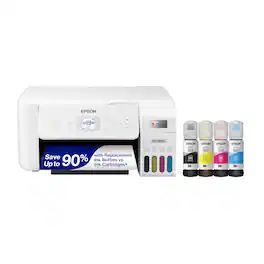
Your family needs a printer that’s fast, affordable, and easy to use. That’s why we developed the EcoTank ET-2800 – an innovative cartridge-free solution that uses high-capacity, easily refillable ink tanks. So you’ll worry less about running out of ink, and save a lot on replacement ink (1). The ET-2800 features genuine Epson print quality, a high-resolution flatbed scanner, and convenient color display – making it the ideal basic home printer.

The EcoTank Photo ET-8550 wireless all-in-one prints lab-quality, wide-format color photos, graphics and everyday documents — all at an incredible value. Epson’s cartridge-free, 6-color Claria ET Premium Ink system delivers vibrant colors and sharp text for all your creative projects. With low-cost replacement ink bottles, print 4" x 6" photos for about 4 cents each compared to 40 cents with cartridges (1). Print everything from borderless 13" x 19" photos to customized CDs/DVDs. You can even print on cardstock and other media up to 1.3 mm thick. For added convenience, each set of bottles lets you print for up to 2 years (2). Plus, save up to 80 percent with replacement ink bottles vs. ink cartridges (3) — that’s about $2,000 on each set (3). The EcoTank Photo lets you do it all with affordable in-house printing.
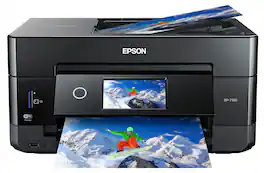
Get creative with this Epson Expression Premium XP-7100 Small-in-One printer. This compact device quickly prints gorgeous, durable photos with smudge-resistant Claria ink and lets you explore your creativity with specialty paper and DVD printing. This Epson Expression Premium XP-7100 Small-in-One printer gets the job done quickly with the 30-page auto document feeder and two-sided printing, scanning and copying.Fast print speeds up to 15.8 ISO ppm* in black, up to 11 ISO ppm* in color; creates a 4" x 6" photo-quality print in as little as 12 seconds.*
| Pros for Epson - Expression Photo XP-8800 Wireless Color All-in-One Inkjet Printer - Black | |||
|---|---|---|---|
| Print Quality, Ease of Use | Print Quality, Ease of use, Overall Performance, Setup, Size | Print Quality, Ease of use, Overall Performance, Setup | Print Quality, Ease of use, Overall Performance, Size, Setup |
| Cons for Epson - Expression Photo XP-8800 Wireless Color All-in-One Inkjet Printer - Black | |||
| There were no cons for this product— | Paper Tray, Connectivity, Noise Level | Paper Jam, Price, Output Tray | Paper Tray |
Specs



Reviews
Customers are saying
Customers are positive about the Expression Photo XP-8800 Wireless Color All-in-One Inkjet Printer. Customers find the print quality to be nice and clear. They also appreciate the printer's ease of use.
Customer Images
The vast majority of our reviews come from verified purchases. Reviews from customers may include My Best Buy members, employees, and Tech Insider Network members (as tagged). Select reviewers may receive discounted products, promotional considerations or entries into drawings for honest, helpful reviews.
- Rated 5 out of 5 stars
Best printer ever!
I effing love this printer!! Ive always wanted my own printer and scanner as a kid. Now that i have one. This is amazing. Easy set up! Very futuristic as far as today use. Like printing from phone and anywhere you are. And to top it off. Beautiful pictures!! It doesnt get better than this!! Thank you epson!!!!
SammyR Posted
- Rated 5 out of 5 stars
EpsonXP-8800
Works great after I got it set up. There was a glitch with the paper feed saying it was out of paper when it wasn’t, but after calling in for technical support, the problem was cleared up and I’m off and printing again!
VickieR Posted
- Rated 5 out of 5 stars
All-in-One works well.
All in One works well and has all the features I require. Easy to use and great color prints.
PaulD Posted






