Hercules - Stream 100, Audio Mixer for Content Creators, Streaming and Gaming - Black
About this product
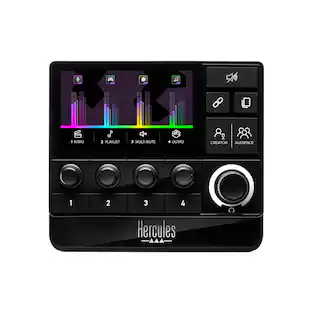
Hercules Stream 100 is a an easy-to-use and effective audio controller that lets you stop worrying about audio settings during your livestreams, and react quickly. Thanks to this audio controller with a built-in LCD screen, you can manage all your audio sources in real time: games, chat software, music, USB microphone, and more. Hercules Stream 100 lets you individually view and control the sound level of each audio track directly onscreen. Instantly enable, turn down the volume, turn up the volume, mute or unmute the sound! More than an audio controller, Hercules Stream 100 is also a command center: you’ll love using the 4 handy assignable action buttons to customize your controls (multiple mute, URL launcher, scene change). Stop worrying about audio settings and focus on your viewers. See your sound..
Full control of the stream's audio
Up to 8 tracks simultaneously: 2 pages of 4 tracks each 4 volume level management encoders (with mute support) USB microphone compatibility.
Complete user-friendly sound control in real time
Monitor all of your content's volume levels live onscreen Overview of the different volume track levels per page High-brightness LCD screen 4 dynamic VU meters Screen ON/OFF button.
Practical action launcher buttons
4 action buttons: multiple mute, URL launcher, scene change, etc.
Fully customizable device
Choice of colors and styles for VU meters custom images and icons profile management
Easy to use through the Hercules Stream Control App
All audio sources immediately detected Core streaming apps pre-integrated (OBS, Streamlabs) Built-in guidance (setup assistance, plug-and-play product, drag-and-drop interface).
Integrated software
Hercules Stream Control app. Core streaming apps pre-integrated (OBS, Streamlabs), built-in guidance (setup assistance, plug-and-play product, drag-and-drop interface).
- Lighting TypeMulticolorForm FactorFull-sizeConnection TypeWired
Reviews
Rating 4.6 out of 5 stars with 20 reviews
Customer Images
The vast majority of our reviews come from verified purchases. Reviews from customers may include My Best Buy members, employees, and Tech Insider Network members (as tagged). Select reviewers may receive discounted products, promotional considerations or entries into drawings for honest, helpful reviews.





Compare similar products

Hercules Stream 100 is a an easy-to-use and effective audio controller that lets you stop worrying about audio settings during your livestreams, and react quickly. Thanks to this audio controller with a built-in LCD screen, you can manage all your audio sources in real time: games, chat software, music, USB microphone, and more. Hercules Stream 100 lets you individually view and control the sound level of each audio track directly onscreen. Instantly enable, turn down the volume, turn up the volume, mute or unmute the sound! More than an audio controller, Hercules Stream 100 is also a command center: you’ll love using the 4 handy assignable action buttons to customize your controls (multiple mute, URL launcher, scene change). Stop worrying about audio settings and focus on your viewers. See your sound..

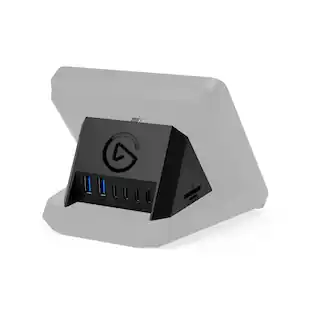
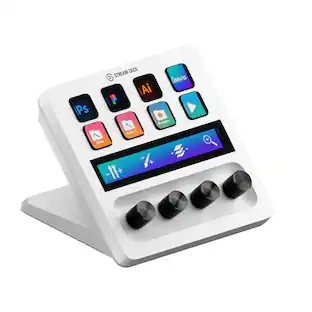
Short on ports? Now your Stream Deck + doubles as a USB Hub. Around back, connect up to four devices, from peripherals to external drives. It also powers your laptop, freeing the port you‘d nor?mally use for charging. Transfer files fast at speeds up to 5 Gb/s via USB-C, or use the convenient SD card reader on its side. USB Hub stows away and hides cables, keeping your workspace clean. Plus, your ports are always within arm’s reach, and it assembles in seconds—no drivers needed. Everything you need to expand and streamline your setup, all from one device.

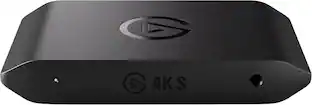
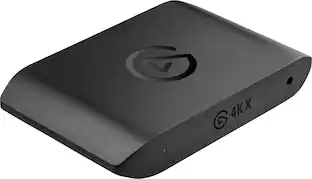
Showcase your gameplay at its best with Elgato Game Capture 4K S. Play and capture in crisp 4K60, ultra-smooth 1440p120, or even 1080p240—all with near-zero latency. With VRR passthrough, HDR10 capture on Windows, and analog audio input, this external USB-C card delivers pro-level features in a plug-and-play form factor. Whether you’re streaming or recording, it works seamlessly on Windows, macOS, and iPadOS—no drivers needed. 4K S is compatible with OBS Studio, Streamlabs, Discord, Zoom, and more. Connect your PS5, Xbox, or docked Switch 2, and share your gameplay in cinematic detail.
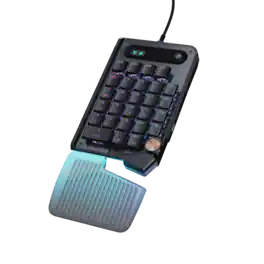
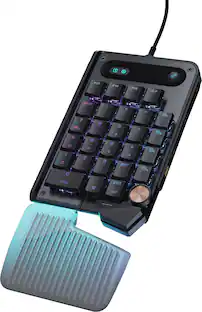
The Turtle Beach Command Series KP7 Modular Keypad is engineered for speed, precision, and adaptability across gaming, creation, and productivity workflows. Use it as a dedicated keypad, macro pad, or numpad, with seamless docking to the Turtle Beach Command Series KB7 Wired TKL Keyboard via dual modular rails, or as a standalone device. Titan low-profile Hall-Effect switches rated for 100 million clicks deliver fast, precise input with adjustable actuation and Rapid Trigger. True 8K wired performance ensures 0.125ms latency. A low‑profile chassis with kickstands, detachable wrist rest, programmable scroll wheel, extendable thumb bar when mounted to the right side of the Command Series KB7 or as a standalone, and per‑key RGB lighting completes a premium experience. The KP7 delivers a powerful, modular control solution for users who demand adaptability, performance, and workflow efficiency.
| Pros for Hercules - Stream 100, Audio Mixer for Content Creators, Streaming and Gaming - Black | |||
|---|---|---|---|
| There were no pros for this product— | Connectivity | Overall Performance, Latency | There were no pros for this product— |
| Cons for Hercules - Stream 100, Audio Mixer for Content Creators, Streaming and Gaming - Black | |||
| There were no cons for this product— | There were no cons for this product— | Audio Quality, Setup Difficulty | There were no cons for this product— |
Specs
Customers often buy these together
![CAPS LOCK ESC F1 F2 F3 F4 F5 F6 F7 F8 F9 F10 F11 F12 PRNT LOCK P/B B 1 ! 2 @ 3 # 4 $ 5 % 6 7 & 8 * 9 0 ) - = + INS HOME PG TAB Q W E R T Y U I O P [ { ] } / I DEL END PG CAPS A S D F G H J K L ; : " SHIFT Z X C V B N M / ? SHIFT CTRL ALT ALT FN CTRL](https://pisces.bbystatic.com/image2/BestBuy_US/images/products/8fe36680-ae7a-4af0-9f9a-b619c0aff083.png;maxHeight=232;maxWidth=233?format=webp)
Logitech - G515 RAPID TKL Wired Mechanical Analog Low-Profile Switch Gaming Keyboard with LIGHTSYNC RGB - Black
$139.99The price was $169.99
![G CAPS LOCK 144 I P ESC F1 F2 F3 F4 F5 F6 F7 F8 F9 F10 F11 F12 PRINT LOCK P/B - 1 1! 20 3# 4S 5% 6 7 7& 8 9 I 0) - = INS HOME PAGE TAB W E R T Y U I O P [ C ] } 1 DEL END PAGE UP PAGE DOWN CAPS LOCK A S D F G H J K L ; u SHIFT Z X C V B M V > ? SHIFT CTRL ALT ALT FN H CTRL](https://pisces.bbystatic.com/image2/BestBuy_US/images/products/eb9af4c8-3264-44d8-863b-3c38c161efb6.jpg;maxHeight=232;maxWidth=233?format=webp)



More to consider
 $159.99The price was $179.99
 $298.99The price was $349.99
Explore tech essentials Sponsored
 $89.99The price was $139.99
 $130.99The price was $149.99
- $298.99The price was $349.99
Discover related products
 $16.99The price was $19.99
 $13.99The price was $19.99
 $30.99The price was $32.99
 $94.99The price was $99.99









Keep exploring
 $69.99The price was $75.49
 $80.99The price was $89.99