HP - 734pm 34" Class Webcam UW-QHD Curved Screen LED Monitor - 21:9 - 34" Viewable - In-plane Switching (IPS) - Black
HP - 734pm 34" Class Webcam UW-QHD Curved Screen LED Monitor - 21:9 - 34" Viewable - In-plane Switching (IPS) - Black
FREE shipping to
More Buying Options
Related Item

Highlights
- Key Specs
- Refresh Rate: 144Hz (The number of frames per second the device can produce natively without enhancement. Higher rates help produce smooth, seamless pictures.)
- Maximum Resolution: 1920 x 1080 (Maximum resolution refers to the highest number of pixels that a screen can process and display. Higher resolution signals produce more detailed images.)
- Screen Size: 15.6 inches (Size of the screen, measured diagonally from corner to corner.)
- Display Connector(s): 1 x HDMI (The number and type of connectors used to connect to an external display.)
- General
- Brand: HP
- Model Number: 8K157UT#ABA
- Product Name: HP 734pm 34" Class Webcam UW-QHD Curved Screen LED Monitor - 21:9 - 34" Viewable - In-plane Switching (IPS) Black
- Color: Black
- Display
- Refresh Rate: 144Hz (The number of frames per second the device can produce natively without enhancement. Higher rates help produce smooth, seamless pictures.)
- Maximum Resolution: 1920 x 1080 (Maximum resolution refers to the highest number of pixels that a screen can process and display. Higher resolution signals produce more detailed images.)
- Contrast Ratio: 1200:1 (Measured difference between a displayed image's brightest whites and darkest blacks. The larger the first number, the more detail and color that can be displayed.)
- Display Type: LED
- Aspect Ratio: 16:9 (The measurement of the width of a screen compared to the height of a screen, expressed as a ratio.)
- Curved Screen: true
- Brightness: 400.0 candela per square meter (A measure of the total light output.)
- Screen Size: 15.6 inches (Size of the screen, measured diagonally from corner to corner.)
- Connectivity
- Number of HDMI Inputs (Total): 1
- Display Connector(s): 1 x HDMI (The number and type of connectors used to connect to an external display.)
- Features
- Adjustable Stand Height: true
- Dimensions
- Product Width: 32 inches (The out of box width of the item. Width is measured as the horizontal distance from one side of the item to the other as it would be primarily used or placed.)
- Product Weight: 35.0 pounds (The out of box weight of the item.)
- Stand Included: true
- Certifications Listings & Approvals
- ENERGY STAR Certified: false (Devices carrying the ENERGY STAR service mark, such as computer products and peripherals, kitchen appliances, and other products, generally use 20% to 30% less energy than required by federal standards.)
- Warranty
- Warranty - Parts: 3 year limited
- Warranty - Labor: 3 Year
- Other
- UPC: 198415143433
Effortlessly make a great impression through extraordinary collaboration powered by built-in AI conferencing on a dazzling ultrawide display with Thunderbolt 4. Display size (diagonal): 86.4 cm (34"). Response time (typical): 5ms GtG (withoverdrive). Native resolution: WQHD (3440 x1440). Contrast ratio:2000:1
- Put your best self on display: Usher in a new era of intelligent conferencing with effortless AI experiences across any OS. Collaborate like you're face to face thanks to lifelike audio and visual clarity from the 5MP HDR AI webcam with integrated speakers so you can always conference with confidence.
- Productivity beyond measure: This cutting-edge WQHD curved monitor provides an ultrawide canvas that makes maximum productivity effortless. Do more, uninterrupted, on more devices with this Thunderbolt 4 monitor's incredible performance and advanced work flow features.
- Your vision, exactly as you dream it: Reimagine your creative process. Trust what's on screen straight from the box with factory-calibrated color accuracy on a brilliant display. Jump into the wide array of vivid, lifelike colors and rich contrast thanks to IPS Black, HDR400, 98% Display P3, and more.
- Intelligent conferencing, ahead of the curve | Intelligen...: The integrated Poly Studio 5MP HDR AI webcam adapts to lighting conditions to always deliver superb camera quality. No matter the device you work on, the built-in AI collaboration tools ensure you're always ready to make a stellar first impression.
- Full-Suite AI Experience: Collaborate confidently with a host of built-in AI webcam features. Auto framing keeps you front and center, background blur minimizes distractions, and auto lock and awake offers added security so you can focus on your conversation, not your tech.
Whats Included
- MAG 275UPD E14 monitor, DisplayPort cable (1.4a), power cord (C13), quick guide
Compare similar products
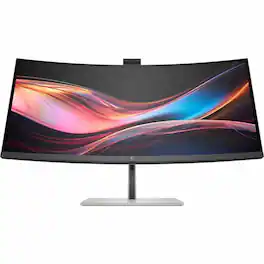
Effortlessly make a great impression through extraordinary collaboration powered by built-in AI conferencing on a dazzling ultrawide display with Thunderbolt 4. Display size (diagonal): 86.4 cm (34"). Response time (typical): 5ms GtG (withoverdrive). Native resolution: WQHD (3440 x1440). Contrast ratio:2000:1
Marketing Information from the Manufacturer

Dell 32 Plus 4K Monitor - S3225QS. Whether you're watching movies or playing games, enjoy an immersive viewing experience with improved eye comfort on a 4-star certified monitor.
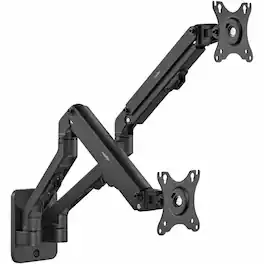
Rocstor ErgoReach EW1 Premium Dual Ergonomic Monitor Wall Mount Arm is a perfect solution designed to optimize space utilization in your workspace. When desk space falls short, this wall-mounted arm elegantly accommodates two monitors from 17" to 27" , each weighing up to 15.4lb (7kg), without effecting the aesthetics of your workspace. Designed with a user-friendly quick-installation base and keyhole patterns, the equipment setup process is very simple and easy, completing within a few minutes. The ergonomic design offers a wide tilt range from +90° to -45°, granting flexibility for optimal viewing angles and reduced glare, optimizing your viewing comfort. Maximize productivity and organize your workspace efficiently with the built-in cable management system that keeps cords tangle-free and clutter-free. Its swivel ability, with ±90° Range, facilitates multiple screen viewing angles, while the 360° rotary VESA plate allows for a dynamic viewing experience. Rocstor EW1 Monitor Wall Mount Arm offers both portrait and landscape orientations to match varying viewing needs. Its robust aluminum spring-assisted design delivers durability while ensuring an enhanced counterbalance experience for effortless adjustments. Unleash the potential of your workspace with this hassle-free and space-saving wall-mounted monitor arm. ThisErgoReach EW1 Premium Dual Ergonomic Monitor Wall Mount Arm is backed by Rocstor's 5-year warranty and lifetime free technical support.
| Pros for HP - 734pm 34" Class Webcam UW-QHD Curved Screen LED Monitor - 21:9 - 34" Viewable - In-plane Switching (IPS) - Black | |||
|---|---|---|---|
| There were no pros for this product— | There were no pros for this product— | Sound Quality, Refresh Rate, Screen Size, Port Count, Resolution | There were no pros for this product— |
| Cons for HP - 734pm 34" Class Webcam UW-QHD Curved Screen LED Monitor - 21:9 - 34" Viewable - In-plane Switching (IPS) - Black | |||
| There were no cons for this product— | There were no cons for this product— | Viewing Angle, Connectivity | There were no cons for this product— |
Specs
Reviews
This product doesn't have any reviews yet.