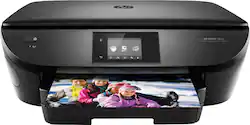
HP - ENVY 5663 Wireless All-In-One Printer
- Key Specs
- Networking: Wired, Wireless
- ENERGY STAR Certified: true (Devices carrying the ENERGY STAR service mark, such as computer products and peripherals, kitchen appliances, and other products, generally use 20% to 30% less energy than required by federal standards.)
- Printer Type: All In One, Copier, Scanner
- ISO Color Print Speed: 9 pages per minute (The number of color pages able to be printed per minute in the device's default single-side mode, as tested by the International Standards Organization (ISO).)
- ISO Mono Print Speed: 14 pages per minute (The number of black ink (grayscale) pages able to be printed per minute in the device's default single-side mode, as tested by the International Standards Organization (ISO).)
- Output Tray Capacity: 25
- General
- Brand: HP
- Model Number: F8B12A#ABA
- Product Name: ENVY 5663 Wireless All-In-One Printer
- Display Screen: true
- Display Screen Size: 2.65 inches
- Dimensions
- Product Height: 6.34 inches (The out of box height of the item. Height is measured as the vertical distance from the bottom of the item to the top as it would be primarily used or placed.)
- Product Width: 17.87 inches (The out of box width of the item. Width is measured as the horizontal distance from one side of the item to the other as it would be primarily used or placed.)
- Product Weight: 15.04 pounds (The out of box weight of the item.)
- Features
- Photo Printing: true
- Duty Cycle: Up to 1,000 (The maximum number of pages per month that the device can produce without failing, as specified by the manufacturer.)
- Certifications Listings & Approvals
- EPEAT Qualified: false (The Electronic Product Environmental Assessment Tool (EPEAT) was designed to provide an environmental assessment tool for purchasers. In order to qualify for EPEAT, a product must meet all 23 required criteria.)
- Scanner Info
- Scanner Type: Flatbed
- Scanner Resolution: Up to 1200 x 1200 (Refers to the number of pixels/dots, both horizontally and vertically, of the image produced by the scanner. Generally, the higher the resolution, the sharper and cleaner the produced image.)
- Fax Info
- Integrated Fax: false
- Ink
- Compatible Cartridges: HP 62 Black Ink Cartridge, HP 62 Tri-color Ink Cartridge, HP 62XL Black Ink Cartridge, HP 62XL Tri-color Ink Cartridge
- Ink Subscription Service Available: true (The printer monitors ink usage and alerts the subscription provider when levels are low. A purchased subscription provides refills of ink based on usage.)
- Paper Info
- Maximum Document Length: 14 inches
- Maximum Document Width: 8.5 inches
- Supported Paper Sizes: Letter, legal, 4 x 6 in, 5 x 7 in, 8 x 10 in, No. 10 envelopes, Custom from 3.85 x 8.5 to 5 x 14 in
- Paper Handling: 125 sheet Main Input Tray, 15 sheet photo tray; 25-sheet output tray
- Compatible Media Types: Paper (plain, inkjet, photo), Envelopes, Transparencies, Labels, cards, HP premium media, iron-on transfers, borderless media
- Copier Info
- Maximum Number Of Copies: 50
- Copier Resolution (Black): Up to 300 x 300 (Refers to the number of pixels/dots, both horizontally and vertically, of the image produced by the copier in black ink. Generally, the higher the resolution, the sharper and cleaner the produced image.)
- Copier Resolution (Color): Up to 600 x 600 (Refers to the number of pixels/dots, both horizontally and vertically, of the image produced by the copier in colored ink. Generally, the higher the resolution, the sharper and cleaner the produced image.)
- Performance
- Printer Resolution (Black): Up to 1200 x 1200 (Refers to the number of pixels/dots, both horizontally and vertically, of the image produced by the printer in black ink. Generally, the higher the resolution, the sharper and cleaner the produced image.)
- Printer Resolution (Color): Up to 4800 x 1200 (Refers to the number of pixels/dots, both horizontally and vertically, of the image produced by the printer in colored ink. Generally, the higher the resolution, the sharper and cleaner the produced image.)
- Connectivity
- Minimum System Requirements: Windows 10/8.1/8/7: 1 GHz CPU, 2 GB HDD space, CD/DVD drive/Internet, USB port, browser. Windows Vista: 800 MHz CPU. Windows XP SP3 (32-bit): Intel Pentium II, Celeron or 233 MHz CPU, 850 MB HDD space. MAC: OS X v10.7/v10.8/v10.9, 1 GB HDD space, USB
- Other
- UPC: 889296982654
Print, scan and copy from all your devices with this HP Envy all-in-one wireless printer. It prints in both black and white and full color, and its automatic duplexing capability saves paper. This HP Envy all-in-one wireless printer's photo paper tray lets you make quick 4'H x 6'W prints from your camera or smartphone.
Prints up to 14 ISO ppm*, up to 9 ppm* in color
- Prints up to 14 ISO ppm* in black, up to 9 ISO ppm* in color: To produce documents quickly.
- Inkjet printers are best for home or small business use: They offer excellent print quality for photos and documents and accept a variety of paper types and sizes.
- Wireless and mobile printing capability: Connect this printer to your home or office network with built-in Ethernet or wireless LAN. Plus, print from your mobile device with the free HP ePrint app.
- Apple® AirPrint enabled: For Apple iPad® and iPhone® printing.
- Customize your photos: The included HP Photo Creations software offers templates, custom fonts, borders and photo editing tools. Make cards and customized photos with just a few mouse clicks.
- Up to 4800 x 1200 dpi (dots per inch) color resolution: High resolution for producing incredible quality and detail in documents and photos. Up to 1200 x 1200 dpi when printing black only.
- 1 black and 1 tri-color print cartridge: Three dye-based inks produce vivid color in photos, and the pigment-based black ink produces crisp text.
- HP Instant Ink: Original HP Ink ordered by your printer, delivered to your door.
- Paper trays for high-volume printing and copying: Reload less often with the 125-sheet input tray, 15-sheet photo tray and 25-sheet output tray.
- 2.65" touch screen: Use the intuitive touch screen to print, store files and access business apps directly from the printer.
- 1 USB port for simple connectivity: 1 high-speed USB 2.0 port offers a standard connection to your PC or a simple way to plug in and print with a USB drive, camera or other device.
- Built-in duplex printing: Print on both sides of the page without turning it over manually, to minimize your printing costs and help the environment.
- More print, copy and scan solutions: Automatically print 2-sided documents, scan documents to your computer or directly to e-mail, send quick faxes and more.
Whats Included
- HP ENVY 5663 Wireless All-In-One Printer
- HP 62 Black Ink Cartridge and HP 62 Tri-color Ink
- Power cord
- Software CD
- Setup Instructions
- Media Pack
Product Manuals
A: HP web page for the 5660 states: "Paper sizes supported: Letter, legal, 4x6 in, 5x7 in, 8x10 in, No. 10 envelopes." Under the specifications, Supported Paper Sizes" is stated: Letter, legal, 4" x 6", 5" x 7", 8" x 10", #10 envelopes, 3" x 5" to 8.5" x 14" Note: HP says that the 5660 and 5663 are the same, latter is model number for their retailers such as Best Buy. So, I would assume what is stated for 5660 applies to 5663.
A: I've now tried it out for a couple of weeks and it works great (Win 10 on desktop and laptop). The photo tray is not adjustable and only holds 4 x 6" paper. I've used it (printing from a file on computer), and the print quality was not great, but I save most pics with low megapixels The paper tray (8.5 x 11"), prints photos or documents of any width up to 8.5", including envelopes, and using varying size stock - the sliding side guides are adjustable. The front of the paper tray will fold down, so longer sheets will fit (8 x 14"); however for copying or scanning, the glass document viewer is only about 8 x 12". You could print a 14" document from a file. Note there is no document feeder for scanning, copying multiple pages. The HP Envy 7640 has the document feeder and is virtually the same machine for an added $50. The HP Printer Assistant allows scanning features in addition to the "Touch Screen" for example to scan multiple pages into one document (PDF or JPEG). The enclosed paper tray is dust free and the printer has a streamlined appearance. However, the strange little paper holder that "pops out" when printing is flimsy, exposed, and possibly easily damaged. Also, it's something to malfunction compared to a simple slide out tray to hold the printed sheets.
Q: will this printer print 4 x 6 borderless photos HP Envy 65663 wireless
A: I have tried some of the features and printed both a 4x6 color and black and white using the Photo paper tray, which only accommodates 4x6 paper. The 8x10 paper bed is adjustable and will also print on photo paper of many sizes. The quality of the samples I printed were not great (like photos printed at Walgreens). Maybe my camera megapixel setting was the problem..
Q: Will this work on laptop HP Chrombook ?
A: The printer has the following capabilities so you should be able to print from Chromebook. HP All-in-One Printer Remote app1 HP ePrint HP ePrint app Apple AirPrint HP Print Service Plugin for Android devices HP Print Service Plugin for Kindle devices Google Cloud Print HP Print for Chrome Mopria Samsung Print Service Plugin Wi-Fi Direct Windows 10 Mobile
A: I googled and found the following: " It's already in the OS on your machine. Make sure your printer is connected to the same network as your iOS device or Mac. Then select the AirPrint printer from your favorite app and you're ready to print. On your iPad, iPhone, iPod Touch, or Mac computer and select the Print option in any program. You'd then see a list of AirPrint-compatible printers on your local network." "AirPrint is a mobile printing solution included with the Apple iOS v4.2 and later mobile operating systems. iPad, iPhone, and iPod touch users can print wirelessly to any ePrint-enabled HP printer that is connected to the same local wireless network. Most HP printers released in 2010 and later support AirPrint."
A: Yes, this is compatible with both Windows and Mac operating systems.
Q: Is this a color printer or can I put Colorful ink inside the printer.
A: Yes, it is a color printer. In fact it is a very nice printer. I like it very much. I use it much more than I thought I would and it is so convenient.
A: Its resolution is good enough but you'll want to get high quality paper.
People also viewed
 $119.89The price was $179.89
 $99.89The price was $179.89
 $79.89The price was $109.89
 $449.00The price was $450.45
 $119.89The price was $159.89
 $299.89The price was $429.89





Today's top picks
 $199.99The price was $249.99
 $149.99The price was $239.99
 $789.99The price was $1,049.99











