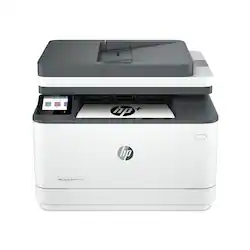
HP - LaserJet Pro MFP 3101fdwe Wireless Black-and- All-In-One Laser Printer with 3 mo. of Instant Ink included with HP+ - White
- Key Specs
- Networking: Wireless, Wired
- ENERGY STAR Certified: true (Devices carrying the ENERGY STAR service mark, such as computer products and peripherals, kitchen appliances, and other products, generally use 20% to 30% less energy than required by federal standards.)
- Printer Type: All In One
- Duty Cycle: Up to 50,000 (The maximum number of pages per month that the device can produce without failing, as specified by the manufacturer.)
- ISO Mono Print Speed: 35 pages per minute (The number of black ink (grayscale) pages able to be printed per minute in the device's default single-side mode, as tested by the International Standards Organization (ISO).)
- Monochromatic/Color: Monochromatic
- General
- Brand: HP
- Model Number: LaserJet Pro 3101fdwe
- Product Name: LaserJet Pro MFP 3101fdwe Wireless Black-and-White All-In-One Laser Printer with 3 mo. of Instant Ink included with HP+
- Color: White
- Display Screen: true
- Display Screen Size: 2.7 inches
- Dimensions
- Product Height: 18.7 inches (The out of box height of the item. Height is measured as the vertical distance from the bottom of the item to the top as it would be primarily used or placed.)
- Product Width: 16.8 inches (The out of box width of the item. Width is measured as the horizontal distance from one side of the item to the other as it would be primarily used or placed.)
- Product Depth: 29.9 inches (The out of box depth of the item. Depth is measured as the distance from the front of the item to the back as it would be primarily used or placed.)
- Product Weight: 23.1 pounds (The out of box weight of the item.)
- Features
- Automatic Document Feeder: true
- Photo Printing: false
- Automatic Reduction/Enlargement: false
- Touch Screen: true (Touch-screen devices make navigating more intuitive. Using a touch-screen display, you can do things such as tap to select, hold and drag to move items, swipe to scroll, and pinch to zoom.)
- Automatic Two-Sided Printing: true
- Certifications Listings & Approvals
- EPEAT Qualified: false (The Electronic Product Environmental Assessment Tool (EPEAT) was designed to provide an environmental assessment tool for purchasers. In order to qualify for EPEAT, a product must meet all 23 required criteria.)
- Paper Info
- Automatic Document Feeder Capacity: 50 sheets
- Paper Feeder: Cassette tray
- Paper Handling: Input Capacities: Up to 250 sheets Standard; Up to 10 envelopes; Auto Document Feeder: Standard, 50 sheets; Output Capacities: Up to 150 sheets Standard; Duplex Options: Automatic (standard) Standard paper trays: 1
- Supported Paper Sizes: Letter; Legal; Executive; Oficio 8.5x13; 3x5; 4x6; 5x7; 5x8; Envelope #10; Envelope Monarch
- Tray Capacity: 250
- Ink
- Compatible Cartridges: HP 138A Original Black LaserJet Toner Cartridge W1380A, HP 138X Original Black LaserJet Toner Cartridge W1380X
- Ink Subscription Service Available: true (The printer monitors ink usage and alerts the subscription provider when levels are low. A purchased subscription provides refills of ink based on usage.)
- Copier Info
- Copier Resolution (Black): Up to 300 x 300 (Refers to the number of pixels/dots, both horizontally and vertically, of the image produced by the copier in black ink. Generally, the higher the resolution, the sharper and cleaner the produced image.)
- Copier Resolution (Color): Up to 300 x 300 (Refers to the number of pixels/dots, both horizontally and vertically, of the image produced by the copier in colored ink. Generally, the higher the resolution, the sharper and cleaner the produced image.)
- Scanner Info
- Duplex Scan Function: true
- Scanner Resolution: Up to 300 x 300 (Refers to the number of pixels/dots, both horizontally and vertically, of the image produced by the scanner. Generally, the higher the resolution, the sharper and cleaner the produced image.)
- Scanner Type: Flatbed
- Fax Info
- Integrated Fax: true
- Performance
- Approximate Page Yield (Black): 1000
- Printer Resolution (Black): Up to 1200 x 1200 (Refers to the number of pixels/dots, both horizontally and vertically, of the image produced by the printer in black ink. Generally, the higher the resolution, the sharper and cleaner the produced image.)
- Output Tray Capacity: 150
- First Page Out Time: 7 seconds (The time it takes the printer to print and deliver the first page in the output tray. May depend on the complexity of the copy being printed.)
- Connectivity
- Minimum System Requirements: PC: Microsoft® Windows® 11, 10: 32-bit or 64-bit, 2 GB available hard disk space, Internet connection.; Mac: Apple® macOS v10.15 Catalina, macOS v11 Big Sur, macOS v12 Monterey; 2 GB HD; Internet required
- Other
- UPC: 195122461782
Get fast speeds and powerful productivity with the multifunction LaserJet Pro 3101fdwe with HP+ included at no additional cost. Get laser quality black & white printing for all your business documents. Includes HP+ smart office features so you can set up and manage printers in multiple locations with a single dashboard. Never run out of toner with an optional subscription for Instant Ink for lasers.
- Best for small teams: Print, scan, copy and fax professional-quality black & white documents and reports. Auto 2-sided printing and auto document feeder for fast scan/copy. Easy to set up and manage in the office or remotely.1 Ideal for up to 7 users.
- Fast and effortless: Fast print speeds, auto paper jam recovery and self-healing Wi-FiTM.2 Cloud-connected so you can invite users, control settings and print from anywhere
- HP+ Smart Office Features included: Makes it easy to set up and manage printers in multiple locations from a single dashboard. This printer only works with Original HP Toner Cartridges and requires an HP account and internet connection to operate.
- Manage printers in multiple locations: The HP Smart Admin Dashboard lets you set up and manage your LaserJet Pro from a single dashboard, invite new users, track toner levels, monitor security and control settings from any location.
- Super-fast print speeds: Up to 35 pages per minute single-sided.
- Stay connected: Intelligent Wi-Fi looks for the best connection to stay online. Always connected and ready to print from anywhere on any device and any network.
- 24/7 advanced security: HP Wolf Pro Security with automated monitoring, customizable settings and automatic updates so your printer and information are always secure.
- Connect and print from any device: Wirelessly connect and print from all mobile devices, PCs and tablets. Print from Wi-Fi, USB 2.0, Ethernet and Bluetooth LE.
- Never run out of toner: Save up to 50% on toner with Instant Ink for lasers. Cartridges delivered only when you need them, and get multiple locations and printers on one consolidated bill.
- Dedicated live HP+ support: Speak with a live HP+ support rep when you need it, backed by our 2 year extended HP warranty.
- Print Speed:: Letter: Up to 35 ppm black; First Page Out: As fast as 6.6 sec black
- Print Resolution:: Black (best): Up to 1200 x 1200 dpi
- Scan Resolution:: Hardware: Up to 300 x 300 dpi (color and mono, ADF); Up to 1200 x 1200 dpi (color and mono, flatbed); Optical: Up to 300 dpi (color and mono, ADF); Up to 1200 dpi (color and mono, flatbed)
- Copy Resolution:: Black (text & graphics): Up to 300 dpi
- Fax Resolution:: Black (best): Up to 300 x 300 dpi
- Standard Connectivity:: Hi-Speed USB device (compatible with USB 2.0 specifications); 10/100Mbps Ethernet; Wireless 802.11b/g/n, Dual band 2.4GHz/5GHz; BLE.
- Mobile Printing Capability:: HP Smart App; Apple AirPrint™; Mopria™ Certified; Wireless Direct Printing; HP ROAM For Business; Optional ROAM Queue Printing
- Duty cycle:: Monthly (letter): Up to 50,000
- Display:: 2.7" CGD; Touch Screen
- Best for small teams: Print, scan, copy and fax professional-quality black & white documents and reports. Auto 2-sided printing and auto document feeder for fast scan/copy. Easy to set up and manage in the office or remotely.1 Ideal for up to 7 users.
- Fast and effortless: Fast print speeds, auto paper jam recovery and self-healing Wi-FiTM.2 Cloud-connected so you can invite users, control settings and print from anywhere
- HP+ Smart Office Features included: Makes it easy to set up and manage printers in multiple locations from a single dashboard. This printer only works with Original HP Toner Cartridges and requires an HP account and internet connection to operate.
- Manage printers in multiple locations: The HP Smart Admin Dashboard lets you set up and manage your LaserJet Pro from a single dashboard, invite new users, track toner levels, monitor security and control settings from any location.
- Super-fast print speeds: Up to 35 pages per minute single-sided.
- Stay connected: Intelligent Wi-Fi looks for the best connection to stay online. Always connected and ready to print from anywhere on any device and any network.
- 24/7 advanced security: HP Wolf Pro Security with automated monitoring, customizable settings and automatic updates so your printer and information are always secure.
- Connect and print from any device: Wirelessly connect and print from all mobile devices, PCs and tablets. Print from Wi-Fi, USB 2.0, Ethernet and Bluetooth LE.
- Never run out of toner: Save up to 50% on toner with Instant Ink for lasers. Cartridges delivered only when you need them, and get multiple locations and printers on one consolidated bill.
- Dedicated live HP+ support: Speak with a live HP+ support rep when you need it, backed by our 2 year extended HP warranty.
- Print Speed:: Letter: Up to 35 ppm black; First Page Out: As fast as 6.6 sec black
- Print Resolution:: Black (best): Up to 1200 x 1200 dpi
- Scan Resolution:: Hardware: Up to 300 x 300 dpi (color and mono, ADF); Up to 1200 x 1200 dpi (color and mono, flatbed); Optical: Up to 300 dpi (color and mono, ADF); Up to 1200 dpi (color and mono, flatbed)
- Copy Resolution:: Black (text & graphics): Up to 300 dpi
- Fax Resolution:: Black (best): Up to 300 x 300 dpi
- Standard Connectivity:: Hi-Speed USB device (compatible with USB 2.0 specifications); 10/100Mbps Ethernet; Wireless 802.11b/g/n, Dual band 2.4GHz/5GHz; BLE.
- Mobile Printing Capability:: HP Smart App; Apple AirPrint™; Mopria™ Certified; Wireless Direct Printing; HP ROAM For Business; Optional ROAM Queue Printing
- Duty cycle:: Monthly (letter): Up to 50,000
- Display:: 2.7" CGD; Touch Screen
Whats Included
- HP LaserJet Pro MFP 3101fdwe
- HP Black LaserJet Toner Introductory Cartridge, yield ~1000 pages
- Setup Guide, Reference Guide, Regulatory Flyer, HP+ Concierge Support Flyer, Warranty Guide
- Power Cord
- HP LaserJet Pro MFP 3101fdwe
- HP Black LaserJet Toner Introductory Cartridge, yield ~1000 pages
- Setup Guide, Reference Guide, Regulatory Flyer, HP+ Concierge Support Flyer, Warranty Guide
- Power Cord
Product Manuals
Q: Will this printer allow me to print from my iPad Air and iPhone?
A: Hello, Susan. Thanks for your question. Yes, you can print from your iPad Air and iPhone with this HP LaserJet Pro 3101fdwe all-in-one printer. We recommend using the HP Smart app to set up the printer on your devices. Here is more information on the HP Smart app: https://support.hp.com/rs-en/document/ish_1716406-1413451-16
A: Hello, Susan. Thanks for your question. Yes, this HP LaserJet Pro 3101fdwe all-in-one printer has AirPrint.
Q: Can I put legal size paper in the tray and close it? or is it open?
A: Thank you for the question. The paper tray can accept legal-sized paper and the tray/draw would be closed.
Q: Can you print custom envelopes?
A: no sure
Q: When printing an envelope, do I have to remove all of the paper out of the tray first?
A: Thank you for the question. Yes, because you'll need to adjust the paper guide to the size of the envelope. If you place the envelope on top of a paper stack (and the guide is set for that paper width) the envelope's feed will not be guided - aligned properly to print.
Q: Does this printer support both PC/Windows and Apple laptops?
A: Hello, Steve. Thanks for your question. This HP LaserJet Pro 3101fdwe all-in-one printer is compatible with Windows 7 and 10; and macOS 10.14 and higher.
A: Hello. Thanks for your question. The HP LaserJet Pro 3101fdwe all-in-one printer has 1 paper tray. The HP LaserJet Pro MFP 4101fdwe Printer has 1 multi-purpose tray that can hold up to 100 sheets and 1 tray that can hold up to 250 sheets. You can add an optional tray, the HP LaserJet Pro Feeder Tray, D9P29A; that can hold up to 550 sheets to the HP LaserJet Pro MFP 4101fdwe Printer.
A: Hello. Thanks for your question. You would need to manually turn the paper over when scanning double-sided documents with this HP LaserJet Pro 3101fdwe all-in-one printer. We recommend looking at the HP LaserJet Pro MFP 4101fdwe Printer which does have the capability to scan both sides through the ADF (Auto Document Feeder) on top.