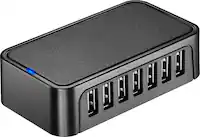
Insignia™ - 7-Port USB-C Hub - Gray
Related Item

Specifications
- Number of USB Port(s)2
- Key Specs
- Number of USB Port(s): 2
- General
- Brand: Insignia™
- Model Number: NS-PH571MS23
- Product Name: 7-Port USB-C Hub
- Color: Gray
- Network
- Ethernet Standard: 10/100/1000 (Each standard is a variation of the IEEE 802.3 set of computer networking technologies known as Ethernet. New versions evolved to include higher bandwidth, different physical media, and other new and improved features. Standards are often denoted by speeds (in Megabits per second). For example, a 10/100/1000 Ethernet port transmits at 10 Mbps, 100 Mbps, and 1000 Mbps (1 Gbps).)
- Features
- Hub Type: USB hubs (The type of connection, such as Ethernet or USB, used to connect peripheral devices to the hub for shared access.)
- Plug and Play Operation: true
- Ports
- Number of USB Port(s): 2
- Port Type(s): HDMI, RJ-45, USB, Other (USB 2.0 connects external drives, gaming controllers, smartphones, MP3 players and other accessories.USB 3.0 transfers data faster than USB 2.0, but only when used with USB 3.0 devices.USB Type-C provides fast speeds and versatile power, featuring connectors with identical ends that plug in upside down or right side up. Adapters allow for video as well as backward compatibility.Thunderbolt provides ultra-high bandwidth for fast data transfer between devices featuring a Thunderbolt or MiniDisplayPort connection.HDMI allows you to connect a projector or display HD media on your HDTV or monitor.Media card slots allow you to transfer photos from your digital camera or camcorder.)
- Compatibility
- System Requirements: Windows 10 & 11, macOS 10.12, Chrome OS 81 and Android OS (The software that a product must have for it to be able to integrate with another product.)
- Dimensions
- Product Height: 3.74 inches (The out of box height of the item. Height is measured as the vertical distance from the bottom of the item to the top as it would be primarily used or placed.)
- Product Length: 0.39 inches (The out of box length of the item. Length is measured as the longest dimension of the item.)
- Product Width: 1.57 inches (The out of box width of the item. Width is measured as the horizontal distance from one side of the item to the other as it would be primarily used or placed.)
- Product Weight: 0.19 pounds (The out of box weight of the item.)
- Warranty
- Warranty - Parts: 1 year limited
- Warranty - Labor: 1 year limited
- Other
- UPC: 600603315428
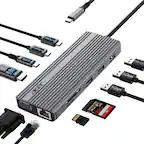
If you’re like many busy people, you have a dozen things going on at once, and working on the computer is no different. There’s a good chance you’re already using all your computer’s ports and wish you had extras to connect new devices. Thankfully, this hub helps optimize your workspace by adding two extra USB ports, an ethernet port, an HDMI port, a USB-C Power Delivery port, and SD and Micro SD slots. Simply plug it into your computer’s USB-C port and start connecting your mouse, keyboard and other accessories. Transfer speeds up to 5 Gbps move files quickly and efficiently and its compact size makes it perfect for slipping into a purse or backpack. Don’t limit your connected devices – enjoy more options with the Insignia 7-Port USB-C Hub.
- 7-port hub: Connects various devices to your laptop with a USB-C port.
- HDMI port with 4K resolution at 60Hz: Lets you mirror or extend your screen while displaying true-to-life images.
- Ethernet port: Supports high-speed internet with full 10/100/1000 Mbps superfast Gigabit Ethernet performance.
- Two USB 3.0 ports: Grant a high data transfer rate.
- SD and Micro SD slots: Lets you transfer files with ease.
- USB-C Power Delivery port: Charges your devices while you work.
- 5 Gbps data transfer speed: Helps you work more efficiently by quickly uploading and downloading photos, videos, music and other files.
- Up to 85W: Efficiently charges your laptop with a 100W wall adapter.
- Plug and play technology: Requires no additional drivers for an easy hookup.
- Wide compatibility: Works with Windows 10 & 11, macOS 10.12, Chrome OS 81 and Android OS.
- Slim design: Easily fits in your pocket, purse, backpack and more for easy transport.
- Braided, 4.53 in. (11.5 cm) cable: Grants flexible placement while keeping the hub nearby.
- 7-port hub: Connects various devices to your laptop with a USB-C port.
- HDMI port with 4K resolution at 60Hz: Lets you mirror or extend your screen while displaying true-to-life images.
- Ethernet port: Supports high-speed internet with full 10/100/1000 Mbps superfast Gigabit Ethernet performance.
- Two USB 3.0 ports: Grant a high data transfer rate.
- SD and Micro SD slots: Lets you transfer files with ease.
- USB-C Power Delivery port: Charges your devices while you work.
- 5 Gbps data transfer speed: Helps you work more efficiently by quickly uploading and downloading photos, videos, music and other files.
- Up to 85W: Efficiently charges your laptop with a 100W wall adapter.
- Plug and play technology: Requires no additional drivers for an easy hookup.
- Wide compatibility: Works with Windows 10 & 11, macOS 10.12, Chrome OS 81 and Android OS.
- Slim design: Easily fits in your pocket, purse, backpack and more for easy transport.
- Braided, 4.53 in. (11.5 cm) cable: Grants flexible placement while keeping the hub nearby.
Whats Included
- Insignia 7-Port USB-C Hub
- Quick Setup Guide
- Insignia 7-Port USB-C Hub
- Quick Setup Guide
Q: How many USB ports does this Insignia hub have?
A: This Insignia hub has two USB 3.0 ports.
Q: Does this hub support Power Delivery?
A: Yes, it has a USB-C Power Delivery port that allows you to charge your devices while you work.
Q: What operating systems is this USB-C hub compatible with?
A: This hub is compatible with Windows 10 & 11, macOS 10.12, Chrome OS 81 and Android OS.
Q: Does this hub have an ethernet port?
A: Yes, this hub has an ethernet port that supports full 10/100/1000 Mbps superfast Gigabit Ethernet performance.
Q: What is the maximum data transfer speed of this hub?
A: This hub supports data transfer speeds up to 5 Gbps.
Q: Can I use this hub to connect an external monitor to my laptop?
A: Yes, the hub has an HDMI port that supports 4K resolution at 60Hz for mirroring or extending your screen.
Q: Does this product support CAT-7 Ethernet Architecture?
A: undefined
Compare similar products

If you’re like many busy people, you have a dozen things going on at once, and working on the computer is no different. There’s a good chance you’re already using all your computer’s ports and wish you had extras to connect new devices. Thankfully, this hub helps optimize your workspace by adding two extra USB ports, an ethernet port, an HDMI port, a USB-C Power Delivery port, and SD and Micro SD slots. Simply plug it into your computer’s USB-C port and start connecting your mouse, keyboard and other accessories. Transfer speeds up to 5 Gbps move files quickly and efficiently and its compact size makes it perfect for slipping into a purse or backpack. Don’t limit your connected devices – enjoy more options with the Insignia 7-Port USB-C Hub.

Connect your laptop to a 4K monitor, projector, and other devices with our USB-C 4-in-1 Multiport Adapter. This compact USB-C adapter is the perfect solution for home, the office, or in-between workstations. It features two USB-A ports to charge and connect your smartphone, tablet, keyboard, thumb drive, mouse, or other high consumption device while its HDMI port connects your MacBook Pro, Chromebook, or other USB-C laptop to a display with up to 4K resolutions. This Belkin USB-C Hub supports pass-through charging up to 100W so you don’t have to choose between port expansion and power. Gain up to 5 Gbps of bandwidth between connected devices, for quick data transfer between computer and peripheral devices. This computer docking station also supports high-definition display resolutions up to 4K through the HDMI Port. Encased in a sleek aluminum finishing that matches popular devices, this compact USB port hub is a stylish addition for your work, study, or play setup.

Take your desk setup to the next level. Whether you're gaming, designing, or juggling deadlines, the HyperDrive Flex 5 Port USB-C Hub keeps you seamlessly connected. Enjoy crisp 4K monitor support for sharp visuals while editing, streaming, or multitasking. Power your laptop and other devices simultaneously with the 100W Power Delivery USB-C port, and transfer files in seconds via its high-speed USB ports. With a sleek design crafted from 75% post-consumer recycled plastics, it’s bold, functional tech that complements your style.
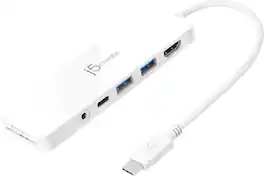
Our USB-C Multi-Port Hub with Power Delivery provides extra connectivity for your computer. This pocket-sized multi-adapter with 2 USB 3.1 Type-A ports allow you to connect an external keyboard, mouse, or USB flash drive. With high-speed transmission up to 5 Gbps, data transfer is quick and easy. The HDMI port allows you to mirror or extend your screen and directly output 4K UHD @ 30 Hz or Full HD 1080p video to an HDTV, monitor, or projector. Equipped with a USB-C Power Delivery 3.0 charging port. It offers charging up to 60W when connected to a USB-C power adapter. The hub also provides direct access to your SD & microSD memory cards. The audio/mic combo jack allows you to connect your headphone set or speakers.
| Pros for Insignia™ - 7-Port USB-C Hub - Gray | |||
|---|---|---|---|
| Ease of use, USB-C, Overall Performance, Connectivity, Compatibility | Overall Performance, Ease of use, Connectivity, HDMI, Size | Overall Performance, Connectivity, Portability, Port Selection, Power Delivery | Overall Performance, Ease of use, Connectivity, USB-C, Ports |
| Cons for Insignia™ - 7-Port USB-C Hub - Gray | |||
| There were no cons for this product— | Heat, Price, Cable Length | Indicator Light | Heat, Audio Quality |
Specs
Reviews
Customers are saying
Customers admire the 7-Port USB-C Hub for its USB-C connectivity, ease of use, and overall performance. Users appreciate its compatibility and find that it effectively expands connectivity options. The hub's compact size, sleek design, and reasonable price further contribute to its appeal. Overall, customers seem very satisfied with the hub and its ability to meet their needs.
- Ease of use (36)
- USB-C (35)
- Overall Performance (30)
Customer Images
The vast majority of our reviews come from verified purchases. Reviews from customers may include My Best Buy members, employees, and Tech Insider Network members (as tagged). Select reviewers may receive discounted products, promotional considerations or entries into drawings for honest, helpful reviews.
- Rated 4 out of 5 stars
Great hub
I like it. It’s much more cinematic than the previous USB-C hub I was using. It displays a much broader level of colors than the previous hub which, was about $20, that I was using. However, I’m not getting any data from the USB-C on the hub. I’m not sure if this is an issue with the hub or with my computer. I started using the hub because the HDMI plug was overheating my laptop. The hub allows me to move that heat off of the laptop itself, and then into an external hub. I’m much prefer this, and this is stopped the video and audio from flickering from my laptop when I use it in a desktop mode. I gave it four stars because the USB-C doesn’t seem to be working, but it’s much more cinematic than the previous hub I was using.
LandonB Posted
- Rated 5 out of 5 stars
Usb c mulit-connector Dongle
Fast and strong connection, wire doesn't get frayed or shorts. I've used mins for multiple projects and connection different devices at one and it works perfectly.
AnthonyS Posted
- Rated 5 out of 5 stars
Cheaper and better
This hub worked great for exactly what I needed to do and it was cheaper than the apple one and does more. It has Ethernet, Mini HDMI. I needed that for my external monitor I have for my MacBook.
Explore tech essentials Sponsored
- $39.99The price was $42.99