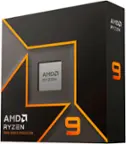
Intel - Core i9-13900K 13th Gen 24 cores 8 P-cores + 16 E-cores 36M Cache, 3 to 5.8 GHz LGA1700 Unlocked Desktop Processor - Grey/Black/Gold
FREE shipping to
 NZXT - Kraken Elite RGB 360mm 2024 Radiator (1x Single-Frame RGB Core Fan) Liquid Cooler with 2.72" 60FPS Display - Black$279.99$319.99
More Buying Options
Related Item

Specifications
- Processor SocketSocket LGA 1700PCI Express VersionPCI Express 5.0, PCI Express 4.0CPU Base Clock Frequency3 gigahertzCPU Boost Clock Frequency5.7 gigahertzNumber of CPU Cores24-coreNumber of CPU Threads32
- Key Specs
- Processor Socket: Socket LGA 1700 (Type of pin configuration that connects a CPU to a computer’s motherboard.)
- PCI Express Version: PCI Express 5.0, PCI Express 4.0
- CPU Base Clock Frequency: 3 gigahertz (Actual central processing unit (CPU) speed may vary by device configuration and design. The average rate at which the processor is able to execute tasks under normal operating conditions as asserted by the manufacturer.)
- CPU Boost Clock Frequency: 5.7 gigahertz (Actual central processing unit (CPU) speed may vary by device configuration and design. The maximum rate at which the processor is able to execute tasks, typically only used for a short period of time as needed. This rate may temporarily boost the processor's performance, but may result in overheating, shutdown, or damage to equipment if sustained.)
- Number of CPU Cores: 24-core (A core, or "brain" of a CPU, allows it to receive and execute instructions. Each core can work independently or together to perform parallel operations.)
- Number of CPU Threads: 32 (Generally, the more threads, the faster and more responsive the operating system.)
- Unlocked Processor: true
- Memory Type Supported: DDR5, DDR4
- L3 Cache: 36 megabytes (Cache memory, also called CPU memory, is random-access memory (RAM) that a computer microprocessor can access more quickly than it can access regular RAM. This memory is typically integrated directly with the CPU chip or placed on a separate chip that has a separate bus interconnect with the CPU.)
- Processor Base Power: 125 watts
- Integrated Graphics: true (Device has a built-in graphics processing unit.)
- Integrated Graphics Processor: Intel UHD Graphics 770 (This is responsible for displaying image content and decoding/encoding video content in programs and games.)
- Processor Generation/Series: 13th Generation
- General
- Brand: Intel
- Model Number: BX8071513900K
- Product Name: Core i9-13900K 13th Gen 24 cores 8 P-cores + 16 E-cores 36M Cache, 3 to 5.8 GHz LGA1700 Unlocked Desktop Processor
- Color: Grey/Black/Gold
- Processor Model Number: 13900K
- Processor Collection: Core i9
- Processor Generation/Series: 13th Generation
- Year of Release: 2022
- Compatibility
- Processor Socket: Socket LGA 1700 (Type of pin configuration that connects a CPU to a computer’s motherboard.)
- PCI Express Configuration: PCIe Gen 5 x16, PCIe Gen 5 x8
- PCI Express Lanes (Total): 20
- PCI Express Version: PCI Express 5.0, PCI Express 4.0
- Processor Instruction Set: 64-bit
- Performance
- CPU Base Clock Frequency: 3 gigahertz (Actual central processing unit (CPU) speed may vary by device configuration and design. The average rate at which the processor is able to execute tasks under normal operating conditions as asserted by the manufacturer.)
- CPU Boost Clock Frequency: 5.7 gigahertz (Actual central processing unit (CPU) speed may vary by device configuration and design. The maximum rate at which the processor is able to execute tasks, typically only used for a short period of time as needed. This rate may temporarily boost the processor's performance, but may result in overheating, shutdown, or damage to equipment if sustained.)
- Number of CPU Cores: 24-core (A core, or "brain" of a CPU, allows it to receive and execute instructions. Each core can work independently or together to perform parallel operations.)
- Number of CPU Threads: 32 (Generally, the more threads, the faster and more responsive the operating system.)
- Unlocked Processor: true
- Memory
- Maximum Memory Supported: 128 gigabytes
- Memory Type Supported: DDR5, DDR4
- Number of Memory Channels Supported: 2
- Cache Level: L3 (The cache stores data that the CPU needs to access quickly in order to complete tasks. Each level is ranked according to priority of access; Level 1 (L1) cache stores data that the CPU needs to access first. L1 cache is also the fastest but holds the least amount of data, with each following level decreasing in speed but increasing in capacity.)
- L3 Cache: 36 megabytes (Cache memory, also called CPU memory, is random-access memory (RAM) that a computer microprocessor can access more quickly than it can access regular RAM. This memory is typically integrated directly with the CPU chip or placed on a separate chip that has a separate bus interconnect with the CPU.)
- Features
- Processor Type: Desktop
- RAID Support: None (A Redundant Array of Independent Disks (RAID) includes a collection of separate disks that your computer recognizes as one disk unit. Each configuration offers a different level of mirroring, striping and read/write speeds.)
- Power
- Processor Base Power: 125 watts
- Processor Boost Power: 253 watts
- Graphics
- Integrated Graphics: true (Device has a built-in graphics processing unit.)
- Integrated Graphics Processor: Intel UHD Graphics 770 (This is responsible for displaying image content and decoding/encoding video content in programs and games.)
- GPU Base Clock Frequency: 0.3 gigahertz (The minimum rate at which the graphics controller is guaranteed to operate.)
- GPU Boost Clock Frequency: 1.5 gigahertz (The maximum ideal rate at which the graphics controller is able to operate, typically only for a short period of time.)
- Number of GPU Cores: 256
- Warranty
- Warranty - Parts: 3 year limited
- Warranty - Labor: 3 Year Limited
- Other
- UPC: 735858526616
13th Gen Intel Core i9-13900K desktop processor. Featuring Intel Adaptive Boost Technology, Intel Thermal Velocity Boost, Intel Turbo Boost Max Technology 3.0, and PCIe 5.0 and 4.0 support, DDR5 and DDR4 support, unlocked 13th Gen Intel Core i9 desktop processors are optimized for enthusiast gamers and serious creators and help deliver high performance. Compatible with Intel 700 Series and Intel 600 Series Chipset based motherboards. 125W Processor Base Power.
- Intel Core i9 desktop processor: Intel Core i9 desktop processors are optimized for enthusiast gamers and serious creators
- Chipset Compatability: Intel 700 Series Chipset an Intel 600 Series Chipset
- Intel Smart Cache (L3) Size: 36 MB
- Processor Graphics: Intel UHD Graphics 770
- Processor Cores (P-cores + E-cores): 24 (8P+16E)
- Processor Threads: 32
- Maximum Memory Capacity: 128GB
Whats Included
- Core i9-13900K 13th Gen 24 cores 8 P-cores + 16 E-cores 36M Cache, 3 to 5.8 GHz LGA1700 Unlocked Desktop Processor
- User Documentation
Product Manuals
Q: What temps do you get while gaming?
A: This will depend on your cooling and case setup. With a front/side mounted AIO (280/360) expect to see temps in the mid 50s while gaming. Games that utilize more cores may result in higher temps. Chip quality will also vary. I would not recommend anything less than a DeepCool AK620, Dark Rock Pro 4 or NH D15 air cooler (capable of handling up to 250w) if you are going with air cooling.
A: Greetings from the Intel team. Thank you for your question. Even though the Kraken Elite 360 is compatible with the processor socket, reaching the manufacturer to ensure that the Kraken Elite 360 meets or exceeds the TDP recommendation for the Intel® Core™ i9-13900K processor is recommended. The TDP for Intel Processors of the 12th generation (and higher generation) is called Processor Base Power and can be located under CPU Specifications. Intel® 600 Series and Intel® 700 Series chipset-based motherboards require a BIOS update to boot the Intel® Core™ desktop processors (13th and 14th gen). Intel® recommends updating the BIOS on systems for compatibility before updating your Intel® Core™ desktop processors. Intel® 600 Series and Intel® 700 Series may require a BIOS update when upgrading between Intel® Core™ Desktop Processors 12th, 13th, or 14th gen. For additional information, visit: https://www.intel.com/content/www/us/en/support/articles/000092294/processors.html Based on the motherboard CPU compatibility list, the Intel® Core™ i9-13900K processor is supported starting with the Bios version 7E25v10, for detailed information, check: https://www.msi.com/Motherboard/MPG-Z790-EDGE-TI-MAX-WIFI/support#cpu For information about the Intel® Core™ i9-13900K processor, visit: https://ark.intel.com/content/www/us/en/ark/products/230496/intel-core-i9-13900k-processor-36m-cache-up-to-5-80-ghz.html Thank you for choosing Intel! Emilio_Intel
Q: Does this include the Intel Laminar RH1 Cooler fan?
A: No fan Is included It's flagship processor. So they expect you to buy an aftermarket cooler. It's a very great processor though!
A: Yes I would recommend updating the bios to ensure that your cpu is running the correct voltage that was the main issue with the 13 and 14th gen cpu that intel released better to be safe than sorry.
Q: What does the manufactures warranty cover?
A: undefined
A: Greetings from the Intel team. Thank you for your question. Not all processors are affected by the Vmin Shift Instability issues. Intel is investigating options to identify affected processors on end-user systems. Customers experiencing instability symptoms on 13th and 14th Generation desktop processors should contact their system manufacturer, or in the case of an Intel Boxed Processor, contact Intel Customer Support. Ensure that the latest BIOS from your system or board manufacturer is being used. Contact your system or motherboard manufacturer for BIOS updates. Intel is offering a two-year extended warranty for the 13th and 14th gen Intel Desktop processors listed below: i9-13900KS i9-14900KS i9-13900K i9-14900K i9-13900KF i9-14900KF i9-13900F i9-14900F i9-13900 i9-14900 i7-13700K i7-14700K i7-13700KF i7-14700KF i7-13790F i7-14790F i7-13700F i7-14700F i7-13700 i7-14700 i5-13600K i5-14600K i5-13600KF i5-14600KF For Intel boxed processors presenting instability, contact Intel Customer Support: https://www.intel.com/content/www/us/en/support/contact-us.html#support-intel-products_873:873 Warranty Guide for Intel® Processors: https://www.intel.com/content/www/us/en/support/articles/000005494/processors.html Thank you for choosing Intel! Emilio_Intel
A: Yes it is, But make sure power supply can handle it, plus you need a sufficient cooling device for it.
Q: I was just wondering if this cpu is a good pair to the rtx 4070
A: Yes it's a fine pairing both are considered high performance parts you shouldn't run into any bottlenecks as well when playing most AAA games however this generation of intel processors did have voltage problems with the motherboard but it's an easy fix you'll need update the Bios for your motherboard and you can find that on your motherboard manufacture site ensure you have a usb thumb drive save that to the stick and either press F2 or F10 in most cases that will get you into the Bios and you will see the option to update the bios in the menu just update from the thumb drive and you will be fine I'm running a i9 13900kf and have had no issues after the update everyone is afraid to troubleshoot their own tech and sadly the brutal reality is it does come with the territory when building a pc and joining the community.
Compare similar products
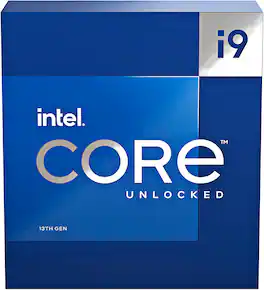
13th Gen Intel Core i9-13900K desktop processor. Featuring Intel Adaptive Boost Technology, Intel Thermal Velocity Boost, Intel Turbo Boost Max Technology 3.0, and PCIe 5.0 and 4.0 support, DDR5 and DDR4 support, unlocked 13th Gen Intel Core i9 desktop processors are optimized for enthusiast gamers and serious creators and help deliver high performance. Compatible with Intel 700 Series and Intel 600 Series Chipset based motherboards. 125W Processor Base Power.

Intel Core i9-14900K (14th gen) desktop processor. Featuring Intel Thermal Velocity Boost, Intel Turbo Boost Max Technology 3.0, and PCIe 5.0 & 4.0 support, DDR5 and DDR4 support, unlocked 14th Gen Intel Core i9 desktop processors are optimized for enthusiast gamers and serious creators and help deliver high performance. Compatible with Intel 700 Series and Intel 600 Series Chipset based motherboards. 125W Processor Base Power. Purchase Qualifying Intel Processors and Get Two Games - Purchase qualifying Intel Core Ultra or Intel Core processors and get Sid Meier's Civilization VII and Assassin's Creed Shadows. A voucher containing a redemption code will be emailed to you following the qualifying purchase. Only one voucher is provided per purchase. Must be 18 years or older to be eligible. Residency and geographical restrictions apply. Purchases must be made between January 23, 2025 and March 31, 2025. Offer available while supplies last. Codes must be redeemed by May 15, 2025, or they will expire. Terms and conditions may be found at https://softwareoffer.intel.com/offer/25Q1-01/terms. To redeem your voucher key: 1) Go to https://softwareoffer.intel.com/; 2) Sign-in or create an account; 3) Once your account is verified, log in and enter your redemption key to claim your software.

Intel Core Ultra 9 desktop processor 285K. Featuring PCIe 5.0 & 4.0 support and DDR5 support, unlocked Intel Core Ultra 9 desktop processors (series 2) are optimized for enthusiast gamers and serious creators and help deliver high performance. Compatible with Intel 800 Series Chipset based motherboards. 125W Processor Base Power. Purchase Qualifying Intel Processors and Get Two Games - Purchase qualifying Intel Core Ultra or Intel Core processors and get Sid Meier's Civilization VII and Assassin's Creed Shadows. A voucher containing a redemption code will be emailed to you following the qualifying purchase. Only one voucher is provided per purchase. Must be 18 years or older to be eligible. Residency and geographical restrictions apply. Purchases must be made between January 23, 2025 and March 31, 2025. Offer available while supplies last. Codes must be redeemed by May 15, 2025, or they will expire. Terms and conditions may be found at https://softwareoffer.intel.com/offer/25Q1-01/terms. To redeem your voucher key: 1) Go to https://softwareoffer.intel.com/; 2) Sign-in or create an account; 3) Once your account is verified, log in and enter your redemption key to claim your software.

12th Gen Intel Core i9-12900K unlocked desktop processor. Featuring Intel Turbo Boost Max Technology 3.0 and PCIe Gen 5.0 & 4.0 support, DDR5 and DDR4 support, unlocked 12th Gen Intel Core desktop processors are optimized for enthusiast gamers and serious creators and help deliver high performance overclocking for an added boost. Thermal solution NOT included in the box. Compatible with 600 series chipset based motherboards. 125W.
| Pros for Intel - Core i9-13900K 13th Gen 24 cores 8 P-cores + 16 E-cores 36M Cache, 3 to 5.8 GHz LGA1700 Unlocked Desktop Processor - Grey/Black/Gold | |||
|---|---|---|---|
| There were no pros for this product— | Processor Speed, Performance, Multitasking | Processor Speed, Overall Performance | There were no pros for this product— |
| Cons for Intel - Core i9-13900K 13th Gen 24 cores 8 P-cores + 16 E-cores 36M Cache, 3 to 5.8 GHz LGA1700 Unlocked Desktop Processor - Grey/Black/Gold | |||
| There were no cons for this product— | Heat, Price | There were no cons for this product— | There were no cons for this product— |
Specs
Reviews
Customer Images
The vast majority of our reviews come from verified purchases. Reviews from customers may include My Best Buy members, employees, and Tech Insider Network members (as tagged). Select reviewers may receive discounted products, promotional considerations or entries into drawings for honest, helpful reviews.
- Rated 5 out of 5 stars
Made my gaming experience a unique one love it !
This is a true powerhouse making my gaming experience a unique one. The gaming performance is a standout feature. With its high clock speeds and multithreading capabilities, the i9-13900K ensures buttery-smooth gameplay even in the most graphically intensive titles. The ability to run background applications without compromising gaming performance is a game-changer for streamers and content creators. Multitasking reaches new heights with this processor. The 24 cores enable effortless switching between applications, ensuring a seamless workflow even with resource-hungry software. Whether I'm editing videos, running virtual machines, or working on complex projects, the processor's performance remains consistently impressive. The Intel Core i9-13900K's compatibility with the latest technologies is worth noting. Support for PCIe 5.0 and DDR5 memory allows for lightning-fast data transfer speeds and optimal memory performance, further enhancing the overall computing experience. Thermal management is another area where this processor shines. The advanced cooling solutions and efficient power consumption ensure that the processor maintains optimal temperatures under heavy loads, contributing to its long-term reliability. In conclusion, the Intel Core i9-13900K Gaming Desktop Processor has exceeded my expectations in terms of performance, gaming prowess, multitasking capabilities, technology integration, and thermal management. Its 24 cores offer a level of processing power that's perfect for gamers, content creators, and professionals seeking exceptional performance across the board. If you're looking to elevate your gaming and computing experience to unprecedented heights, the Intel Core i9-13900K is undoubtedly a worthy investment. It has earned my highest praise and has become the centerpiece of my high-performance desktop setup.
This review is from Intel - Core i9-13900K 13th Gen 24 cores 8 P-cores + 16 E-cores 36M Cache, 3 to 5.8 GHz LGA1700 Unlocked Desktop Processor - Grey/Black/Gold
Posted by Insignia
- Rated 5 out of 5 stars
BEAST for productivity but does run hot
I am using the 13900k for video editing in Premiere Pro and let me tell you that this chip is an absolute beast! It does run pretty hot at stock clocks. I have it mounted with a pressure plate I got from Amazon, Deepcool LS720 AIO to cool it in an NZXT H7 Flow Case with 140mm fans all over (Except the 360 AIO which has 3-120mm fans on the radiator). Here are my temps: Idles: 30C 2 hours of rendering: 85C (peak at 90C but usually doesn't stay there for long). Also my office tends to stay in the 73F-75F range, so a bit warm. The ONLY time i've ever thermal throttle'd (100C) is when I was using Prime95 to simply stress test it. But seeing that I do not thermal throttle during editing videos i will not undervolt it. If you game, you'll obviously get lower temps since gaming doesn't utilize as much CPU power compared to productivity softwares. Bottom line, i'm not sure why one would need the 13900k UNLESS it was for productivity; but it's an investment work wise!
This review is from Intel - Core i9-13900K 13th Gen 24 cores 8 P-cores + 16 E-cores 36M Cache, 3 to 5.8 GHz LGA1700 Unlocked Desktop Processor - Grey/Black/Gold
Posted by StarvMarv
- Rated 5 out of 5 stars
Crazy fast!!! Highly recommend!!!!
I'm coming from an 11900K and holy smokes is this thing fast as lightning! Out of the box with stock ILM and a Corsair H150i Elite in a lian li 011 it was hitting 100c at full load but after installing the Thermal Grizzly contact frame and using their Kryonaut Extreme paste its now running 10-15 degrees cooler. I overclocked the P cores to 5.7Ghz and now when I game its in the low to mid 60s vs before it was in the mid to high 80s. So yes the chip does run super hot but with time, patience and the right equipment it's very manageable.
This review is from Intel - Core i9-13900K 13th Gen 24 cores 8 P-cores + 16 E-cores 36M Cache, 3 to 5.8 GHz LGA1700 Unlocked Desktop Processor - Grey/Black/Gold
Posted by RawDawg