Kensington - Pro Fit™ Ergo KM680 EQ Rechargeable Desktop Set - USB Type A Wireless Bluetooth/RF 5.4 2.40 GHz - Black
Reviews coming soon
About this product
Many professionals experience discomfort and inefficiency when relying on standard keyboards and mice. Many lack ergonomic support, require manual device switching, and use disposable batteries. The Pro Fit Ergo KM680 EQ Rechargeable Desktop Set is designed for comfort and productivity, catering to multitaskers who work across multiple devices. Easily connect and switch between up to three devices, enjoy all-day comfort with a full-size split keyboard, enhance productivity with programmable mouse buttons, and minimize interruptions in your workflow with long-lasting rechargeable batteries. Partially made from recycled materials, this set offers comfort, versatility, and convenience.
Kensington Pro Fit™ Ergo KM680 EQ Rechargeable Desktop
Many professionals experience discomfort and inefficiency when relying on standard keyboards and mice. Many lack ergonomic support, require manual device switching, and use disposable batteries. The Pro Fit Ergo KM680 EQ Rechargeable Desktop Set is designed for comfort and productivity, catering to multitaskers who work across multiple devices. Easily connect and switch between up to three devices, enjoy all-day comfort with a full-size
Precision Wireless Mouse
Contoured shape with responsive tracking for smooth navigation across documents and applications.
Multi‑OS Compatibility
Works seamlessly with Windows, macOS, and ChromeOS for versatile cross‑platform productivity.
Compact Form Factor
Space‑saving design integrates easily into home or office setups without sacrificing functionality.
Reliable Wireless Connection
Stable RF 2.4 GHz connectivity ensures consistent performance with minimal interference.
- Form FactorErgonomicConnection TypeWireless
Reviews
This product doesn't have any reviews yet.





Compare similar products
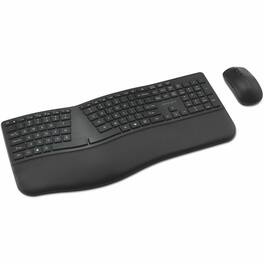
Many professionals experience discomfort and inefficiency when relying on standard keyboards and mice. Many lack ergonomic support, require manual device switching, and use disposable batteries. The Pro Fit Ergo KM680 EQ Rechargeable Desktop Set is designed for comfort and productivity, catering to multitaskers who work across multiple devices. Easily connect and switch between up to three devices, enjoy all-day comfort with a full-size split keyboard, enhance productivity with programmable mouse buttons, and minimize interruptions in your workflow with long-lasting rechargeable batteries. Partially made from recycled materials, this set offers comfort, versatility, and convenience.
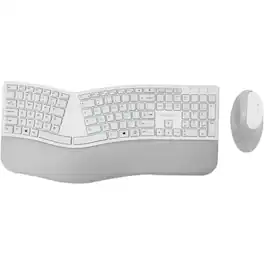
Kensington Pro Fit Ergo Wireless Keyboard and Mouse-Gray - USB Wireless Bluetooth/RF 4.0 Keyboard - Gray - USB Wireless Bluetooth/RF Mouse - Gray - Compatible with PC, Mac - Retail

Caps Lock, Numbers Lock, Scroll Lock, and F-Keys-Popular features that make typing and navigating easier and more efficient.With its split and sloped keyboard with adjustable reverse tilt and built-in wrist rest, the ergonomist-approved Pro Fit Ergo Wireless Keyboard positions your hands for improved comfort. Features include dual wireless (2.4 GHz and Bluetooth 4.0 LE) with 128-bit AES encryption security; quiet typing; spill-proof keys; F-keys for shortcuts; caps lock, numbers lock, and scroll lock; a three-mode power-saving switch; and a replaceable receiver. In the event the receiver is lost or damaged, simply purchase a new one, pair it with your mouse, and you're all set.
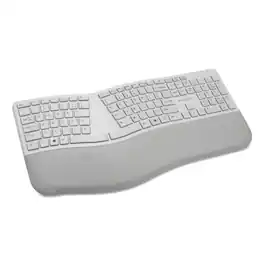
Ergonomist-approved design positions your hand for improved comfort. Split and sloped keyboard with adjustable reverse tilt positions hands, wrists, and forearms for comfort and neutral alignment. Built-in wrist rest supports, cushions, and cradles the wrists. Dual wireless with 128-bit AES encryption security delivers the flexibility of 2.4 GHz and Bluetooth 4.0 LE, with government-grade encryption. Quiet keys means typing is smooth, easy, and non-disruptive. Spill-proof keys make cleanup fast and easy. With a replaceable receiver, if your receiver is ever lost or damaged, simply purchase a new one, pair it with your mouse, and you're all set. Three-mode power-saving switch allows you to toggle between 2.4GHz, Bluetooth, and Off for best battery life. Caps Lock, Numbers Lock, Scroll Lock, and F-Keys are popular features that make typing and navigating easier and more efficient.
Specs
Be the first to ask a question.
We’ll try to get your question answered within 24 hours by a Best Buy customer or brand representative.
Customers often buy these together

Logitech - MK540 Full-size Advanced Wireless Membrane Keyboard and Mouse Combo for PC - Black
Top Deal$49.99The price was $59.99



![esc 1 ! 2 @ 3 # 4 $ 5 % 6 ^ 7 & 8 * 9 ( 0 ) - = | F1 F2 F3 F4 F5 F6 F7 F8 F9 F10 F11 F12 tab Q W E R T Y U I O P [ ] { } | caps A S D F G H J K L : : enter shift Z X C V B N M , < > ? shift ctrl alt fn ctrl](https://pisces.bbystatic.com/image2/BestBuy_US/images/products/bc5bce35-ca08-45da-bcc3-8d6fb215154b.jpg;maxHeight=232;maxWidth=233?format=webp)
![esc F1 F2 F3 F4 F5 F6 F7 F8 F9 F10 F11 F12 1 2 3 4 5 6 7 8 9 0 - = backspace tab Q W E R T Y U I O P [ ] \ caps lock A S D F G H J K L ; ' shift Z X C V B N M , . / shift ctrl alt logi](https://pisces.bbystatic.com/image2/BestBuy_US/images/products/6411/6411501_sd.jpg;maxHeight=232;maxWidth=233?format=webp)
![Sure, here is the corrected and grouped text from the image:
**Top Row:**
- ESC
- F1
- F2
- F3
- F4
- F5
- F6
- F7
- F8
- F9
- F10
- F11
- F12
- PRTSC
- DEL
**Number Row:**
- 1
- 2
- 3
- 4
- 5
- 6
- 7
- 8
- 9
- 0
- -
- =
- \
**Letter Row:**
- TAB
- Q
- W
- E
- R
- T
- Y
- U
- I
- O
- P
- [
- ]
- \
**Letter Row:**
- CAPS
- A
- S
- D
- F
- G
- H
- J
- K
- L
- ;
- '
**Letter Row:**
- SHIFT
- Z
- X
- C
- V
- B
- N
- M
- ,
- .
- /
**Function Row:**
-](https://pisces.bbystatic.com/image2/BestBuy_US/images/products/9be10b95-8e90-4a5d-b85f-cbc6a7d8e8df.png;maxHeight=232;maxWidth=233?format=webp)

![Sure, here is the corrected and grouped text:
```
ESC F1 F2 F3 F4 F5 F6 F7 F8 F9 F10 F11 F12 1 2 3 logitech - - 1 2 # $ 4 % 5 6 & 7 8 9 0 - - back insert home page up num lock clear / . tab Q W E R T Y U I O P { [ } ] / delete end page down 7 home 8 A 9 P9 up + caps lock A S D F G H J K L : ; a enter 4 5 6 shift Z X C V B N M < > ? shift 1 end 2 3 pg dn enter ctrl fn start alt opt alt crnd x alt cmd x fn ctrl alt opt 0 ins del 1 logitech
```](https://pisces.bbystatic.com/image2/BestBuy_US/images/products/5761/5761911_sd.jpg;maxHeight=232;maxWidth=233?format=webp)

![Sure, here is the corrected and grouped text from the image:
---
**Top Row:**
- Esc
- F1 F2 F3 F4 F5 F6 F7 F8 F9 F10 F11 F12
**Second Row:**
- 1 ! 2 @ 3 # 4 $ 5 % 6 ^ 7 & 8 * 9 ( 0 ) - _ + =
**Third Row:**
- Tab Q W E R T Y U I O P [ { ] } \
**Fourth Row:**
- Caps Lock A S D F G H J K L ; ' Enter
**Fifth Row:**
- Shift Z X C V B N M , . / Shift
**Function Keys:**
- F1 F2 F3 F4 F5 F6 F7 F8 F9 F10 F11 F12
**Right Side:**
- Insert Home Page Up Delete End Page Down
**Bottom Row:**
- Ctrl Alt Spacebar Alt Ctrl
**Additional Keys:**
- Logi
- Scroll Lock
- Pause Break
---
This should match the layout of the keyboard in the image.](https://pisces.bbystatic.com/image2/BestBuy_US/images/products/0ce0f170-380c-41e4-8d6a-fa0aadbd534c.jpg;maxHeight=232;maxWidth=233?format=webp)
![esc ~ ! 1 tab caps lock shift ctrl F2 Fl # 2 3 Q W A S Z start opt L F3 $ 4 E D X alt cmd3 ) FS F4 A % 5 6 R T F G V C logi 44 HI & F9 FID FB F7 F6 * ) - - & 0 8 9 7 O P U I Y K L H J > < N M 1 B PM + = { [ : I ; ? I alt cmd D 2 4 300 3 1 F12 . * page I insert home up clear backspace 8 9 + 7 page A pg up end down home } I delete ] / 6 4 5 4 enter 2 3 enter 1 dn Pg end shift = 0 del ins etrl fn opt](https://pisces.bbystatic.com/image2/BestBuy_US/images/products/6539/6539505_sd.jpg;maxHeight=232;maxWidth=233?format=webp)


![Esc F1 F2 F3 F4 F5 F6 F7 F8 F9 F10 F11 F12 Print Screen Scroll Lock Pause Break 1 2 3 4 5 6 7 8 9 0 - + = Backspace Insert Home H Page Up A Num Look 1 I Tab Q W E R T Y U I o P { [ } ] I I Delete End IN Page Down 7 Home 8 9 Pg Up Caps A Lock A S D F G H J K L ; : DE g Enter 4 5 6 Shift Z X C V N M < > ? I Shift 1 End 2 3 Pp Dn Enter Ctrl Alt Alt Ctrl 0 Ins Del](https://pisces.bbystatic.com/image2/BestBuy_US/images/products/a588d446-5678-40ae-86b8-1f15e0026e66.jpg;maxHeight=232;maxWidth=233?format=webp)
Customers ultimately bought
 Top Deal$129.99The price was $149.99
Explore tech essentials Sponsored
 $189.99The price was $199.99
 $124.99The price was $219.99
 Top Deal$119.99The price was $129.99
 $89.99The price was $149.99

Keep exploring
 $69.99The price was $99.99
 $101.99The price was $105.04
 $39.99The price was $45.99