KINESIS - Freestyle2 Split Ergonomic Keyboard for PC - Black
Reviews coming soon
About this product
The Kinesis Freestyle2 ergonomic keyboard features a split adjustable design that allows users to position each module for improved comfort and reduced wrist strain. This model includes the preinstalled V3 Pro Accessory Kit, providing adjustable tenting and negative tilt to support a more natural wrist and forearm posture during extended use. Designed for PC users, it offers low-force membrane keys for a quiet and comfortable typing experience along with a familiar Windows layout for easy adoption. The compact, low-profile design reduces reach and promotes better ergonomics, while plug-and-play USB connectivity ensures quick setup with no drivers required. Ideal for office and home environments, the Freestyle2 delivers flexible positioning and enhanced ergonomic support
Color
BlackFeatures
Top View – Split Keyboard Layout
Top-down view of the Kinesis Freestyle2 keyboard showing the split design and standard layout, allowing adjustable positioning for improved ergonomic comfort and reduced wrist strain.
Angled View – V3 Tenting and Ergonomic Positioning
Angled view of the keyboard with the preinstalled V3 Pro Accessory Kit, demonstrating adjustable tenting and negative tilt for a more natural wrist and forearm posture.
Specifications
- Lighting TypeNoneForm FactorErgonomicConnection TypeWired
Reviews
This product doesn't have any reviews yet.
Compare similar products
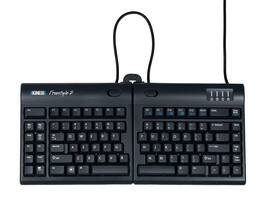
The Kinesis Freestyle2 ergonomic keyboard features a split adjustable design that allows users to position each module for improved comfort and reduced wrist strain. This model includes the preinstalled V3 Pro Accessory Kit, providing adjustable tenting and negative tilt to support a more natural wrist and forearm posture during extended use. Designed for PC users, it offers low-force membrane keys for a quiet and comfortable typing experience along with a familiar Windows layout for easy adoption. The compact, low-profile design reduces reach and promotes better ergonomics, while plug-and-play USB connectivity ensures quick setup with no drivers required. Ideal for office and home environments, the Freestyle2 delivers flexible positioning and enhanced ergonomic support

The Kinesis Freestyle2 ergonomic keyboard for PC features an award-winning split design that allows users to rotate and separate the key modules up to 9 inches. This flexibility promotes natural hand, wrist, and forearm positions tailored to individual body types and preferences. Designed with a standard Windows layout, the Freestyle2 includes convenient hotkeys for Cut, Copy, and Paste, along with multimedia keys to enhance productivity. Additionally, the embedded numeric 10-key eliminates the need for any software or special drivers, ensuring a seamless user experience. This ergonomic keyboard aligns with your comfort needs while maximizing efficiency.
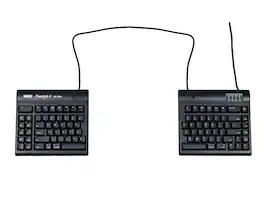
The Kinesis Freestyle2 ergonomic keyboard for Mac features a split adjustable design that allows users to position each module independently for improved comfort and reduced wrist strain. Designed specifically for Mac users, it includes Mac-specific key layout and plug-and-play USB connectivity for quick and easy setup. The 20 inch separation between modules provides maximum flexibility for customized ergonomic positioning. Its low-force membrane keys offer a quiet and comfortable typing experience, making it ideal for long hours of use at home or in the office.
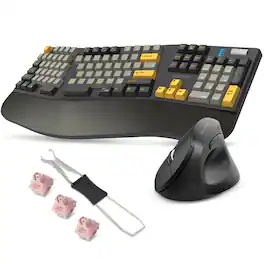
Upgrade your daily setup with a Delton E450 wireless ergonomic keyboard and vertical ergonomic mouse designed to keep you comfortable and focused. The mechanical keyboard supports 2.4G, Bluetooth, and USB C wired connections, includes a magnetic wrist rest, customizable switches, a full 104-key layout, a volume wheel, and up to 40 hours of working time for dependable use across Windows, Android, iOS, and ChromeOS devices. Its ergonomic shape helps reduce strain so you can type with ease. The vertical computer mouse wireless connects instantly with its USB A dongle and offers 6 accessible buttons, 3 DPI levels, smooth scrolling, and long battery life, making it an ideal choice for both home and office work. Together, this comfortable keyboard and wireless mouse pair deliver steady performance, natural hand positioning, and simple, everyday reliability.
Specs
Be the first to ask a question.
We’ll try to get your question answered within 24 hours by a Best Buy customer or brand representative.
Customers often buy these together

Logitech - MK270 Full-size Wireless Membrane Keyboard and Mouse Bundle for PC - Black
$26.99The price was $29.99


![esc 1 ! 2 @ 3 # 4 $ 5 % 6 ^ 7 & 8 * 9 ( 0 ) - = | F1 F2 F3 F4 F5 F6 F7 F8 F9 F10 F11 F12 tab Q W E R T Y U I O P [ ] { } | caps A S D F G H J K L : : enter shift Z X C V B N M , < > ? shift ctrl alt fn ctrl](https://pisces.bbystatic.com/image2/BestBuy_US/images/products/bc5bce35-ca08-45da-bcc3-8d6fb215154b.jpg;maxHeight=232;maxWidth=233?format=webp)



![Sure, here is the corrected and grouped text from the image:
**Top Row:**
- ESC
- F1
- F2
- F3
- F4
- F5
- F6
- F7
- F8
- F9
- F10
- F11
- F12
- PRTSC
- DEL
**Number Row:**
- 1
- 2
- 3
- 4
- 5
- 6
- 7
- 8
- 9
- 0
- -
- =
- \
**Letter Row:**
- TAB
- Q
- W
- E
- R
- T
- Y
- U
- I
- O
- P
- [
- ]
- \
**Letter Row:**
- CAPS
- A
- S
- D
- F
- G
- H
- J
- K
- L
- ;
- '
**Letter Row:**
- SHIFT
- Z
- X
- C
- V
- B
- N
- M
- ,
- .
- /
**Function Row:**
-](https://pisces.bbystatic.com/image2/BestBuy_US/images/products/9be10b95-8e90-4a5d-b85f-cbc6a7d8e8df.png;maxHeight=232;maxWidth=233?format=webp)

![esc F1 F2 F3 F4 F5 F6 F7 F8 F9 F10 F11 F12 1 2 3 4 5 6 7 8 9 0 - = backspace tab Q W E R T Y U I O P [ ] \ caps lock A S D F G H J K L ; ' shift Z X C V B N M , . / shift ctrl alt logi](https://pisces.bbystatic.com/image2/BestBuy_US/images/products/6411/6411501_sd.jpg;maxHeight=232;maxWidth=233?format=webp)


![Esc F1 F2 F3 F4 F5 F6 F7 F8 F9 F10 F11 F12 Print Screen Scroll Lock Pause Break 1 2 3 4 5 6 7 8 9 0 - + = Backspace Insert Home H Page Up A Num Look 1 I Tab Q W E R T Y U I o P { [ } ] I I Delete End IN Page Down 7 Home 8 9 Pg Up Caps A Lock A S D F G H J K L ; : DE g Enter 4 5 6 Shift Z X C V N M < > ? I Shift 1 End 2 3 Pp Dn Enter Ctrl Alt Alt Ctrl 0 Ins Del](https://pisces.bbystatic.com/image2/BestBuy_US/images/products/a588d446-5678-40ae-86b8-1f15e0026e66.jpg;maxHeight=232;maxWidth=233?format=webp)
![Sure, here is the corrected and grouped text:
```
ESC F1 F2 F3 F4 F5 F6 F7 F8 F9 F10 F11 F12 1 2 3 logitech - - 1 2 # $ 4 % 5 6 & 7 8 9 0 - - back insert home page up num lock clear / . tab Q W E R T Y U I O P { [ } ] / delete end page down 7 home 8 A 9 P9 up + caps lock A S D F G H J K L : ; a enter 4 5 6 shift Z X C V B N M < > ? shift 1 end 2 3 pg dn enter ctrl fn start alt opt alt crnd x alt cmd x fn ctrl alt opt 0 ins del 1 logitech
```](https://pisces.bbystatic.com/image2/BestBuy_US/images/products/5761/5761911_sd.jpg;maxHeight=232;maxWidth=233?format=webp)

Explore tech essentials Sponsored
 Top Deal$181.99The price was $239.99
 $159.99The price was $219.99





Keep exploring
 $56.99The price was $88.00
 $129.95The price was $159.95
 $38.99The price was $58.99