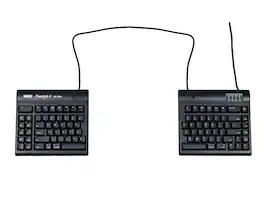
KINESIS - Freestyle2 Split Ergonomic Keyboard for Mac with 20 Inch Separation - Black
Reviews coming soon
About this product
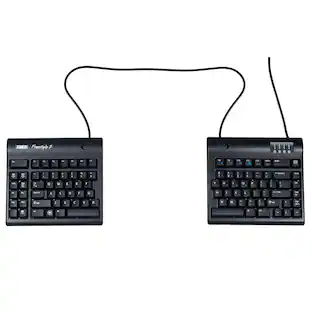
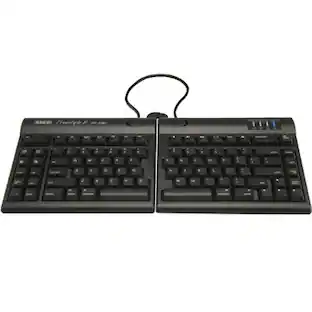
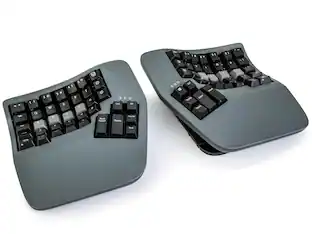
The Kinesis Freestyle2 ergonomic keyboard for Mac features a split adjustable design that allows users to position each module independently for improved comfort and reduced wrist strain. Designed specifically for Mac users, it includes Mac-specific key layout and plug-and-play USB connectivity for quick and easy setup. The 20 inch separation between modules provides maximum flexibility for customized ergonomic positioning. Its low-force membrane keys offer a quiet and comfortable typing experience, making it ideal for long hours of use at home or in the office.
Color
BlackFeatures
Split Keyboard with 20 Inch Adjustable Separation
Top view of the Kinesis Freestyle2 for Mac keyboard showing the split design with extended 20 inch separation cable for maximum ergonomic positioning flexibility and improved typing comfort.
Specifications
- Lighting TypeNoneForm FactorErgonomicKeyboard TechnologyMembraneConnection TypeWired
Reviews
This product doesn't have any reviews yet.





Compare similar products
The Kinesis Freestyle2 ergonomic keyboard for Mac features a split adjustable design that allows users to position each module independently for improved comfort and reduced wrist strain. Designed specifically for Mac users, it includes Mac-specific key layout and plug-and-play USB connectivity for quick and easy setup. The 20 inch separation between modules provides maximum flexibility for customized ergonomic positioning. Its low-force membrane keys offer a quiet and comfortable typing experience, making it ideal for long hours of use at home or in the office.
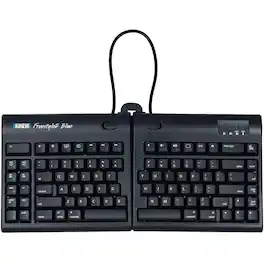
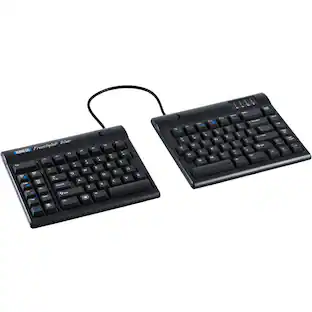
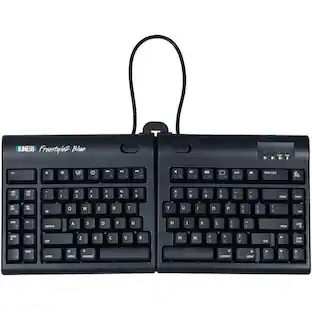
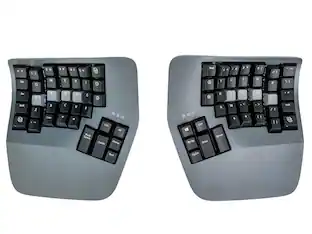
The Kinesis Freestyle2 Blue Bluetooth Keyboard for Mac (KB800MB-BT) is an ergonomic, split keyboard designed to improve comfort and reduce strain during extended typing sessions. Its unique two-piece layout allows users to position each half independently, promoting a more natural hand, wrist, and shoulder alignment while minimizing ulnar deviation. Built specifically for Mac users, it features a familiar layout with dedicated macOS shortcuts and seamless Bluetooth connectivity that supports pairing with up to three devices. The low-force membrane keys provide a quiet, comfortable typing experience, and the slim profile helps reduce wrist extension. Ideal for professionals, remote workers, and anyone seeking a customizable ergonomic setup, the Freestyle2 Blue delivers flexibility, wireless convenience, and long-term typing comfort.
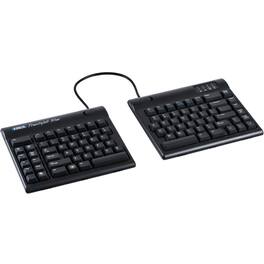
The Kinesis Freestyle2 Blue is the wireless evolution of the popular Freestyle2 split keyboard—delivering the same ergonomic benefits of adjustable split design, now with Bluetooth multichannel connectivity that lets you seamlessly switch between three paired devices with the press of a button.
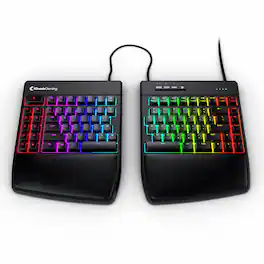
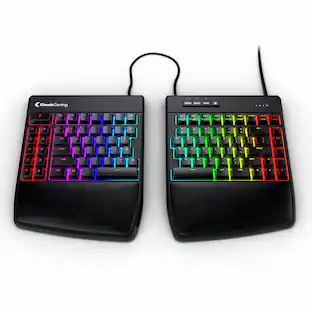
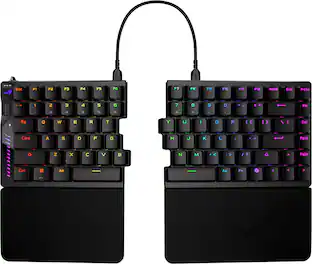
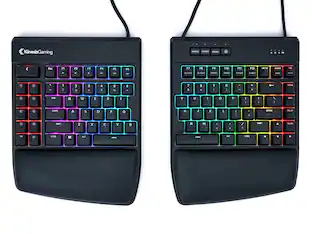
The Freestyle Edge RGB+ combines ergonomic comfort and gaming performance with a fully adjustable split design, smooth Gateron Red linear mechanical switches, customizable per key RGB backlighting, onboard macro programming, and detachable cushioned palm supports. The split layout allows users to position each module independently for improved comfort and reduced strain during long gaming or work sessions. Ideal for gamers, programmers, content creators, and professionals seeking both performance and ergonomic benefits.
Specs
Be the first to ask a question.
We’ll try to get your question answered within 24 hours by a Best Buy customer or brand representative.
Customers often buy these together

Logitech - MK270 Full-size Wireless Membrane Keyboard and Mouse Bundle for PC - Black
$26.99The price was $29.99


![esc 1 ! 2 @ 3 # 4 $ 5 % 6 ^ 7 & 8 * 9 ( 0 ) - = | F1 F2 F3 F4 F5 F6 F7 F8 F9 F10 F11 F12 tab Q W E R T Y U I O P [ ] { } | caps A S D F G H J K L : : enter shift Z X C V B N M , < > ? shift ctrl alt fn ctrl](https://pisces.bbystatic.com/image2/BestBuy_US/images/products/bc5bce35-ca08-45da-bcc3-8d6fb215154b.jpg;maxHeight=232;maxWidth=233?format=webp)



![Sure, here is the corrected and grouped text from the image:
**Top Row:**
- ESC
- F1
- F2
- F3
- F4
- F5
- F6
- F7
- F8
- F9
- F10
- F11
- F12
- PRTSC
- DEL
**Number Row:**
- 1
- 2
- 3
- 4
- 5
- 6
- 7
- 8
- 9
- 0
- -
- =
- \
**Letter Row:**
- TAB
- Q
- W
- E
- R
- T
- Y
- U
- I
- O
- P
- [
- ]
- \
**Letter Row:**
- CAPS
- A
- S
- D
- F
- G
- H
- J
- K
- L
- ;
- '
**Letter Row:**
- SHIFT
- Z
- X
- C
- V
- B
- N
- M
- ,
- .
- /
**Function Row:**
-](https://pisces.bbystatic.com/image2/BestBuy_US/images/products/9be10b95-8e90-4a5d-b85f-cbc6a7d8e8df.png;maxHeight=232;maxWidth=233?format=webp)
![esc F1 F2 F3 F4 F5 F6 F7 F8 F9 F10 F11 F12 1 2 3 4 5 6 7 8 9 0 - = backspace tab Q W E R T Y U I O P [ ] \ caps lock A S D F G H J K L ; ' shift Z X C V B N M , . / shift ctrl alt logi](https://pisces.bbystatic.com/image2/BestBuy_US/images/products/6411/6411501_sd.jpg;maxHeight=232;maxWidth=233?format=webp)

![esc ~ ! 1 tab caps lock shift ctrl F2 Fl # 2 3 Q W A S Z start opt L F3 $ 4 E D X alt cmd3 ) FS F4 A % 5 6 R T F G V C logi 44 HI & F9 FID FB F7 F6 * ) - - & 0 8 9 7 O P U I Y K L H J > < N M 1 B PM + = { [ : I ; ? I alt cmd D 2 4 300 3 1 F12 . * page I insert home up clear backspace 8 9 + 7 page A pg up end down home } I delete ] / 6 4 5 4 enter 2 3 enter 1 dn Pg end shift = 0 del ins etrl fn opt](https://pisces.bbystatic.com/image2/BestBuy_US/images/products/6539/6539505_sd.jpg;maxHeight=232;maxWidth=233?format=webp)


![Esc F1 F2 F3 F4 F5 F6 F7 F8 F9 F10 F11 F12 Print Screen Scroll Lock Pause Break 1 2 3 4 5 6 7 8 9 0 - + = Backspace Insert Home H Page Up A Num Look 1 I Tab Q W E R T Y U I o P { [ } ] I I Delete End IN Page Down 7 Home 8 9 Pg Up Caps A Lock A S D F G H J K L ; : DE g Enter 4 5 6 Shift Z X C V N M < > ? I Shift 1 End 2 3 Pp Dn Enter Ctrl Alt Alt Ctrl 0 Ins Del](https://pisces.bbystatic.com/image2/BestBuy_US/images/products/a588d446-5678-40ae-86b8-1f15e0026e66.jpg;maxHeight=232;maxWidth=233?format=webp)
![Sure, here is the corrected and grouped text:
```
ESC F1 F2 F3 F4 F5 F6 F7 F8 F9 F10 F11 F12 1 2 3 logitech - - 1 2 # $ 4 % 5 6 & 7 8 9 0 - - back insert home page up num lock clear / . tab Q W E R T Y U I O P { [ } ] / delete end page down 7 home 8 A 9 P9 up + caps lock A S D F G H J K L : ; a enter 4 5 6 shift Z X C V B N M < > ? shift 1 end 2 3 pg dn enter ctrl fn start alt opt alt crnd x alt cmd x fn ctrl alt opt 0 ins del 1 logitech
```](https://pisces.bbystatic.com/image2/BestBuy_US/images/products/5761/5761911_sd.jpg;maxHeight=232;maxWidth=233?format=webp)
More to consider
 $120.00The price was $145.11
 Top Deal$129.99The price was $159.99
Explore tech essentials Sponsored
 $132.58The price was $159.99





Keep exploring
 $248.03The price was $283.49
 $129.95The price was $159.95
 $91.49The price was $107.49
 $71.99The price was $89.99