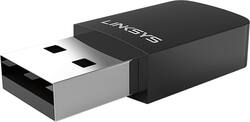
Linksys - Next-Gen AC Dual-Band AC600 USB Network Adapter - Black
- Key Specs
- Wi-Fi Speed: 600 megabits per second (The maximum rate at which data is transferred between a network device and wireless router.)
- Wireless Standard: AC (The wireless networking protocol used by the device. Each iteration of the protocol is based on the 802.11 standard developed by the Institute of Electrical and Electronics Engineers (IEEE) Standards Association. Denoted by letters following 802.11 (802.11a, 802.11ac, etc.), each version, published in alphabetical order, encompasses all previous versions.)
- Adapter Type: Wireless
- Form Factor: USB adapter (The size, arrangement, and physical configuration of the product.)
- Frequency: 2.4GHz Digital, 5.0 GHz (A measurement of the electromagnetic radio waves a device emits.)
- USB Generation: USB 2.0 (The specification (generation) of the USB standard. Generations are backwards compatible with previous specifications (provided that those devices have the necessary adapter to accommodate the connection type).)
- Wireless Networking Standard: Wi-Fi 5 (The wireless networking standard used by the device. Each iteration of the standard developed by the Wi-Fi Alliance corresponds to an existing IEEE 802.11 protocol; for example, standard 802.11ac (or AC) is termed Wi-Fi 5. Refers specifically to the standard the device is designed to use, but ultimately determines product interoperability and backward compatibility including previous versions.)
- General
- Brand: Linksys
- Model Number: WUSB6100M
- Product Name: Next-Gen AC Dual-Band AC600 USB Network Adapter
- Color: Black
- Security
- Data Encryption: true
- Network
- Quality Of Service (QoS) Traffic Prioritization: false (Allows a user to manage a device's network performance by configuring the types of traffic that receive top priority for transmission. High priority functions and applications receive maximum network performance, while low priority traffic receives minimum performance.)
- Compatible Wireless Standard(s): Wireless-AC (The wireless networking standard(s) the device is backwards compatible with. This includes networking protocols based on the IEEE 802.11 standard (alphabetically ascending) and the Wi-Fi Alliance standard (numerically ascending), both of which provide high-throughput wireless local area networks (WLANs). Devices designed to work with specific standard(s) will be backwards compatible with previous versions but may not run at optimal performance when using earlier iterations.)
- Attached Antenna: false
- Wireless Networking Standard: Wi-Fi 5 (The wireless networking standard used by the device. Each iteration of the standard developed by the Wi-Fi Alliance corresponds to an existing IEEE 802.11 protocol; for example, standard 802.11ac (or AC) is termed Wi-Fi 5. Refers specifically to the standard the device is designed to use, but ultimately determines product interoperability and backward compatibility including previous versions.)
- Ports
- Number Of Ports: 0
- Dimensions
- Product Height: 0.2 inches (The out of box height of the item. Height is measured as the vertical distance from the bottom of the item to the top as it would be primarily used or placed.)
- Product Length: 1.4 inches (The out of box length of the item. Length is measured as the longest dimension of the item.)
- Product Width: 0.3 inches (The out of box width of the item. Width is measured as the horizontal distance from one side of the item to the other as it would be primarily used or placed.)
- Product Weight: 0.022 pounds (The out of box weight of the item.)
- Warranty
- Warranty - Parts: Not available
- Warranty - Labor: Not available
- Other
- UPC: 745883711192
Create a fast home network with this Linksys USB adapter. Access to both 2.4GHz and 5GHz bands lets you gain more coverage than a standard single-band USB adapter, and connections are fast and secure. This Linksys USB adapter provides a secure Wi-Fi connection when you use it with a Windows-based notebook.
- Wireless WiFi 5 technology: Delivers up to 600 Mbps data transfer rates for high-speed wireless access.
- Easy setup: Features setup wizard and WiFi protected Setup for quick installation
- External network adapter for wireless devices: So you can connect an additional device.
- WPA and WPA2 data encryption: For high-level wireless security.
Whats Included
- Linksys Next-Gen AC Dual-Band Wireless-AC600 USB Network Adapter
A: Hi, I have this adapter and you do not need a cable. It comes with a dvd that you load into your computer. After that, you just plug the adapter into your computer and you will connect to your router without any need of wires. Hope this helps!
A: My Internet box is about 35 40 feet away and a get a perfect signal
A: I'm not sure about MU-MIMO, but I bought this to be able to use 5ghz wifi and get off the cluttered 2.4ghz band. Making this switch, I went from about 50mbps to about 94mbps on average, on a 100mbps service.
Q: does this work with Windows vista?
A: Hi! Regarding your query, the Linksys WUSB6100M will not work with Windows Vista. It is only compatible with computers running on Windows 7, Windows 8.1 and Windows 10.
A: Yes it will. USB 3.0 is completely backwards compatible with USB 2.0.
Q: Can you use this on a smart tv so it can pick up the houses internet?
A: No, mcsmith. This adapter will only work with computers running on Windows 7, 8.1 and 10.
A: Yes you can as long as you have an open and functional USB port.
A: It should connect to your router. Just make sure you know the password to connect to the router. If you do not have a password protected wireless network, I suggest you do. Otherwise anyone can connect to your router and that can reduce your internet speeds and make your pc and devices vulnerable to danger.
People also viewed
 $12.99The price was $14.99
Today's top picks
 $479.99The price was $729.99
 $69.99The price was $129.99
 $199.99The price was $249.99
 $49.99The price was $62.99