Logitech - ERGO M575 Wireless Trackball Ergonomic Mouse for Business - Wireless - Graphite
About this product
ERGO M575 Trackball features a sculpted shape and smooth thumb control. Certified by US Ergonomics, it is designed to keep hands relaxed and improve forearm posture. Get precise tracking on any surface and adjust cursor speed to your preference. Plus, customizable buttons and quiet clicks improve the work experience.
Features
Enterprise-grade wireless trackball mouse
M575 Wireless Trackball for Business is ideal to deploy at scale for employees who want an ergonomic mouse for all day comfort; remotely deploy and monitor with Logitech Sync. ¹
Less movement, more comfort
The comfortable, sculpted ergonomic shape reduces muscle activity by 25% and promotes a better forearm posture for longer comfort. ²
User-tested, ergonomist-approved
Designed with Logi Ergo Lab experts, user-tested and certified by US Ergonomics, the wireless ergonomic trackball mouse keeps hand and arm relaxed at work
Smooth, precise tracking
The smooth thumb control offers precision and control on any surface; adjust the cursor speed with Logi Tune for tracking precision. ³
Perfect for tight spaces
Because the trackball doesn’t move, it’s ideal for tight workspaces and busy desks
Time-saving shortcuts
Personalize the mouse buttons with shortcuts in the Logi Options+ app, such as activating Copilot in Windows. ⁴ ⁵
Long battery life
Up to 18-months of use from a single AA battery. ⁶
Designed for sustainability
The plastic parts in ERGO M575 Trackball include 52% post consumer recycled plastic. ⁷
Specifications
- Lighting TypeNoneMaximum Sensitivity400 dots per inchNumber of Buttons (Total)5Connection TypeWireless
Reviews
Rating 5 out of 5 stars with 3 reviews
The vast majority of our reviews come from verified purchases. Reviews from customers may include My Best Buy members, employees, and Tech Insider Network members (as tagged). Select reviewers may receive discounted products, promotional considerations or entries into drawings for honest, helpful reviews.





Compare similar products

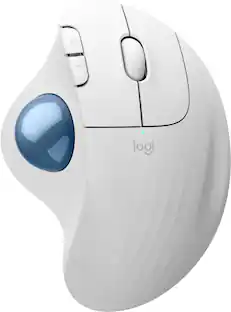
ERGO M575 Trackball features a sculpted shape and smooth thumb control. Certified by US Ergonomics, it is designed to keep hands relaxed and improve forearm posture. Get precise tracking on any surface and adjust cursor speed to your preference. Plus, customizable buttons and quiet clicks improve the work experience.

Minimize movement and maximize comfort with the Logitech ERGO M575S wireless trackball mouse. Thumb control lets you move the cursor without moving your arm, while the sculpted ergonomic design fully supports your hand and keeps your forearm in a more natural position. This wireless ergonomic mouse has been developed by Logi Ergo Lab experts, user-tested and certified by ergonomists to give you 25% less muscle strain in your forearm . The smooth and responsive thumb control can be used anywhere – and since it doesn’t need to be moved, the ERGO M575S is perfect for tight setups and busy desks.

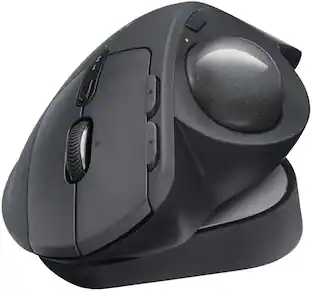
The MX Ergo S Plus is Logitech’s most advanced ergonomic trackball mouse yet, with a 20-degree tilt angle and a 10-degree detachable wedge, and precise thumb control - user-tested and certified by United States Ergonomics. The MX Ergo S wireless ergonomic mouse is sculpted to fit the palm of your hand while keeping it relaxed, and it tilts 20 to 30 degrees for 27% less muscle activity in the forearm, providing elevated comfort throughout your day. Work faster with 6 customizable buttons and a DPI button to effortlessly switch between speed and high-precision tracking. Now with 80% quieter clicks. For even more control that's tailored to your needs, assign time-saving shortcuts and Smart Actions using the Logi Options+ App. Connect your wireless mouse to 2 devices via Bluetooth or the included Logi Bolt receiver and switch between devices with a click of the Easy-Switch button.
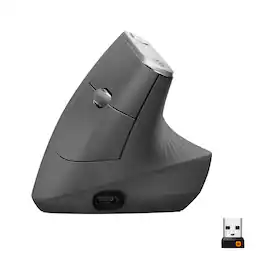
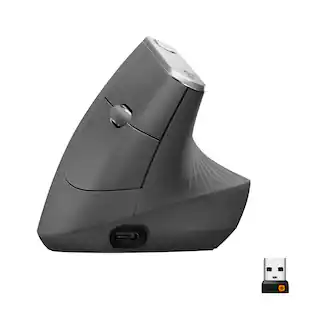
MX Vertical is an advanced ergonomic mouse that combines science-driven design with the elevated performance of Logitech’s MX series. The natural handshake position of MX Vertical reduces wrist pressure and forearm strain. The unique 57° vertical angle has been optimized for an ergonomic posture without compromising a pixel of performance. MX Vertical features a 4000 DPI high-precision sensor, resulting in 4x less hand movement and reducing fatigue. And the cursor speed switch allows you to instantly adjust DPI speed and accuracy with the touch of a button. MX Vertical stays powered for up to four months on a full charge – and gets three hours of use from a one-minute quick charge.
| Pros for Logitech - ERGO M575 Wireless Trackball Ergonomic Mouse for Business - Wireless - Graphite | |||
|---|---|---|---|
| There were no pros for this product— | Ergonomics, Overall Performance, Ease of Use, Connectivity, Battery Life | Ergonomics, Overall Performance, Battery Life, Ease of Use, Connectivity | Ergonomics, Battery Life, Overall Performance, Ease of use, Bluetooth |
| Cons for Logitech - ERGO M575 Wireless Trackball Ergonomic Mouse for Business - Wireless - Graphite | |||
| There were no cons for this product— | Button Sensitivity | Weight | Wrist Pain, Size, Scroll Wheel, Price |
Specs
Customers often buy these together
Computer Keyboards


![esc 1 2 3 4 5 6 7 8 9 0 - = tab Q W E R T Y U I O P [ ] \ caps lock A S D F G H J K L ; ' shift Z X C V B N M , . / ctrl fn opt cmd start alt end home pg up pg dn del backspace 1 2 3 4 5 6 7 8 9 0 - =](https://pisces.bbystatic.com/image2/BestBuy_US/images/products/6554/6554353_sd.jpg;maxHeight=232;maxWidth=233?format=webp)
![g) FS F4 F3 esc F2 F1 A $ % # 6 ! 4 5 ~ 3 1 2 R T W E Q tab F G S D lock A caps V C X Z shift H command option control F6 & 7 Y H B logi 44 F9 FB F7 * ( ) 9 0 8 I O U K L J < N M 1.0% r FI3 FQ2 Fl F10 fn + delete - = - 3 I { / P [ ] A return : I ; shift ? > I control option command 2 10 300 3 F PS F1 page clear home up page 7 end down Q P F F8 = I 8 9 4 5 1 2 0 F9 * 1 + 6 3 enter](https://pisces.bbystatic.com/image2/BestBuy_US/images/products/6578/6578481_sd.jpg;maxHeight=232;maxWidth=233?format=webp)

![esc ~ ! 1 tab caps lock shift ctrl F2 Fl # 2 3 Q W A S Z start opt L F3 $ 4 E D X alt cmd3 ) FS F4 A % 5 6 R T F G V C logi 44 HI & F9 FID FB F7 F6 * ) - - & 0 8 9 7 O P U I Y K L H J > < N M 1 B PM + = { [ : I ; ? I alt cmd D 2 4 300 3 1 F12 . * page I insert home up clear backspace 8 9 + 7 page A pg up end down home } I delete ] / 6 4 5 4 enter 2 3 enter 1 dn Pg end shift = 0 del ins etrl fn opt](https://pisces.bbystatic.com/image2/BestBuy_US/images/products/6539/6539505_sd.jpg;maxHeight=232;maxWidth=233?format=webp)
![Esc F1 F2 F3 F4 F5 F6 F7 F8 F9 F10 F11 F12 Print Screen Scroll Lock Pause Break 1 2 3 4 5 6 7 8 9 0 - + = Backspace Insert Home H Page Up A Num Look 1 I Tab Q W E R T Y U I o P { [ } ] I I Delete End IN Page Down 7 Home 8 9 Pg Up Caps A Lock A S D F G H J K L ; : DE g Enter 4 5 6 Shift Z X C V N M < > ? I Shift 1 End 2 3 Pp Dn Enter Ctrl Alt Alt Ctrl 0 Ins Del](https://pisces.bbystatic.com/image2/BestBuy_US/images/products/a588d446-5678-40ae-86b8-1f15e0026e66.jpg;maxHeight=232;maxWidth=233?format=webp)







Customers ultimately bought
 $74.99The price was $119.99
 Techtober Deal$59.99The price was $89.99
 $74.99The price was $79.99
 $33.00The price was $39.99


Explore tech essentials Sponsored







Discover related products
 Techtober Deal$10.99The price was $13.99









Keep exploring
 Techtober Deal$24.99The price was $32.99
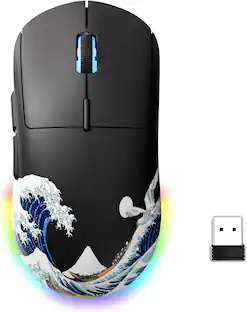 $23.99The price was $24.99
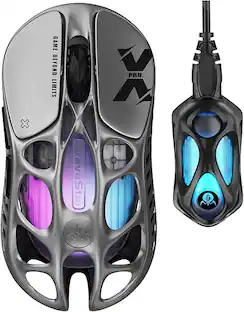 $139.95The price was $187.95