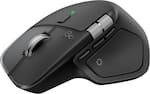
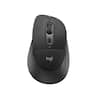
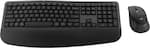
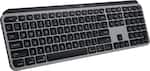
Experience day-long comfort and productivity with this wireless ergonomic keyboard and mouse combo. Typing feels instantly familiar on Wave Keys’ wavy keyframe design. The cushioned keyboard palm rest lifts pressure and improves wrist support. The Signature M550 L Wireless Mouse features a contoured shape and rubber side grip to keep medium- to large-sized hands comfortable throughout the day.
Q: Can I connect this combo to multiple devices?
A: Yes, you can connect to up to three devices and switch between them using the Easy-Switch feature.
Q: How does the SmartWheel feature enhance scrolling?
A: The SmartWheel allows you to scroll through documents line by line or swiftly navigate through long web pages.
Q: Does this keyboard and mouse combo come with a palm rest?
A: Yes, the keyboard features a cushioned palm rest with memory foam for enhanced wrist support.
Q: Is this mouse suitable for left-handed users?
A: Yes, the mouse is designed to be ambidextrous, making it comfortable for both left and right-handed users.
A: The mouse utilizes SilentTouch technology, reducing click noise by over 90% compared to the Logitech M185.
Q: What is the maximum wireless range of the keyboard and mouse?
A: Both the keyboard and mouse have a maximum wireless range of 33 feet.
Q: I just purchased this keyboard. can you tell me where the calculating key is.
A: Hey! The Logitech Wave Keys MK670 Combo doesn’t include a dedicated calculator key, but you can easily assign one using the Logi Options Plus application.
A: The Logitech - Wave Keys MK670 Combo is designed for both Mac and Windows operating systems. It features a dual layout with printed keys for both systems. You simply switch between the two using the included Easy-Switch button. There's no need to choose between a Mac or Windows layout as the keyboard accommodates both.

Experience day-long comfort and productivity with this wireless ergonomic keyboard and mouse combo. Typing feels instantly familiar on Wave Keys’ wavy keyframe design. The cushioned keyboard palm rest lifts pressure and improves wrist support. The Signature M550 L Wireless Mouse features a contoured shape and rubber side grip to keep medium- to large-sized hands comfortable throughout the day.

The Logitech Wireless Desktop MK710. Where comfort and productivity go hand-in-hand. This low-profile keyboard features Logitech Incurve keys, which are so comfortable you’d think they were custom-made to fit your fingers, and a cushioned palm rest. Up to three-year battery life for both keyboard and mouse practically eliminates the need to replace batteries.

Experience next-level comfort and productivity with the MK850 Performance. Hyper-fast scrolling and a full-size keyboard help you get more done at your desk – and a cushioned palm rest, curved keyframe and contoured mouse let you power through in comfort. Type and switch seamlessly between your computer, tablet, and phone. And pair your mouse with up to 3 devices. The combo has been optimized for use with all your operating systems – including Windows, Mac, and Chrome OS.

For workdays that go easy on you, Feel the Wave. Wave Keys wireless ergonomic keyboard is shaped to feel instantly familiar and keep you typing all day in a natural position. A cushioned palm rest with memory foam gives your wrists more support throughout the day.
| Pros for Logitech - Wave Keys MK670 Combo Ergonomic Wireless Membrane Keyboard and Mouse Bundle for PC/Mac with Integrated Palm-rest - Graphite | |||
|---|---|---|---|
| Ergonomics, Ease of use, Palm Rest, Overall Performance, Connectivity | Keyboard Quality, Ease of use, Battery Life, Wireless, Wrist Rest | Keyboard Quality, Ease of use, Connectivity, Battery Life | Ergonomics, Palm Rest, Connectivity, Overall Performance, Color |
| Cons for Logitech - Wave Keys MK670 Combo Ergonomic Wireless Membrane Keyboard and Mouse Bundle for PC/Mac with Integrated Palm-rest - Graphite | |||
| Keyboard Size, Key Spacing, Backlight | Lag, Price, Key Feel, Scroll Wheel | Lag, Price | Size, Wrist Pain |
Customers express satisfaction with the Wave Keys MK670 Combo's ergonomic design, ease of use, and integrated palm rest, noting its excellent overall performance and reliable wireless connectivity. However, some users find the keyboard smaller than expected. Additionally, a few customers have noted the key spacing and lack of backlighting as potential drawbacks.
The vast majority of our reviews come from verified purchases. Reviews from customers may include My Best Buy members, employees, and Tech Insider Network members (as tagged). Select reviewers may receive discounted products, promotional considerations or entries into drawings for honest, helpful reviews.
I purchased this combo for use in my office after having a couple of the Amazon deal ones fizzle out after a couple months of use. Seeing how my office is using one of those open office concepts, having a massive ergonomic keyboard isn't exactly practical since it needs to fit in a rather quaint locker at the end of the day. Ergonomics - I love this keyboard/mouse combo not only for the fact it fits nicely in a locker, but ergonomics of them are very nice. I am one of those who cannot use either a traditional keyboard, let alone a laptop keyboard for extended periods of time. Feel - The tactile response of the keys is smooth and satisfying for typing. You don't have a great deal of noise coming from the keys, which is nice in an open environment that is already flooded with other auditory irritants. The mouse has smooth operations and again has the same smooth tactile response. Connection - Unlike other Bluetooth connected keyboards & mice that I have used, the connection for these stays strong even at a distance. I haven't noticed any interference or lag even with multiple devices connected at once. Other keyboards I have used had a tendency to become interrupted or slow to respond if I was connected on a Teams call or had my headphones connected as well streaming music. Provided the batteries are good, I've seen little to no connection issue here. I also love that these have physical power buttons included so you can make sure they are turned off at the end of use and don't eat in to your battery life. Overall - Great product for your home or office. If you are short on space, this is an excellent choice for those who like the comfort and feel of an ergonomic keyboard.
TateB Posted
Absolutely love this keyboard. The look and feel to it is superb! This is my second time buying this product because of how comfortable it is to type with. I love that the sound of typing is minimal while the mouse clicking is hardly noticeable and palm rest is great! Only down fall of this product is that sometimes the mouse or keyboard don't respond, but it's an easy fix of just unplugging/plugging the USB from computer and it's back like normal.
LorenaV Posted
I purchased 2 of Logitech wase keys MK670, why I got 2 septate pc, side by side, so far, I enjoy it but one seem to freeze up as far as the arrow but once i put out the USB and re install it its back to normal, i like its wireless no wires showing on desk, it great, the padded strip for the hands feels great
RickG Posted