
Logitech - MK470 Full-size Wireless Scissor Keyboard and Mouse Bundle for Windows with Quiet clicks - Black/Gray
Logitech - MK470 Full-size Wireless Scissor Keyboard and Mouse Bundle for Windows with Quiet clicks - Black/Gray
Color
Black/Gray- Logitech - Brio 100 1080p Full HD Webcam for Meetings and Streaming - Graphite$30.49$39.99
More Buying Options

Specifications
- Lighting TypeNoneAdjustable Weight SystemNoForm FactorFull-sizeKeyboard TechnologyScissorConnection TypeWireless
- Key Specs
- Lighting Type: None
- Adjustable Weight System: false (Customize the mouse by adding or removing weights to find the optimal balance, control, and flexibility.)
- Form Factor: Full-size (The size, arrangement, and physical configuration of the product.)
- Keyboard Technology: Scissor (Type of technology that detects a key press.)
- Connection Type: Wireless
- General
- Brand: Logitech
- Model Number: 920-009437
- Product Name: MK470 Full-size Wireless Scissor Keyboard and Mouse Bundle for Windows with Quiet clicks
- Color: Black/Gray
- Features
- Lighting Type: None
- Numeric Keypad: true
- Touchpad: false
- Keyboard Type: Keypad
- Palm Rest: false
- Spill Resistant: false (Designed to resist some degree of accidental liquid spill. The level of spill-resistance is indicated by the product manufacturer, but the degree of protection may not be guaranteed after normal wear of the product.)
- Keyboard Features: Slim, minimalist design, wireless, space-saving
- Foldable: false
- Adjustable Weight System: false (Customize the mouse by adding or removing weights to find the optimal balance, control, and flexibility.)
- Keycap Material: ABS
- Maximum Number of Memory Profiles: 0
- Functions
- Form Factor: Full-size (The size, arrangement, and physical configuration of the product.)
- Number Of Keys: 101
- Keyboard Technology: Scissor (Type of technology that detects a key press.)
- Dedicated Macro Keys: false (Perform shortcuts of key sequences to carry out commands with a single key. Key sequences may include key strokes, mouse actions, and/or menu actions.)
- Adjustable Tilt Function: false
- Multimedia Keys: false
- Internet Keys: false
- Number Of Programmable Keys: 0
- Connectivity
- Connection Type: Wireless
- Wireless Connectivity: Radio Frequency (RF) (The manner in which a device sends data to another device over a short distance without the use of wires or cables.)
- Maximum Wireless Range: 33 feet
- Number Of USB Port(s): 1 (The total number of USB ports including all generations and versions.)
- Number of Devices Connectable Simultaneously: 1
- Compatibility
- Operating System Compatibility: Windows, Chrome
- Plug and Play Operation: true
- System Requirements: Available USB port, Windows 10, 11 or later, ChromeOS, Works with Surface (The software that a product must have for it to be able to integrate with another product.)
- Power
- Rechargeable Battery: false
- Battery Size: AAA (The battery size required for operation.)
- Number of Batteries Required: 2
- Battery Chemistry: Alkaline
- Batteries Included: true (Indicates whether the product comes with the required batteries for its operation.)
- On/Off Switch: true
- Dimensions
- Product Height: 0.84 inches (The out of box height of the item. Height is measured as the vertical distance from the bottom of the item to the top as it would be primarily used or placed.)
- Product Width: 14.7 inches (The out of box width of the item. Width is measured as the horizontal distance from one side of the item to the other as it would be primarily used or placed.)
- Product Depth: 5.6 inches (The out of box depth of the item. Depth is measured as the distance from the front of the item to the back as it would be primarily used or placed.)
- Product Weight: 19.7 ounces (The out of box weight of the item.)
- Product Height (Mouse): 4.21 inches (The out of box height of the item. Height is measured as the vertical distance from the bottom of the item to the top as it would be primarily used or placed.)
- Product Length (Mouse): 1.04 inches (The out of box length of the item. Length is measured as the longest dimension of the item.)
- Product Width (Mouse): 2.32 inches (The out of box width of the item. Width is measured as the horizontal distance from one side of the item to the other as it would be primarily used or placed.)
- Product Weight (Mouse): 3.53 grams (The out of box weight of the item.)
- Mouse
- Mouse Included: true
- Mouse Operation: Scroll wheel, Button(s)
- Mouse Type: Compact
- Connection Type (Mouse): Wireless
- Wireless Connectivity (Mouse): Radio Frequency (RF) (The manner in which a mouse sends data to another device over a short distance without the use of wires or cables.)
- Maximum Sensitivity: 1000 dots per inch (Mouse sensitivity is measured in dots per inch (DPI). The higher the DPI, the more sensitive the mouse is and may be more useful for high-density pixel screens. Lower DPI typically means more precision and accuracy in mouse movement.)
- Minimum Sensitivity: 1000 dots per inch (Mouse sensitivity is measured in dots per inch (DPI). The higher the DPI, the more sensitive the mouse is. Lower DPI typically means more precision and accuracy in mouse movement, but higher DPI may be useful for high-density pixel screens.)
- Number of Buttons: 3
- Number of Thumb Buttons: 0
- Number of Programmable Buttons: 0
- Handedness: Ambidextrous
- Rechargeable Battery (Mouse): false
- Battery Chemistry (Mouse): Alkaline
- Battery Size (Mouse): AA (The battery size required for operation.)
- Warranty
- Warranty - Parts: 1 year
- Warranty - Labor: None
- Other
- UPC: 097855153326
The slim profile and minimalist design transform your keyboard and mouse into a visual statement that elevates your desk setup. A slim profile and compact design make typing and mousing a pleasure. Low-profile keys give you that laptop-like typing experience you know and love. Whisper-quiet keys and a 90% noise-reduced mouse let you power through in near-silence. Long battery life and an easy plug-and-play 2.4GHz USB receiver ensure a reliable, hassle-free experience.
- Compact keys with numpad: Logitech MK470 cordless combo features a compact modern designed keyboard with low-profile scissor keys, a number pad and a layout optimized for Windows.
- Ultra slim duo: This wireless keyboard and mouse set also features a comfortable, ambidextrous 3-button mouse with high precision optical tracking and mechanical scroll wheel.
- Ultra quiet: Whisper quiet keyboard and lab-tested, noise-reduced mouse means an ultra quiet work experience for you and those around you both in the office and at home.
- Reliable wireless connectivity: Simple plug-and-play USB nano receiver offers a strong reliable 2.4 GHz wireless connection with 33ft of range.¹
- Extended autonomy: Auto-sleep feature saves battery life, allowing for 36 months of keyboard use and 18 months of mouse use.²
- Customizable keys: Unlock a full range of possibilities and customize this combo to fit your personalized needs; set up and assign shortcuts to the 12 customizable FN keys with Logi Options+ software.
Whats Included
- Keyboard
- 2 AAA batteries (pre-installed)
- Mouse
- 1 AA battery (pre-installed)
- USB receiver
- User documentation
A: Hello, yes this is compatible with Mac but it does need an available USB port in order to function. -Danielle from Logitech.
A: Hello Charlie. The MK470 combo does not have CAPS or NUM lock indicators on-board.
Q: Is there an on/off switch on the keyboard?
A: The keyboard for the MK470 doesn't have an on/off switch. There is a sleep mode that the keyboard goes into when not in use that helps preserve battery life.
Q: Will this work with a Mac and Windows?
A: yes it will
A: If it is a PC keyboard paired with a Mac laptop, try the "Windows" key instead of the Ctrl key, i.e., Windows C, Windows V. The Windows key is usually equivalent to the Command key.
Q: Is this compatible with a Chromebook?
A: Hello Sam, the MK470 works with Windows® 10 or later, Windows 8, Windows 7 and also works with Surface. Although it won't have Chrome specific keys, it will still work. I recommend checking out our K580 combo we have. That keyboard was designed for Chrome OS and I think that it would be a better fit for what you are looking for. I'll attach a link at the end of this message, have a great day. https://www.logitech.com/en-us/products/combos/k580-m355-chromebook-keyboard-mouse-combo.html
A: OPEN the SILVER Full Width "Plastic Strip" at the TOP of the Keyboard. Kinda hard to open. Must SLIDE this Silver Strip FORWARD and AWAY From the Keys. Takes some fiddling to get the "hang of it". Found instructions on Logitech Website ... because I could not figure it out. Keep pressing forward on Silver Strip (with "logi" in center) ... NOT LIFTING UP ... you will get nowhere ... then SUDDENLY the stupid things slides open. DUH!
Q: What are the dimensions of this device
A: Very small profile. 14 3/4 x 5 3/4 Love my keyboard! Joe
Compare similar products

The slim profile and minimalist design transform your keyboard and mouse into a visual statement that elevates your desk setup. A slim profile and compact design make typing and mousing a pleasure. Low-profile keys give you that laptop-like typing experience you know and love. Whisper-quiet keys and a 90% noise-reduced mouse let you power through in near-silence. Long battery life and an easy plug-and-play 2.4GHz USB receiver ensure a reliable, hassle-free experience.

Defy Boring with the Pebble 2 Combo made with recycled plastic. Its minimalist, slim design makes it as iconic as you and super portable. Pair up to 3 wireless devices across OS and switch between devices with a press of a button (Logi Bolt receiver also included). With Logi Options+ app, you can customize your Pebble Mouse 2 M350s’ middle button with shortcuts that shuffle your Spotify playlist, send emojis on WhatsApp, and more. Personalize the 10 keyboard Fn shortcut keys to work how you want and save time.
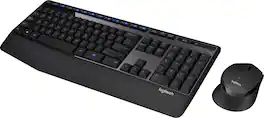
The Logitech Wireless Combo MK345 pairs a comfortable full-size keyboard with a right-handed mouse. It comes with comfortable and textured palm rest, spill-resistant design, and glossy finish. Its wireless connectivity gives the reliability of a cord plus wireless convenience and freedom. Its energy efficient engineering delivers 36-month keyboard and 18-month mouse battery life.

MK540 Advanced is an instantly familiar wireless keyboard and mouse combo built for precision, comfort and reliability. The full-size keyboard features a familiar key shape, size, and feeling – optimized for precision and noise reduction. The palmrest and adjustable tilt legs keep you comfortable for long stretches and the contoured mouse is designed to fit perfectly into either palm. Plug and play your keyboard and mouse with one tiny USB receiver with Logitech Unifying technology. You’ll get a reliable – and encrypted – wireless connection up to 32.8 ft away with virtually no delays or dropouts.
| Pros for Logitech - MK470 Full-size Wireless Scissor Keyboard and Mouse Bundle for Windows with Quiet clicks - Black/Gray | |||
|---|---|---|---|
| Keyboard Quality, Ease of use, Size, Design, Weight | Size, Keyboard Quality, Battery Life, Portability, Connectivity | Keyboard Quality, Ease of use, Wireless, Price, Battery Life | Keyboard Quality, Ease of use, Wireless, Price, Battery Life |
| Cons for Logitech - MK470 Full-size Wireless Scissor Keyboard and Mouse Bundle for Windows with Quiet clicks - Black/Gray | |||
| Caps Lock Indicator, Compatibility | There were no cons for this product— | Lag | Lag, Connection |
Specs
Reviews
Customers are saying
Customers find value in the MK470 keyboard's quality, ease of use, and suitable size for desks. The lightweight design and wireless functionality are also appreciated. However, some customers have expressed a desire for a Caps Lock indicator and have reported compatibility issues.
Customer Images
The vast majority of our reviews come from verified purchases. Reviews from customers may include My Best Buy members, employees, and Tech Insider Network members (as tagged). Select reviewers may receive discounted products, promotional considerations or entries into drawings for honest, helpful reviews.
- Rated 5 out of 5 stars
Logitech MK470 keyboard and mouse bundle Review
I’ve been using the Logitech MK470 keyboard and mouse bundle for a bit now, and overall it’s a really solid setup especially for the price. The first thing I noticed is how quiet it is. The scissor-style keys are very low-profile and soft, so typing doesn’t make a lot of noise at all. That’s perfect if you’re working in a shared space, on calls, or late at night. The keyboard feels comfortable for everyday typing like emails, documents, and general work, even during long sessions. The mouse is simple but reliable. It’s lightweight, quiet-clicking, and tracks smoothly on most surfaces. It’s not meant for gaming or heavy design work, but for office work and general use, it does exactly what you need without any issues. Setup was effortless, just plug in the USB receiver and both the keyboard and mouse connect instantly. No drivers, no headaches. I also really like how slim and modern the keyboard looks; it keeps my desk clean and uncluttered. Battery life has been great so far, and not having to constantly swap batteries is a big plus. For a wireless combo at this price point, the build quality feels better than expected. Overall, this is an excellent keyboard and mouse bundle if you’re looking for something quiet, simple, and dependable for everyday use. It’s not flashy, but it gets the job done very well, and I’d definitely recommend it for home offices, work-from-home setups, or general computer use.
MichaelY Posted
- Rated 5 out of 5 stars
Sleek, Quiet, and Perfect for Everyday Use
The Logitech MK470 is a great combo for anyone who values a clean, modern design and quiet typing. The scissor-switch keys feel smooth and comfortable, almost like a laptop keyboard, and the mouse clicks are nearly silent. Both the keyboard and mouse are slim, lightweight, and take up little desk space while still feeling sturdy. Battery life has been excellent so far, and the wireless connection is strong with no lag. It’s perfect for work, school, or casual use, especially if you want a quiet setup. Highly recommended!
This review is from Logitech - MK470 Full-size Wireless Scissor Keyboard and Mouse Bundle for Windows with Quiet clicks - Off-White
escobarjr Posted
- Rated 4 out of 5 stars
Great keyboard!
Really like the keyboard, but I don’t love the mouse design, it’s a bit flat for my liking. Ended up just using the keyboard and getting a different mouse.
Gise Posted







