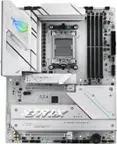
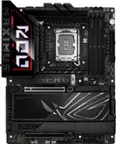
MSI - Z890 GAMING PLUS WIFI (Socket LGA 1851) Intel Z890 ATX DDR5 Wi-Fi 7 Motherboard - Black
 Thermal Grizzly - Kryonaut - 1 Gram - Extremly High Performance Thermal Paste - for Demanding Applications & Overclocking$10.99

More Buying Options
Related Item

Specifications
- ChipsetIntel Z890Form FactorATXProcessor SocketSocket LGA 1851Wireless Networking StandardWi-Fi 7Number Of Memory Slots4Maximum Memory Supported256 gigabytes
- Key Specs
- Chipset: Intel Z890
- Form Factor: ATX (The size, arrangement, and physical configuration of the product.)
- Processor Socket: Socket LGA 1851 (Type of pin configuration that connects a CPU to a computer’s motherboard.)
- Wireless Networking Standard: Wi-Fi 7 (The wireless networking standard used by the device. Each iteration of the standard developed by the Wi-Fi Alliance corresponds to an existing IEEE 802.11 protocol; for example, standard 802.11ac (or AC) is termed Wi-Fi 5. Refers specifically to the standard the device is designed to use, but ultimately determines product interoperability and backward compatibility including previous versions.)
- Number Of Memory Slots: 4
- Maximum Memory Supported: 256 gigabytes
- Memory Type Supported: DDR5
- General
- Brand: MSI
- Model Number: Z890 GAMING PLUS WIFI
- Product Name: Z890 GAMING PLUS WIFI (Socket LGA 1851) Intel Z890 ATX DDR5 Wi-Fi 7 Motherboard
- Color: Black
- Year of Release: 2024
- Compatibility
- Chipset: Intel Z890
- Chipset Compatibility: Intel
- Form Factor: ATX (The size, arrangement, and physical configuration of the product.)
- Processor Socket: Socket LGA 1851 (Type of pin configuration that connects a CPU to a computer’s motherboard.)
- Processor Compatibility: Intel Core Ultra 5 Series 2, Intel Core Ultra 7 Series 2, Intel Core Ultra 9 Series 2
- Operating System Compatibility: Windows 10, Windows 11 Home, Windows 11 Pro
- Slot
- Number of M.2 Slots: 2 (This interface is most commonly used for high-speed solid state drives (SSDs), and is often used in laptops due to its small size.)
- Number Of PCI-E x16 Slots: 1
- Number Of PCI-E x4 Slots: 2
- Number Of PCI-E x1 Slots: 1
- Number Of Memory Slots: 4
- Connectivity
- Wireless Connectivity: Bluetooth, Wi-Fi (The manner in which a device sends data to another device over a short distance without the use of wires or cables.)
- Wireless Networking Standard: Wi-Fi 7 (The wireless networking standard used by the device. Each iteration of the standard developed by the Wi-Fi Alliance corresponds to an existing IEEE 802.11 protocol; for example, standard 802.11ac (or AC) is termed Wi-Fi 5. Refers specifically to the standard the device is designed to use, but ultimately determines product interoperability and backward compatibility including previous versions.)
- Wireless Standard: BE (The wireless networking protocol used by the device. Each iteration of the protocol is based on the 802.11 standard developed by the Institute of Electrical and Electronics Engineers (IEEE) Standards Association. Denoted by letters following 802.11 (802.11a, 802.11ac, etc.), each version, published in alphabetical order, encompasses all previous versions.)
- Ports
- USB Ports: 8 x USB-A 2.0, 6 x USB-A 3.2, 1 x USB-A 3.2, 1 x USB-C 3.2, 1 x USB-C 3.2 (The number and type of USB ports the product has.)
- Number of Audio Channels: 7.1 (The number of discrete channels of sound output. This can be a single number or multiple numbers separated by decimal(s). The first number is the primary, horizontally directed audio channels. The number after the first decimal, if applicable, is the number of subwoofer outputs or channels. The number after the second decimal, if applicable, is the number of height or atmospheric channels designed to immerse the listener by producing overhead sound effects.)
- Dimensions
- Product Length: 304.8 millimeters (The out of box length of the item. Length is measured as the longest dimension of the item.)
- Product Width: 243.84 millimeters (The out of box width of the item. Width is measured as the horizontal distance from one side of the item to the other as it would be primarily used or placed.)
- Product Weight: 48 ounces (The out of box weight of the item.)
- Memory
- Maximum Memory Supported: 256 gigabytes
- Memory Type Supported: DDR5
- Memory Format Supported: UDIMM (Memory module size that will fit with the device.)
- Memory Speeds Supported: 4x DDR5, Maximum Memory Capacity 256GB (The RAM's bandwidth rating supported by the device. The number refers to transfer speed. For example, 12800 would indicate that the memory has a theoretical bandwidth of 12,800 megabytes per second (MBs). The higher the number, the faster the speed.)
- Memory Slot Type: 288-pin DIMM
- Features
- RAID Support: RAID 0, RAID 1, RAID 10 (RAID 1+0) (A Redundant Array of Independent Disks (RAID) includes a collection of separate disks that your computer recognizes as one disk unit. Each configuration offers a different level of mirroring, striping and read/write speeds.)
- Other
- UPC: 824142381465
Z890 GAMING PLUS WIFI takes all the essential elements of the Intel Core Ultra Processors (Series 2) and combines them with game-ready features and proven durability.
- Processor compatibility: Supports Intel Core Ultra Processors (Series 2)
- Speed (memory speed supported): 4x DDR5, Maximum Memory Capacity 256GB Memory Support DDR5 7800+(OC)/ 7600(OC)/ 7400(OC)/ 7200(OC)/ 7000(OC)/ 6800(OC)/ 6600(OC)/ 6400(OC)/ 6200(OC)/ 6000(OC)/ 5800(OC)/ 5600(OC)/ 5400(OC)/ 5200(OC)/ 5000(OC)/ 4800(JEDEC) MH
- Graphics: Integrated Graphics Processor
- DDR5 memory: 4 DIMMs, Duel Channel DDR5 7800+MHZ (OC)
- Audio: 8-Channel (7.1) HD Audio with Audio Boost
- Processor compatibility: Supports Intel Core Ultra Processors (Series 2)
- Speed (memory speed supported): 4x DDR5, Maximum Memory Capacity 256GB Memory Support DDR5 7800+(OC)/ 7600(OC)/ 7400(OC)/ 7200(OC)/ 7000(OC)/ 6800(OC)/ 6600(OC)/ 6400(OC)/ 6200(OC)/ 6000(OC)/ 5800(OC)/ 5600(OC)/ 5400(OC)/ 5200(OC)/ 5000(OC)/ 4800(JEDEC) MH
- Graphics: Integrated Graphics Processor
- DDR5 memory: 4 DIMMs, Duel Channel DDR5 7800+MHZ (OC)
- Audio: 8-Channel (7.1) HD Audio with Audio Boost
Q: How many USB-A 2.0 ports does the motherboard have?
A: This motherboard has eight USB-A 2.0 ports.
Q: What is the maximum memory capacity supported by the motherboard?
A: The maximum memory capacity supported by the motherboard is 256 gigabytes.
Q: Is the motherboard compatible with Windows 10?
A: This motherboard is compatible with Windows 10.
Q: Can the motherboard support RAID 0?
A: This motherboard supports RAID 0.
Q: Which wireless networking standard does the motherboard support?
A: The motherboard supports the Wi-Fi 7 wireless networking standard.
Compare similar products

Z890 GAMING PLUS WIFI takes all the essential elements of the Intel Core Ultra Processors (Series 2) and combines them with game-ready features and proven durability.
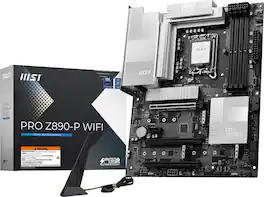
PRO Z890-P WIFI takes all the essential elements of the Intel Core Ultra Processors (Series 2) and combines them with game-ready features and proven durability.
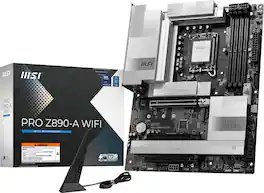
PRO Z890-A WIFI takes all the essential elements of the Intel Core Ultra Processors (Series 2) and combines them with game-ready features and proven durability.

Z790 GAMING PLUS WIFI is designed with tons of connectivity, flexible tools, and convenient Wi-Fi solution with DDR5 memory version for gamers who want all.
| Pros for MSI - Z890 GAMING PLUS WIFI (Socket LGA 1851) Intel Z890 ATX DDR5 Wi-Fi 7 Motherboard - Black | |||
|---|---|---|---|
| There were no pros for this product— | There were no pros for this product— | Overall Performance | Overall Performance, Ease of use, BIOS, Design, M.2 Slots |
Specs
Reviews
Customer Images
The vast majority of our reviews come from verified purchases. Reviews from customers may include My Best Buy members, employees, and Tech Insider Network members (as tagged). Select reviewers may receive discounted products, promotional considerations or entries into drawings for honest, helpful reviews.
- Rated 5 out of 5 stars
Good one
This motherboard is exceptionally well-built, and I tested all the I/O ports—they all performed flawlessly. This demonstrates that the manufacturer didn’t skimp on these less noticeable details. Moreover, the design is more refined compared to the previous generation, featuring a brand-new and visually appealing BIOS UI. A commendable aspect is that the Wi-Fi 7 chip is from Intel—stable and fast. Unlike MediaTek solutions, which are often plagued by driver issues, this makes a significant difference.
Posted by Nico
- Rated 5 out of 5 stars
MSI
Working really well had a hiccup with not noticing the socket was different than my now previous processor. Only issue I have atm is that the iBuyPower fans led's aren't connecting to the Hyte Nexus software due to MSI software overriding it even when seeing if uninstalling it would fix it. Other than that amazing product. Needed to also install LAN drivers during windows fresh install using their media creation tool. Then uninstalled the Killer software since it lowered my internet speed by adjusting the bandwidth.
Posted by ZigzagComplex
- Rated 4 out of 5 stars
Lack of instructions
We had to go to MSI.com and YouTube to figure some of the installation issues out. There're no instructions included. DIMM slot A2 had issues fitting the DIMM, but after several tries of reseating it, the DIMM slipped right in as it should. No issues with B2 DIMM slot. It seemed like the slot wasn't big enough to begin with. Checked both DIMMS and they appeared identical without flaws. Didn't see any flaws on MB slot either. It just didn't want to fit into the slot so wiggling and force had to be used, but carefully and within reason. When we finally got it to fit into the slot, the MB would not recognize it. We tried one last time and it slipped right in without issue.
Posted by Battleship