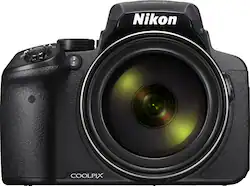
Deciding on this camera: We bought this camera to take on safari. We have been using point-and-shoot cameras with smaller zooms (15X and 25X) for travel, but we wanted to make sure the animals we saw were not just little dots in the pictures when we return from the Serengeti. We looked into purchasing a DSLR; however, to get a similar zoom plus the camera body seemed like it was going to cost over $1K. The most informative review on the P900 was at Photography Life (https://photographylife.com/reviews/nikon-coolpix-p900) by John Sherman. He highlights the features, at times in comparison to his expensive professional DSLR, and includes many sample photographs. Sure some quality is lost in the picture of the eagle at full zoom; however, the camera that took the crisp, clear photo cost him over $21K! For many people, lack of RAW format was a disappointment; however, my version of editing is using Google's Picasa to sort through (and occasionally crop) the 100s (or 1000s) of photos I take with the point and shoot. Thus, JPEG format is fine for us.
Purchasing: Finding the P900 in stock was a challenge, but we were able to get one from Best Buy following the advice in one of the Amazon reviews that suggested checking the stock on the Nikon webpage each day. Basically, there is an option on the P900 Nikon page to "Where to Buy" that actually lists the online suppliers and whether they have the camera in stock. I looked everyday for about a week in mid-June, and one morning it was listed as "In Stock" at Best Buy. I bought the camera and then looked back at the "Where to Buy" on the Nikon page, and it said out-of-stock again.
First impressions: The camera case is a lightweight plastic that some reviewers thought looked/felt cheap. However, carrying the camera around at the Botanica Gardens in the heat, I was very appreciative of how much less the camera would weigh than if it were made of metal or heavier plastic. I was able to hold onto the camera with one hand via the grip with the strap wrapped around my wrist for a little extra security for the hour we were out without tiring. I used my left hand to stablize the camera whenever using the zoom or when I was not in direct sunlight.
Using the super zoom: When I first tested the camera indoors or in the shade with the zoom fully extended, it was difficult to get a non-shaky picture. However, when we went to a local nature reserve, I was able to get pictures of birds we only spotted with our 10X42 binoculars at full zoom with the camera supported only by my two hands (not even bracing my elbows against my chest as I did in the shade pictures). There is enough detail to see that the birds eyelids are open in one picture and closed in the next. I used the "bird watching mode" under Scenes, which takes up to 7 pictures (in 1 sec) when you press the button. This increased the odds of getting a good picture of the bird, but had the downside of waiting a few seconds after each burst of pictures for the pictures to write to the SD card (16 MP picture quality, 90MB/s memory card). The camera has this great function when the zoom is extended and you lose the bird you are trying to shoot called "snapback zoom". With your left hand you hold down the button on the side of the lens and the camera will zoom out. A black box appears in the view finder, move the camera to get the bird in the box and then release the button to zoom in on the bird. This is super efficient and less nauseating than trying to search for the bird at full zoom.
Continuous shooting mode: We had great fun photographing animals that stayed primarily in the same place. However, we will need more practice to be able to catch a flying bird. The continuous shooting mode at max rate is 7 frames per second but it stops after the 7th frame and starts writing to the card. The pre-shooting cache is partial way around this. You press the shutter release half-way down, and it starts taking pictures. When the animal does something interesting, you press the shutter release the rest of the way down and the camera saves the previous 5 pictures and then 10 more. I was trying to use these functions to take pictures of my nephew going down a circular slide at the park. He got frustrated when I asked him to go again and again. I was only catching him appearing around the first loop. In retrospect, what I really needed was to use 2 fps (one of the slower continuous modes) so I could keep taking pictures until he reached the bottom. 7 fps was just too many pictures for the slide action.
Battery Life: I bought 2 Watson brand batteries as they were $40 each at B&H photo, instead of $80 for an extra Nikon battery. Then at Best Buy a few weeks later, I saw their generic brand on sale for $10 per battery (normally $30) and bought 3. The P900 uses the same camera battery as the P600. They tend to last about half-a-day depending on how much I use the view finder vs the screen. The other issue is that if you are trying to track animals to photograph, this also eats up battery so the picture estimate that others have given (~260 photos) may be much less (if you have to wait sometime for your shot) or twice that if you use continuous shoot. We shot ~600 photos of birds (7fps, 1 sec at a time) over a ~2 hour period at a bird reserve last weekend.
Automatic vs Manual Modes: On my previous point-and-shoot camera, I had relied on the "intelligent auto" function. For the P900, the automatic button (green) takes reasonable pictures but you can make very few adjustments. Under SCENE mode on the dial, there is an auto scene selector as the first option that works more like the "intelligent auto" on other cameras. There are many great scenes to choose from including the bird watching. To use some of the great features such as "Active D-lighting" to bring objects out of the shadows, however, we have had to take a crash course in manual settings for photography (using many free web resources). This overall has been very rewarding, and we are now primarily using aperture mode for everyday shooting with the camera. Note that for the manual mode, there is an option under setup to have the screen reflect the exposure level before the photo is taken. This is good for reducing the number of too dark photos.
Other cool features: The camera has a time lapse mode for taking pictures of cityscapes, sunsets or night skies. We have tried the 50 minute series for sunsets twice now with great results. It takes several pictures a minute and then quickly compresses it into a 9 second movie.