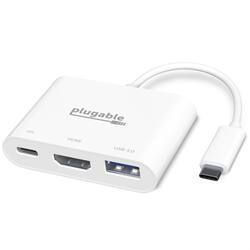
Plugable - USB C to HDMI Multiport Hub - Driverless - White
- Key Specs
- Number of USB Port(s): 1
- General
- Brand: Plugable
- Model Number: USBC-MD103
- Product Name: USB C to HDMI Multiport Hub - Driverless
- Color: White
- Features
- Hub Type: USB hubs (The type of connection, such as Ethernet or USB, used to connect peripheral devices to the hub for shared access.)
- Ports
- Number of USB Port(s): 1
- Port Type(s): USB (USB 2.0 connects external drives, gaming controllers, smartphones, MP3 players and other accessories.USB 3.0 transfers data faster than USB 2.0, but only when used with USB 3.0 devices.USB Type-C provides fast speeds and versatile power, featuring connectors with identical ends that plug in upside down or right side up. Adapters allow for video as well as backward compatibility.Thunderbolt provides ultra-high bandwidth for fast data transfer between devices featuring a Thunderbolt or MiniDisplayPort connection.HDMI allows you to connect a projector or display HD media on your HDTV or monitor.Media card slots allow you to transfer photos from your digital camera or camcorder.)
- Compatibility
- System Requirements: macOS 10.14 (Mojave) or later; Windows 10 and Above (The software that a product must have for it to be able to integrate with another product.)
- Dimensions
- Product Height: 0.6 inches (The out of box height of the item. Height is measured as the vertical distance from the bottom of the item to the top as it would be primarily used or placed.)
- Product Length: 6 inches (The out of box length of the item. Length is measured as the longest dimension of the item.)
- Product Width: 2.3 inches (The out of box width of the item. Width is measured as the horizontal distance from one side of the item to the other as it would be primarily used or placed.)
- Product Weight: 1 pounds (The out of box weight of the item.)
- Warranty
- Warranty - Parts: 2 year limited
- Warranty - Labor: 2 year limited
- Other
- UPC: 819927012375
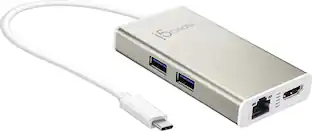
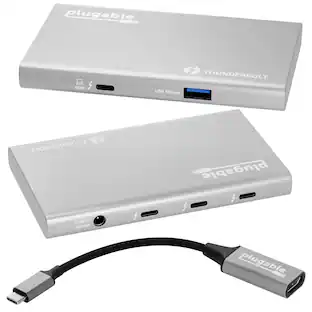
Plugable's USB-C Mini Dock enables you to connect an external monitor, USB peripheral and USB-C power adapter to a USB Type-C or Thunderbolt 3 supported system. The compact size of this USBC multi port adapter allows for ultra portability and removes the need to carry multiple dongles that could occupy other valuable ports. Awarded by Macworld as the Best Alternative to Apple AV Multiport Adapter. Performance The Plugable Thunderbolt multiport adapter leverges the USB-C DisplayPort Alt Mode and USB Power Delivery technologies to support an external monitor and Power Delivery functions. It offers a USB 3.0 Type-A port that supports data transfer speeds up to 5Gbps. The USB C to hdmi with charging port is entirely USB bus powered and does not require a power supply to work. Please note: disconnecting the system's USB power adapter when plugged into the USB C digital AV multiport adapter will disconnect the connected monitor and USB device and they should autmatically reconnect The HDMI 1.4 port on the HDMI to USB C adapter can support resolutions up to 3840x2160@60Hz and 1080p resolutions at 60Hz Charge your system's battery using the USB hub's USB-C power adapter while conencted to the USB-C 3.0 Power Delivery input port (5-20v @ 3A) Compatibility Compatible with Windows, macOS and Chromebook systems with a USB-C port that supports DisplayPort Alternate Mode, USB Power Delivery or Thunderbolt 3. Our adapter has been tested on the MacBook Pro, HP Spectre x360, Dell XPS, Lenovo ThinkPad and many other systems with compatible USB-C or Thunderbolt 3 ports. Not compatible with USB Type-A systems even when used with USB Type-A to USB Type-C adapters. The host system and connected monitor must support the desired resolution. The host system must also support Power Delivery over USB-C in order for charging functions to work
- 3-in-1 Expansion: Awarded by Macworld as the Best Alternative to Apple AV Multiport Adapter, this USB-C multiport adapter enhances your setup by adding essential ports including a USB 3.0 port, HDMI port, and USB-C Power Delivery charging port. Connect via a single cable to your M1/M2/M3/M4 Mac, or PC with USB4, Thunderbolt 3 / 4, or a full-featured USB-C port
- High Definition: Digital AV multiport adapter allows for an external HDMI monitor to stream video and multitask with support up to 4K 60Hz resolutions. No drivers required; easily plug and play on compatible hosts and phones as a USB C converter with HDMI.
- High Speed Data: Both USB ports on this USB hub support up to 5Gbps data transfer to quickly sync and transfer files. Backwards compatible with USB 2.0 devices and can be used to connect devices such as your flash drive, USB cable, camera, and more. Also works as a USBC to HDMI adapter.
- Stay Powered: The USB-C pass-through charging port supports USB-C power adapters and can charge your laptop with up to 100W of power. Not all laptops support USB-C Power Delivery, please confirm with your laptop manufacturer
- 2-Year Coverage, Lifetime Support: Every Plugable product, including this USB C to HDMI multiport adapter,, is covered against defects for 2 years and comes with lifetime support. If you ever have questions, contact our North American-based team - even before purchase
Whats Included
- Quick Start Guide
People also viewed
 $22.99The price was $24.99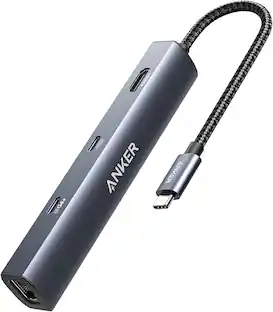
Anker - 6-in-1 USB C Hub with 1Gbps Ethernet, USB C to 4K HDMI Multiport Adapter, 65W Power Delivery
$29.98The price was $39.99 $40.68The price was $53.99
 $47.84The price was $57.58



Today's top picks
 $169.99The price was $269.99