Plustek - OpticFilm 8200i AI 35mm Film and Slides Scanner - Black

About This Item
- General
- Brand: Plustek
- Model Number: OF8200IAI
- Product Name: OpticFilm 8200i AI 35mm Film and Slides Scanner
- Color: Black
- Dimensions
- Product Width: 5 inches (The out of box width of the item. Width is measured as the horizontal distance from one side of the item to the other as it would be primarily used or placed.)
- Product Height: 5 inches (The out of box height of the item. Height is measured as the vertical distance from the bottom of the item to the top as it would be primarily used or placed.)
- Product Depth: 10 inches (The out of box depth of the item. Depth is measured as the distance from the front of the item to the back as it would be primarily used or placed.)
- Product Weight: 3 pounds (The out of box weight of the item.)
- Connectivity
- Operating System Compatibility: Mac, Windows
- Software Included: SilverFast 8 Ai Studio
- USB Cable Included: true
- File Format(s): JPEG, TIFF
- Display
- Display Type: None
- Imaging
- Image Resolution (Display): 10000 x 6000 (Refers to the number of pixels, both horizontally and vertically, used to either capture an image or display it. The higher the resolution the finer the image details.)
- Features
- Tray Included: true
- Warranty
- Warranty - Parts: 1 year limited
- Warranty - Labor: 1 year limited
- Other
- UPC: 783064365338
Plustek OpticFilm 8200i Ai is a powerful scanner with 7200 dpi resolution. Its sharp optical system produces excellent detail in shadow areas and has a remarkable tonal range. The built-in infrared channel helps users remove dust and scratches on the original negatives and slides without additional post-processing. With the included IT 8 calibration slide, this powerful scanner consistently delivers accurate color and detail. The well-designed hardware features of the OpticFilm 8200i Ai combine perfectly with the professional scanner software, SilverFast Ai Studio *(1). SilverFast Multi-Exposure increases dynamic range, reduces noise, and increases picture details. SilverFastiSRD can save images from dust and scratches while optimizing images. SilverFast Auto IT8 Calibration color calibrates the scanner device in just 2 minutes.
- 7200 dpi resolution: Provides image file sizes up to 400MB and enlargements up to 36" x 24".
- 3.6 Dynamic Range: High dynamic range enables you to capture all detail in your film and slides. Highlight and shadow details are accurately reproduced.
- 48 bit internal color depth: Scanned images retain all the colors of the original film and slides.
- Infrared dust and scratch removal: Automatically removes dust and scratches from scanned images.
- IT8 Calibration slide included: Create a unique color profile for your scanner by using the IT8 calibration slide. Ensures accurate colors and reduces the need for post scan editing.
- SilverFast 8 Ai Studio scanning software: Works together with the scanner to improve your workflow and ensure proper results every time.
- Windows and Mac compatible: Works with both Windows and Mac computers.
Whats Included
- 35mm film and slide trays
- USB cable
- Carrying case
- SilverFast 8 Ai Studio software
- AC power adapter
- User guide
- Quick start guide
- IT8 Calibration slide
Q: How does the scanner handle dust and scratches on old photos?
A: It uses built-in infrared dust and scratch removal to automatically remove them from scanned images.
Q: What is the resolution of this scanner?
A: This scanner has a resolution of 7200 dpi.
Q: Does this scanner come with software?
A: Yes, it comes with SilverFast 8 Ai Studio scanning software.
Q: Is this scanner compatible with both Windows and Mac computers?
A: Yes, this scanner is compatible with both Windows and Mac computers.
Q: What is included with the scanner?
A: The scanner includes an IT8 Calibration slide, and a USB cable.
Q: What is the dynamic range of the Plustek scanner?
A: The Plustek OpticFilm 8200i AI scanner has a dynamic range of 3.6.
Q: How long does it take to scan each negative (35mm)?
A: Unfortunately, there is no one single answer to your question. There are many variables: Scan resolution, scan settings, image processing features that are used, CPU speed, and memory installed. But all that said, a single-pass scan with no image processing, and dust and scratch removal disabled will take about 36 seconds when scanning at 3600 dpi.
A: Thanks for your interest in the OpticFilm 8200i Ai. The slide holder holds four slides. It has a manual feed so you manually push the holder to advance to the next slide. Typically customers with large scanning jobs will purchase a second tray so they can have a tray loaded and ready to go. The scanner comes with SilverFast scanning software. You preview the images in SilverFast, make adjustments and then save to your computer. It supports all common image formats: JPG, TIF, PSD etc.
Reviews
The vast majority of our reviews come from verified purchases. Reviews from customers may include My Best Buy members, employees, and Tech Insider Network members (as tagged). Select reviewers may receive discounted products, promotional considerations or entries into drawings for honest, helpful reviews.
Compare similar products
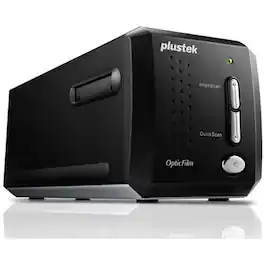
Plustek OpticFilm 8200i Ai is a powerful scanner with 7200 dpi resolution. Its sharp optical system produces excellent detail in shadow areas and has a remarkable tonal range. The built-in infrared channel helps users remove dust and scratches on the original negatives and slides without additional post-processing. With the included IT 8 calibration slide, this powerful scanner consistently delivers accurate color and detail. The well-designed hardware features of the OpticFilm 8200i Ai combine perfectly with the professional scanner software, SilverFast Ai Studio *(1). SilverFast Multi-Exposure increases dynamic range, reduces noise, and increases picture details. SilverFastiSRD can save images from dust and scratches while optimizing images. SilverFast Auto IT8 Calibration color calibrates the scanner device in just 2 minutes.

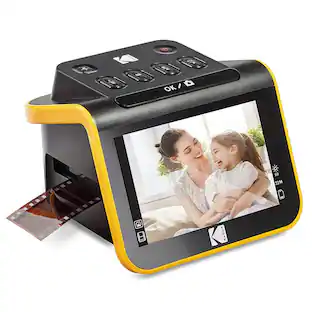
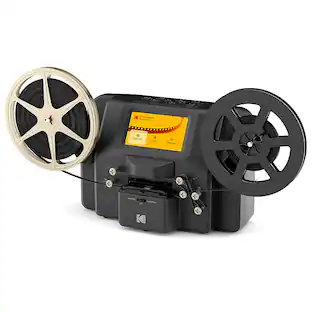
With the new portable slide projector & scanner from KODAK, you can view, edit & convert your old photos. This easy yet elegant 22MP scanner delivers crisp, clear, beautiful images with the press of a button. Watch old memories come to life on the large 5” LCD screen perfect for viewing pictures, or for using the scanner as a desktop photo frame!
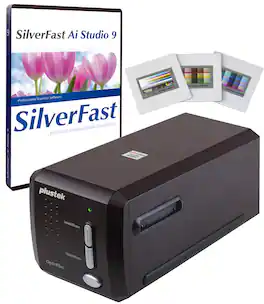
A complete solution for 35mm negative films and slides for professional photographers, shutterbugs and graphic designers. Through the new algorithm and upgrade of IC chip, Scanning speed can be increased by up to 38% compared to the last model OpticFilm 8200i(*), users are capable of creating digital image archives of their own analog images easier than before.
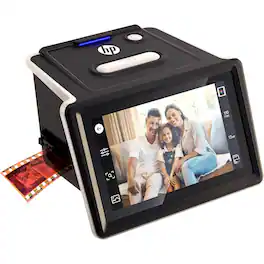
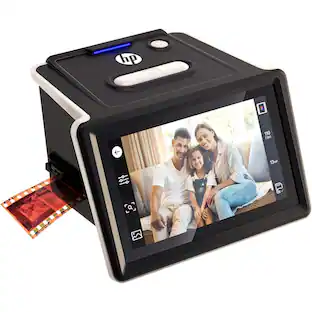
Convert your old slides and negatives into digital memories easily with the HP FilmScan negative scanner. Featuring a bright 5″ touch-screen display, the photo scanner for old photos to digital lets you preview, crop, and edit images with a simple tap—no computer required. Its built-in 13-MP sensor delivers crisp, clear images, turning 135, 126, and 110 film formats into sharp JPEG photos. The quick-load tray of the digital film scanner accommodates one slide or film strip at a time, making the process fast and intuitive. Whether you’re preserving family photos or digitizing archives, this standalone film and slide scanner brings your memories to life effortlessly.
| Pros for Plustek - OpticFilm 8200i AI 35mm Film and Slides Scanner - Black | |||
|---|---|---|---|
| There were no pros for this product— | Ease of Use, Image Quality | There were no pros for this product— | There were no pros for this product— |