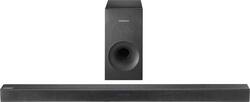
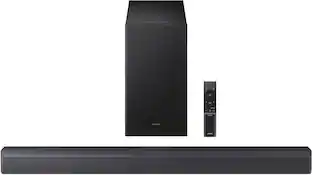
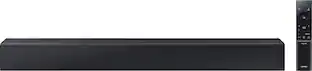
Samsung - 2.1-Channel Soundbar System with Wireless Subwoofer and Digital Amplifier - Black
- Key Specs
- Wireless Connectivity: Bluetooth (The manner in which a device sends data to another device over a short distance without the use of wires or cables.)
- General
- Brand: Samsung
- Model Number: HW-K360/ZA
- Product Name: 2.1-Channel Soundbar System with Wireless Subwoofer and Digital Amplifier
- Color: Black
- Audio
- Surround Sound Supported: DTS, Dolby Digital (Surround sound systems use multiple audio channels and speakers to create an immersive sound experience for the listener. There are also various proprietary technologies that imitate this kind of sound via a device's built-in speakers or soundbar.)
- Connectivity
- Wireless Connectivity: Bluetooth (The manner in which a device sends data to another device over a short distance without the use of wires or cables.)
- Audio Only Inputs: 1 x Optical digital audio, 1 x USB-A, 1 x 3.5mm audio
- Number of HDMI Inputs (Total): 0
- Number of USB Inputs: 1
- Number of Optical Audio Inputs: 1
- Number of HDMI Outputs (Total): 0
- Speaker
- Subwoofer: Included
- Dimensions
- Product Height: 2 inches (The out of box height of the item. Height is measured as the vertical distance from the bottom of the item to the top as it would be primarily used or placed.)
- Product Width: 35.7 inches (The out of box width of the item. Width is measured as the horizontal distance from one side of the item to the other as it would be primarily used or placed.)
- Product Depth: 2.8 inches (The out of box depth of the item. Depth is measured as the distance from the front of the item to the back as it would be primarily used or placed.)
- Product Weight: 3.3 pounds (The out of box weight of the item.)
- Included
- Remote Control Included: true
- Cable(s) Included: None
- Certifications Listings & Approvals
- ENERGY STAR Certified: true (Devices carrying the ENERGY STAR service mark, such as computer products and peripherals, kitchen appliances, and other products, generally use 20% to 30% less energy than required by federal standards.)
- Warranty
- Warranty - Parts: 1 year
- Warranty - Labor: 1 year
- Other
- UPC: 887276143156
Pump up the volume on all of your Bluetooth devices with this Samsung sound bar. This 130W audio device comes with a wireless subwoofer, so connecting to any Bluetooth-compatible device is easy and your media center remains clutter-free. Use the Samsung audio app on your Android phone to control your Samsung sound bar remotely.
- 130W total system power: Provides dynamic sound.
- Wireless subwoofer: For deep, powerful bass.
- Dolby Digital decoder: Reproduces multichannel audio to deliver a cinematic audio experience.
- Bluetooth music streaming: Makes it easy to enjoy tracks stored on a compatible Bluetooth-enabled device (not included).
- Volume control: Lets you find a comfortable listening level.
- Sleek appearance: Fits seamlessly along most HDTVs for a streamlined look.
- Inputs: Includes 1 mini jack, 1 Toslink and 1 micro-USB type B.
- Remote: Enables simple operation from a distance.
- Supports a variety of file formats: Including WAV, WMA, AAC, MP3, FLAC and OGG, so you can enjoy your favorite media.
- Wall-mountable: With the included bracket.
Whats Included
- Samsung 2.1-Channel Soundbar System with Wireless Subwoofer and Digital Amplifier
Q: WILL raising tv volume from tv remote control this. samsung tv want 1 remote
A: Yep - works like a charm. You go into your Samsung TV > Audio settings, select "External Speaker" and bam! Even my cable remote automatically started controlling the soundbar volume. The nicest thing is that you turn the TV on, and the soundbar fires up automatically - turn the TV off and in a few minutes the soundbar turns off too.
Q: Does this work with any tv?
A: It has all kinds of connection for older model TV's to the newest setups.
Q: Does the soundbar run on batteries or Ac power? Or both?
A: AC power
Q: What is the l with length high of the sound bar
A: The dimensions of the soundbar are 37.1 W x 2.6 D x 2.3 H inches.
Q: Where exactly can I put this sound bar?
A: It depends on how you've got your TV set up. My soundbar sits right in front of the TV, on the media stand. Since the TV and stand don't take up the entire depth of the top of the stand, there's room for the soundbar.
A: Easy enough to try and find out. Also, there are several sound shaping options the sound bar can do. One of them is for voice clarity. Scroll through the different settings of the soundbar and try them out.
A: The wireless part of the soundbar is the connection between the soundbar and the subwoofer (meaning you can place the subwoofer somewhere else in the room). The soundbar has Bluetooth technology already in it and it is used for the sub and for phone/ other Bluetooth capable devices (play music from phone/laptop). You can also plug devices in through USB and AUX cables to the bottom of the soundbar.
A: Speaker has Bluetooth capabiiity
People also viewed
 $397.99The price was $499.99
 $249.99The price was $399.99
 $1,599.99The price was $1,999.99





Today's top picks
 $449.99The price was $829.99
 $2,449.99The price was $3,199.99
 $999.98The price was $1,639.98
 $199.99The price was $249.99
 $1,099.99The price was $1,499.99