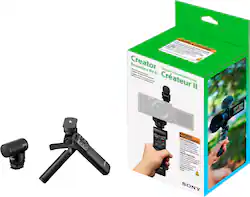
Sony - Creator Accessory Kit II - Black
Model: ACCVC2
SKU: 6588524
This item is no longer available in new condition. See similar items below
- Key Specs
- Maximum Weight Capacity: 3.3 pounds (The maximum load that can be supported by the product.)
- Compatible Devices: DSLR Camera, Mirrorless Camera, Camcorder
- General
- Brand: Sony
- Model Number: ACCVC2
- Product Name: Creator Accessory Kit II
- Color: Black
- Dimensions
- Maximum Weight Capacity: 3.3 pounds (The maximum load that can be supported by the product.)
- Product Weight: 1.2 pounds (The out of box weight of the item.)
- Compatibility
- Compatible Devices: DSLR Camera, Mirrorless Camera, Camcorder
- Stabilizer and Support Type: Hand grip
- Brand Compatibility: Sony
- Model Compatibility: Universal
- Connectivity
- Wireless Connectivity: Bluetooth (The manner in which a device sends data to another device over a short distance without the use of wires or cables.)
- Material
- Material: Plastic
- Power
- Rechargeable Battery: false
- Warranty
- Warranty - Parts: 1 year
- Warranty - Labor: 1 year
- Other
- UPC: 027242298828
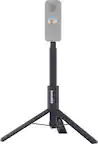
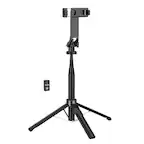
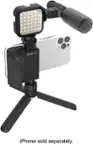
The ACCVC2 includes a GP-VPT2BT and an ECM-G1. It is ideal for creating content ranging from vlogs to travel to simple everyday use. A flexible angle tilt function easily switches from normal to self-shooting mode and can also be used as a mini tripod. Capture clear, crisp audio whenever and wherever you shoot.
- [Grip] Cable-free control with Wireless Bluetooth: While holding the grip normally, remote controls for still and movie shooting can be operated with a compatible camera attached, without having to touch the camera. Any function assigned to the camera's C1 button can also be recalled via the remote grip C1 button.
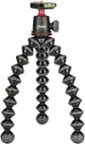
- [Grip] Quickly convert handheld grip to a convenient and stable tripod: Spread the grip's cleverly integrated legs and it becomes a handy, stable tripod, leaving both hands free for vlogging and other applications.
- [Grip] Quick change from normal to selfie position: Quickly and easily position the camera direction for subject or selfie stills or movies. Improve your chances of getting the shot, even when shooting stills or movies without assistance. Combined with the grip's easy angle adjustment capability, 90° lock positions also make it possible to shoot in vertical orientation with optimum stability.
- [Mic] Cable-free, battery-free operation via MI (Multi Interface) Shoe: Connecting the microphone via a compatible MI (Multi-Interface) Shoe means you don't have to worry about noise being transmitted mechanically through cable connections or cables getting in the way of your shot, for greater portability when shooting.
- [Mic] Excellent for recording human voices: The ECM-G1 is well suited to the frequency bands of human voice characteristics, capturing vocal audio clearly and distinctly. It's ideal for shooting vlogs of product reviews and interviews.
- [Grip] Cable-free control with Wireless Bluetooth: While holding the grip normally, remote controls for still and movie shooting can be operated with a compatible camera attached, without having to touch the camera. Any function assigned to the camera's C1 button can also be recalled via the remote grip C1 button.
- [Grip] Quickly convert handheld grip to a convenient and stable tripod: Spread the grip's cleverly integrated legs and it becomes a handy, stable tripod, leaving both hands free for vlogging and other applications.
- [Grip] Quick change from normal to selfie position: Quickly and easily position the camera direction for subject or selfie stills or movies. Improve your chances of getting the shot, even when shooting stills or movies without assistance. Combined with the grip's easy angle adjustment capability, 90° lock positions also make it possible to shoot in vertical orientation with optimum stability.
- [Mic] Cable-free, battery-free operation via MI (Multi Interface) Shoe: Connecting the microphone via a compatible MI (Multi-Interface) Shoe means you don't have to worry about noise being transmitted mechanically through cable connections or cables getting in the way of your shot, for greater portability when shooting.
- [Mic] Excellent for recording human voices: The ECM-G1 is well suited to the frequency bands of human voice characteristics, capturing vocal audio clearly and distinctly. It's ideal for shooting vlogs of product reviews and interviews.
Whats Included
- GP-VPT2BT Grip, Grip Pouch, and Recording Cable.
- ECM-G1 Microphone, Windscreen, and Microphone Pouch
- GP-VPT2BT Grip, Grip Pouch, and Recording Cable.
- ECM-G1 Microphone, Windscreen, and Microphone Pouch
Q: Can the hand grip be used as a mini tripod?
A: The hand grip can be used as a mini tripod.
Q: What type of devices is the kit compatible with?
A: The Creator Accessory Kit II is compatible with DSLR cameras.
Q: What is the maximum weight the hand grip can support?
A: The maximum weight the hand grip can support is 3.3 pounds.
Q: Does the kit include a microphone?
A: The Creator Accessory Kit II includes a GP-VPT2BT and an ECM-G1.