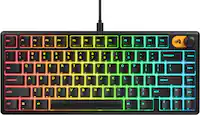
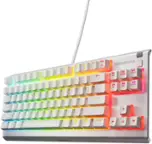
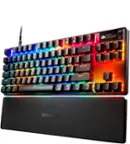
SteelSeries - Apex 5 Full Size Wired Mechanical Hybrid Blue Tactile & Clicky Switch Gaming Keyboard with RGB Backlighting - Black
SteelSeries - Apex 5 Full Size Wired Mechanical Hybrid Blue Tactile & Clicky Switch Gaming Keyboard with RGB Backlighting - Black
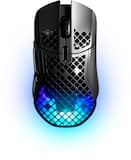
- SteelSeries - Aerox 5 Ultra Lightweight Honeycomb Water Resistant Wireless RGB Optical Gaming Mouse With 9 Programmable Buttons - Wireless - Black$115.99$169.99

More Buying Options
Related Item

Specifications
- Lighting TypeRGBForm FactorFull-sizeKeyboard TechnologyMechanicalKey Switch BehaviorClickyConnection TypeWired
- Key Specs
- Lighting Type: RGB
- Form Factor: Full-size (The size, arrangement, and physical configuration of the product.)
- Keyboard Technology: Mechanical (Type of technology that detects a key press.)
- Key Switch Behavior: Clicky (Refers to the mechanisms under the keycaps on a keyboard that enable you to type faster and more precisely. Linear switches move straight up and down without any sound or bump. Tactile switches provide a noticeable bump in the key press, and no sound. Clicky switches provide a bump in the key press and "clicky" sound.)
- Connection Type: Wired
- General
- Brand: SteelSeries
- Model Number: 64532
- Product Name: Apex 5 Full Size Wired Mechanical Hybrid Blue Tactile & Clicky Switch Gaming Keyboard with RGB Backlighting
- Color: Black
- Features
- Lighting Type: RGB
- Customizable Lighting: true
- Numeric Keypad: true
- Touchpad: false
- Keyboard Type: Gaming, Programmable
- Palm Rest: true
- Spill Resistant: false (Designed to resist some degree of accidental liquid spill. The level of spill-resistance is indicated by the product manufacturer, but the degree of protection may not be guaranteed after normal wear of the product.)
- Keyboard Features: Hybrid Mechanical Gaming Keyboard with OLED Smart Display
- Foldable: false
- Keycap Material: ABS
- Maximum Number of Memory Profiles: 5
- Functions
- Form Factor: Full-size (The size, arrangement, and physical configuration of the product.)
- Number Of Keys: 104
- Keyboard Technology: Mechanical (Type of technology that detects a key press.)
- Dedicated Macro Keys: false (Perform shortcuts of key sequences to carry out commands with a single key. Key sequences may include key strokes, mouse actions, and/or menu actions.)
- Adjustable Tilt Function: true
- Key Switch Type: SteelSeries Blue
- Key Switch Behavior: Clicky (Refers to the mechanisms under the keycaps on a keyboard that enable you to type faster and more precisely. Linear switches move straight up and down without any sound or bump. Tactile switches provide a noticeable bump in the key press, and no sound. Clicky switches provide a bump in the key press and "clicky" sound.)
- Rollover: Full-key (Refers to the number of keys that can be correctly registered when pressed simultaneously. Rollover may be referred to as n-key rollover (KRO) or anti-ghosting.)
- Multimedia Keys: true
- Internet Keys: false
- Number Of Programmable Keys: 104
- Actuation Distance: 2mm
- Connectivity
- Connection Type: Wired
- Wired Connectivity: USB-A (USB 3.0 Gen1)
- Cable Length: 6.5 feet
- Number Of USB Port(s): 1 (The total number of USB ports including all generations and versions.)
- Number of Devices Connectable Simultaneously: 1
- Compatibility
- Operating System Compatibility: Windows, Mac
- Plug and Play Operation: true
- System Requirements: SteelSeries Engine 3 + for Windows (7 or newer) and Mac OS X (10.11 or newer) (The software that a product must have for it to be able to integrate with another product.)
- Dimensions
- Product Height: 5.51 inches (The out of box height of the item. Height is measured as the vertical distance from the bottom of the item to the top as it would be primarily used or placed.)
- Product Width: 17.5 inches (The out of box width of the item. Width is measured as the horizontal distance from one side of the item to the other as it would be primarily used or placed.)
- Product Depth: 1.59 inches (The out of box depth of the item. Depth is measured as the distance from the front of the item to the back as it would be primarily used or placed.)
- Product Weight: 32.7 ounces (The out of box weight of the item.)
- Mouse
- Mouse Included: false
- Warranty
- Warranty - Parts: 1 year
- Warranty - Labor: 1 year
- Other
- UPC: 813682026721
The Apex 5 gaming keyboard has hybrid mechanical switches that combine the smoothness of a membrane switch with the added durability, performance, and satisfying tactile click of a blue mechanical switch. It also has per-key RGB customization, OLED Smart Display, aluminum alloy frame, premium magnetic wrist rest, and more.
- Hybrid Blue Switch mechanical switches: The tactile click of a blue mechanical switch plus a smooth membrane.
- OLED Smart Display: Customize with gifs, game info, Discord messages, and more.
- Aircraft Grade Aluminum Alloy Frame: Manufactured for unbreakable durability and sturdiness.
- Dynamic Per Key RGB Illumination: Gorgeous color schemes and reactive effects for every key.
- Premium magnetic wrist rest: Provides full palm support and comfort.
- Dedicated Multimedia Controls: Adjust volume and settings on the fly.
- Five On-Board Profiles: Save up to 5 unique profiles directly on the keyboard.
- Three-Way Cable Routing: Three built-in channels where the cable can exit.
- Gaming Grade Anti-Ghosting: Won’t lose inputs when multiple keys are pressed.
- PC and Mac compatible: For use with your existing computer.
Whats Included
- SteelSeries Apex 5 - keyboard
- Magnetic wrist rest
Product Manuals
Q: What is the maximum number of memory profiles on this keyboard?
A: The keyboard allows you to save a maximum of 5 memory profiles.
Q: Can I use this keyboard with a Mac?
A: Yes, this keyboard is compatible with both PC and Mac.
Q: What type of switches does this keyboard use?
A: This keyboard uses hybrid blue switch mechanical switches that combine the smoothness of a membrane switch with the durability, performance, and tactile click of a blue mechanical switch.
Q: Does this keyboard have a wrist rest?
A: Yes, it comes with a premium magnetic wrist rest for full palm support and comfort.
Q: How is the keyboard connected?
A: The keyboard is connected using a USB-A (USB 3.0 Gen1) wired connection.
Q: How many profiles can I save on the keyboard?
A: You can save up to 5 unique profiles directly on the keyboard.
Q: How Loud are the Switches? (are they clicky?)
A: Yes very clicky and I love them
Q: What type of Switches does it use?
A: It uses blue switches
Compare similar products

The Apex 5 gaming keyboard has hybrid mechanical switches that combine the smoothness of a membrane switch with the added durability, performance, and satisfying tactile click of a blue mechanical switch. It also has per-key RGB customization, OLED Smart Display, aluminum alloy frame, premium magnetic wrist rest, and more.

Upgrade the core of your battlestation with the Razer BlackWidow V4 X—an advanced mechanical gaming keyboard crafted for extended control. Execute advanced commands and shortcuts instantly with a set of macro and media keys, as you take your immersion to the next level with Razer Chroma RGB.
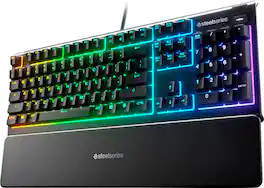
The Apex 3 gaming keyboard was built for the needs of gamers, with water and dust resistance for protection against spills and accidents, as well as premium features like low friction whisper quiet gaming switches, 10-zone RGB customization, a premium magnetic wrist rest, multimedia controls, and gaming-grade keys.

Create custom command setups with this SteelSeries Apex 7 mechanical gaming keyboard. The linear red switches offer fast smooth inputs and last for up to 50 million presses, ideal for heavy use. This SteelSeries Apex 7 mechanical gaming keyboard has a built-in OLED smart display, letting you change input and lighting settings without software.
| Pros for SteelSeries - Apex 5 Full Size Wired Mechanical Hybrid Blue Tactile & Clicky Switch Gaming Keyboard with RGB Backlighting - Black | |||
|---|---|---|---|
| Keyboard Quality, RGB Backlighting, Wrist Rest, OLED Display, Ease of use | Keyboard Quality, Ease of use, RGB Lighting, Color Pattern, Lighting | Keyboard Quality, RGB Backlighting, Key Feel, Wrist Rest, Noise Level | Keyboard Quality, RGB Backlighting, Key Feel, Wrist Rest, OLED Display |
| Cons for SteelSeries - Apex 5 Full Size Wired Mechanical Hybrid Blue Tactile & Clicky Switch Gaming Keyboard with RGB Backlighting - Black | |||
| Noise Level | There were no cons for this product— | Size, Software, Connectivity | Software, Size, Price |
Specs
Reviews
Customers are saying
Customers consistently note the high quality of the Apex 5 keyboard and appreciate its vibrant RGB backlighting. The comfortable wrist rest and unique OLED display are also well-received features. However, some customers have mentioned that the keyboard can be a little loud.
Customer Images
The vast majority of our reviews come from verified purchases. Reviews from customers may include My Best Buy members, employees, and Tech Insider Network members (as tagged). Select reviewers may receive discounted products, promotional considerations or entries into drawings for honest, helpful reviews.
- Rated 5 out of 5 stars
Beautiful keyboard
This keyboard is a great addition for those looking to experience the click-clack of mechanical keys, but not have to drop significant cash. The cherry blues that come with this keyboard offer a great clicking sound without the high-pitch metal coil ring that you might get from a full mechanical keyboard using the same switches. It is tactile, and the RGBs are great. There are a number of options for alternating patterns. Additionally, I was sold by the side LED screen where you could modify keyboard settings without having to open the full on SteelSeries application--though you can do much more with that app. I also purchased the Rival650 (wireless mouse) by SteelSeries, and it has been an awesome combo for personal and work use. The number pad is great and the keyboard is crisp and flawless. If I had to buy a new keyboard again, I might go with a wireless option that offers USB charging, and also perhaps look into a 60% keyboard design to gain back some space on my table top. The 4 out of 5 for Ease of use refers more to the Macros functionality and setting that up using the SteelSeries software. If you want to learn it, you will have to spend a little time figuring out how to configure the custom macros (I still haven't had time to learn it myself). Overall, this is a solid quality build AND the magnetic palm rest bar is clutch.
Bmore Posted
- Rated 5 out of 5 stars
Very awesome keyboard for a great price.
This is my first gaming keyboard that I’ve owned. With all the choice available, and there are plenty, I decided on this one. To me Steelseries is newer company that I’ve only recently heard of compared to other industry heavyweights like Corsair or Razer. I’m thoroughly happy with my choice on Steelseries. They have five or six different keyboards available but I felt like this one is a great price with the features I was looking for without having to spend more. It’s clicky but not too clicky, the ENTIRE keyboard is addressable RGB with the Steelseries Engine software, and there’s a cool OLED mini screen that you can adjust or change to your liking. I can’t seem to get it to customize but that’s most likely my own inability to do so. They claim it’s water resistant but I’m not willing to test that out but I suppose it’s a plus for accidents. Overall a great keyboard with many features and low price. 5/5
Blue93 Posted
- Rated 4 out of 5 stars
Great keyboard, mechanical changed my life
So I bought this out of impulse, however, I love it. It’s so much better to type that on my MacBook keyboard. Love the volume control on the right. The support for your hands is nice and comfy, love for gaming. My issue is that I didn’t do full research and didn’t realize it was a blue switch which is very loud. Steel series I love. Just for this keyboard I would prefer to get a red one that has the feel but less clicky
Gordon Posted