Tripp Lite - P137-06N-HDV 6 in. Keyspan Mini DisplayPort to VGA/DVI/HDMI All-in-One Adapter/Converter - false

About This Item
- General
- Brand: Tripp Lite
- Model Number: P137-06N-HDV
- Product Name: Tripp Lite P137-06N-HDV 6 in. Keyspan Mini DisplayPort to VGA/DVI/HDMI All-in-One Adapter/Converter
- Color: false
- Quantity: 1
- Compatibility: Thunderbolt /Mini DisplayPort equipped laptops, Chromebooks, MacBooks and Microsoft Surface
- Connectivity
- Input(s): Display Port
- Output(s): VGA, HDMI, DVI
- Features
- Signal Conversion: Video
- Powered: false
- Warranty
- Warranty - Parts: 1 year
- Warranty - Labor: 1 year
- Other
- UPC: 037332185402
Allows you to convert your computer's Mini DisplayPort or Thunderbolt to a VGA, DVI, or HDMI monitor as an all-in-one, compact adapter. Ideal for Thunderbolt /Mini DisplayPort equipped laptops, Chromebooks, MacBooks and Microsoft Surface. Mac 10.11, Windows 10 Compatible. This passive, plug-and-play adapter requires no external power, drivers, or software, and supports video resolutions up to 1920 x 1200, or HD video resolutions up to 1920 x 1080 ( 1080p ). Supports up to 36-bit Deep Color (12 bits per channel).
- All-in-one, compact adapter.: Allows you to convert your computer's Mini DisplayPort or Thunderbolt to a VGA, DVI, or HDMI monitor as an all-in-one, compact adapter.
- High-Resolution Support: Ideal for Thunderbolt /Mini DisplayPort equipped laptops, Chromebooks, MacBooks and Microsoft Surface.
- Audio Support: Mac 10.11, Windows 10 Compatible.
- Thunderbolt Compatibility: This passive, plug-and-play adapter requires no external power, drivers, or software, and supports video resolutions up to 1920 x 1200, or HD video resolutions up to 1920 x 1080 (1080p).
- Portable Design: Supports up to 36-bit Deep Color (12 bits per channel).
Whats Included
- 6 in. Keyspan Mini DisplayPort to VGA/DVI/HDMI All-in-One Adapter/Converter - P13706NHDV
Reviews
This product doesn't have any reviews yet.
Compare similar products
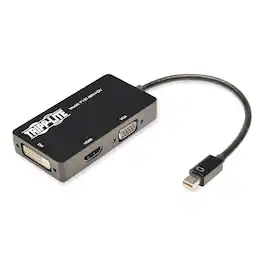
Allows you to convert your computer's Mini DisplayPort or Thunderbolt to a VGA, DVI, or HDMI monitor as an all-in-one, compact adapter. Ideal for Thunderbolt /Mini DisplayPort equipped laptops, Chromebooks, MacBooks and Microsoft Surface. Mac 10.11, Windows 10 Compatible. This passive, plug-and-play adapter requires no external power, drivers, or software, and supports video resolutions up to 1920 x 1200, or HD video resolutions up to 1920 x 1080 ( 1080p ). Supports up to 36-bit Deep Color (12 bits per channel).

Only @ Best BuyEasily link audio devices with digital audio outputs to devices with analog audio inputs using this Insignia NS-HZ313 digital-to-analog converter, which is optical or coaxial input selectable to accommodate a wide range of audio devices.

Add extra functionality to your laptop with the JCA379 USB-C to HDMI & USB 3.0 with Power Delivery. This device allows you to add an additional USB 3.0, HDMI monitor, and USB-C that can be charged through your USB-C port. The USB 3.0 SuperSpeed port gives you data transfer rates up to 5 Gbps. Display Alt Mode for HDMI supports a resolution up to 4K @ 30 Hz with Primary, Extended, and Mirrored display modes. The JCA379 supports upstream charging and Power Delivery 2.0 to keep your connected laptop powered up while in use.
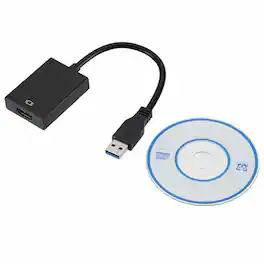
This USB 3.0 to HDMI adapter allows you to connect an additional display to your desktop or laptop computer. It supports ultra-high-definition displays with resolutions up to 1920x1080p. The adapter is easy to install and operate, and it features gold-plated connectors for durability and improved signal transmission.
| Pros for Tripp Lite - P137-06N-HDV 6 in. Keyspan Mini DisplayPort to VGA/DVI/HDMI All-in-One Adapter/Converter - false | |||
|---|---|---|---|
| There were no pros for this product— | Compatibility, Connectivity, Sound Quality, Ease of use, Price | Connectivity, Compatibility, Overall Performance, Portability, Port Expansion | There were no pros for this product— |
| Cons for Tripp Lite - P137-06N-HDV 6 in. Keyspan Mini DisplayPort to VGA/DVI/HDMI All-in-One Adapter/Converter - false | |||
| There were no cons for this product— | Volume Control | Cord Length, Heat Dissipation | There were no cons for this product— |