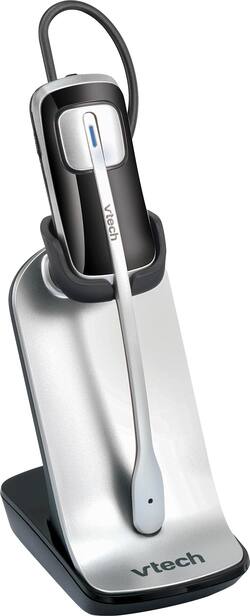
VTech - Wireless Headset - Silver
- Key Specs
- Noise Cancelling (Active): true
- Connection Type: Wireless
- Wireless Connectivity: Radio Frequency (RF) (The manner in which a device sends data to another device over a short distance without the use of wires or cables.)
- True Wireless: false (These headphones not only lack wires between the device and headphones, they also lack wires between the headphones themselves. (true wireless is really only possible with in-ear headphones))
- Built-In Microphone: true
- Microphone Features: Noise cancelling
- Headphone Fit: Over-the-Ear
- Battery Life: 4 hours (Battery life will vary depending on the product configuration, product model, applications loaded on the product, power management setting of the product and the product features used by the customer. As with all batteries, the maximum capacity of this battery will decrease with time and usage.)
- General
- Brand: VTech
- Model Number: IS6200
- Product Name: Wireless Headset
- Color: Silver
- Audio
- Noise Cancelling (Active): true
- Sound Isolating: true
- Connectivity
- Connection Type: Wireless
- Wireless Connectivity: Radio Frequency (RF) (The manner in which a device sends data to another device over a short distance without the use of wires or cables.)
- True Wireless: false (These headphones not only lack wires between the device and headphones, they also lack wires between the headphones themselves. (true wireless is really only possible with in-ear headphones))
- Features
- Built-In Microphone: true
- Microphone Features: Noise cancelling
- Controls: Call
- Body Metrics Measured: Not Applicable
- Bone Conducting Technology: false
- Customizable Lighting: false
- Lighting Type: Single color
- Design
- Headphone Fit: Over-the-Ear
- Style: Telephone
- Power
- Rechargeable: true
- Battery Life: 4 hours (Battery life will vary depending on the product configuration, product model, applications loaded on the product, power management setting of the product and the product features used by the customer. As with all batteries, the maximum capacity of this battery will decrease with time and usage.)
- Other
- UPC: 735078028389
Enhance your productivity by talking hands-free with this VTech cordless headset. A noise-cancelling microphone keeps your own communication clear, and interference-free audio makes your conversations crisp and efficient. Wear this VTech cordless headset in a variety of comfortable configurations, and use it with either landline or mobile phones to enjoy private, effortless connection.
- Compatible with most desk telephones: For wireless communication.
- DECT 6.0 technology: Offers clear calls with reduced interference.
- Noise cancelling: Reduces background noise.
- Headset controls: For one-touch operation of volume, mute, flash and call answer/end functions.
Whats Included
- VTech Wireless Headset
- Charging base
- Power adapter
- 3 earpieces
- 3 earhooks
- Earhook sponge
- Over the head band
- Owner's manual
Product Manuals
A: The sequence to Deregister the IS6200 is: 1. Volume + 2. Power Button 3. Volume - 4. Power Button 5. Volume + 7. Volume - 8. Power Button
A: Hi - We are sorry to hear that you are having issues registering the IS6200 to the VTech DS6771-3. Here's the step on how you can register the headset to the telephone base. Step 1: Make sure that the headset is out of the charger. Headset charger must be right next the telephone base during registration. Step 2: Press and hold the FIND HANDSET button on the telephone base for four seconds or until the IN USE light turns on. Step 3: Release the FIND HANDSET button then place the headset on the charger. It will take about 60 seconds for the registration to be completed. If this does not help, you can contact our Customer Support at 1-800-595-9511. We are open from 9:00 AM to 3:00 PM, Mondays through Fridays. Thank you, -VTech Support
Q: IS THIS COMPATIBLE WITH THE VTECH CM18445 DECT 6.0 4-LINES PHONES?
A: Yes, this headset is compatible with VTech 4-Line Small Business System Main Console model # CM18445.
A: Hi - The VTech IS6200 has to be registered to the AT&T TL86109 via DECT 6.0 technology and not via Bluetooth. Here's the steps on how to go about it. Step 1: Remove the headset from the headset base or charger. Step 2: Press and hold HOLD on the telephone base for about four seconds until it shows Registering...Please wait. Then, release the button. Step 3: Place the headset back to the headset base or charger Step 4: It takes up to 60 seconds to complete the registration. When the registration completes, the telephone base displays HEADSET Registered and you hear a confirmation tone. Thank you, -VTech Support
A: GO TO VTECH.COM THEN ACCESSORIES AND IT WILL GIVE U A LIST OF PHONES THAT ARE COMPATIBLE, I THINK I DO REMEMBER SEEING ONLY AT&T AND VTECH PHONES
A: Joe - We are sorry to hear that you are having issues registering the headset to your VTech LS6425-3. Make sure that the IS6200 is right next to your telephone base during registration. The headset charger must also be connected to an AC outlet. If this does not help, you may need to deregister all existing devices from your telephone base then re-register them one at a time. If you have other questions, please contact our Consumer Sales and Service Center between the hours of 9:00 AM and 3:00 PM Monday through Friday at 1-800-595-9511. Thank you, -VTech Support
A: Hi - The DS6151-11 or DS6101-11 are not compatible with any cordless headset. The two line phone unit compatible with the IS6200 is the model DS6251-2. Thank you!
Q: Is this headset compatible with the Vtech CS6649? Thanks
A: Hello - The IS6200 is not compatible with the CS6649. You can view the compatible phones tested to work with the IS6200 by using the link below. https://cdn-media.vtechphones.com/products/IS/IS6200/IS6200%20compatibility%20list_20170216_a.pdf Thank you -VTech Support
People also viewed
 $349.89The price was $516.95
 Clearance$115.99The price was $209.99
 $115.99The price was $157.99
 $19.99The price was $24.99
Today's top picks
 $199.99The price was $249.99
 $789.99The price was $1,049.99












