AVerMedia - Live Streamer CAM PW513 3840 x 2160 Webcam
FREE shipping to
More Buying Options
Related Item

Specifications
- Video Resolution4K (2160p)
- Key Specs
- Video Resolution: 4K (2160p) (Refers to the number of pixels, both horizontally and vertically, used to capture the video. The higher the resolution the finer the video detail that can be seen.)
- General
- Brand: AVerMedia
- Model Number: PW513
- Product Name: Live Streamer CAM PW513 3840 x 2160 Webcam
- Camera
- Video Resolution: 4K (2160p) (Refers to the number of pixels, both horizontally and vertically, used to capture the video. The higher the resolution the finer the video detail that can be seen.)
- Maximum Video Frame Rate: 2160p (4K) @ 60 FPS (The maximum frequency at which consecutive images can be captured by a video recording device.)
- Megapixels: 8 megapixels (Measures the amount of graphic resolution that the product can capture.)
- Image Resolution (Display): 3840 x 2160 (Refers to the number of pixels, both horizontally and vertically, used to either capture an image or display it. The higher the resolution the finer the image details.)
- Field of View (Diagonal): 94 degrees
- Features
- Integrated Microphone: true
- Plug And Play Operation: true (The product can work when first used or connected, without reconfiguration or adjustment by the user.)
- 360 Degrees Rotation: true (The product is capable of turning freely about an axis, incorporating horizontal points of view covering 360 degrees.)
- Connectivity
- System Requirements: Operating system: Windows 10, macOS 10.14 or above / 3.2GHz Intel Core, i5-4460 or above / 4GB RAM or more (The software that a product must have for it to be able to integrate with another product.)
- Connectivity: USB Type C
- Dimensions
- Product Height: 1.94 inches (The out of box height of the item. Height is measured as the vertical distance from the bottom of the item to the top as it would be primarily used or placed.)
- Product Width: 5.12 inches (The out of box width of the item. Width is measured as the horizontal distance from one side of the item to the other as it would be primarily used or placed.)
- Product Depth: 2.07 inches (The out of box depth of the item. Depth is measured as the distance from the front of the item to the back as it would be primarily used or placed.)
- Product Weight: 0.88 pounds (The out of box weight of the item.)
- Other
- UPC: 795522966735
The Live Streamer CAM 513 captures astonishing 4Kp30 video that elevates content to a professional level. With Sony®️ Exmor™️ technology and AVerMedia’s precision adjustments, this plug-and-play webcam is all about the details, featuring 4K Ultra HD crystal-clear video for recording, streaming, and more. For work conferences, school lessons, live streaming, and more.
- 4K Ultra HD : Record 4K UltraHD video at 30fps for higher clarity or 1080p FullHD video at 60fps for smoother motion.
- 94 Wide Angle: 94 degree wide angle - fit more and stream more with untra-wide angle design
- Plug and Play: Plug and Play easy setup and compatible with mainstream video chat and streaminig apps such as Zoom Discord, OBS, RECentral, and more.
- Privacy Shutter: Built-in privacy shutter to keep you protected when the webcam is not in use, and a full 360 swivel looks good from any angle.
- ePTZ with CamEngine: Enhance with CamEngine 3.0 to make the most of this powerful webcam with software features including filters, AI motion tracking, custom framing, and more.
- 4K Ultra HD : Record 4K UltraHD video at 30fps for higher clarity or 1080p FullHD video at 60fps for smoother motion.
- 94 Wide Angle: 94 degree wide angle - fit more and stream more with untra-wide angle design
- Plug and Play: Plug and Play easy setup and compatible with mainstream video chat and streaminig apps such as Zoom Discord, OBS, RECentral, and more.
- Privacy Shutter: Built-in privacy shutter to keep you protected when the webcam is not in use, and a full 360 swivel looks good from any angle.
- ePTZ with CamEngine: Enhance with CamEngine 3.0 to make the most of this powerful webcam with software features including filters, AI motion tracking, custom framing, and more.
A: I went ahead and purchased it and tried it on PopOS 20.10, which is based on Ubuntu 20.10. The firmware update utility runs on Windows and Mac so you'll want access to one of these since AVerMedia has improved the camera a lot with recent firmware updates. However, the camera works flawlessly in Linux and is plug and play with no driver or special setup required; just make sure you have access to Windows or MacOS to get the firmware updated.
Q: will this work with windows hello?
A: The PW513 is not compatible with Windows Hello. I have a few laptops that have cameras that are compatible with Windows Hello and they tend to have an infrared component to the cameras and that feature is missing on the PW513 camera. Also, while the camera is connected to my Windows 10 PC, I went to the Sign-in options and I'm getting a message: "We couldn't find a camera compatible with Windows Hello Face".
A: No. But the software (AverMedia CamEngine) that comes with the camera is highly configurable (brightness, saturation, contrast, sharpness, hue, white balance, zoom_ and has filters that adjust skin tone and smoothing).. it also includes ePTZ quick buttons to allow for quick zooms etc.) for the background images, overlay, greenscreening, graphic overlays, etc... You would want to incorporate this camera into a program like OBS Studio (free)....OBS Studio is an a very popular program that is widely adopted and resourced with tutorials etc ... this program works with most video conferencing software but you should research its compatibility if you are using a video conferencing platform that is less popular or exotic. Last note... if you are a person who does not tinker with the settings and just leave to default settings... you will not like this camera. A few tweaks though and the camera is good with adequate lighting.
Q: Does this unit have speakers?
A: Bruh Why would a web cam have speakers.
Q: Can you use on amazon fire tv
A: undefined
A: undefined
Q: Is cam compatible with chromebooks?
A: Yes
Compare similar products
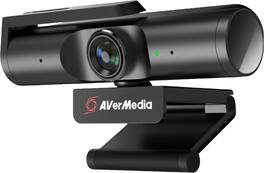
The Live Streamer CAM 513 captures astonishing 4Kp30 video that elevates content to a professional level. With Sony®️ Exmor™️ technology and AVerMedia’s precision adjustments, this plug-and-play webcam is all about the details, featuring 4K Ultra HD crystal-clear video for recording, streaming, and more. For work conferences, school lessons, live streaming, and more.

Brio 4K is an advanced webcam that helps you meet like a pro in every video call. Stream crystal-clear video up to 4K with beautiful colors and RightLight 3 auto light correction, or get up to 90 fps high frame rates at 720p. Also features autofocus, adjustable field of view, and 5x digital zoom. Brio 4K is certified for Zoom, and Google Meet, enables fast and secure facial recognition for Windows Hello, and is compatible with other popular applications. Low-carbon aluminum for camera housing and a minimum 38% post-consumer recycled plastic in the plastic components makes Brio 4K a choice you’ll feel good about.

Logitech C920s is a budget-friendly, work-from-anywhere webcam that delivers a professional video meeting experience. It includes features designed to make you look and sound great in your next meeting. A 78º diagonal field of view perfectly frames you and your space, while autofocus adjusts smoothly and precisely. RightLight 2 technology automatically adjusts to your lighting situation even in low-light or backlit conditions. And dual integrated mics accurately capture your voice from multiple angles for greater nuance. If you’re streaming or recording, use Logitech’s Capture app to edit and customize. Flip down the lens cover at any point to protect your privacy.
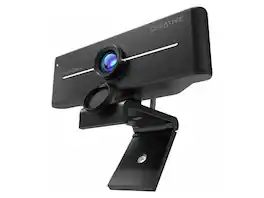
Creative Live! Cam 4K UHD USB Webcam w/ Backlight Compensation - Up to 60 FPS, 95° Wide-Angle Lens, Privacy Lens, Built-in Mics, Plug & Play for PC and Mac
| Pros for AVerMedia - Live Streamer CAM PW513 3840 x 2160 Webcam | |||
|---|---|---|---|
| There were no pros for this product— | Ease of Use, Setup, Image Quality, Field of View | Ease of Use, Setup, Video Quality, Overall Performance, Privacy Feature | There were no pros for this product— |
| Cons for AVerMedia - Live Streamer CAM PW513 3840 x 2160 Webcam | |||
| There were no cons for this product— | Compatibility, Focus, Software, Connectivity, Price | Focus, Compatibility, Autofocus, Cable Length, Field of View | There were no cons for this product— |
Specs
Reviews
Customer Images
The vast majority of our reviews come from verified purchases. Reviews from customers may include My Best Buy members, employees, and Tech Insider Network members (as tagged). Select reviewers may receive discounted products, promotional considerations or entries into drawings for honest, helpful reviews.
- Rated 5 out of 5 stars
Best Webcam I've ever had!
When i was looking at it on the website the pictures make it look kinda big so I was very surprised to see just how compact it is. It's built very sturdy & high-quality material. Great picture, great quality, good feild of veiw for the pixel resolution. Plug & play easy to use, won't have to buy another Webcam for another 5 years!
This review is from AVerMedia - Live Streamer CAM PW513 3840 x 2160 Webcam
LucidM Posted
- Rated 5 out of 5 stars
Great WebCam
Amazing product. It has good quality of video and a clear audio from its microphone.
This review is from AVerMedia - Live Streamer CAM PW513 3840 x 2160 Webcam
Michael Posted
- Rated 5 out of 5 stars
This webcam really works well for me
I'm very surprised with some of the not so great reviews of this Webcam. After installation of the Cam Engine software and updating the camera (due to the issue of too much default brightness) I found this webcam to be superior to any of the ones I own including Logitech Streamcam and other Logitech and HP webcams. With the updated software, you have the option to adjust multiple settings and not rely on "auto" or "default" settings that the camera provides. During use and depending on the lighting inside my office, I find that tweaking these adjustments provides the right exposure when I need to adjust. The only caveat is not all web meeting application supports 4k resolution/streaming but I'm sure that will change in due time.
This review is from AVerMedia - Live Streamer CAM PW513 3840 x 2160 Webcam
VictorR Posted