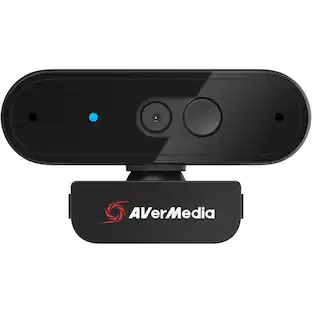
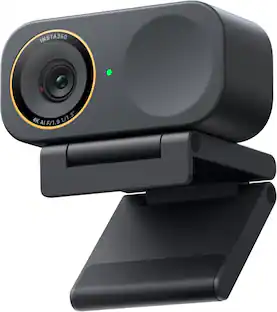
Video Resolution: 4K (2160p) (Refers to the number of pixels, both horizontally and vertically, used to capture the video. The higher the resolution the finer the video detail that can be seen.)
General
Brand: AVerMedia
Model Number: PW513
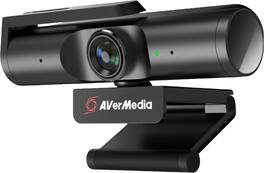
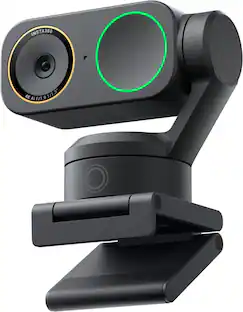
Product Name: Live Streamer CAM PW513 3840 x 2160 Webcam
Camera
Video Resolution: 4K (2160p) (Refers to the number of pixels, both horizontally and vertically, used to capture the video. The higher the resolution the finer the video detail that can be seen.)
Maximum Video Frame Rate: 2160p (4K) @ 60 FPS (The maximum frequency at which consecutive images can be captured by a video recording device.)
Megapixels: 8 megapixels (Measures the amount of graphic resolution that the product can capture.)
Image Resolution (Display): 3840 x 2160 (Refers to the number of pixels, both horizontally and vertically, used to either capture an image or display it. The higher the resolution the finer the image details.)
Field of View (Diagonal): 94 degrees
Features
Integrated Microphone: true
Plug And Play Operation: true (The product can work when first used or connected, without reconfiguration or adjustment by the user.)
360 Degrees Rotation: true (The product is capable of turning freely about an axis, incorporating horizontal points of view covering 360 degrees.)
Connectivity
System Requirements: Operating system: Windows 10, macOS 10.14 or above / 3.2GHz Intel Core, i5-4460 or above / 4GB RAM or more (The software that a product must have for it to be able to integrate with another product.)
Connectivity: USB Type C
Dimensions
Product Height: 1.94 inches (The out of box height of the item. Height is measured as the vertical distance from the bottom of the item to the top as it would be primarily used or placed.)
Product Width: 5.12 inches (The out of box width of the item. Width is measured as the horizontal distance from one side of the item to the other as it would be primarily used or placed.)
Product Depth: 2.07 inches (The out of box depth of the item. Depth is measured as the distance from the front of the item to the back as it would be primarily used or placed.)
Product Weight: 0.88 pounds (The out of box weight of the item.)
Other
UPC: 795522966735
The Live Streamer CAM 513 captures astonishing 4Kp30 video that elevates content to a professional level. With Sony®️ Exmor™️ technology and AVerMedia’s precision adjustments, this plug-and-play webcam is all about the details, featuring 4K Ultra HD crystal-clear video for recording, streaming, and more. For work conferences, school lessons, live streaming, and more.
4K Ultra HD : Record 4K UltraHD video at 30fps for higher clarity or 1080p FullHD video at 60fps for smoother motion.
94 Wide Angle: 94 degree wide angle - fit more and stream more with untra-wide angle design
Plug and Play: Plug and Play easy setup and compatible with mainstream video chat and streaminig apps such as Zoom Discord, OBS, RECentral, and more.
Privacy Shutter: Built-in privacy shutter to keep you protected when the webcam is not in use, and a full 360 swivel looks good from any angle.
ePTZ with CamEngine: Enhance with CamEngine 3.0 to make the most of this powerful webcam with software features including filters, AI motion tracking, custom framing, and more.
A: I went ahead and purchased it and tried it on PopOS 20.10, which is based on Ubuntu 20.10. The firmware update utility runs on Windows and Mac so you'll want access to one of these since AVerMedia has improved the camera a lot with recent firmware updates. However, the camera works flawlessly in Linux and is plug and play with no driver or special setup required; just make sure you have access to Windows or MacOS to get the firmware updated.
A: The PW513 is not compatible with Windows Hello. I have a few laptops that have cameras that are compatible with Windows Hello and they tend to have an infrared component to the cameras and that feature is missing on the PW513 camera. Also, while the camera is connected to my Windows 10 PC, I went to the Sign-in options and I'm getting a message: "We couldn't find a camera compatible with Windows Hello Face".
A: No.
But the software (AverMedia CamEngine) that comes with the camera is highly configurable (brightness, saturation, contrast, sharpness, hue, white balance, zoom_ and has filters that adjust skin tone and smoothing).. it also includes ePTZ quick buttons to allow for quick zooms etc.)
for the background images, overlay, greenscreening, graphic overlays, etc... You would want to incorporate this camera into a program like OBS Studio (free)....OBS Studio is an a very popular program that is widely adopted and resourced with tutorials etc ... this program works with most video conferencing software but you should research its compatibility if you are using a video conferencing platform that is less popular or exotic.
Last note... if you are a person who does not tinker with the settings and just leave to default settings... you will not like this camera. A few tweaks though and the camera is good with adequate lighting.
The Live Streamer CAM 513 captures astonishing 4Kp30 video that elevates content to a professional level. With Sony®️ Exmor™️ technology and AVerMedia’s precision adjustments, this plug-and-play webcam is all about the details, featuring 4K Ultra HD crystal-clear video for recording, streaming, and more. For work conferences, school lessons, live streaming, and more.
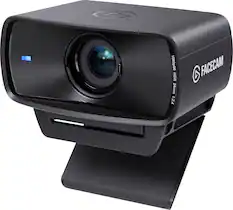
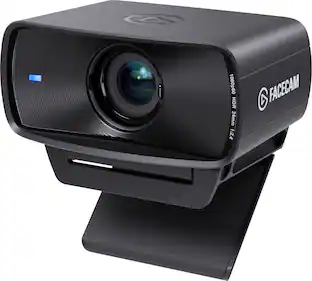
We think webcams should do more. With Facecam, you get not only 1080p 60fps capture, but also uncompressed, low-latency video in lifelike detail and color. Adept in low-light conditions, Facecam even overcomes tricky high-contrast lighting—like bright office windows—thanks to HDR capability. Its software, Camera Hub, offers not just superficial settings, but instead deep DSLR-style control such as ISO and shutter speed to customize your image. What’s more, your settings won’t disappear when you reboot or change computers. Loaded with features like cinematic FX and Stream Deck compatibility, Facecam does what other webcams don’t—because “good enough“ is no longer good enough.
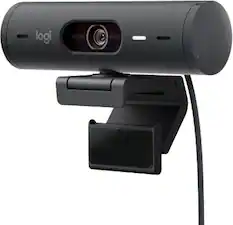
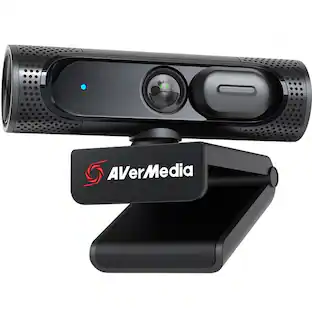
Look, sound, and meet better with Brio 100—a simple and affordable webcam that lets you show your best self in video calls. Full HD 1080p resolution and auto-light balance bring clarity and brightness to your calls, so you look your best. Sound better with a built-in microphone, and get total privacy with an integrated shutter.
The vast majority of our reviews come from verified purchases. Reviews from customers may include My Best Buy members, employees, and Tech Insider Network members (as tagged). Select reviewers may receive discounted products, promotional considerations or entries into drawings for honest, helpful reviews.
Rated 5 out of 5 stars
Best Webcam I've ever had!
When i was looking at it on the website the pictures make it look kinda big so I was very surprised to see just how compact it is. It's built very sturdy & high-quality material.
Great picture, great quality, good feild of veiw for the pixel resolution. Plug & play easy to use, won't have to buy another Webcam for another 5 years!
I'm very surprised with some of the not so great reviews of this Webcam. After installation of the Cam Engine software and updating the camera (due to the issue of too much default brightness) I found this webcam to be superior to any of the ones I own including Logitech Streamcam and other Logitech and HP webcams. With the updated software, you have the option to adjust multiple settings and not rely on "auto" or "default" settings that the camera provides. During use and depending on the lighting inside my office, I find that tweaking these adjustments provides the right exposure when I need to adjust. The only caveat is not all web meeting application supports 4k resolution/streaming but I'm sure that will change in due time.
INTRO:
The AVerMedia Live Streamer CAM PW513 sets out to be a high-end webcam solution for 4K streaming. Whether it’s streaming on Twitch, YouTube, Discord, Skype, Zoom, WebEx, Teams or through softwares like OBS and XSplit, the PW513 might be what you’re looking for.
COMPATIBILITY:
It’s important to note that since this is a 4K webcam, it does require additional bandwidth and processing power, meaning USB 2.0 will not work. But if you’re on Windows, you’ll need a minimum CPU of i5-4660 and 4GB of RAM; and on macOS, it’s recommended to have an i7 with 16GB of RAM.
AVerMedia also claims that the PW513 might experience video delay on macOS and that you may have to compensate your audio, as well. Not a great user experience, and for this reason, I might suggest macOS users consider alternative products—especially considering the very demanding system specifications compared to those using Windows.
For Windows users who want to use the CamEngine software, AVerMedia recommends that you use a modern dedicated graphics card, with AVerMedia claiming the GTX 1060 being the minimum on desktops and the GTX 1050 Ti as the minimum requirement on laptops. You’ll also want respectable CPU performance with AVerMedia recommending a minimum of the i5-6000 series on desktops and i7-7700HQ on laptops.
For macOS users, there is a CamEngine Lite software which allows adjustments such as Brightness, Sharpness, Contrast, Saturation, and Hue.
BUILD / SETUP:
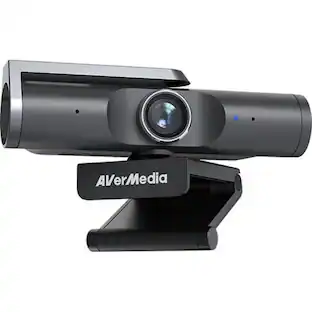
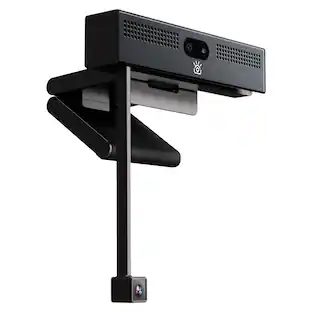
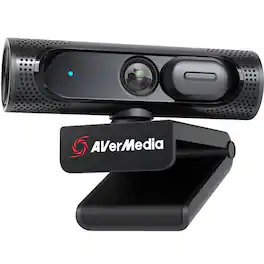
While the PW513 does have a plastic build, it doesn’t feel cheap. The finish feels more like metal, which gives it a more premium look and feel. On the back, you have a single USB-C connection for power and data, and on the front you have the camera sensor and stereo microphone system. It should be noted that included in the box is a USB 3.0 Type-C to Type-A cable for compatibility with most laptops and desktops, but if you’re on a device with only USB-C, you’ll need to acquire a USB 3.0 Type-C (Male) to Type-C (Male) cable.
The mounting system is simple with a very sturdy hinge design that allows it to mount atop your monitor or other objects, as you see fit. Alternatively, you can collapse the hinge and let it sit on your desk or other flat surface, or you can also use a 1/4" tripod mount (not included).
I had no issues with the hinge loosening up like I’ve seen with cheap webcams, so the PW513 will have no issues staying mounted atop your monitor if you choose to use the hinge mechanism. Just mount it, plug it into a USB 3.0 port on your computer, and you’re just about ready to go!
Additionally, there is a privacy swivel arm that physically covers the camera sensor so that you can always ensure that you’re not visible until you are ready. In the age of personal cyber attacks and online scammers that could leverage your webcam, this should be a standard feature for modern webcams. And while this does not disable the camera sensor nor the microphones, it is a step in the right direction.
While Windows did recognize the PW513 upon connecting it, I also visited AVerMedia’s support website and downloaded the latest firmware update and optional CamEngine software. It’s important to note that the CamEngine software is currently in BETA. During my review period, I used AVerMedia CamEngine (Win) Beta v3.2.0.8 & Firmware: 0.0.8000.24 from their official support website.
I have not tested any firmwares or CamEngine software prior to this.
SOFTWARE:
Using the CamEngine software on Windows, I was able to fine tune the image and preview the changes in real-time. You can make adjustments to the white balance, contrast, hue & saturation, exposure & gain. There are even some automatic options as well as defaults if you prefer to run with those. I found that initially I had a yellow/orange hue to my skin tone, but after making some adjustments to the exposure, white balance, hue and saturation, I was able to get a natural looking skin tone with properly exposed highlights in my environment.
There are other features such as AI framing, effects, and facial smoothing. Personally, I think that the AI framing is probably the only notable one, as it will digitally zoom to crop the image to faces on screen, and can even crop to the current speaker. While I haven’t gotten to test the latter half with multiple people, I can confirm that it does crop to my face when it’s enabled. Additionally, the CamEngine software allows you to create image crop presets which you can bind to hotkeys. This allows you to quickly change which portion of the image you want to show while you’re broadcasting.
It should be noted that the CamEngine AI features might not work in every software, but I have verified that it does work in OBS and Discord as long as you set your camera source to use the CamEngine, rather than the PW513 directly.
Personally, I think it might be helpful if CamEngine allowed you to save presets for your video settings so that you can very easily switch if you do have different lighting conditions, but this is likely more of an edge case.
VIDEO QUALITY:
The PW513 is somewhat akin to a front-facing camera on a smartphone. When configured with the CamEngine software, it can be fine tuned to deliver proper exposure, color, and sharpness. With a 94 degree field-of-view, you can be sure that you’ll always be in frame, so you don’t have to position the camera at a distance. Additionally, if you need to crop the image, you can do so through the CamEngine software so that your audience will only see what you want them to see.
The Sony Exmor R sensor can deliver both 3840x2160p@30fps as well as 1920x1080p@60fps, making it a great choice for different needs. However, I found that 1080p@60fps delivered a much softer image while 1080p@30fps was sharper and more detailed. The basic math here suggests that on average, 60fps has to deliver a frame every ~16.66 milliseconds, while 30fps has to deliver a frame every ~33.33 milliseconds. Photography science would suggest that by using 30fps instead of 60fps, that additional time per-frame is being used to gather more light, resulting in improved detail retrieval. So my recommendation is to use 30fps if you want better detail; however, 60fps could be useful for situations where you need to capture fast motion—such as playing an instrument very quickly.
With webcams, low light exposure is always of concern, and overall, I found that with great lighting conditions, the PW513 does a good job handling exposure with low noise. If you’re the kind of person who uses a softbox for lighting, that will make a big difference when complemented with manual adjustments via the CamEngine software.
But if you plan to use the PW513 with lower lighting conditions, you’ll find that the image can yield more visual noise. To balance things out, I manually raised the exposure in the CamEngine software. But this also decreases the shutter speed of the sensor in order to let more light in per-frame. This means that the framerate can be very low if you end up having to max out the exposure, and you’ll have to adjust the gain which will likely introduce visual noise. So it’s important to recognize this if your lighting conditions are not the best.
That being said, having this much control over the sensor is fantastic compared to other webcam offerings. The PW513 can deliver very impressive results compared to others on the market because it gives you more advanced controls. Normally one might recommend that novice users leverage the default settings, but I think that it’s worthwhile to consider the advanced settings to maximize the image quality.
AUDIO QUALITY:
In terms of audio quality, I found that the built-in stereo microphone was very clear and delivered a very full frequency range that is more comparable to a dedicated USB microphone than a headset microphone or laptop microphone. It wasn’t shrill or harsh in the treble range, but rather a nice balanced sound that could be used for sharing voice, musical instruments, and more.
That being said, the CamEngine software also has an option to enable AI noise cancellation which will allow you to reduce unintentional noise. I found that it was effective without adversely affecting the sound quality. However, it might be best to leave this setting off if you are streaming/recording a musical performance, as it can cut quieter sounds out. After turning it off, I played some clean and distorted electric guitar through a nearby amplifier and it picked up all the dynamics of my instrument without issue.
CONCLUSION:
The PW513 has a lot of potential for streamers who want a high quality webcam solution without needing to buy an expensive camera and microphone. It delivers a quality picture and is complemented with surprisingly great stereo audio. The CamEngine software is mostly easy to use, but cropping your frame can be a little clunky, and sometimes programs will crash if you don’t open them up *after* first opening the CamEngine software, should you choose to use it. But as a plug-n-play option, it generally works well. Once you get things set up and feel comfortable with the results, it’s pretty good, general speaking.
In the end, if you don’t mind a bit of tinkering, the PW513 might just be a great choice. But if you’re hoping for a super easy experience with no difficulty, you might find yourself a bit frustrated with varying compatibility.
Is a nice-looking webcam but I bought it thinking on the max resolution and max fps for streaming and video recording, here some pictures of the program that comes with the cam.