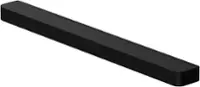
Yamaha - 2.1-Channel Soundbar with Wireless Subwoofer and Alexa Built-in - Black
Yamaha - 2.1-Channel Soundbar with Wireless Subwoofer and Alexa Built-in - Black
FREE shipping to
Specifications
- Wireless ConnectivityBluetooth, Wi-FiApp CompatibleYesWorks WithAmazon AlexaVoice Assistant Built-inAmazon Alexa
- Key Specs
- Wireless Connectivity: Bluetooth, Wi-Fi (The manner in which a device sends data to another device over a short distance without the use of wires or cables.)
- App Compatible: true (The product can be connected to a program or software application on a mobile device, which then receives collected data from the product.)
- Works With: Amazon Alexa (Compatible with or able to be connected to other smart devices or applications.)
- Voice Assistant Built-in: Amazon Alexa (A digital assistant built into the device that uses voice commands to answer questions and control smart devices.)
- General
- Brand: Yamaha
- Model Number: YAS-209BL
- Product Name: 2.1-Channel Soundbar with Wireless Subwoofer and Alexa Built-in
- Color: Black
- Audio
- Surround Sound Supported: Other (Surround sound systems use multiple audio channels and speakers to create an immersive sound experience for the listener. There are also various proprietary technologies that imitate this kind of sound via a device's built-in speakers or soundbar.)
- RMS Power: 200 watts (The maximum amount of continuous power the device is able to handle.)
- Connectivity
- Wireless Connectivity: Bluetooth, Wi-Fi (The manner in which a device sends data to another device over a short distance without the use of wires or cables.)
- Audio Only Inputs: 1 x Optical digital audio
- Number of HDMI Inputs (Total): 1
- Number of USB Inputs: 0
- Number of Optical Audio Inputs: 1
- Number of HDMI Outputs (Total): 1
- Features
- App Compatible: true (The product can be connected to a program or software application on a mobile device, which then receives collected data from the product.)
- Speaker
- Subwoofer: Included
- Number of Tweeters: 2
- Tweeter Size: 1 inches
- Number of Drivers: 7
- Driver Size: 6.5 inches
- Number of Woofers: 4
- Woofer Size: 1.75 inches
- Dimensions
- Product Height: 2.5 inches (The out of box height of the item. Height is measured as the vertical distance from the bottom of the item to the top as it would be primarily used or placed.)
- Product Width: 36.6 inches (The out of box width of the item. Width is measured as the horizontal distance from one side of the item to the other as it would be primarily used or placed.)
- Product Depth: 4.3 inches (The out of box depth of the item. Depth is measured as the distance from the front of the item to the back as it would be primarily used or placed.)
- Product Weight: 6 pounds (The out of box weight of the item.)
- Subwoofer Height: 16.5 inches
- Subwoofer Width: 7.5 inches
- Subwoofer Depth: 16 inches
- Subwoofer Weight: 17.4 pounds
- Included
- Remote Control Included: true
- Cable(s) Included: Optical digital audio
- Certifications Listings & Approvals
- ENERGY STAR Certified: false (Devices carrying the ENERGY STAR service mark, such as computer products and peripherals, kitchen appliances, and other products, generally use 20% to 30% less energy than required by federal standards.)
- Warranty
- Warranty - Parts: 2 years
- Warranty - Labor: 2 years
- Compatibility
- Works With: Amazon Alexa (Compatible with or able to be connected to other smart devices or applications.)
- Voice Assistant Built-in: Amazon Alexa (A digital assistant built into the device that uses voice commands to answer questions and control smart devices.)
- Other
- UPC: 027108958279
Upgrade your sound entertainment experience with this Yamaha sound bar. The robust construction ensures longevity even with rugged use, while built-in Bluetooth and Wi-Fi technologies provide convenient wireless connectivity. This Yamaha sound bar (winner of the 2020 CNET Editor’s Choice Award) has a compact design for easy placement, built-in Alexa technology for hands-free operation and four woofers for immersive sound reproduction.
- Amazon Alexa Built-in: Easily control your sound bar, music, smart devices, set alarms and more with Alexa built-in.
- 200W total output power: Provides quality sound for your favorite movies, shows, games and music.
- Two 1" tweeters and four 1-3/4" cone woofers: Enhance the frequency range of audio playback to ensure crisp voices and dynamic soundtracks.
- Wireless subwoofer: With 6-1/2" driver for powerful bass.
- Dolby Digital and DTS Virtual:X: Reproduces multichannel audio to deliver a cinematic audio experience.
- Bluetooth music streaming: Makes it easy to enjoy tracks stored on a compatible Bluetooth-enabled device (not included).
- Sleek appearance: Fits seamlessly along most HDTVs for a streamlined look.
- Inputs: Includes optical digital audio and HDMI.
- Outputs: Includes HDMI ARC.
- Remote Control and free Home Theater Controller app: Offer simple operation with options for control.
Whats Included
- Yamaha 2.1-Channel Soundbar with Wireless Subwoofer and Alexa Built-in
- Remote Control
A: Not sure if this relates to your situation or not. I also have my soundbar connected via the HDMI ARC port and noticed sound stopped playing from TV sometimes, usually after asking Alexa to play music or playing music from my phone through a Bluetooth connection. In my case when this happens I can get sound back again by pushing the TV button at the top of the remote. I noticed that the white LED light on top of the soundbar was on NET and needed to be put back in “TV” input mode again.
A: Just the hdmi cable should work. Just be sure to hook up the cable to the "hdmi arc" input on the tv...if not, it won't work.
A: So long as your TV has an optical output you’ll be able to use the soundbar system by plugging it into the optical port on the TV with the included optical cable. HDMI (ARC) allows you to turn the unit and the TV on/off using only your TV remote. Without that connection you’ll need to turn the soundbar on/off using a separate remote that comes with the soundbar. BTW, the soundbar and included wireless subwoofer sound great in our master bedroom. We no longer have rear speakers as we used to but for a bedroom audio system and for the price, this is a nice system.
A: Correct: no internet cable (CAT-5 cable) comes with unit, although the unit DOES have an ethernet (CAT-5) jack. If your house is wired for ethernet and you want to connect to the WIRED ethernet, then you have to buy an appropriate length of CAT-5 cable, then use the new cable to attach the soundbar's ethernet jack to the nearest ethernet jack in your house (i.e. ethernet wall jack). If your house is NOT wired for ethernet (or if you prefer to connect wirelessly even if you house IS wired for ethernet), the soundbar is able to connect to a home wireless network. However you have to use the "sound bar controller app" in order to do so. The app is the only way you can do things like (a) select your wireless network to connect to, (b) enter the network security key/password... You cannot do that stuff via the (very basic) remote that comes with the unit. I'm not a big smart-phone guy, but I did download the Yamaha Sound Bar Controller App to connect the soundbar to my wireless home network. The download/install process on my Samsung phone was free and surprisingly easy. Once you get the app installed then you can do all the network-selection/enter-network-password stuff required to connect the soundbar to your wireless home network. So the bottom line is you have to install the Yamaha Sound Bar Controller App on either your smart phone or a tablet device in order to configure the soundbar to be able to connect to a wireless network.
Q: Does this system work well with a 65” Sony Bravia 850f?
A: works very well with my 900F
A: It doesn’t require any additional Amazon/Alexa components other than an account.
Q: Can the soundbar be mounted on the wall like my previous Yamaha soundbar?
A: Yes, the soundbar can be mounted on the wall.
Compare similar products

Upgrade your sound entertainment experience with this Yamaha sound bar. The robust construction ensures longevity even with rugged use, while built-in Bluetooth and Wi-Fi technologies provide convenient wireless connectivity. This Yamaha sound bar (winner of the 2020 CNET Editor’s Choice Award) has a compact design for easy placement, built-in Alexa technology for hands-free operation and four woofers for immersive sound reproduction.

Step up to spatial sound. Now it’s easier than ever to experience Dolby Atmos immersive audio in your home with this simple yet powerful soundbar with wireless subwoofer. Elevate your favorite TV shows, movies, games and music with exceptionally clear, detailed and spacious sound.

Make a true home theater in any space. True X Surround 50A gives you the cinematic immersion of Dolby Atmos in a slim sound bar and wireless subwoofer. Add portable wireless surrounds for a flexible home theater. Alexa voice control built-in for extra convenience. Play podcasts and music easily with Spotify Connect, AirPlay 2, TIDAL Connect or Bluetooth.

Effortlessly enrich your entertainment experience with the latest generation of Beam, now with Dolby Atmos. Enjoy panoramic sound for shows, movies and games when the TV is on, and stream music radio and more when it's off.
| Pros for Yamaha - 2.1-Channel Soundbar with Wireless Subwoofer and Alexa Built-in - Black | |||
|---|---|---|---|
| There were no pros for this product— | There were no pros for this product— | There were no pros for this product— | Sound Quality, Ease of use, Setup, Size, Bass |
| Cons for Yamaha - 2.1-Channel Soundbar with Wireless Subwoofer and Alexa Built-in - Black | |||
| There were no cons for this product— | There were no cons for this product— | There were no cons for this product— | Connectivity, Price, Remote |