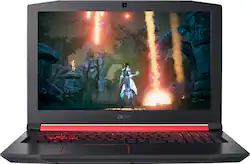
Acer - Nitro 5 15.6" Gaming Laptop - AMD Ryzen 5 - 8GB Memory - AMD Radeon RX 560X - 1TB Hard Drive
- Key Specs
- Screen Size: 15.6 inches (Size of the screen, measured diagonally from corner to corner.)
- Screen Resolution: 1920 x 1080 (Full HD) (Screens come in a range of resolutions (measured in pixels, horizontal x vertical). The higher the resolution, the greater the picture quality.)
- Touch Screen: false (Touch-screen devices make navigating more intuitive. Using a touch-screen display, you can do things such as tap to select, hold and drag to move items, swipe to scroll, and pinch to zoom.)
- Storage Type: HDD
- Total Storage Capacity: 1000 gigabytes
- System Memory (RAM): 8 gigabytes (Random-access memory (RAM) is a computing device's short-term data storage, which allows active information to be accessed quickly. The size and type of RAM determines how efficiently the device can handle large amounts of information at one time. For example, gaming or video editing requires more RAM for optimal performance.)
- Backlit Keyboard: true (Integrated lights allow for visibility of the keys in low-light conditions.)
- General
- Product Name: Nitro 5 15.6" Gaming Laptop - AMD Ryzen 5 - 8GB Memory - AMD Radeon RX 560X - 1TB Hard Drive
- Brand: Acer
- Model Number: AN515-42-R5ED
- Display
- Screen Size: 15.6 inches (Size of the screen, measured diagonally from corner to corner.)
- Screen Resolution: 1920 x 1080 (Full HD) (Screens come in a range of resolutions (measured in pixels, horizontal x vertical). The higher the resolution, the greater the picture quality.)
- Touch Screen: false (Touch-screen devices make navigating more intuitive. Using a touch-screen display, you can do things such as tap to select, hold and drag to move items, swipe to scroll, and pinch to zoom.)
- Processor
- Processor Brand: AMD
- Processor Model Number: 2500U
- Storage
- Storage Type: HDD
- Total Storage Capacity: 1000 gigabytes
- Hard Drive Capacity: 1000 gigabytes (The amount of data that can be stored on the device's mechanical hard drive. Hard disk drives (HDDs) typically have larger capacities than solid state drives (SSDs) but may have slower speeds.)
- Hard Drive Interface: SATA (Connects the hard drive to the host system for transferring data between the hard disk cache and system memory. IDE and SATA interfaces are primarily used for personal computing, while larger servers and workstations typically use SAS or SCSI.)
- Hard Drive RPM: 7200 revolutions per minute (A hard drive's data is stored on disks, or platters, that spin while transferring information to the host system. The higher the RPM, the faster the hard drive's performance.)
- Hard Drive Accelerator: None (A module integrated (or added) into a PC to improve performance speed. By acting as a high-speed cache, an accelerator speeds up access times to the hard drive, which results in faster web browsing, improved gaming experience, and overall more responsiveness.)
- Memory
- System Memory (RAM): 8 gigabytes (Random-access memory (RAM) is a computing device's short-term data storage, which allows active information to be accessed quickly. The size and type of RAM determines how efficiently the device can handle large amounts of information at one time. For example, gaming or video editing requires more RAM for optimal performance.)
- Type of Memory (RAM): DDR4 SDRAM (Each type of RAM delivers a different level of speed, bandwidth, energy efficiency and performance.)
- Number of Memory Sticks Included: 1
- System Memory RAM Expandable To: 32 gigabytes (Adding more random-access memory (RAM) to a computer speeds up performance and improves efficiency. Upgrades to memory are limited by the number of expansion slots for additional RAM and existing RAM installed on the device.)
- Compatibility
- Operating System: Windows 10 Home (The operating system manages all software and hardware, including files, memory and connected devices. Most importantly, it lets you interact with your device and your programs in a visual way; otherwise, you'd be typing computer code to get anything done.)
- Operating System Architecture: 64-bit (An operating system (OS) manages computer hardware, software resources, and programs in conjunction with the system's processor. 64-bit operating systems can handle more data at once than 32-bit systems, resulting in faster speeds, more effiency, and overall improved performance.)
- Connectivity
- Headphone Jack: true (The device features an interface that allows for the connection of headphones.)
- Ethernet Card: 10/100/1000 (Also known as an Ethernet adapter, this card plugs into a computer's motherboard and enables it to access an Ethernet network. Ethernet data transmission speeds are measured in Mbps (megabits per second) and Gbps (gigabits per second). For example, a 10/100 Ethernet port transmits 10 and 100 Mbps, while a 10/100/1000 Ethernet port transmits 10 and 100 Mbps and has a maximum speed of 1000 Mbps (1 Gbps).)
- Power
- Power Supply Input: USB Type C
- Power Supply Maximum Wattage: 135 watts
- Battery Cells: 4-cell
- Battery Capacity: 3320 milliampere hours (The amount of energy stored in the battery.)
- Camera
- Front-Facing Camera: true
- Front Facing Camera Megapixels: 0.92 megapixels (The more megapixels, the more detail that the camera facing the user can capture.)
- Front Facing Camera Video Resolution: 720p (Refers to the number of pixels, both horizontally and vertically, used by the camera facing the user to capture video. The higher the resolution the finer the video detail that can be seen.)
- Built-In Microphone: true
- Features
- Backlit Keyboard: true (Integrated lights allow for visibility of the keys in low-light conditions.)
- Media Card Reader: true (A hardware device that allows for access to data on a memory card and enables the transfer of its files to a computer. These devices may have one or multiple slots for various types of memory cards, and may be integrated into the computer or available as an external device.)
- Audio Technology: Acer TrueHarmony technology
- Speaker Type: Stereo speakers
- Dimensions
- Product Height: 1.1 inches (The out of box height of the item. Height is measured as the vertical distance from the bottom of the item to the top as it would be primarily used or placed.)
- Product Width: 15.4 inches (The out of box width of the item. Width is measured as the horizontal distance from one side of the item to the other as it would be primarily used or placed.)
- Product Depth: 10.5 inches (The out of box depth of the item. Depth is measured as the distance from the front of the item to the back as it would be primarily used or placed.)
- Certifications Listings & Approvals
- ENERGY STAR Certified: false (Devices carrying the ENERGY STAR service mark, such as computer products and peripherals, kitchen appliances, and other products, generally use 20% to 30% less energy than required by federal standards.)
- EPEAT Qualified: false (The Electronic Product Environmental Assessment Tool (EPEAT) was designed to provide an environmental assessment tool for purchasers. In order to qualify for EPEAT, a product must meet all 23 required criteria.)
- Included
- Numeric Keypad: true
- Other
- UPC: 191114932346
Enjoy engaging simulations and immersive visuals with this Acer Nitro 5 gaming laptop. The Radeon graphics card offers 4GB of dedicated video memory for efficient rendering performance, and the 2.GHz AMD Ryzen processor and 8GB of RAM provide ample computing power. This Acer Nitro 5 gaming laptop has a 1TB hard drive for your collection.
- Windows 10 operating system: Windows 10 brings back the Start Menu from Windows 7 and introduces new features, like the Edge Web browser that lets you markup Web pages on your screen. Learn more ›
- 15.6" Full HD display: Acer ComfyView technology reduces reflection. The 1920 x 1080 resolution boasts impressive color and clarity. IPS technology. LED backlight.
- Ryzen 5: Enjoy high application performance and smoother gaming experiences with AMD Ryzen™ 5 processors, with machine intelligence, multitasking capabilities and efficient architecture with up to 6 cores and 12 processing.
- 8GB system memory for advanced multitasking: Substantial high-bandwidth RAM to smoothly run your games and photo- and video-editing applications, as well as multiple programs and browser tabs all at once.
- 1TB hard drive for ample file storage space: Holds a sizeable collection of digital photos, music, HD videos and DVD-quality movies. 7200 rpm spindle speed enables rapid read/write times for handling large files and complex applications.
- AMD Radeon RX 560X graphics: Backed by 4GB GDDR5 dedicated video memory for a fast, advanced GPU to fuel your games.
- Weighs 5.95 lbs. and measures 1.1" thin: Thin and light design with DVD/CD drive omitted for improved portability. 4-cell lithium-ion battery.
- HDMI output expands your viewing options: Connect to an HDTV or high-def monitor to set up two screens side by side or just see more of the big picture.
- Built-in media reader for simple photo transfer: Supports SD memory card formats.
- Next-generation wireless connectivity: Connects to your network or hotspots on all current Wi-Fi standards. Connect to a Wireless-AC router for speed nearly 3x faster than Wireless-N. The Gigabit Ethernet LAN port also plugs into wired networks.
- Built-in HD webcam with microphone: Makes it easy to video chat with family and friends or teleconference with colleagues over Skype or other popular applications.
- Backlit keyboard: Allows you to enjoy comfortable and accurate typing, even in dim lighting.
- Additional port: Headphone/microphone combo jack.
Whats Included
- Acer Nitro 5 515-42-R5ED
- 4-cell battery
- Power adapter, sleeve
A: I called the Microsoft store and they said that it is vr compatible I am also getting this in a couple of days to run vr so I will keep u posted.
A: This is the perfect reason to get this bad boy. It is great for surfing because it has a 1080p screen for crisp clear viewing. This is also a high power gaming computer as well. You will not be sorry to get this.
Q: Would I be able to run world of Warcraft on here?
A: I personally dont own this, but am thinking about getting this model. I have a similar laptop now, which has an a10 9630p and a rx 560 and it plays WoW on medium settings around 30 fps with BFA content. This models processor is easily double what my current processor is in benchmarks, so it should play real smooth on medium, high graphics, based off the specs this laptop has.
Q: Would this be able to handle a game like Pubg because I heard u need a good computer for it
A: Yes it can play PUBG but not at the highest setting. You also might want to consider getting another RAM for it to get better experience.
A: Updating the video driver would be the best place to start. 1. Go to https://www.amd.com/en/support 2. Select RX 560X on the drop down menu and click submit 3. Select the latest driver, and click download 4. Install the driver that you download.
A: It's a second generation Zen APU (CPU/GPU Combo) and since it can set its speed depending on the load, it's extremely energy efficient, but it can also kick up to 3.7 Ghz which makes it adequate for most tasks. Also, it's a quad core processor which can handle 8 threads at a time. In most applications, it outperforms most i5 CPU's by Intel.
Q: Am I able to insert dvds and cds in this laptop?
A: No, no cd or dvd drive
A: This would work fine for video editing or Youtubing. While Acer does not test many gaming applications we would recommend you check that the computer meets the system requirements of the application/game to determine if it will work. You can also contact the software vendor to see if they can provide information on compatibility with their software. You might also post your question on the Acer Community where there are many users that post questions and offer help and advice on Acer products. The link is: https://community.acer.com/













