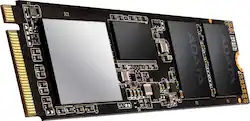
ADATA - XPG SX8200 Pro Series 512GB Internal SSD PCIe Gen 3 x4 for Desktops
- Key Specs
- Storage Capacity: 512 gigabytes (Measured in megabytes (MB), gigabytes (GB) and terabytes (TB), this is the amount available for storing files, music, movies, photos and more. The total includes the capacity of the hard disk drive and solid state drive if both are included on the computer.)
- Storage Drive Type: SSD (Traditional, mechanical hard disk drives are the most common type of storage because they're relatively inexpensive and offer huge capacities. However, they also generate both noise and heat. Solid state drives, also known as SSDs, are many times faster than hard disk drives and have no moving parts to wear out, but typically offer less capacity for the same price.)
- Maximum Read Speed: 3500 megabytes per second (The greatest speed at which the device can read information; for example, opening files.)
- Maximum Write Speed: 2300 megabytes per second (The greatest speed at which the device can write information; for example, saving files.)
- Interface(s): PCIe Gen 3 x4 (Refers to the types of connections that devices use to interact and communicate with each other.)
- General
- Product Name: XPG SX8200 Pro Series 512GB Internal SSD PCIe Gen 3 x4 for Desktops
- Brand: ADATA
- Model Number: ASX8200PNP-512GT-C
- Capacity
- Storage Capacity: 512 gigabytes (Measured in megabytes (MB), gigabytes (GB) and terabytes (TB), this is the amount available for storing files, music, movies, photos and more. The total includes the capacity of the hard disk drive and solid state drive if both are included on the computer.)
- Performance
- Storage Drive Type: SSD (Traditional, mechanical hard disk drives are the most common type of storage because they're relatively inexpensive and offer huge capacities. However, they also generate both noise and heat. Solid state drives, also known as SSDs, are many times faster than hard disk drives and have no moving parts to wear out, but typically offer less capacity for the same price.)
- Maximum Read Speed: 3500 megabytes per second (The greatest speed at which the device can read information; for example, opening files.)
- Maximum Write Speed: 2300 megabytes per second (The greatest speed at which the device can write information; for example, saving files.)
- Compatibility
- Internal Or External: Internal
- Product Compatibility: Desktop computers
- Interface(s): PCIe Gen 3 x4 (Refers to the types of connections that devices use to interact and communicate with each other.)
- Features
- Usage: Everyday computing, Gaming
- Memory
- NAND Flash Memory Type: TLC (Single Level Cell (SLC) stores 1 bit of data per memory cell; Multi Level Cell (MLC) stores 2 bits per cell, Triple Level Cell (TLC) 3 bits, and Quad Level Cell (QLC) 4 bits. Vertical NAND (V-NAND) or 3D NAND stores more data by layering cells vertically. Similarly, there are 3D MLC, 3D TLC and 3D QLC stacked cells.)
- Dimensions
- Product Height: 0.86 inches (The out of box height of the item. Height is measured as the vertical distance from the bottom of the item to the top as it would be primarily used or placed.)
- Product Width: 0.13 inches (The out of box width of the item. Width is measured as the horizontal distance from one side of the item to the other as it would be primarily used or placed.)
- Product Weight: 0.6 ounces (The out of box weight of the item.)
- Other
- UPC: 842243017830
The SX8200 Pro M.2 2280 SSD is XPG’s fastest SSD to date and is designed for avid PC enthusiasts, gamers, and overclockers. It features an ultra-fast PCIe Gen3x4 interface that offers sustained peak read/write speeds of 3500/3000MB per second, outpacing SATA 6Gb/s by a wide margin. Supporting NVMe 1.3, the SX8200 Pro delivers excellent random read/write performance and multi-tasking capabilities. With SLC caching, a DRAM Cache buffer, E2E Data Protection, and LDPC ECC, it maintains high speeds and data integrity, even during highly intensive applications such as gaming rendering, and overclocking. Designed for discerning gamers, PC enthusiasts, overclockers, and video content producers using Rapid PCIe Gen3x4 Interface : read/write up to 3500/3000MB/, NVMe 1.3-Support and New Generation 3D NAND Flash : Higher capacity, durability, and power efficiency. With intelligent SLC caching and a DRAM cache buffer, the SX8200 Pro can accelerate sequential and 4K random read/write speeds to shorten system response time, making it especially suitable for multimedia editing and gaming. Built with 3D NAND Flash the SX8200 Pro comes in capacities of up to 2TB, offers higher efficiency, and is more reliable than 2D SSDs. Thanks to the support of data protection technologies, it also features a high TBW and excellent durability to meet the demands of various applications. The SX8200 Pro supports LDPC (Low-Density Parity-Check) error correcting code technology to detect and fix a wider range of data errors for more accurate data transfers and a longer SSD lifespan. Supporting E2E (End-to-End) Data Protection and RAID Engine, the SX8200 Pro ensures data safety, integrity, and delivers an extended lifespan. Every component on the SX8200 Pro has passed meticulous screening, testing, and certification. The SX8200 Pro box has a sleek black XPG heatsink with pre-applied thermal compound inside for easy DIY. With or without heatsink: the choice is yours, as the SX6000 looks great in builds either way.
- PCI Express 3.0 x4 (NVMe) interface: Offers simple connection to your computer.
- Warranty: 5 year Limited Warranty
- AES 256-bit hardware encryption: Helps safeguard sensitive data.
- Free SSD Toolbox and Migration Utility Software: Making it a breeze to move from HDD to SSD
- 512GB Storage Capacity: Plenty of storage space for gaming, music, movies and any of your needs.
- Data transfer rates up to 2300 MBps: Ultra fast response when updating files
- PCI Express 3.0 x4 (NVMe) interface: Easy connection to your computer.
- Performance matters: Live life in the fast lane, whether you're looking to boost your system's overall responsiveness or load games and levels quickly, allowing you to cut down on your wait time, getting you back into action and ahead of the game.
A: undefined
A: Hello, When replacing a laptop SSD, you must clone your existing harddrive/SSD onto the new drive (SSD). This may require that you purchase an external enclosure to be able to copy your existing data onto the new drive. ADATA has teamed up with Acronis to offer a cloning service for your convenience. You may find the Acronis software link here: https://www.adata.com/rs/support/consumer?tab=downloads The process requires some tools, but is relatively easy to install after copying your OS and files onto the new drive (cloning). Please refer to your laptops owners manual to see if your laptop is compatible with traditional SSD expansion or m.2 expansion. Hopefully this offers some insight into the process. Have a great day! Sincerely, The ADATA/XPG team
A: Hello Tim, Currently the ZBook 15 G6 does support our SX8200 Pro 512GB drive as a replacement for the drive currently inside. We recommend you reach out to your laptops Manufacturer to request information regarding expandability of your laptops storage or to see if there are any extra M.2 slots inside the unit.
Q: Can I install this SSD 512 G to my HP ZBook 15 G6
A: Hello Tim, Currently the ZBook 15 G6 does support our SX8200 Pro 512GB drive as a replacement for the drive currently inside. We recommend you reach out to your laptops Manufacturer to request information regarding expandability of your laptops storage or to see if there are any extra M.2 slots inside the unit.




















