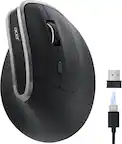
Adesso - iMouse Wireless Optical Ergonomic Mouse - Wireless - Black
Adesso - iMouse Wireless Optical Ergonomic Mouse - Wireless - Black
More Buying Options
Related Item

Specifications
- Lighting TypeNoneMaximum Sensitivity2000 dots per inchNumber of Buttons (Total)2Connection TypeWireless
- Key Specs
- Lighting Type: None
- Maximum Sensitivity: 2000 dots per inch (Mouse sensitivity is measured in dots per inch (DPI). The higher the DPI, the more sensitive the mouse is and may be more useful for high-density pixel screens. Lower DPI typically means more precision and accuracy in mouse movement.)
- Number of Buttons (Total): 2
- Connection Type: Wireless
- General
- Brand: Adesso
- Model Number: IMOUSEE10
- Product Name: iMouse Wireless Optical Ergonomic Mouse
- Color: Black
- System Requirements: Apple MacOS X or later, Microsoft Windows 2000/XP/Vista/7/8 (The software that a product must have for it to be able to integrate with another product.)
- Features
- Mouse Type: Standard
- Lighting Type: None
- Performance
- Mouse Operation: Button(s), Scroll wheel
- Mouse Grip Style: Standard (In comparison to many palm and claw grips, ergonomic grip mice are designed for a specific handedness and put the hand and wrist in a position to promote comfort. Customizable grips feature buttons/keys that can be configured to perform specific actions and may also have customizable calibration and sensitivity settings.)
- Handedness: Right-handed
- Tracking Method: Optical (There are several types of computer mice, optical and laser being among the most common. Optical mice detect less detail and provide more precise and accurate movement. Laser mice detect more detail and can be used on a wider variety of surfaces, but are more sensitive to small movements.)
- Maximum Sensitivity: 2000 dots per inch (Mouse sensitivity is measured in dots per inch (DPI). The higher the DPI, the more sensitive the mouse is and may be more useful for high-density pixel screens. Lower DPI typically means more precision and accuracy in mouse movement.)
- Minimum Sensitivity: 1000 dots per inch (Mouse sensitivity is measured in dots per inch (DPI). The higher the DPI, the more sensitive the mouse is. Lower DPI typically means more precision and accuracy in mouse movement, but higher DPI may be useful for high-density pixel screens.)
- Number of Buttons (Total): 2
- Number of Thumb Buttons: 0
- Number of Programmable Buttons: 0
- Connectivity
- Connection Type: Wireless
- Wireless Connectivity: Radio Frequency (RF) (The manner in which a device sends data to another device over a short distance without the use of wires or cables.)
- Maximum Wireless Range: 30 feet
- Operating System Compatibility: Windows, Mac
- Plug and Play Operation: true
- Power
- Mouse Power Source: Battery-powered
- On/Off Switch: true
- Rechargeable Battery (Mouse): false
- Battery Size: AAA (The battery size required for operation.)
- Number of Batteries Required: 1
- Batteries Included: true (Indicates whether the product comes with the required batteries for its operation.)
- Included
- Mouse Pad Included: false
- Dimensions
- Product Height: 2.5 inches (The out of box height of the item. Height is measured as the vertical distance from the bottom of the item to the top as it would be primarily used or placed.)
- Product Length: 3 inches (The out of box length of the item. Length is measured as the longest dimension of the item.)
- Product Width: 3 inches (The out of box width of the item. Width is measured as the horizontal distance from one side of the item to the other as it would be primarily used or placed.)
- Product Weight: 113 grams (The out of box weight of the item.)
- Warranty
- Warranty - Parts: 1 year
- Warranty - Labor: 1 year
- Other
- UPC: 783750006132
Click in comfort with this ergonomic Adesso wireless iMouse. Its vertical, contoured body provides more support for the forearm, reducing strain, and the navigation buttons on the side let you perform tasks with fewer hand movements. Speed up response times with the built-in DPI switch of this Adesso wireless iMouse.
- Optical technology: LED lights scan the surface beneath the mouse to detect movement with a fair amount of accuracy, suitable for everyday computing and browsing.
- Up to 2000 dpi movement resolution: Ensures precise operation.
- 2.4GHz wireless connection: This mouse connects to your computer using a wireless USB receiver and works up to 33 feet away.
- Right-handed design: Ensures comfort use.
- Compatible with most Windows and Mac computers: Works across a wide array of computers.
- Optical technology: LED lights scan the surface beneath the mouse to detect movement with a fair amount of accuracy, suitable for everyday computing and browsing.
- Up to 2000 dpi movement resolution: Ensures precise operation.
- 2.4GHz wireless connection: This mouse connects to your computer using a wireless USB receiver and works up to 33 feet away.
- Right-handed design: Ensures comfort use.
- Compatible with most Windows and Mac computers: Works across a wide array of computers.
Whats Included
- Adesso iMouse E10
- USB wireless receiver
- Adesso iMouse E10
- USB wireless receiver
A: yes. it uses regular batteries that seem to last a long time. however I do turn it off when using it to save on batteries. it is completely wireless and I use it on my MacBook Pro with no problems. they do make a less expensive one with a cord but I like wireless.
Q: Can this Mouse work with windows 10 yes or no.
A: Yes the mouse works good with Windows 10
Q: Will it work with a Chromebook?
A: undefined
Q: Do you make a left-handed version of this mouse?
A: I am only a consumer but I read there was a left handed one to purchase from this manufacturer.
Q: Do you need a mouse pad with a wrist bump for this mouse? Thanks.
A: I personally don't. While using it, the outer pad of my hand rests comfortably on the mouse pad. I haven't tried using a wrist rest, but I think one might put your arm and hand at an uncomfortable angle that would be worse for ergonomics with this particular style of mouse. I've also noticed this mouse elevates my wrist enough that my watch band doesn't dig in, which is an unexpected plus.
Q: Is this okay for small hands
A: yes. my wife tried my adesso mouse and it worked fine for her smaller hands
Compare similar products
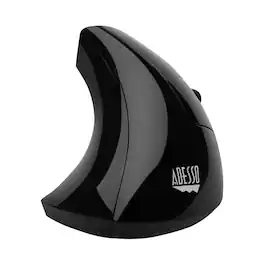
Click in comfort with this ergonomic Adesso wireless iMouse. Its vertical, contoured body provides more support for the forearm, reducing strain, and the navigation buttons on the side let you perform tasks with fewer hand movements. Speed up response times with the built-in DPI switch of this Adesso wireless iMouse.

The JBuds Ergonomic Mouse offers blissful comfort with a personalized set-up for your favorite functions and tasks. With seven buttons, you have everything you need to reach working-from-home greatness, and everything you want to play your game, your way. The vertical design provides a natural angle for your wrist and hand, so switching between your favorite functions and your top devices is effortless.

Desk life getting you down? Lift yourself up with Lift Vertical Ergonomic Mouse – a comfy and intuitive wireless mouse with quiet clicks crafted specially for small-to-medium hands. Available in right and left. Lift’s unique 57-degree angle elevates your wrist to give a feeling of relief — and sends a wave of comfort through the forearm and upper body. Scrolling feels second nature with SmartWheel, which easily shifts from precision to speed-scroll. Customize Lift ergo mouse using intuitive Logi Options+ Software.

Defined in ambition. Built through rigor. M75 AIR was made for a single purpose – to help you win. The symmetrical mouse shape has been expertly crafted to let nothing come between you and top-tier play. The speed and control you gain from M75 AIR is simply unrivaled, and at just 60g, M75 AIR is unbelievably light, enabling you to make the most agile movements, sweeps, and recenters. The 26K DPI CORSAIR MARKSMAN optical sensor detects those moves with pro grade precision, and your shots register instantly on optical switches guaranteed for 100 million clicks. When you grasp M75 AIR, you’re holding a mouse that’s sculpted by victory.
| Pros for Adesso - iMouse Wireless Optical Ergonomic Mouse - Wireless - Black | |||
|---|---|---|---|
| There were no pros for this product— | Battery Life, Ergonomics, Ease of use, Overall Performance, Connectivity | There were no pros for this product— | Battery Life, Weight, Build Quality, Comfort, DPI |
| Cons for Adesso - iMouse Wireless Optical Ergonomic Mouse - Wireless - Black | |||
| There were no cons for this product— | Weight, Size, Wrist Pain | There were no cons for this product— | Connectivity, Price |
Specs
Reviews
Customer Images
The vast majority of our reviews come from verified purchases. Reviews from customers may include My Best Buy members, employees, and Tech Insider Network members (as tagged). Select reviewers may receive discounted products, promotional considerations or entries into drawings for honest, helpful reviews.
- Rated 3 out of 5 stars
Good ergonomics, but maybe not for everyone
While I do not suffer from RSI or carpal tunnel syndrome, the shape of this mouse effectively relieved the shoulder & neck pain I was experiencing from long-term computer use. Combined with good posture, the vertical orientation can prevent the shoulder from rolling forward and inward. It also feels like a more natural wrist position. The relationship between the mouse pointer on screen and where I'd expect it to be based on my hand & finger position took a couple weeks to get used to, as did the difference in clicking. Unlike a normal mouse where you press your finger down toward the desktop, with this mouse, it's more of a pinching movement toward your thumb. For the first month or so of use, this caused enough wiggle to interfere with double-clicks registering properly, but I've learned to adapt. I think for me, a mouse that's at less of an extreme angle would be better without compromising the superior posture. Functionally, it's pretty basic, with standard left & right buttons, 2 thumb buttons (forward & back website navigation), and a clickable scroll wheel. The DPI switch is responsive, but I'm not a fan of either of the 2 settings it uses, and they can't be changed. I'm also not a fan of the aesthetics or feel of the glossy black finish, but the blue LED swoop on the side, while unnecessary, is a nice touch. The cable is a little bit too stiff, and coupled with the tall height and light weight, this mouse is quite easy to knock around unintentionally. I would suggest trying this if you are looking for a more ergonomic solution for general home or office use, but be aware there may be a learning curve due to the nature of this shape. I would not recommend it for gaming or other tasks requiring higher precision & speed. Aside from the vertical orientation, this is a fairly basic mouse that is showing signs of wear (squeaky wheel) after only a month and a half of use, but for its price, it's not hard to overlook some minor faults.
This review is from Adesso - iMouse Wired Optical Ergonomic Mouse - Wired - Glossy black
LJBB Posted
- Rated 4 out of 5 stars
Great Inexpensive Vertical Mouse
I can’t use any form of wireless mice at work (DoD). I also am not allowed to load any drivers. Any peripherals I purchase have to be “plug and play” with Windows 7/10. We use either HP or Dell stock mice and keyboards w/ built in CaC readers. I am comparing this mouse Adesso Vertical USB mouse to the medium Evoluent VM4 Vertical USB mouse. Adesso: Pros: All the features seem to work on this mouse without any additional drivers. Two buttons on the right and scroll wheel work just like stock mice. I cannot program change the function of the third button which is too low and my ring finger already has nerve damage (right click) without installing drivers. Cons: So far only see one size and it’s a smaller size. I have a large hands so I wish it came in a medium or was a little bigger. The bottom of my hand/palm is already sore from years of using government issue stock mice. The bottom of my hand rubs the desk while I use this mouse. So for the price and compatibility with true “plug and play” abilities .... it is a great deal. Also everyone thinks it looks cool the subtle accent blue light on the left side is the shape of horizontal arch .... get a lot of comments “cool mouse”, “looks like something from the StarTrek”, etc.!
This review is from Adesso - iMouse Wired Optical Ergonomic Mouse - Wired - Glossy black
Speedy98 Posted
- Rated 4 out of 5 stars
Nice upright mouse
I like the mouse because it definitely gives the hand a break from the usual position. The only thing I take a little issue with is that sometimes I feel like I need to lift it to get it to track better. They should consider making one for lefties.
This review is from Adesso - iMouse Wired Optical Ergonomic Mouse - Wired - Glossy black
nottatechy Posted