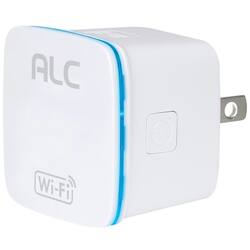
ALC - Network Extender - White
- Key Specs
- Wi-Fi Speed: 300 megabits per second (The maximum rate at which data is transferred between a network device and wireless router.)
- Adapter Type: Wireless
- Form Factor: External (The size, arrangement, and physical configuration of the product.)
- Wireless Networking Standard: Wi-Fi 4 (The wireless networking standard used by the device. Each iteration of the standard developed by the Wi-Fi Alliance corresponds to an existing IEEE 802.11 protocol; for example, standard 802.11ac (or AC) is termed Wi-Fi 5. Refers specifically to the standard the device is designed to use, but ultimately determines product interoperability and backward compatibility including previous versions.)
- General
- Brand: ALC
- Model Number: AMR300N
- Product Name: Network Extender
- Color: White
- Network
- Compatible Wireless Standard(s): Wireless-N (The wireless networking standard(s) the device is backwards compatible with. This includes networking protocols based on the IEEE 802.11 standard (alphabetically ascending) and the Wi-Fi Alliance standard (numerically ascending), both of which provide high-throughput wireless local area networks (WLANs). Devices designed to work with specific standard(s) will be backwards compatible with previous versions but may not run at optimal performance when using earlier iterations.)
- Data Link Protocol: IEEE 802.11b, IEEE 802.11g, IEEE 802.11n (The protocol used for transferring data between network nodes within the data link layer of computer networking.)
- Wireless Networking Standard: Wi-Fi 4 (The wireless networking standard used by the device. Each iteration of the standard developed by the Wi-Fi Alliance corresponds to an existing IEEE 802.11 protocol; for example, standard 802.11ac (or AC) is termed Wi-Fi 5. Refers specifically to the standard the device is designed to use, but ultimately determines product interoperability and backward compatibility including previous versions.)
- Dimensions
- Product Height: 2 inches (The out of box height of the item. Height is measured as the vertical distance from the bottom of the item to the top as it would be primarily used or placed.)
- Product Length: 2 inches (The out of box length of the item. Length is measured as the longest dimension of the item.)
- Product Width: 2 inches (The out of box width of the item. Width is measured as the horizontal distance from one side of the item to the other as it would be primarily used or placed.)
- Product Weight: 0.1 pounds (The out of box weight of the item.)
- Warranty
- Warranty - Parts: 1 year
- Warranty - Labor: 1 year
- Other
- UPC: 857067005833
Enhance Wi-Fi range easily with this ALC Wi-Fi repeater. The built-in Ethernet port allows for an extra connection, offering added convenience, and the 802.11b/g/n compatibility makes it suitable for use with a range of routers . This ALC Wi-Fi repeater can be quickly plugged into a standard outlet for rapid installation.
- Wireless-N technology: Delivers up to 300 Mbps data transfer rates for high-speed wireless access.
- Compatible with draft 802.11n: Backward compatible with 802.11b/g networks for versatile use.
- Fast data transfer speeds: Delivers up to 300 Mbps data transfer rates.
- External wireless network extender for wireless devices: So you can connect additional devices.
- Wireless-N technology: Delivers up to 300 Mbps data transfer rates for high-speed wireless access.
- Compatible with draft 802.11n: Backward compatible with 802.11b/g networks for versatile use.
- Fast data transfer speeds: Delivers up to 300 Mbps data transfer rates.
- External wireless network extender for wireless devices: So you can connect additional devices.
Whats Included
- ALC Network Extender
- ALC Network Extender
A: The extender picks up your existing WiFi signal and provides a WiFi hotspot which can extend your existing WiFi network. The extender does have an ethernet port so that you could attach an ethernet device, like a printer without WiFi, to a location where you do not otherwise have ethernet cabling but do have a WiFi signal that the extender can connect to. Hope this is helpful.
Q: If a WPS button is not available, is it possible to sync using an iPhone?
A: There is a WPS button for quick and easy setup with your router. But is is also possible to set the WiFi extender up using an iPhone as well as an Android device.
A: Hello, the WiFi extender boosts the WiFi signal from your router. So, I would recommend placing the WiFi extender somewhere between the router and the garage (assuming this middle area has WiFi signal that our extender can boost).
A: Hi thank you for your question. Yes all you do is plug it in and use the WPS button to sync with your home router and it will copy the name and password over for you. The distance will be dependent on your setup but normally will carry the signal as far as WiFi distance allows. Thank you again feel free to call custom service with any other questions. Thank you ALC.
A: The Quick Start Guide that comes with the extender shows you how to set it up and get it connected to your Wi-Fi. After that you can plug in your photoframe for an internet connection.
Q: is it plug and play or do have to do more to get to work
A: The easiest way to set up the AMR300N is to use the WPS button. First you need to make sure that your Wi-Fi router has the WPS button enabled (some routers have this set to Off as default). Then press the WPS button on the router and then press it on the AMR300N. Otherwise you would just follow the instructions in the included Quick Start Guide. It cannot just be a plug and play device since it needs to have your specific Wi-Fi information to work.
Q: Will the ALC network extender work with luma router
A: I have attached the specs as it should work fine as the ALC AMR300N works with all standard router bands. See specifications attached as this should help. https://www.alcwireless.com/product/amr300n-wi-fi-repeater/ Thanks for choosing ALC WIRELESS!!!
A: Hi, thank you for your question, since you will "pair" this extender with your router it will not read or connect to your neighbors signal. This will be specific to your network. Thank you.