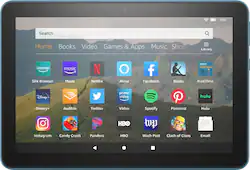
Amazon - Fire HD 8 10th Generation - 8" - Tablet - 32GB - Twilight Blue
- Key Specs
- Screen Size: 8 inches (Size of the screen, measured diagonally from corner to corner.)
- Screen Resolution: 1280 x 800 (Screens come in a range of resolutions (measured in pixels, horizontal x vertical). The higher the resolution, the greater the picture quality.)
- Processor Model: MT8168 (Your computer's processor is like its brain. Working in combination with system memory, the power of the processor determines the complexity of software you can run, how many programs you can have open at the same time, and how fast those programs will run. Most computers feature an AMD, Intel or Snapdragon processor.)
- Total Storage Capacity: 32 gigabytes
- Operating System: Fire OS 7 (The operating system manages all software and hardware, including files, memory and connected devices. Most importantly, it lets you interact with your device and your programs in a visual way; otherwise, you'd be typing computer code to get anything done.)
- Voice Assistant Built-in: Amazon Alexa (A digital assistant built into the device that uses voice commands to answer questions and control smart devices.)
- Works With: Amazon Alexa (Compatible with or able to be connected to other smart devices or applications.)
- Wireless Connectivity: Bluetooth, Wi-Fi (The manner in which a device sends data to another device over a short distance without the use of wires or cables.)
- Battery Chemistry: Lithium-ion polymer
- General
- Brand: Amazon
- Model Number: B07WQ1VH72
- Product Name: Fire HD 8 10th Generation - 8" - Tablet - 32GB
- Color: Twilight Blue
- Model Family: Amazon Fire
- Year of Release: 2020
- Display
- Display Type: LCD
- Screen Type: IPS
- Screen Size: 8 inches (Size of the screen, measured diagonally from corner to corner.)
- Screen Resolution: 1280 x 800 (Screens come in a range of resolutions (measured in pixels, horizontal x vertical). The higher the resolution, the greater the picture quality.)
- Processor
- Processor Brand: MediaTek
- Processor Model: MT8168 (Your computer's processor is like its brain. Working in combination with system memory, the power of the processor determines the complexity of software you can run, how many programs you can have open at the same time, and how fast those programs will run. Most computers feature an AMD, Intel or Snapdragon processor.)
- Storage
- Total Storage Capacity: 32 gigabytes
- Memory
- System Memory (RAM): 2 gigabytes (Random-access memory (RAM) is a computing device's short-term data storage, which allows active information to be accessed quickly. The size and type of RAM determines how efficiently the device can handle large amounts of information at one time. For example, gaming or video editing requires more RAM for optimal performance.)
- Expandable Memory Compatibility: microSD
- Compatibility
- Operating System: Fire OS 7 (The operating system manages all software and hardware, including files, memory and connected devices. Most importantly, it lets you interact with your device and your programs in a visual way; otherwise, you'd be typing computer code to get anything done.)
- Operating System Compatibility: Fire OS
- Voice Assistant Built-in: Amazon Alexa (A digital assistant built into the device that uses voice commands to answer questions and control smart devices.)
- Works With: Amazon Alexa (Compatible with or able to be connected to other smart devices or applications.)
- Connectivity
- Wireless Connectivity: Bluetooth, Wi-Fi (The manner in which a device sends data to another device over a short distance without the use of wires or cables.)
- Network Connectivity: None (The manner in which a device sends data to another device over a long distance using a cellular network.)
- Compatible Wireless Standard(s): Wireless-A, Wireless-AC, Wireless-B, Wireless-G, Wireless-N (The wireless networking standard(s) the device is backwards compatible with. This includes networking protocols based on the IEEE 802.11 standard (alphabetically ascending) and the Wi-Fi Alliance standard (numerically ascending), both of which provide high-throughput wireless local area networks (WLANs). Devices designed to work with specific standard(s) will be backwards compatible with previous versions but may not run at optimal performance when using earlier iterations.)
- Headphone Jack: true (The device features an interface that allows for the connection of headphones.)
- Bluetooth Version: 5.0 (The Bluetooth specification formalized by the Bluetooth Special Interest Group. All versions of the Bluetooth standard are backwards compatible with previous versions.)
- Interface(s): 3.5mm audio, USB-C (Refers to the types of connections that devices use to interact and communicate with each other.)
- Power
- Charging Interface(s): USB-C (The connection for transmitting power to charge the device.)
- Charging Interface Generation/Version: 2.0
- Battery Life (up to): 12 hours (Battery life will vary depending on the product configuration, product model, applications loaded on the product, power management setting of the product and the product features used by the customer. As with all batteries, the maximum capacity of this battery will decrease with time and usage.)
- Battery Capacity: 4850 milliampere hours (The amount of energy stored in the battery.)
- Battery Chemistry: Lithium-ion polymer
- Camera
- Front-Facing Camera: true
- Front Facing Camera Megapixels: 2 megapixels (The more megapixels, the more detail that the camera facing the user can capture.)
- Front Facing Camera Video Resolution: 720p (Refers to the number of pixels, both horizontally and vertically, used by the camera facing the user to capture video. The higher the resolution the finer the video detail that can be seen.)
- Rear-Facing Camera: true
- Rear Facing Camera Megapixels: 2 megapixels (The more megapixels, the more detail that the camera facing away from the user can capture.)
- Rear Facing Camera Video Resolution: 720p (Refers to the number of pixels, both horizontally and vertically, used by the camera facing away from the user to capture video. The higher the resolution the finer the video detail that can be seen.)
- Dimensions
- Product Height: 0.4 inches (The out of box height of the item. Height is measured as the vertical distance from the bottom of the item to the top as it would be primarily used or placed.)
- Product Width: 5.4 inches (The out of box width of the item. Width is measured as the horizontal distance from one side of the item to the other as it would be primarily used or placed.)
- Product Depth: 8 inches (The out of box depth of the item. Depth is measured as the distance from the front of the item to the back as it would be primarily used or placed.)
- Product Weight: 12.5 ounces (The out of box weight of the item.)
- Warranty
- Warranty - Parts: 90 Days
- Warranty - Labor: 90 Days
- Other
- UPC: 840080575100
Stay productive on the go with this Amazon all-new Fire HD tablet. The 720p HD recording capacity allows smooth teleconferencing, while the 2GB of RAM and a dual-core processor deliver ultra-fast performance. This Amazon all-new Fire HD tablet is USB Type-C enabled for rapid charging, and a built-in battery provides up to 12 hours of runtime.
- Fast and responsive: Stream movies, watch videos, or play games with the enhanced Wi-Fi. Enjoy downloaded content all day with the 12-hour battery life. USB-C for easier charging when you need to power back up.
- Designed for entertainment: Enjoy your favorite movies, TV episodes, apps, eBooks, and songs-plus games you can play distraction-free in Game Mode. Stream and download videos from Netflix, Prime Video, Disney+, and SHOWTIME or make video calls on apps like Zoom.
- Meet Alexa: Alexa connects you to the information, entertainment, and people who matter most - with just your voice. Ask to play videos and music, open apps, check the weather, call or message almost anyone, and much more.
- Amazon FreeTime: Allows to create child profiles to limit screen time, set educational goals, and manage content with easy-to-use parental controls. FreeTime is free on every Fire tablet - or subscribe to FreeTime Unlimited to access over 20,000 kid-friendly titles.
- Fire OS 7 operating system: Instantly access your favorite apps via the Amazon App Store.
- 8" screen with 1280 x 800 resolution: Crisp, bright resolution for watching movies, surfing the web, reading books and more.
- 32GB internal storage plus microSD slot: Enjoy plenty of space for music, movies, photos and more. Expand your storage up to 1TB with a microSD card (sold separately).
- Quad-core processor: The right combination of fast performance and power efficiency. It allows rapid multitasking, delivers smooth response and unleashes stunning graphics.
- Dual HD cameras for photos and face-to-face chat: 2 MP front and rear-facing cameras with 720p HD video recording.
Whats Included
- 5W power adapter
- Amazon Fire HD 8 10th Generation - 8" - Tablet - 32GB
- Lithium-ion polymer battery
- Owner's manual
- USB-C (2.0) cable
Q: Does this come with or without special offers?
A: The HD 8 does come with special offers enabled. The special offers on this tablet only show up on the lock screen of the device. There are no other ads on the device during its use.
A: Hello Stephanie, Google Chrome is not available for download on the Fire Tablets, however Zoom is available to download free of charge. Hope this helps!
Q: Is there a SD card slot for this tablet? What’s the max memory it can hold?
A: Hello, Kunane! Yes, the Fire HD 8 has a microSD card slot for you to expand the memory. The maximum memory you can add to the tablet is 1 TB. I hope that helps! Have a great day!
A: Hi Chris, Yes, you can listen to Audio Books from this device, or pair Bluetooth headphones or a Bluetooth speaker to this device for listening as well. Hope that helps.
A: Yes! You can use the amazon app store to download the app if it does not come preloaded on the tablet.
Q: What features come on this Kindle, i.e. camera, daylight light feature, etc?
A: Hello Caro, here are some of the features for the new Fire HD 8 Plus: 8" HD display, 2X the storage (32 or 64 GB of internal storage and up to 1 TB with microSD card) + 3 GB RAM. Up to 12 hours of battery life and now with USB-C for easier charging. Fully charges in under 4 hours (with included cable and adapter). There's two 2MP cameras on the front and back as well. The new HD 8 Plus also features a game mode for an optimized gaming experience and Blue Shade which helps offer a more comfortable reading experience, especially at night. Hope this helps!
Q: Does this tablet have Bluetooth and Wi-Fi connection
A: Yes it has both Bluetooth connection and WiFi connection
A: In the bottom of the screen you will see 3 icons, back arrow, circle for home and a square. Tap the square and then swipe all the tabs away. Hope that helps
















![The text on the image reads:
17 F8 Home P End F10 PgUp it PgDn F12 Ies Del * 8 ( 9 ) 0 I I + = Backspace I o P : [ ] ] I / K L : : .. . Enter M V > . ? / Shift Alt <
The corrected text should be:
17 F8 Home PgUp it PgDn F10 F12 Ies Del * 8 ( 9 ) 0 I I + = Backspace I o P : [ ] ] I / K L : : .. . Enter M V > . ? / Shift Alt <
The corrected text groups the keys in a more organized manner, making it easier to read and understand.](https://pisces.bbystatic.com/image2/BestBuy_US/images/products/699c06f5-6aba-4ab2-bbf6-114986b58b2a.jpg;maxHeight=144;maxWidth=200?format=webp)





