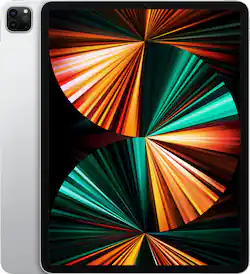
Apple - 12.9-Inch iPad Pro with Wi-Fi - 512GB - Silver
- Key Specs
- Screen Size: 12.9 inches (Size of the screen, measured diagonally from corner to corner.)
- Screen Resolution: 2732 x 2048 (Screens come in a range of resolutions (measured in pixels, horizontal x vertical). The higher the resolution, the greater the picture quality.)
- Processor Model: Apple M1 chip, 16-core Neural Engine (Your computer's processor is like its brain. Working in combination with system memory, the power of the processor determines the complexity of software you can run, how many programs you can have open at the same time, and how fast those programs will run. Most computers feature an AMD, Intel or Snapdragon processor.)
- Total Storage Capacity: 512 gigabytes
- Operating System: Apple iPadOS (The operating system manages all software and hardware, including files, memory and connected devices. Most importantly, it lets you interact with your device and your programs in a visual way; otherwise, you'd be typing computer code to get anything done.)
- Voice Assistant Built-in: Siri (A digital assistant built into the device that uses voice commands to answer questions and control smart devices.)
- Works With: Siri (Compatible with or able to be connected to other smart devices or applications.)
- Wireless Connectivity: Wi-Fi, Bluetooth (The manner in which a device sends data to another device over a short distance without the use of wires or cables.)
- Security Features: Facial recognition, Password Protection, Touch ID sensor
- General
- Product Name: 12.9-Inch iPad Pro with Wi-Fi - 512GB
- Brand: Apple
- Model Number: MHNL3LL/A
- Model Family: Apple iPad Pro (5th Generation)
- Year of Release: 2021
- Color: Silver
- Display
- Display Type: LED
- Screen Type: Retina Display
- Screen Size: 12.9 inches (Size of the screen, measured diagonally from corner to corner.)
- Screen Resolution: 2732 x 2048 (Screens come in a range of resolutions (measured in pixels, horizontal x vertical). The higher the resolution, the greater the picture quality.)
- Processor
- Processor Brand: Apple
- Processor Model: Apple M1 chip, 16-core Neural Engine (Your computer's processor is like its brain. Working in combination with system memory, the power of the processor determines the complexity of software you can run, how many programs you can have open at the same time, and how fast those programs will run. Most computers feature an AMD, Intel or Snapdragon processor.)
- Storage
- Total Storage Capacity: 512 gigabytes
- Memory
- System Memory (RAM): 8 gigabytes (Random-access memory (RAM) is a computing device's short-term data storage, which allows active information to be accessed quickly. The size and type of RAM determines how efficiently the device can handle large amounts of information at one time. For example, gaming or video editing requires more RAM for optimal performance.)
- Expandable Memory Compatibility: None
- Compatibility
- Operating System: Apple iPadOS (The operating system manages all software and hardware, including files, memory and connected devices. Most importantly, it lets you interact with your device and your programs in a visual way; otherwise, you'd be typing computer code to get anything done.)
- Operating System Compatibility: Apple iOS
- Voice Assistant Built-in: Siri (A digital assistant built into the device that uses voice commands to answer questions and control smart devices.)
- Works With: Siri (Compatible with or able to be connected to other smart devices or applications.)
- Connectivity
- Wireless Connectivity: Wi-Fi, Bluetooth (The manner in which a device sends data to another device over a short distance without the use of wires or cables.)
- Network Connectivity: None (The manner in which a device sends data to another device over a long distance using a cellular network.)
- Compatible Wireless Standard(s): Wireless-AX (The wireless networking standard(s) the device is backwards compatible with. This includes networking protocols based on the IEEE 802.11 standard (alphabetically ascending) and the Wi-Fi Alliance standard (numerically ascending), both of which provide high-throughput wireless local area networks (WLANs). Devices designed to work with specific standard(s) will be backwards compatible with previous versions but may not run at optimal performance when using earlier iterations.)
- Headphone Jack: false (The device features an interface that allows for the connection of headphones.)
- Bluetooth Version: 5.0 (The Bluetooth specification formalized by the Bluetooth Special Interest Group. All versions of the Bluetooth standard are backwards compatible with previous versions.)
- GPS Enabled: true
- Camera
- Front-Facing Camera: true
- Front Facing Camera Megapixels: 12 megapixels (The more megapixels, the more detail that the camera facing the user can capture.)
- Front Facing Camera Video Resolution: 1080p (Refers to the number of pixels, both horizontally and vertically, used by the camera facing the user to capture video. The higher the resolution the finer the video detail that can be seen.)
- Rear-Facing Camera: true
- Rear Facing Camera Megapixels: 12 megapixels (The more megapixels, the more detail that the camera facing away from the user can capture.)
- Rear Facing Camera Video Resolution: 4K video recording at 24 fps, 25 fps, 30 fps, or 60 fps (Refers to the number of pixels, both horizontally and vertically, used by the camera facing away from the user to capture video. The higher the resolution the finer the video detail that can be seen.)
- Features
- Keyboard Included: false
- Security Features: Facial recognition, Password Protection, Touch ID sensor
- Wake Word: Hey Siri (The term or phrase used to activate a device.)
- Mobile Payment Service Supported: Apple Pay
- Certifications Listings & Approvals
- ENERGY STAR Certified: true (Devices carrying the ENERGY STAR service mark, such as computer products and peripherals, kitchen appliances, and other products, generally use 20% to 30% less energy than required by federal standards.)
- Included
- Included Software: Camera, Photos, Messages, FaceTime, Mail, Music, Safari, Maps, Siri, Calendar, iTunes Store, App Store, Notes, Voice Memos, Contacts, Books, Home, Reminders, Stocks, Clock, TV, News, Photo Booth, Podcasts and more
- Stylus Included: false
- Other
- UPC: 194252196151
iPad Pro features the powerful Apple M1 chip for next-level performance and all-day battery life.³ An immersive 12.9-inch Liquid Retina XDR display for viewing and editing HDR photos and videos.¹ And a front camera with Center Stage keeps you in frame automatically during video calls. iPad Pro has pro cameras and a LiDAR Scanner for stunning photos, videos, and immersive AR. Thunderbolt for connecting to high-performance accessories. And you can add Apple Pencil for note-taking, drawing, and marking up documents, and the Magic Keyboard for a responsive typing experience and trackpad.⁴
Whats Included
- Apple 12.9-Inch iPad Pro with Wi-Fi - 512GB
- USB-C charge cable (1 meter)
- 20W USB-C power adapter
A: I’m looking at this same situation as a possibility for myself, but haven’t received my new iPad Pro yet. I am going to throw out this as a possible workaround that may wor for Procreate users. When Procreate opens a file, it tries to create an editable file in the same location as the source file, and this is likely where the problem lies. Procreate may not be allowed to work with the external SSD freely because of security limitations in iPadOS. You can likely save or export the file to the external SSD, but you will almost certainly need to import the file back to the internal storage to work with it. This is almost certainly down to the sandboxing elements of iPadOS, which are much more extreme than MacOS. The actual hardware is fully capable of laptop/desktop style use and support of Thunderbolt compliant SSDs. Apple locks out higher level access to external devices because the iPad is an ultraportable and concealable device: i.e. an incredibly big security risk, as both a target and a tool. It’s gonna take some time for them to develop secure workarounds for external devices. In the meantime, as a workaround, try importing the file from the external SSD in Procreate. If that fails, try using the Files app to copy the file from the external SSD to somewhere on the internal storage, then import from that file back into Procreate. Either method should reduce the external access to a file read, which shouldn’t be a problem.
Q: Is this a good one to stream movies, etc?
A: Yes it works wonderful for streaming movies. I recently went on a trip and watched five hours worth of downloads from Netflix and it only used 20% of the power.
A: The latest model is currently the 5th generation.
Q: If this is the latest version, where is the M2 chip?
A: No it is M1.
Q: Can you put the apps and pics on the older iPad to the new iPad?
A: Yes if you backup to iCloud. There is an option in setup to make it like another device picked from the list of your backups. Did mine in less than 30 minutes and in a month of use I have not found anything missing. Using iCloud storage is (I think) $0.99 a month for the lowest cost option. I back up 3 iPads, 2 iPhones and an iPod using that plan.
A: On line. It is self-teaching and intuitive.
Q: Can you run Microsoft word, Excel, power point on Apple iPad Pro?
A: Microsoft word, Excel, Power point can be run on your IPad. You have to sign in to your Microsoft account and work online through Internet.





















